
⚡ Awesome Jev Skills
Jev demos, workflows and skills for coding agents.

Overview
Jev chooses, classifies and scores. Your coding agent supplies context and executes the next step. This collection helps you find a use case and try it:
- Explore: 45 project and resource entries and 108 scenarios, from browser control to music.
- Install: 6 skills for your own Codex, Claude Code or OpenCode agent.
- Adapt: 14 recorded input/output examples, editable templates and evaluation notes.
Table of contents
| Get started | Explore | Go deeper | |---|---|---| | 📦 Install | 🎬 Demos | 🧯 Pitfalls | | 🔑 Agent setup | 🧭 Projects | ⚡ Context & batching | | 🚀 How to use | 🗂 All scenarios | 🎯 Calibration | | 🧪 Input → output | 📊 Experiments | 🔗 Sources & credits |
Browse scenarios by topic
| | | |---|---| | Long-running agents | Review & evaluation | | Routing & context | Browser & desktop | | Inbox & support | Documents & research | | Data & developer tools | Games & creative tools | | Build your own | More experiments & safety testing |
🎬 Demos
Community demos and an illustrated guide. Click a preview for the original; these are not our test runs.

🌐 Browser automation Jev selects; browser tools click and type. Original / demo ↗ |

🧱 Tetris Code enumerates placements; Jev ranks them. Original / demo ↗ |

🐋 Whale city Astra builds the world; Jev acts; H3 renders. Original / demo ↗ |

🎹 MIDI composer Jev picks parts; code renders editable MIDI. Original / demo ↗ |
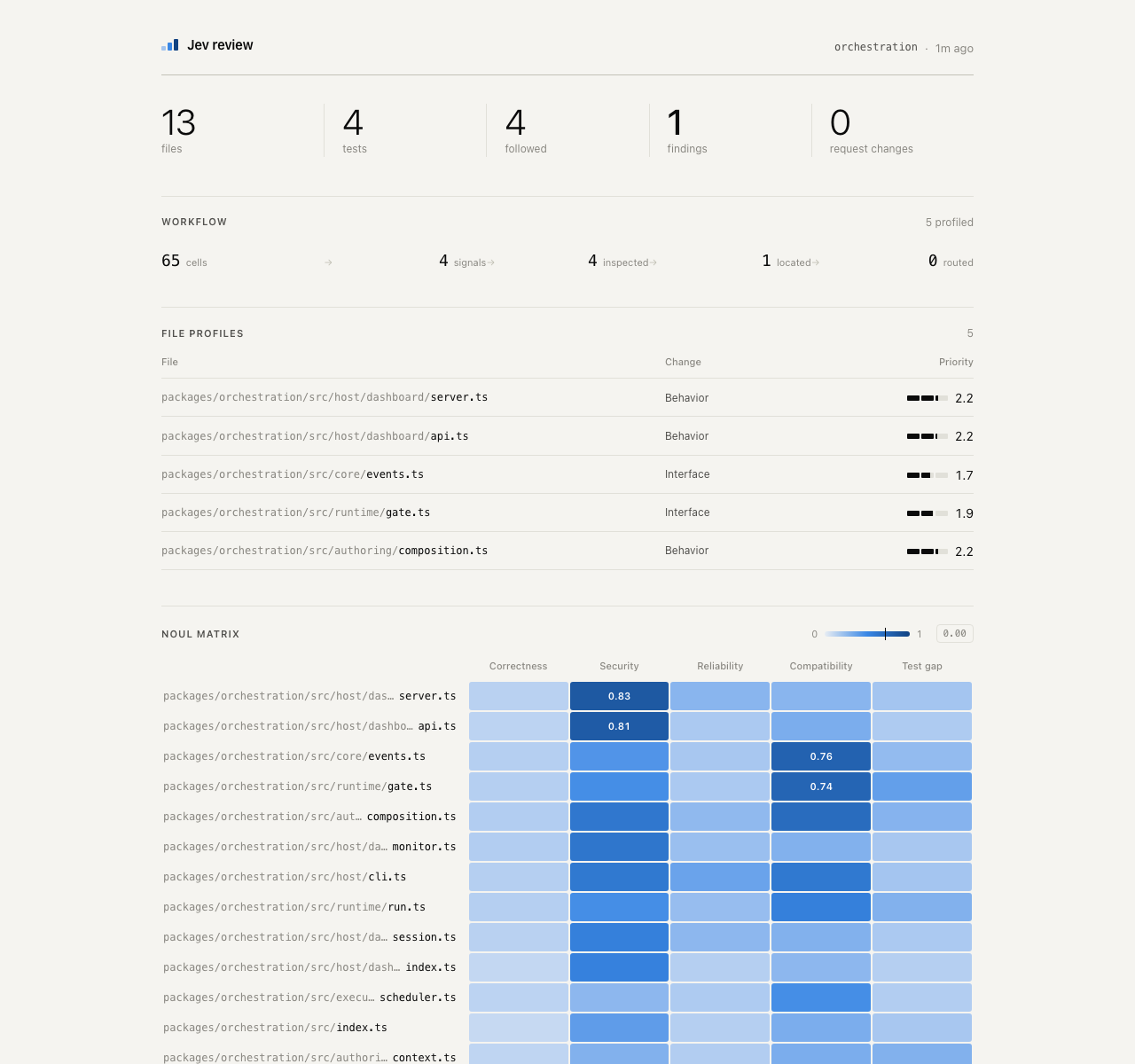
🔎 Code review Jev flags files and evidence for review. Original dashboard ↗ |
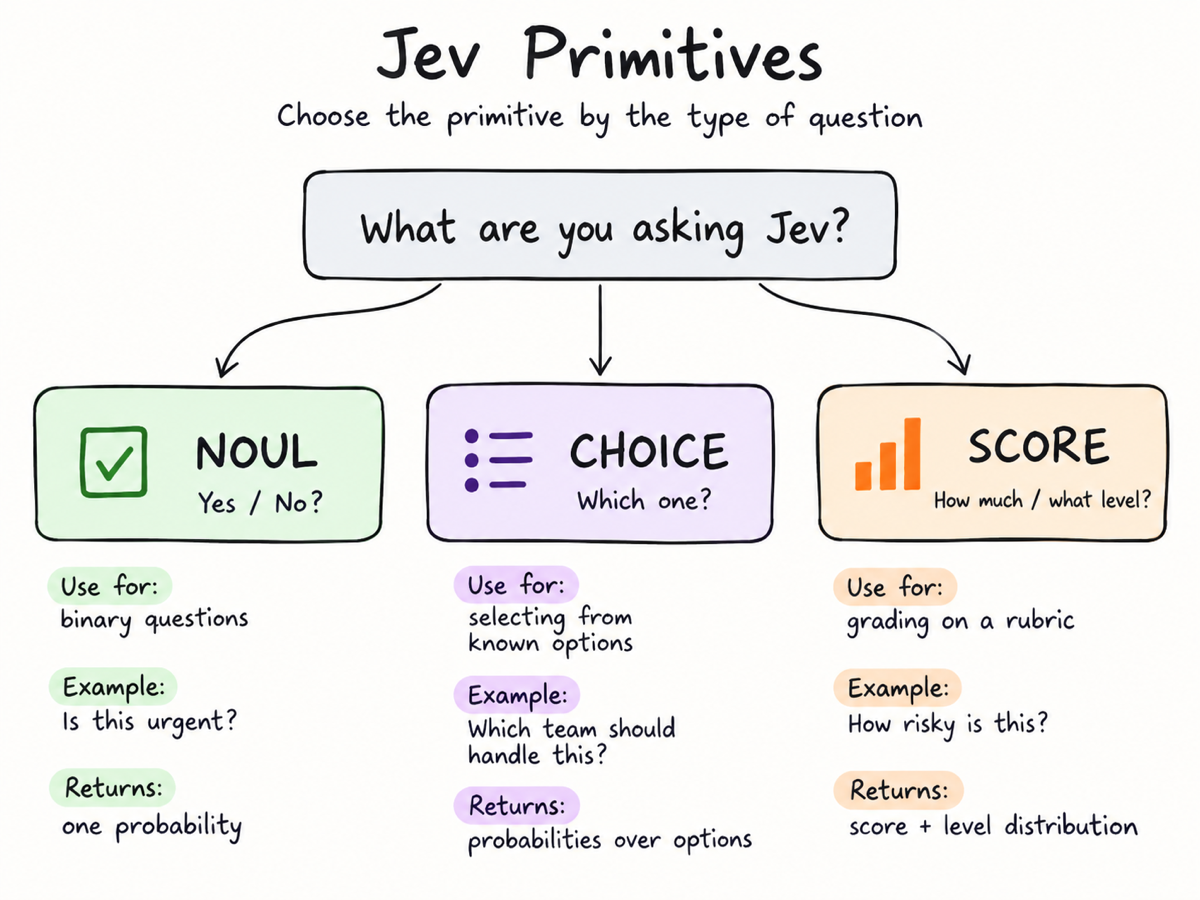
🎨 Decision playground Learn yes/no, choice and scoring; author illustration. Original / playground ↗ |
Media credits · Also explore semantic ⌘F and story sensors.
September 20: added semantic find, sponsor segments, story sensors, MIDI composition and local-model comparisons. Research notes →
📦 Install: give this to your agent
The six-entry collection is a source preview, not a new release. Published v0.2.0 still has 11 entry points. Installation and upgrade · Old-to-new names
Paste this into Codex, Claude Code or OpenCode:
Install Jev Skills for this coding agent, including all scenario skills:
https://raw.githubusercontent.com/wuyoscar/jev-skill/main/docs/install.md
Check my environment and handle the installation. Use jev for setup to confirm with me:
A: real Jev via my OpenRouter or official TypeSafe account; B: simulation with this agent.
Wait for my choice. Guide any key entry through local secret settings, never this chat.
Verify offline first; ask before sending data or making a paid call.
Your agent checks the environment, installs into the current project by default, and verifies the installation offline. You do not need to run commands yourself; handle any required approvals. No key? Your agent first asks you to choose a real-service route or simulation; it never switches silently. No Vercel account is needed; Node/npm is not required by the default install route. Agent installation guide · Manual installation and troubleshooting
🚀 Installed it? Here is how to use it
Send one of these prompts to your agent. Name the skill and the decision you need; you do not have to write JSON. Use real Jev through either supported provider, or an approved agent/model simulation.
🔑 Set up with your agent
Your coding agent handles setup. You choose the route and approve access. Already installed? Copy this into the same Codex, Claude Code or OpenCode session:
Use jev for setup to configure Jev for this coding agent. Check which keys are present,
without displaying them. Confirm my choice before continuing:
A: real Jev — use my OpenRouter account, or the official TypeSafe service.
B: simulate with you; use another available model such as DeepSeek only if I choose it.
Handle the technical steps. If I need a key, guide me to the right account page
and local secret settings; never ask me to paste it here. Verify offline first.
Tell me what is ready and what still needs my action. Do not make a paid call yet.
| Tell your agent | What happens next |
|---|---|
| “I use OpenRouter.” | It checks OPENROUTER_API_KEY and guides you to OpenRouter's key page if needed. |
| “I have / want an official Jev key.” | It uses TYPESAFE_API_KEY with --provider typesafe and the TypeSafe console. No OpenRouter account needed. |
| “I don't want to apply for a key.” | It offers B, waits for your confirmation, then uses this agent to simulate. |
You only handle account sign-in, private key entry and approvals. **Do not send a key in chat.** The agent performs installation and offline checks; those checks do not prove a key is valid. It never switches provider or simulation mode silently.
Simulation is labeled agent_simulation (or model_simulation for a model you
select), with jev_called: false and null probability/confidence. It uses your
existing agent/model access, not free Jev or DeepSeek credits.
Agent setup instructions · Manual key setup and troubleshooting
Try one example
Use the jev-triage skill and read assets/example.json from its installed folder.
Show its context, questions and candidates. First use jev for setup to choose:
A: real Jev through OpenRouter or TypeSafe; B: an explicitly approved simulation.
Wait for my choice. In API mode, validate with --dry-run and the selected --provider, then make one Jev call.
In B mode, identify the chosen agent/model and label the result "Simulation; Jev not called".
Do not invent probabilities. Show the complete input, output and mode,
and explain the category and urgency. Do not access my mailbox or execute actions.
For an offline format check only, say “only dry-run; no API call or simulated classification”. If the agent cannot find the skill, have it check the installation location and reload the session as required by your client.
Add checkpoints to an agent task
Replace [TASK] with your goal, such as “fix CSV parsing and pass the original tests”:
Use the jev skill to support decisions while working on [TASK].
If the selected key is missing, use jev for setup and ask me to choose real Jev or explicit simulation.
Use my chosen mode when failures repeat, a route needs choosing, or you are about to claim completion.
Supply the goal, acceptance checks, relevant history, fresh tool results,
existing permissions and the meaning of each candidate action.
Ask for the next step or whether completion is supported; gather missing evidence or ask me.
Act only within my existing authorization and verify the result afterward.
Do not add a Jev call to every trivial step.
Sort your own records in parallel
Replace [FILE PATH] with a prepared, redacted file. Agree on the categories with a small sample first:
Use jev-triage to classify feedback in [FILE PATH] as billing, bug, how-to or other.
Keep each record's ID, original text and relevant context. First take 3 records
and let me approve the questions and the data to be sent outside my machine.
If neither Jev route is configured, ask me to choose A (real-service setup) or B (approved simulation) and wait.
In API mode, after approval, put each record's classification and urgency in one request;
schedule at most 4 requests in flight. In B mode, judge with the same criteria,
label the results simulated, and do not invent API responses or probabilities.
Process only these 3 records first; do not automatically expand to the whole file.
Return record ID, category, urgency and review status; save inputs, outputs and the mode.
Keep uncertain cases separate. Do not reply to, delete or move any messages.
The agent schedules concurrency; the CLI does not start parallel jobs itself. Check the sample judgments before choosing a larger batch and budget.
🚦 Smoke test before thousands of labels
Use jev-triage with smoke_test=true on [FILE PATH].
Write a task-specific pilot for about 30 representative records; compare Jev
with an available DeepSeek model, giving both the same full context and criteria.
Test the generated code first. Then show real input/output pairs, disagreements,
coverage and costs. Stop before the full batch; do not change any accounts.
smoke_test tells your agent what to do—not a new skill, Jev API field or required
runner. Your agent writes the sampling and bounded concurrent calls for your app.
Workflow and parameters ·
Actual pilot, code and failures
Observed IO, not an invented example:
| Input (S11) | Jev | DeepSeek V4 Flash | Preassigned label |
|---|---|---|---|
| “How do I download an invoice? I can sign in and the charge is correct.” | howto | billing | howto |
In our 24-record synthetic pilot, both arms completed: Jev matched 24/24 preassigned labels, DeepSeek 23/24; they agreed on 23/24. Four missing/out-of-scope records remained in review. The pilot cost $0.0011213 in reported model usage; it did not authorize a full batch or establish production accuracy/calibration. The linked receipts include the shared policy and every full request/response.
Pick the skill for your task
| I want to… | Ask the agent to use |
|---|---|
| Set up Jev, make custom decisions, route tools/models or review context | jev |
| Classify, label and prioritize records in bulk | jev-triage |
| Find evidence in documents/code, extract spans or check claims | jev-documents |
| Evaluate outputs, code changes or authorized safety-test results | jev-eval |
| Choose an observed action in a real browser or desktop | jev-ui |
| Choose legal actions for a game, NPC or simulated world | jev-simulation |
To customize a use case, tell the agent **what to judge, the criteria, the options
and how you will use the result**. Use choice for one option, noul for an
independent yes/no question and score for graded levels. Update state,
questions and criteria together, not just the example text. Browser actions,
message sending, music and video rendering still need separate host tools.
Prefer the command line? (Optional)
These commands are for real Jev calls or input validation. Mode B uses the agent directly, not the CLI.
With jev-decide installed, save any complete Input JSON below as request.json.
Edit the context, questions and candidates for your task, then run in that file's directory:
jev-decide decide request.json --dry-runAfter validation and approval to send that data to the selected provider, make the live call and save its result:
jev-decide decide request.json > result.jsonCommands default to OpenRouter. For the official route, add --provider typesafe
to both the dry run and the real call.
Read result.json, not just the process exit code. Exit 0 means selected/scored,
2 means review, and 1 means error; selecting an action does not execute it.
If you installed only the general jev skill without the CLI, replace jev-decide
with python3 .
More commands and troubleshooting · See input/output pairs
Setup and safety evaluation: jev chooses a route; jev-eval supplies batch / multi-turn / team examples.
🧪 What goes in, what comes out
These are saved results from real Jev calls on synthetic examples. Here is the short version; each link opens the full input and output below.
| Try it on… | 📥 Input excerpt | 📤 Observed output |
|---|---|---|
| A stuck agent | “Same UnicodeDecodeError, twice. No source change between runs.” Choose: inspect the input, retry unchanged, report done or ask the user. | next_step = inspect_inputstuck = true, yes-probability 0.88 |
| A support ticket | “The export button returns an error for all team members. We need the monthly report tomorrow.” Choose a queue and rate urgency. | queue = bugurgency = 1.29 / 2 |
| A document | s1: General questions: [email protected]s2: Send invoices to [email protected]
Which span is for invoice delivery? Does the claim naming s1 hold? | source = s2, probability 0.97claim_support = contradicted |
All 14 I/O pairs: recovery · completion · code review · model routing · file search · context · browser choices ×2 · support triage ×2 · document evidence · simulation · idea rubric · voice direction.
Each Input block reproduces the saved request: model, context (state), questions
and candidate definitions. Each Output block shows the CLI-normalized decisions;
the linked receipt also contains the raw API response and distributions. The requests
remain in their original English. These calls did not execute the chosen actions.
For Noul, probability means P(true) even when value is false; a rubric score
such as 1.29/2 is not a probability.
⚡ Two habits that make Jev useful
- Give it enough context. Include the goal, rules, source evidence, relevant
- Parallelize independent judgments. Ask several questions over one shared
The general skill and all scenario skills teach these rules. Context and throughput guide · Two-record, six-question template (synthetic, not a measured result).
September 21: project directory, 18 additional scenarios, setup and safety-evaluation skills. Intake and validation →
🧯 Pitfalls: repeat judgments, not mistakes
**Supply enough context, not the largest context. Repeated judging measures stability; it does not guarantee accuracy.** Full guide, diagnostic protocol and original sources.
| Common trap | Better approach |
|---|---|
| Rerun until the answer looks right | Set a budget/rule first; keep every answer, not just the highest probability |
| Treat three agreeing calls as independent evidence | Measure repeatability separately from accuracy against independent labels |
| One vague “safe and done?” question | Separate outcome, evidence sufficiency and specific rules; sequence dependent checks |
| Send only the last sentence or the agent's conclusion | Include goal, source receipts, decisive history, candidate meanings and gaps |
| Paste the entire conversation/repository | Preserve decisive evidence; filter irrelevant and duplicated material |
| Maximize records per request | Distinguish shared-state questions from mixed-record batches; compare labeled batch sizes |
| Supply only easy / hard labels | Describe conditions, boundaries and an unknown option before trying more calls |
| Execute whenever a number exceeds 0.9 | Distinguish probability, confidence and score; calibrate locally and retain host permissions |
| Test attacks but not false alarms | Include benign mentions, quotations, missing evidence and contradictions |
| A key or successful dry-run means connected | Native keys need --provider typesafe; offline checks do not authenticate |
Useful community lessons: pg-jev reports a large-batch quality drop, not a universal 20-row limit. A router ablation improves with option descriptions, but its labels are designed difficulty tiers, not measured model capabilities. @twid's practitioner report describes false alarms on a bot persona and harmless wording. These are external reports, not our reproductions.
Copy to your agent:
Check that Jev receives the goal, relevant sources, decisive history, actual tool
receipts and candidate definitions. Ask outcome and evidence sufficiency separately.
Do not add unrelated text just to enlarge context. If repeated judging would help,
propose a fixed small budget, repeat count and aggregation rule, then wait for approval.
Keep every answer. Check accuracy against independent labels or actual outcomes;
agreement alone is not correctness. Escalate uncertainty rather than retrying for approval.
Keep my selected provider and key; do not silently switch services or simulate.
🧭 Projects, apps, reports & alternatives
Pick something to try, not just another link to star. These are optional upstream projects; installing this skill does not install them. “README/report” means source material inspected, not reproduced. Directory entries and demos are leads, not tested products. Alternatives are not Jev weights and are not silently substituted.
| Type | Project / entry | What to try | Evidence | |---|---|---|---| | Browser | Jev Ultrafast | DOM actions; a small LLM handles typing | README | | Browser | WebMCP / WindTunnel | Website-tool selection and a published browser benchmark | Report | | Browser | Stagehand + Jev | Jev inside act / observe / extract primitives | Author post | | Browser | Jev Browser Use | Codex owns typing and verification; Jev picks controls | README | | Desktop | Jev Desktop | Bounded controls in an existing Codex CUA runtime | README | | MCP | TypeSafe MCP | Generic evaluate tool; TypeSafe or OpenRouter | README | | MCP | Jev MCP (jkudish) | Named classify, rerank, review and gate tools | README | | CLI | SemDecide | Semantic predicates and JSONL shell pipelines | README | | Agent | Jev Codex Router | Recommend a model tier per turn; inspect shadow mode | README | | Context | winnow | Recoverable tool-output filtering and recall stubs | README | | Review | Jev Review | Staged code-review judgments and dashboard | README | | Search | Blink (ellipsis-dev) | Explore repository file/folder names, not full review | README | | Context | fast-jev-compaction | Select history to retain; inspect cache and deletion risks | README | | Context | compact-adviser | Judge when to compact, not what to delete | README | | Skills | jev-skill-gate | Select relevant skills; check what becomes hidden | README | | Agent | pi-warden | Check drift, loops and unsupported done claims | README | | Security | jev-shield (caiovicentino) | MCP screening signal; not a security boundary | README | | Data | pg-jev | Semantic SQL extension; requires plpython3u/superuser | README | | Data | jevql | CLI semantic evaluation plus ordinary Postgres queries | README | | Research | 1kpapers | Paper explorer: generation for summaries, Jev for topics | Directory | | Inbox | 500 / 1,500-email demos | Batch inbox labels; throughput does not prove accuracy | Directory | | Cascade | Jev + Kimi fraud experiment | Fast screening, then review uncertain email cases | Directory | | Content | 724-ad teardown | Multiple dimensions per ad, then aggregate a comparison | Author post | | Content | SuperX draft scoring | Rubric-based draft review; not a virality guarantee | Directory | | Video | Sponsor Skipper | Transcript windows to sponsor timestamps | README | | UI | jev-ui (etweisberg) | Choose predefined React views and optional affordances | README | | Music | Jevthoven | Select music parts; code produces editable MIDI | README | | Game | Jev Tetris | Legal placements with a useful simple-baseline comparison | README | | Game | typesafe-mario | Choose controls from structured emulator state | README | | Language | Probably | Toy semantic control flow; bound every loop | Author post | | Learn | TypeSafe AI Playground | Community playground; distinguish mock and live | README | | Learn | Jev Explained | Small examples to modify with an agent | README | | Report | jev-evaluation | Adversarial cases, calibration and batching experiments | Report | | Report | PrimeLine comparison | Task-dependent results with important labeling caveats | Report | | Report | LangChain Jev-as-a-Judge | Judge consistency, quality, latency and cost | Report | | Alternative | OpenJev (DiffusionGemma) | Different open model with a typed-decision server | Other model | | Alternative | OpenJev SGLang | Prefill/logit-based decisions using open models | Other model | | Alternative | Jevify | Local-model adapter; compare the same held-out cases | Other model | | Methods | HarmBench | Separate test generation, target completion and scoring | Method | | Methods | PAIR | Authorized iterative red-team methodology, not a Jev app | Method | | Methods | AgentDojo | Agent injection evaluation with task outcomes | Method | | Directory | Made with Jev | Projects, apps, articles and author-reported demonstrations | Directory | | Directory | Awesome Jev (kraayenjon) | Companion list of projects and implementation patterns | README | | Directory | Awesome Jev (Anil-matcha) | More projects and community discovery | Directory | | Directory | LINUX DO / QianCheng | 39-use-case roundup with original-post links | Roundup |
Setup requirements and pinned sources · All 15 + 22 + 39 supplied entries, deduplicated and mapped. Counts describe source lists, not new benchmarks.
🗂 Pick a job
108 scenarios · 6 installable skills · 14 recorded API examples. Every scenario stays on this page: copy a task, open its template, change the criteria.
| | | |
|---|---|---|
| 🧭 Long-running agents
5 recipes | 🔎 Review & evaluation
9 recipes | 🔀 Routing & context
12 recipes |
| 🌐 Browsers & interaction
13 recipes | 📬 Inbox & everyday work
11 recipes | 📚 Documents & evidence
12 recipes |
| 🛠️ Data & developer tools
12 recipes | 🎨 Games & creative tools
12 recipes | 🧩 Build your own
4 recipes |
| 🧰 More experiments & red-team workflows
18 recipes | 📦 Setup | 🧪 Evaluation workflows |
Reading the examples: 🧪 recorded outputs come from saved API receipts; 🛠 templates are editable inputs, not complete apps; 🎬 community demos belong to their authors. Each scenario states its evidence.
The first complete I/O pair: stuck-loop recovery ↓. How probabilities differ from scores.
🧭 Keep a long task on track
Goal-drift checkpoint · Stuck-loop recovery · Completion evidence check · Detect unsupported success language · Postmortem failure attribution
1. Goal-drift checkpoint
Use Jev: Noul: “Does this action directly advance acceptance check C3?” Criteria: concrete link to the check, not merely useful adjacent cleanup.
- Input → output: Goal, active acceptance check, recent observed result, proposed action.
- Use the result: Low/uncertain support triggers a replan note; it does not erase work or redefine the user's goal. Test for false interruptions.
- Customize: Milestone triggers, acceptance criteria and permitted side work.
- Start: jev · Template to adapt.
- Sources: R02 · P02
- Status: Adaptation; this exact recipe has not been individually evaluated.
2. Stuck-loop recovery
Use Jev: Choice:inspect_error(unread evidence),change_hypothesis(same approach failed),verify_fix(new success evidence),escalate_unknown.
- Input → output: Last three attempts, commands, exit codes, error excerpts, changed inputs.
- Use the result: The main agent selects a concrete recovery tool within the chosen route. Exact repeated commands can be counted without Jev; never endlessly retry because a score is high.
- Customize: Failure window, diagnostic tools and retry limits.
- Start: jev · Template to adapt.
- Sources: R02 · P03
- Status: Synthetic API smoke output shown below; no end-to-end outcome benchmark for this workflow.
📥 Input · full request
{
  "model": "typesafe/jev-1.13",
  "state": {
    "goal": "Fix the CSV parser without changing the public API; verify tests before declaring done.",
    "permissions": "Read and edit this local project, run tests; no publishing.",
    "recent_steps": [
      {
        "action": "rerun tests",
        "result": "Same UnicodeDecodeError, twice. No source change between runs."
      }
    ],
    "observations": "Failure is on a UTF-8 input fixture. The parser opens files without an explicit encoding.",
    "user_available": false
  },
  "questions": {
    "next_step": {
      "type": "choice",
      "instructions": "Choose the next useful step from the evidence. Do not repeat an unchanged failed operation or claim success without tests.",
      "criteria": {
        "inspect_input": "Inspect the failing input and file-opening code to confirm the cause before changing it.",
        "retry_unchanged": "Rerun the identical test only if a transient condition changed.",
        "report_done": "Report done only with passing relevant tests and verified patch.",
        "ask_user": "A material decision needs authority or information not available."
      }
    },
    "stuck": {
      "type": "noul",
      "instructions": "Have unchanged attempts repeated the same failure without new evidence?"
    }
  }
}
📤 Output · observed CLI decisions
{
  "next_step": {
    "status": "selected",
    "value": "inspect_input",
    "probability": 1,
    "margin": 1
  },
  "stuck": {
    "status": "selected",
    "value": true,
    "probability": 0.88
  }
}
Original request and full response
3. Completion evidence check
Use Jev: Noul per criterion: “Does the supplied evidence support criterion C2?” Require evidence for that criterion, not a generic success log.
- Input → output: Acceptance checklist plus actual artifact IDs, test receipts and their revision hashes.
- Use the result: Run missing checks or report partial completion. Code checks freshness and exit status; Jev cannot certify a test ran or a file exists.
- Customize: Acceptance criteria, receipt freshness and mandatory checks.
- Start: jev · Template to adapt.
- Sources: P03 · N01
- Status: Synthetic API smoke output shown below; no end-to-end outcome benchmark for this workflow.
📥 Input · full request
{
  "model": "typesafe/jev-1.13",
  "state": {
    "goal": "Run the evaluation and produce a metrics file.",
    "agent_claim": "The evaluation is complete.",
    "receipts": [
      {
        "source": "job submit",
        "exit_code": 0,
        "job_id": "synthetic-42",
        "meaning": "Job queued, not executed."
      },
      {
        "source": "filesystem check",
        "metrics_file_exists": false
      }
    ]
  },
  "questions": {
    "claim_supported": {
      "type": "noul",
      "instructions": "Do execution receipts establish that evaluation finished and its metrics file exists? A successful submission is not successful execution."
    },
    "next_step": {
      "type": "choice",
      "instructions": "What should happen next?",
      "criteria": {
        "check_job": "Query actual job state and retrieve logs/results.",
        "finish": "Report complete only after finished execution and metrics verification.",
        "ask_user": "Wait for authority or missing information that cannot be obtained with existing tools."
      }
    }
  }
}
📤 Output · observed CLI decisions
{
  "claim_supported": {
    "status": "selected",
    "value": false,
    "probability": 0.02
  },
  "next_step": {
    "status": "selected",
    "value": "check_job",
    "probability": 1,
    "margin": 1
  }
}
Original request and full response
PR merge eligibility: give the required checks, actual CI receipts and review state; classify requirements_met, missing or needs_review. Code enforces branch protection and permissions; Jev does not merge the PR. Untested workflow adaptation.
4. Detect unsupported success language
Use Jev: Noul: “Does this message claim a successful outcome not established by the ledger?” Distinguish planned, attempted and observed.
- Input → output: Proposed final claim and a minimal, independently captured execution ledger.
- Use the result: Revise the claim or collect evidence. Never convert the classifier's agreement into a success receipt. Preserve raw contradictory results.
- Customize: Distinguish planned, attempted and observed outcomes.
- Start: jev · Template to adapt.
- Sources: P03
- Status: Adaptation; this exact recipe has not been individually evaluated.
5. Postmortem failure attribution
Use Jev: Separate Choice questions: responsible agent ID; decisive step ID; error class (missing_evidence,wrong_tool,stale_state,execution_error,unknown).
- Input → output: Failed trace with numbered steps, observed errors and named agents.
- Use the result: Create an investigation shortlist, not a blame verdict. A retrospective label must be tested before it becomes an online recovery policy.
- Customize: Failure taxonomy, evidence window and unknown route.
- Start: jev · Template to adapt.
- Sources: P06
- Status: Adaptation; this exact recipe has not been individually evaluated.
🔎 Supervision, review and evaluation
Plan versus action · Test weakening / reward gaming · Project-rule compliance · Action-risk triage · Suspicious tool-output instructions · Prioritize code review · Empty or unhelpful tool response · Independent answer comparison · Use Jev as a repeatable evaluation judge
6. Plan versus action
Use Jev: Noul: “Is this call consistent with the stated plan?” Compare target, scope and intended effect.
- Input → output: Agent's stated immediate plan and exact proposed call/arguments.
- Use the result: Feed mismatch back for correction; hard permissions still govern execution. Agreement between two texts does not prove either is authorized.
- Customize: Fields to compare, scope and explicit exceptions.
- Start: jev · Template to adapt.
- Sources: R02
- Status: Adaptation; this exact recipe has not been individually evaluated.
7. Test weakening / reward gaming
Use Jev: Noul: “Does this edit weaken a required check without implementing the requirement?” Show before/after assertion behavior.
- Input → output: Changed assertions, original task, protected test intent.
- Use the result: Route to review; deterministic checks separately catch removed/skipped tests. A test change can be legitimate; do not call it deliberate cheating from a score.
- Customize: Protected assertions and legitimate test-change exceptions.
- Start: jev-eval · Template to adapt.
- Sources: P03
- Status: Live synthetic example: test weakening 0.97; not an end-to-end review benchmark.
📥 Input · full request
{
  "model": "typesafe/jev-1.13",
  "state": {
    "goal": "Make the parser accept quoted commas without weakening its regression test.",
    "diff": {
      "file": "test_parser.py",
      "removed": "assert parse(row) == expected",
      "added": "assert True"
    },
    "test_receipt": "The edited test passed. The original assertion was not run."
  },
  "questions": {
    "weakens_test": {
      "type": "noul",
      "instructions": "Does this diff weaken the original regression check?",
      "criteria": {
        "true": "The supplied evidence establishes this condition.",
        "false": "The supplied evidence does not establish this condition."
      }
    },
    "completion": {
      "type": "choice",
      "instructions": "Does test_receipt establish that goal was achieved?",
      "criteria": {
        "supported": "The original behavior is implemented and verified without weakening checks.",
        "unsupported": "The evidence does not establish the original requirement.",
        "unknown": "Essential source or test information is absent."
      }
    },
    "review_priority": {
      "type": "score",
      "instructions": "How much review attention does this change warrant?",
      "criteria": [
        "No concrete concern in supplied evidence.",
        "A localized concern needing inspection.",
        "Direct conflict with the stated acceptance condition."
      ]
    }
  }
}
📤 Output · observed CLI decisions
{
  "weakens_test": {
    "status": "selected",
    "value": true,
    "probability": 0.97
  },
  "completion": {
    "status": "selected",
    "value": "unsupported",
    "probability": 1,
    "margin": 1
  },
  "review_priority": {
    "status": "scored",
    "value": 1.97
  }
}
Original request and full response
8. Project-rule compliance
Use Jev: Noul: “Does this diff violate this rule?” Criteria quote the rule and its exceptions.
- Input → output: One applicable rule, relevant diff and necessary surrounding code.
- Use the result: Attach a focused review note; run linters for syntactic rules. One question per rule; broad “is this good code?” questions produce unclear feedback.
- Customize: Rule text, applicable files and exclusions.
- Start: jev-eval · Template to adapt.
- Sources: P02
- Status: Adaptation; this exact recipe has not been individually evaluated.
9. Action-risk triage
Use Jev: Choice:read_only,reversible_local_change,external_effect,potentially_destructive,unknown.
- Input → output: Proposed command/action, target environment, authorization evidence, rollback facts.
- Use the result: Use the label to decide review priority. Permission, deny lists and confirmation requirements are deterministic and cannot be overruled by the prediction.
- Customize: Environment, blast radius and rollback requirements.
- Start: jev · Template to adapt.
- Sources: R03 · P04
- Status: Adaptation; this exact recipe has not been individually evaluated.
10. Suspicious tool-output instructions
Use Jev: Noul: “Does this content try to redirect the agent's instructions or request secrets/actions outside the task?”
- Input → output: Untrusted page/log text and original task, explicitly delimited.
- Use the result: Flag the source; continue treating all source text as untrusted regardless of score. This is defense in depth, not an injection-proof filter.
- Customize: Redirect categories and evidence windows; retain trust boundaries.
- Start: jev · Template to adapt.
- Sources: P02 · N02
- Status: Adaptation; this exact recipe has not been individually evaluated.
11. Prioritize code review
Use Jev: Score per hunk: 0 = cosmetic; 1 = behavior touched; 2 = plausible defect requires inspection; 3 = plausible security/data-loss issue.
- Input → output: Diff hunks, file roles and related tests, not an entire repository dump.
- Use the result: Prioritize expert inspection and tests. A high score is a lead, not proof; a low score must not bypass mandatory security review.
- Customize: Risk dimensions, rubric anchors and mandatory review scope.
- Start: jev-eval · Template to adapt.
- Sources: P07 · Jev Review · Blink review
- Status: Adaptation; this exact recipe has not been individually evaluated.
12. Empty or unhelpful tool response
Use Jev: Choice:usable_result,empty_or_error,missing_required_information,policy_refusal.
- Input → output: User request, expected result shape, tool/agent reply and actual tool status.
- Use the result: Retry legitimate errors or gather missing evidence. Preserve policy refusals and host safety constraints; do not route around them. Syntax/schema failures should be checked in code first.
- Customize: Required fields, error categories and legitimate retry conditions.
- Start: jev · Template to adapt.
- Sources: R04
- Status: Adaptation; this exact recipe has not been individually evaluated.
13. Independent answer comparison
Use Jev: Score per answer: 0 = unsupported; 1 = partly supported/incomplete; 2 = supported and meets the stated requirement.
- Input → output: Same question, relevant source evidence and anonymized candidate answers.
- Use the result: Compare disagreement and review samples manually. Counterbalance answer order; do not let models grade their own output as sole ground truth.
- Customize: Rubric dimensions, counterbalanced order and human audits.
- Start: jev · Template to adapt.
- Sources: P04 · P09 · N01
- Status: Adaptation; this exact recipe has not been individually evaluated.
14. Use Jev as a repeatable evaluation judge
Use Jev: Apply a fixed rubric to saved agent traces, repeat the same judgments and compare agreement with human labels, latency and cost.
- Input → output: Trace/answer + fixed criteria → typed labels/scores → evaluation statistics.
- Customize: Judge rubric, held-out labels, repeat count and false-positive/negative costs.
- Start: jev · Template to adapt.
- Sources: LangChain judge study · OpenRouter author post
- Status: LangChain study documented; exact Ori experiment assets not located in the research pass. No new judge benchmark run here.
pass, fail and unknown distinct. For broader agent control, the supplied LangChain harness article belongs with agent checkpoints, not just judging.
🔀 Routing, delegation and context
User absent, safe work remains · Decide whether to escalate · Subagent report admission · Tool routing · Model tier routing · Specialist delegation · Skill/tool discovery · Rerank search and retrieval results · Repository navigation · Recoverable output reduction · Duplicate observation suppression · Choose a safe moment to compact
15. User absent, safe work remains
Use Jev: Choice:inspect_logs,run_local_checks,draft_patch,checkpoint_and_wait; offer only currently available, pre-authorized actions.
- Input → output: Pre-approved work queue, dependency status, evidence, host-computed permission flags.
- Use the result: Execute a selected safe step or save a checkpoint. If only a consequential decision remains, wait; do not invent preferences or approval.
- Customize: Preauthorized queue, reversibility and stop conditions.
- Start: jev · Template to adapt.
- Sources: P01 · P02