

A Hyprland-like tiling window manager for macOS, built as a fork of AeroSpace, with the look and workflow of the 43PR Hyprland dotfiles.
skyland keeps everything AeroSpace does (virtual workspaces, tree layouts, CLI, config file) and adds what makes Hyprland feel like Hyprland:
- dwindle layout, split side following the cursor (
smart_split),togglesplit - move and resize with the mouse anywhere on a window (
alt+ drag), tiles swap on drop - window decoration: rounded corners, active/inactive opacity, dim inactive windows, focused window border in the theme accent (optionally rotating), Ghostty blur; floating windows stay on top
- Hyprland animations: presets (
hyprland,slide,gnome,vertical,cyberspace: windows rez in through a scan line), stackable, orbezier/animationlines pasted from a hyprland.conf; open, close, move, workspace and scratchpad switches - Liquid Glass (
[decoration] ui-style = 'glass', or Metal / Glass in the settings window): overview, window switcher, HUDs, settings, wallpaper picker and media widget in refractive glass, the engine of skylandbar - Glyph (
ui-style = 'glyph', with theglyph-dark/glyph-lightthemes): a Nothing OS like look, black, white dots, one red. Opaque panels on a faint dot grid, dot matrix numbers (Doto), labels in Space Mono caps, the live thing in red. Palette after glyph-rice; fonts bundled (SIL OFL,resources/fonts) - window switcher (
alt-</alt-backtick, held likecmd-tab): recent windows of every workspace with live thumbnails, type to filter - 43PR themes as CSS files, light/dark toggle, theme picker, colors generated from the wallpaper, light or dark picked from the wallpaper brightness
- wallpaper picker, skylandbar or sketchybar (the bar tells skyland its height), hyprlock-like screen saver, floating media widget with audio-reactive bars or an Audioware-style light wave (
[media] style) - workspace overview (
cmd-up): every workspace as a card with its windows in place; type to search, j / k to pick a window, x or a middle click to close it, alt + drag a card onto another to swap two workspaces,+card for a new one - settings window (
alt-i): gaps, decoration, animations, wallpaper, media widget and lock screen, plus Keys (record a key, edit command and description, duplicates and macOS shortcuts flagged) and Rules (float / tile / workspace per app, from the running apps) tabs; applied live and written to the config with its comments kept - master layout per workspace (
alt-shift-t): one big window and a stack on the side (master in the middle on ultrawide screens),alt-shift-enterswaps with the master (Hyprlandmaster,swapwithmaster) - groups (
alt-g): a container becomes tabs with a tabs bar,alt-ncycles,alt-ctrl-h/j/k/lgroups with a neighbour (Hyprlandtogglegroup,changegroupactive,moveintogroup) - scratchpads (
alt-s, named ones likealt-a= Spotify), pin (alt-ctrl-p: a floating window on every workspace) - window rules: floating utilities, apps sent to a workspace, and Hyprland's windowrule v2 with
window-rule(size, position, center, opacity, rounding, no border / dim / animation) - binding modes (Hyprland submaps): a HUD lists the keys of the active one, like the
resizemode onalt-shift-r - trackpad swipe between workspaces, the windows follow the fingers; smart gaps and per workspace gaps and layout
- window management on/off (
alt-r) with a HUD, windows back to stock macOS while off - shortcut cheat sheet (
alt-shift-h) read from the config - windows keep their workspace across restarts
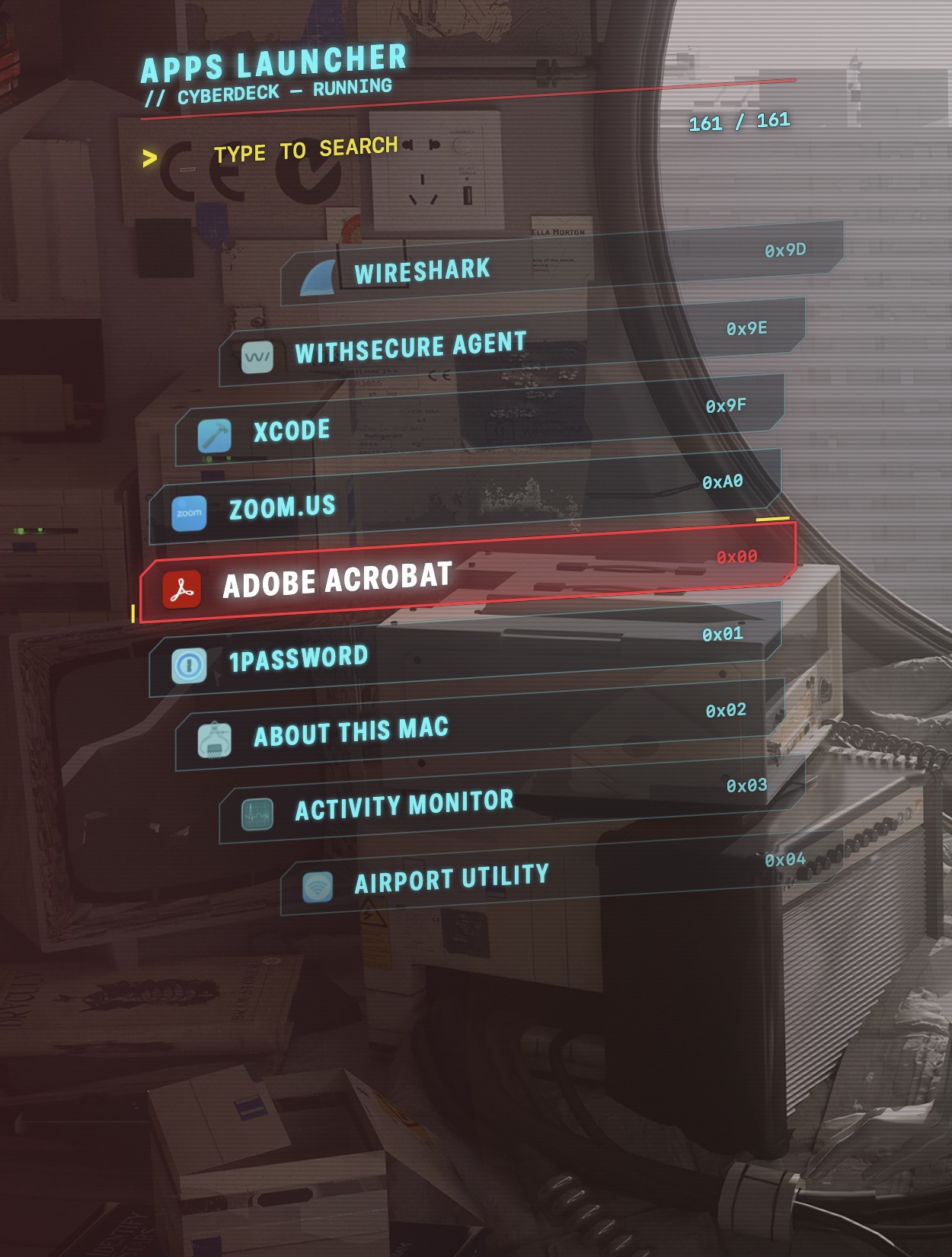
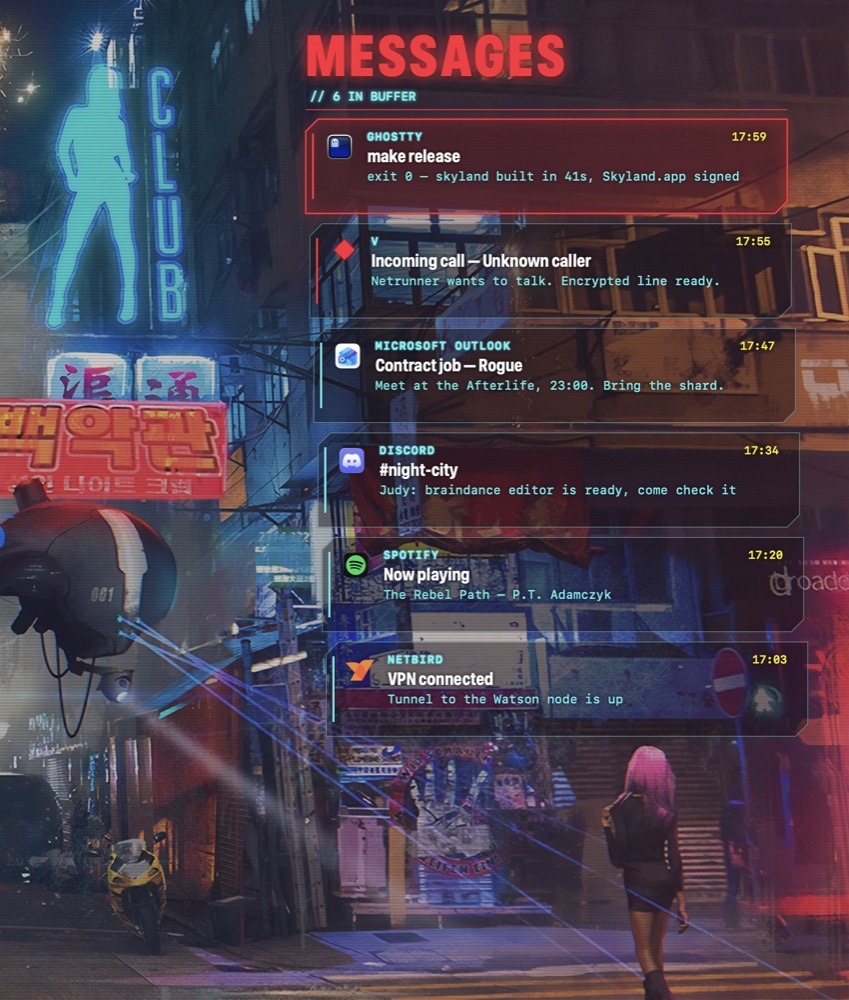
- companion skyland-cyberdeck: cyberpunk apps launcher (
alt-d), messages panel (alt-shift-m) with a scripting API, and a HUD (alt-shift-d) with live system data and herdr agents
 |
 |
Workspace overview (cmd-up) |
Window switcher (alt-<) |
 |
 |
Wallpaper picker (alt-w) |
Lock screen (alt-tab) |

Settings window (alt-i)
Screenshots are framed with tools/frame-screenshot.swift
(swiftc -O tools/frame-screenshot.swift -o .build/frame-screenshot).
Clone it anywhere: bindings call the skyland CLI, and skyland puts its own
bin/(and~/.local/bin) on the PATH ofexec-and-forgetcommands.
skylandbar
skylandbar is skyland's status bar, in a separate repo: it speaks SketchyBar's language, so sketchybar configs and plugins run unchanged, and adds what a skyland bar needs:
- Liquid Glass items, groups and popups (Apple's glass on macOS 26, a refraction
- skyland built in: workspaces with their apps, the focused window title, mode and
exec-on-workspace-change script
- windows below it: it tells skyland its height (
bar-height), no value to keep in sync - a TOML config (
skylandbar.toml) next to sketchybarrc and SbarLua, live reload,

git clone https://github.com/waxdred/skylandBar.git && cd skylandBar
swift build -c release && ln -s "$PWD/.build/release/skylandbar" ~/.local/bin/
skylandbar &   # quit sketchybar first
Linked in ~/.local/bin (or installed in /opt/homebrew/bin), it starts with skyland when
it is not running yet, at login too; without it, skyland starts alone and sketchybar
is reloaded as before.
skyland-cyberdeck
skyland-cyberdeck is a separate repo with the cyberpunk HUD pieces, bound in the hypr profile:
- apps launcher (
alt-d): a see-through "eye implant" deck, curved column of
- messages (
alt-shift-m,alt-shift-xdismisses all): the macOS Notification
- HUD (
alt-shift-d): clock, calendar, Wi-Fi / Bluetooth, brightness and volume,
- scripting API:
skyland-cyberdeck notify -t TITLE -b BODY,list --json,
dismiss; integrations for a sketchybar mail item and
herdr agents (finished / needs you)
 |
 |
git clone https://github.com/waxdred/skyland-cyberdeck.git && cd skyland-cyberdeck
swift build -c release && ln -s "$PWD/.build/release/skyland-cyberdeck" ~/.local/bin/
How it works
The window manager is AeroSpace's Swift app with skyland additions under
Sources/AppBundle/skyland/. Everything AeroSpace cannot do through the public
Accessibility API (corner radius, alpha of other apps' windows, transforms for
animations) goes through a scripting addition injected into Dock: Dock owns
the universal SkyLight connection, so changes sent from there apply to every
app's windows. The payload (osax/payload.m) listens on
/tmp/skyland-sa_$USER.socket and the app sends it one text command per change.
- Animations and fades are stepped by the payload (
SLSSetWindowTransform,
SLSSetWindowAlpha every 8 ms). WindowServer-side animations are never used:
an animated alpha crashed WindowServer when a window closed mid-fade.
- The private SkyLight signatures were recovered with REA (reverse engineering of
Requirements
- Apple Silicon Mac, macOS 15 or later (tested on 15.6.1 and 27.0.1, see
- everything else comes with
skyland install: Swift 6.4 through
cmake, jq, sketchybar,
borders, Hack Nerd Font (see Brewfile); matugen for wallpaper colors
(cargo install matugen, done when cargo is there)
- optional, for window effects (corners, opacity, animations, floating windows
-arm64e_preview_abi boot-arg, exactly
like yabai's scripting addition.
Without it everything else works: tiling, groups, master, scratchpads, overview,
themes, wallpapers, settings
Install
Quick start (SIP on, nothing to disable)
With Homebrew:
brew install waxdred/tap/skyland
skyland install       # dependencies, signing identity, config in ~/.config, start
skyland doctor        # what works, what is missing, how to fix it
After brew upgrade skyland: skyland env restarts it; your config in ~/.config
is kept (an upgrade only adds new themes).
Or from source:
git clone --recurse-submodules https://github.com/waxdred/skyland.git
cd skyland
bin/skyland-install   # dependencies, Swift, signing identity, build, skyland CLI, start
skyland doctor        # what works, what is missing, how to fix it
Or, without building anything (no Swift toolchain): download skyland-
from Releases, unzip it, then
bin/skyland-install in it.
skyland install runs again safely (each step skips what is there). Then allow
Skyland in System Settings > Privacy & Security > Accessibility (and Screen
Recording for the overview thumbnails and the media widget bars). Always start the
app with open or skyland env: launched from a terminal, macOS gives the request to
the terminal and the app resets its own permission.
With SIP on you get everything but the window effects:
| works with SIP on | needs the Dock payload (SIP off) |
|---|---|
| dwindle / master / groups / scratchpads, window rules | rounded corners |
| alt + mouse move and resize | active / inactive opacity, alt-o |
| workspaces per screen, overview with live thumbnails | window and workspace animations, fades |
| themes, theme picker, wallpaper picker and colors, light / dark | floating windows kept on top |
| sketchybar, focused window border (JankyBorders), Ghostty blur | |
| settings window, cheat sheet, lock screen saver, media widget, cyberdeck | |
Full effects (SIP partially off)
Like yabai's scripting addition:
from recovery mode csrutil enable --without fs --without debug --without nvram,
then sudo nvram boot-args=-arm64e_preview_abi and reboot. Then:
skyland sa build && skyland sa load   # build and inject the payload into Dock (sudo)
skyland doctor                        # "payload loaded in Dock"
After a reboot or killall Dock the payload is gone: skyland sa load again, or
let the LaunchAgent do it (see autostart).
Optional
skyland lock install    # hyprlock-like lock screen saver
skyland uninstall       # remove everything but the repo (asks first)
Everything goes through the skyland CLI (~/.local/bin/skyland): skyland theme pick,
skyland scratch toggle, and any window manager command (skyland workspace 3,
skyland list-windows --all, skyland reload-config).
Scripts
| Script | What it does |
|---|---|
| skyland install | first install / update: dependencies, Swift, build, CLI, start |
| skyland doctor | check the install (permissions, SIP, payload, sudoers, bar, border...) and say what to fix |
| skyland uninstall | remove skyland but the repo (asks first) |
| skyland-env [hypr]\|status | set up skyland: link the hypr profile into ~/.config, start the app, sketchybar with skyland workspaces (run at login) |
| skyland-build | build everything with swiftly, sign Skyland.app |
| skyland-sa build\|load\|send | build / install and inject / talk to the Dock payload |
| skyland-theme dark\|light\|toggle\|apply\|pick\|set | apply a CSS theme to sketchybar and Ghostty; pick chooses one from color previews |
| skyland-wallpaper pick\|set\|fetch | picker, set wallpaper + generate colors, download wallpapers from wallhaven (see below) |
| skyland-lock install\|refresh\|now\|preview | hyprlock-like screen saver |
| skyland-media toggle\|open\|close | floating media widget |
| skyland-config | read a value of the config (used by the scripts) |
| skyland-cert | create the skyland-codesign signing identity |
macOS appearance (optional)
With an [appearance] table, every theme change also sets System Settings >
Appearance, so Finder, Mail, Settings and the other apps match:
[appearance]
sync-dark-mode = true   # macOS dark / light follows skyland (alt-l, wallpaper auto-mode)
accent = 'theme'        # the macOS accent closest to the theme accent | 'off' | blue, purple,
                        # pink, red, orange, yellow, green, graphite, multicolor
highlight = 'theme'     # text selection: the theme accent lightened (any color, not only the
                        # 8 of System Settings) | 'off' | a preset | '#rrggbb'
The values found before the first change are kept: skyland appearance restore puts
them back. The first dark / light switch asks to let Skyland control System Events.
Also in the settings window (alt-i).
Volume / brightness popup (optional)
osd = 'skyland' (or Settings > macOS appearance, alt-i) replaces macOS' volume and
brightness popups by skyland's: skyland's icon, the key's symbol, the steps and the value,
in the ui-style and the theme. Drag it where you want it: it comes back there.


skyland takes the volume, mute and brightness keys (option-shift: quarter steps); an output without volume or an external display stays with macOS and its popup.
Wallpapers
skyland-wallpaper fetch downloads SFW wallpapers from wallhaven
into [wallpaper] dir (default ~/Pictures/Wallpapers), no account or API key needed.
A collection goes into its own folder, named after its label; the picker (alt-w)
shows these folders first, with a search field, then the wallpapers of the chosen one.
skyland-wallpaper fetch                       # uploads of the 43PR user, into dir
skyland-wallpaper fetch <user>                # uploads of another user
skyland-wallpaper fetch <user>/favorites/<id> # one public collection, into dir/<label>
skyland-wallpaper fetch <user>/favorites      # every public collection of the user
skyland-wallpaper fetch https://wallhaven.cc/user/43PR/favorites/1262809 # page URL works toohttps://wallhaven.cc/user/). Files already there are skipped,
so running it again only downloads what is new. Then alt-w or
skyland-wallpaper set ; with dynamic-colors = true the theme colors are
generated from the image (matugen).
Configuration
~/.config/skyland/skyland.toml (or ~/.skyland.toml), the default from
profiles/hypr/.config/skyland/skyland.toml put there by skyland-env hypr. An older
~/.config/aerospace/aerospace.toml is copied there once. All AeroSpace options
work (AeroSpace guide); skyland adds:
dwindle = true                    # new window splits the focused one along its longest side
dwindle-smart-split = true
master-ratio = 55                 # master layout (alt-shift-t): master width in percent, Hyprland mfact
master-orientation = 'auto'       # left | center | auto (center on ultrawide screens)
master-workspaces = []            # workspaces in the master layout at the very first start        # ...on the side of the cursor (Hyprland smart_split)
floating-center-percent = 70      # 'layout floating' on a tile: N% of the monitor, centered
mouse-modifier = 'alt'            # alt + left drag moves, alt + right drag resizes (anywhere on a window)
bar-height = 32                   # keep windows below sketchybar on every screen (thinner external menu bars); a bar can send it: skyland bar-height 36
mode-indicator = 'hud'            # binding mode other than main (resize): 'hud' | 'bar' (sketchybar) | 'off'
key-mapping.preset = 'input-source'  # letters follow the active keyboard layout (FR AZERTY / EN QWERTY)
[decoration]
rounding = 8
active-opacity = 100              # percent
inactive-opacity = 85
dim-inactive = 20                 # darken unfocused windows, percent (Dock payload), 0 = none
border-width = 2                  # focused window border, theme accent gradient (JankyBorders), 0 = none
border-rotate-ms = 4000           # the border gradient turns, one turn in ms (skyland draws it), 0 = static
blur = 5                          # Ghostty background blur, 0 = none
group-bar-height = 22             # accordion containers become groups with a tabs bar, 0 = AeroSpace accordion
ui-style = 'metal'                # skyland's panels: metal (blur) | glass (Liquid Glass, from skylandbar) | glyph (dots, Nothing OS like)
[animations]                      # Hyprland speed is in ds: speed 5 = 500 ms
enabled = true
windows-ms = 500
windows-bezier = '0.05, 0.9, 0.1, 1.0'   # Hyprland "bezier = name, x1, y1, x2, y2"
workspaces-ms = 600
workspaces-bezier = '0.0, 0.75, 0.15, 1.0'
fade-ms = 400
fade-bezier = '0.0, 0.75, 0.15, 1.0'
[theme]                           # GTK colors.css files: @define-color key #rrggbb;
dark = '~/.config/skyland/themes/43pr-catppuccin-mocha.css'
light = '~/.config/skyland/themes/43pr-white.css'
[wallpaper]
dir = '~/Pictures/Wallpapers'
dynamic-colors = true             # theme colors from the wallpaper (matugen)
prefer = 'saturation'
scheme = 'auto'                   # monochrome for grayscale wallpapers, else content
auto-mode = true                  # light theme for a bright wallpaper, dark for a dark one (alt-l still toggles)
[lock]
name = 'Neo'                      # lock screen name, default: your macOS full name
blur = 4
[media]
opacity = 92
style = 'classic'                 # or 'audioware': a light wave in the theme's accent, the center line is the progress
The media widget (alt-m) shows what any app plays (Spotify, Brave / YouTube,
Music...) and follows the theme, in two styles:
 |
 |
[media] style = 'classic' |
style = 'audioware' |
The 18 43PR themes are in profiles/hypr/.config/skyland/themes/: copy one and
edit the colors to make your own. wallpaper-colors.json maps Material roles to
theme keys (43PR's semantic.json).
key-mapping.preset = 'input-source' makes letters in bindings follow the active
keyboard layout (switching between French AZERTY and English QWERTY keeps
alt-m on the key that types "m"); digits keep their physical position.
The profile assigns 4 workspaces per screen (1-4, 5-8, 9-12, screens left to right, falling back left when fewer screens are plugged).
Keybindings (hypr profile)
| Keys | Action | 43PR |
|---|---|---|
| alt-t, alt-enter | Ghostty | Super+T |
| cmd-e / cmd-b | Finder / Brave | Super+E / Super+B |
| alt-q | close window | Super+Q |
| alt-f | fullscreen | Super+F |
| alt-space | float 70% centered / tile back | Super+Space |
| alt-j | togglesplit | |
| alt + left drag / right drag | move (swap tiles) / resize from the nearest corner | Super + mouse |
| cmd-h/j/k/l | focus | Super+H/J/K/L |
| cmd-shift-h/j/k/l | move window | Super+Shift+H/J/K/L |
| cmd-alt-h/j/k/l, cmd-alt-e | resize, balance | Super+Ctrl+H/J/K/L |
| cmd-1..0, cmd-shift-1..0 | workspace 1-10 (on its screen), move window there | Super+1..0 |
| cmd-left / cmd-right | previous / next workspace | |
| cmd-up | workspace overview: arrows / h l, a digit or a click to go there; j k select a window, enter focuses it, x or a middle click closes it, typing searches by app or title, drop a window on + for a new workspace, alt + drag a card to swap two workspaces | hyprexpo |
| alt-l | light / dark theme | Super+L |
| alt-shift-l | theme picker (43PR themes + wallpaper colors) | |
| alt-shift-h | shortcut list (read from the config) | |
| alt-s / alt-shift-s | scratchpad: slides in / out here, send the window to it (alt-space on a shown one takes it out); the scratchpad command | Hyprland togglespecialworkspace |
| alt-a | named scratchpad music: Spotify, started if needed (scratchpad toggle ) | special:music |
| alt-g | group: the container becomes tabs (tabs bar on top), again: tiles | togglegroup |
| alt-shift-t | master layout on / off for this workspace (remembered) | layout master |
| alt-shift-enter | swap the focused window with the master | swapwithmaster |
| alt-n, alt-shift-n | next / previous tab of the group (group-focus) | changegroupactive |
| alt-ctrl-h/j/k/l or alt-ctrl-←↓↑→ | group with the window in that direction | moveintogroup |
| alt-i | settings window: gaps, decoration, animations, wallpaper, media, lock (applied live, comments kept) | Super+I |
| alt-shift-r | resize mode: h/j/k/l or arrows resize, e balances, esc / enter back; a HUD lists its keys | submap = resize |
| alt-r | window management off / on (stock macOS windows while off), HUD with the state | |
| alt-o | inactive window opacity 100 / 90 / 80 / 70 | Super+O |
| alt-p, alt-shift-p | screenshot area (space: window), every display; to ~/Pictures/Screenshots + clipboard | Shift+Delete, Delete |
| alt-d | apps launcher (skyland-cyberdeck) | Super+D |
| alt-shift-m, alt-shift-x | messages panel (notifications + script messages), dismiss all | Super+Shift+M, Super+Shift+X |
| alt-shift-d | HUD: clock, calendar, connections, system, herdr agents (skyland-cyberdeck) | |
| alt-w | wallpaper picker | Super+W |
| alt-tab | lock screen | Super+Tab |
| alt-backtick, alt-shift-backtick | window switcher: recent windows of every workspace with thumbnails; hold alt, press again to move on, release to focus (switcher alone: type to filter) | hyprswitch |
| alt-m | media widget | |
Binding modes
AeroSpace modes are Hyprland submaps: alt-shift-r = 'mode resize' and a
[mode.resize.binding] table. While a mode other than main is active,
mode-indicator = 'hud' shows its name and keys at the bottom of the screen (drag it
elsewhere, the place is remembered). With
'bar', the skyland.mode sketchybar item (created by profiles/hypr/sketchybar/skyland.sh)
shows it instead, and skyland_mode is triggered with MODE= (empty back in
main) for your own items:
sketchybar --add item my_mode right --subscribe my_mode skyland_mode \
  --set my_mode script='sketchybar --set my_mode label="$MODE" drawing=$([ -n "$MODE" ] && echo on || echo off)'
Window rules
Hyprland's windowrulev2 maps to [[on-window-detected]] with window-rule commands
(also editable in the Rules tab of the settings window, under "More"):
[[on-window-detected]]
if.app-id = 'com.apple.finder'
run = ['layout floating', 'window-rule size 60% 70%', 'window-rule center',
       'window-rule opacity 95 85', 'window-rule rounding 14', 'window-rule noanim']
size / move take points or a percentage of the screen and need the window floating;
noborder, nodim, noanim turn the effects off for that window. Hyprland's
workspace N silent is move-node-to-workspace N (focus stays where it is; add
--focus-follows-window to follow it). See skyland window-rule --help.
SketchyBar
skyland does not ship a bar config: keep your own sketchybarrc, and connect it
with one line at its end:
[ -x "$HOME/.local/bin/skyland" ] && "$HOME/.local/bin/skyland" bar >/dev/null 2>&1 &(full path: sketchybar started by brew services has a short PATH without ~/.local/bin)
skyland bar (profiles/hypr/sketchybar/skyland.sh) then:
- removes the
space.*items (macOS Spaces) and addsworkspace.1toworkspace.12:
- puts them before an item named
space_separatorif your config has one (else
- writes the focused window as
App: titleinto an item namedwindow_title,
- sets
topmost=on, so the workspace icons get the clicks; skyland hides the bar
- recolors the bar with the current theme (
skyland theme apply; the colors are also
~/.cache/skyland/theme.env for your own plugins: BAR_BG, TEXT, ACCENT...)
skyland fires the skyland_update event on focus and workspace changes
(on-focus-changed, exec-on-workspace-change in the config): subscribe your own
items to it. For anything else, query the CLI, e.g.
skyland list-workspaces --focused or skyland list-windows --focused --format '%{app-name}'.
Autostart
Both steps give extra privileges: nothing is set up without you saying so.
1. Inject the payload without a password. A sudoers rule allowing only the
root-owned loader, pinned to its sha256. skyland sa load offers to write it
(answer y) and renews it after each rebuild, since the hash changes. By hand:
LOADER=/Library/ScriptingAdditions/skyland.osax/Contents/MacOS/loader
ls -l "$LOADER"                       # must be owned by root
HASH=$(shasum -a 256 "$LOADER" | cut -d' ' -f1)
echo "$(whoami) ALL=(root) NOPASSWD: sha256:$HASH $LOADER" > /tmp/skyland.sudoers
sudo visudo -cf /tmp/skyland.sudoers && sudo install -m 0440 -o root -g wheel /tmp/skyland.sudoers /private/etc/sudoers.d/skyland
rm /tmp/skyland.sudoers
then, any time: sudo -n "$LOADER" "$(pgrep -x Dock)"
revoke: sudo rm /private/etc/sudoers.d/skyland
2. Restore the last profile at login with a LaunchAgent,
~/Library/LaunchAgents/com.waxdred.skyland.plist:
<?xml version="1.0" encoding="UTF-8"?>
<!DOCTYPE plist PUBLIC "-//Apple//DTD PLIST 1.0//EN" "http://www.apple.com/DTDs/PropertyList-1.0.dtd">
<plist version="1.0">
<dict>
    <key>Label</key><string>com.waxdred.skyland</string>
    <key>RunAtLoad</key><true/>
    <key>EnvironmentVariables</key>
    <dict>
        <key>PATH</key><string>/opt/homebrew/bin:/usr/bin:/bin:/usr/sbin:/sbin</string>
    </dict>
    <key>ProgramArguments</key>
    <array>
        <string>/bin/bash</string>
        <string>-c</string>
        <string>sleep 5; L=/Library/ScriptingAdditions/skyland.osax/Contents/MacOS/loader; sudo -n "$L" "$(pgrep -x Dock)"; S="$HOME/.local/bin/skyland"; "$S" env</string>
    </array>
    <key>StandardErrorPath</key><string>/tmp/skyland-login.log</string>
</dict>
</plist>
launchctl bootstrap gui/$(id -u) ~/Library/LaunchAgents/com.waxdred.skyland.plist # enable
launchctl bootout gui/$(id -u)/com.waxdred.skyland # disableTroubleshooting
Start with skyland doctor: it checks the whole install and prints the fix for
each problem.
- A window is invisible:
killall Dockresets alpha and transforms set by the
skyland enable off brings windows hidden in the corner back.
skyland restores both on quit and on SIGTERM; on a crash or SIGKILL the Dock
payload shows the windows it changed again (alpha 1, real frame, no dim).
- No rounding / opacity / animations: the payload is not loaded
skyland-sa send ping must answer ok fade): skyland-sa load.
- Shortcuts do nothing: check the Accessibility permission of
Skyland. - Two windows share a workspace after clicking another app: several macOS
Credits and licenses
- AeroSpace by Nikita Bobko, MIT: the
LICENSE.txt).
- yabai by Åsmund Vikane, MIT:
osax/loader.m (Dock injection).
- 43PR/dotfiles, MIT: default config, themes,
- mediaremote-adapter, BSD-3-Clause:
- matugen: Material colors from the wallpaper.