
TourMind Booking Skills
Let Your Agent Search and Book Hotels & Flights Worldwide
Bring Your Customers Into Intelligent Travel
Give your AI Agent end-to-end hotel booking and worldwide flight search and booking capabilities. Without leaving your preferred Agent client, you can search global hotel and flight inventory, compare live prices from leading OTAs and suppliers, verify availability and final prices, and use TourMind Booking Skills to complete bookings and payments and check order status.
Hotel Skill demo
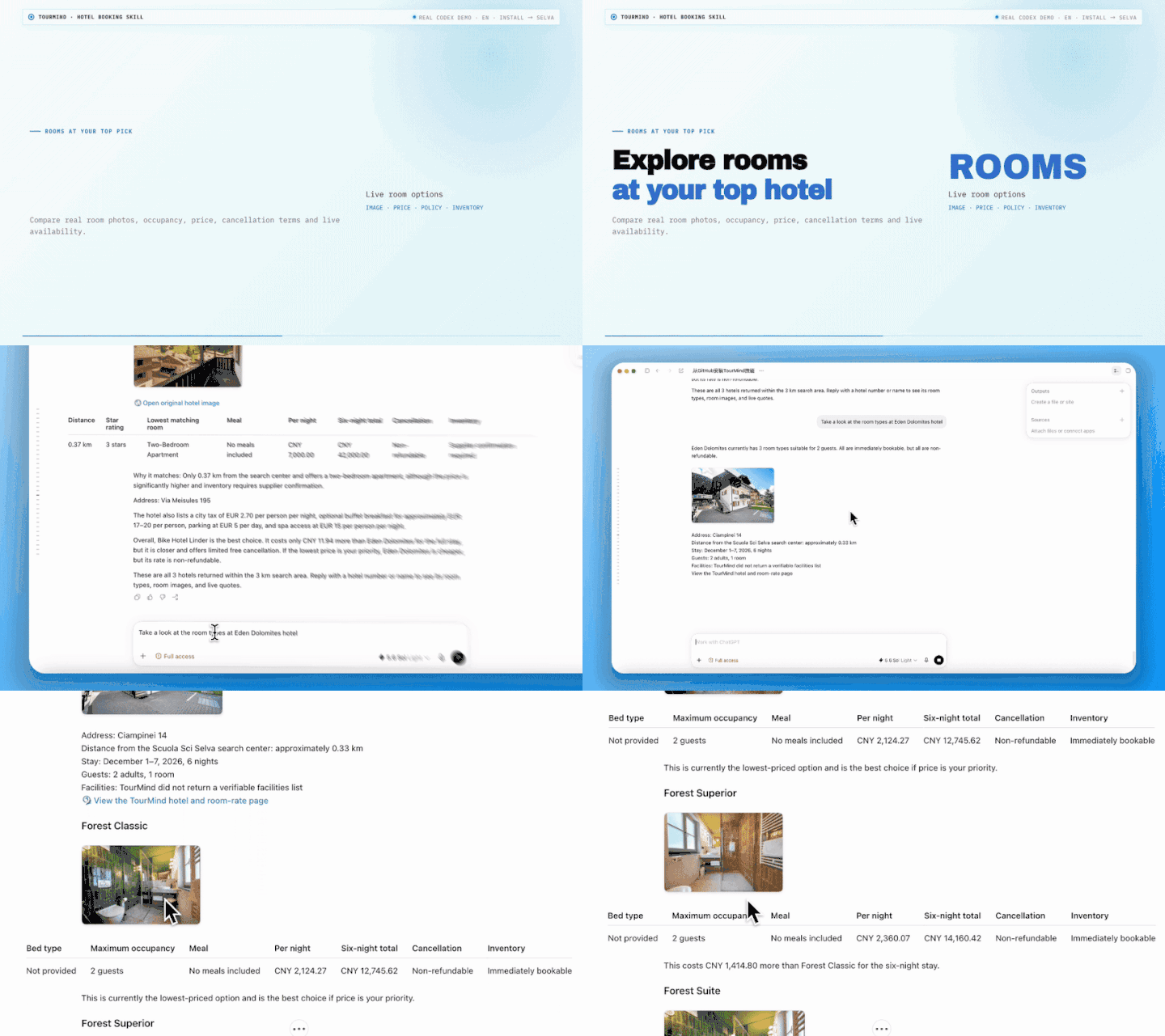
The examples below show the hotel Skill experience.
1. Search live hotels

2. Compare real room options
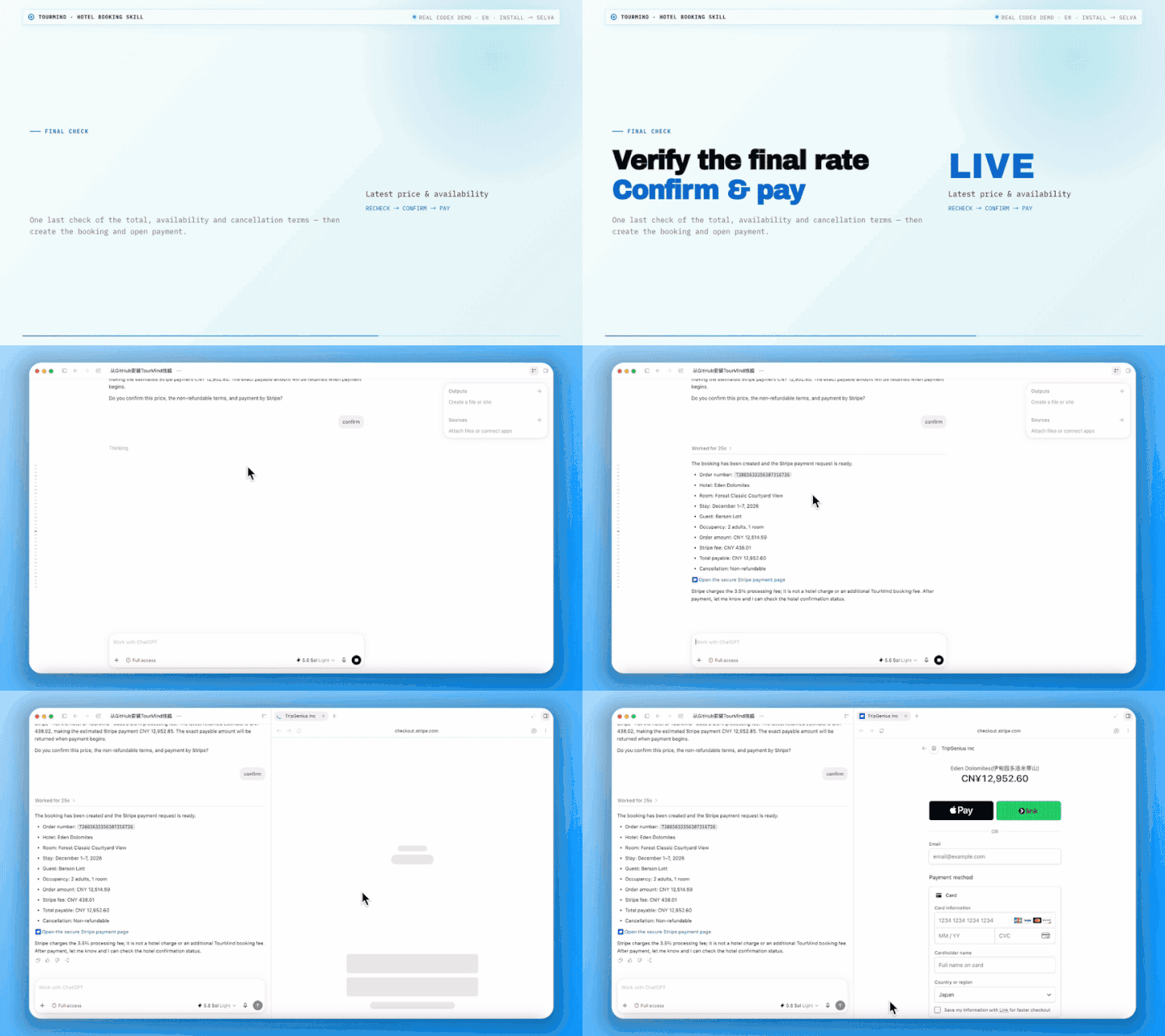
3. Verify the final rate and pay
What you can do
- Hotels: Search worldwide hotel inventory, compare live rooms and prices, view photos, facilities, meals and cancellation terms, recheck availability, and manage booking, payment and cancellation.
- Flights: Find airports and live one-way, round-trip or multi-city flights; compare schedules, cabins, connections, baggage and total prices; then recheck a selected fare and continue to booking, order lookup and payment.
- Complete trip planning: Ask your Agent to plan an itinerary and search both flights and hotels around your dates, budget and preferences.
- Safer transactions: Searching never creates an order. Before creating a hotel or flight booking, cancelling an eligible hotel booking, or starting a payment, the Agent shows the important details and waits for your explicit confirmation.
- Natural conversation: Speak to the Agent in your preferred language instead of filling out complicated search forms.
Supported Agent clients
TourMind Booking Skills can be used with ChatGPT (Work or Codex mode), Claude Code, WorkBuddy, QClaw, Marvis, OpenClaw, Kimi Work, Doubao Work Mode, Qwen Work Mode, Hermes, Cursor, and other Agent clients that support Skills.
Choose the right TourMind integration
This Skill repository combines hotel and flight support for both personal (ToC) and business (ToB) users. MCP packages use a different structure, so choose the option that matches your use case.
| Integration | Users | Capabilities | Repository | |---|---|---|---| | TourMind Booking Skills | ToC and ToB | Hotel and flight Skills | This repository | | Hotel MCP — Personal (ToC) | ToC | Hotel search and booking for personal users | Hotel Booking AI MCP | | Hotel MCP — Business (ToB) | ToB | Hotel search and booking for business users | TourMind Booking MCP | | Flight MCP — Personal and Business | ToC and ToB | One flight MCP shared by personal and business users | Flight Booking AI MCP |
Install in 1 minute
Choose either of the following methods.
Ask your Agent to install it
Copy and send this message to your Agent:
Please help me install TourMind Booking Skills. Skill repository: [email protected]:tourmind-com/Tourmind-Booking-Skills.git.Or run one command
npx skills add tourmind-com/tourmind-booking-skills --allThis command installs both Skills—tourmind-booking for hotels and flight-booking-ai for flights—to all detected Agent clients without additional selection prompts.
You can search and compare hotels, look up airports, and search live flights without a Token. A configured flight-search Token is still validated. Verification and any real booking, order, or payment action require a Token.
If you already have a TourMind account, you can use its Skill Token. If you do not have an account, sign up for a TourMind account and Token. Send it only to your trusted Agent in a private conversation:
Please use the following TourMind Skill Token when calling the AI Skills:
<YOUR_SKILL_TOKEN>
This Token is only for TourMind AI Skill authentication. Do not expose the complete Token in public conversations, public code repositories, or shared documents.
The Agent will save and configure the Token for the installed Skills. You do not need to create or edit a Token file yourself.
After installation, simply ask the Agent to find a hotel, search for a flight, or plan both together.
Try these prompts
Search for a hotel
Find a hotel in Tokyo for two adults from December 9 to December 13, 2026. We want a twin room near a convenient station, an average price below JPY 18,000 per night, free cancellation, and breakfast if possible. Show me the five best live options with room photos, total stay price, meals, cancellation terms, and the main trade-offs. Do not book yet.Search for a flight
Find round-trip flights from Shanghai to Tokyo for two adults, departing December 9 and returning December 13, 2026. Economy Class, preferably nonstop. Compare the available options by total price, departure and arrival times, airports, connections, duration, and baggage. Show the checked-baggage allowance for each option and highlight any that include at least one checked bag per person. Do not book yet.Plan flights and a hotel together
Plan a five-day Osaka trip for two people. First compare practical round-trip flights, then find a well-located hotel that fits our dates and budget. Explain the best flight-and-hotel combinations and show the expected flight and hotel costs separately. Let me choose before you book anything.Continue with a hotel you like
I like the hotel near Shinjuku Station that you just recommended. Please check which twin rooms are still available, then recheck the best-value option and show me the final price, meals, and cancellation terms. Tell me what information you need from me next and wait for my confirmation before booking.Continue with a flight you like
The morning nonstop flight you just showed me works best. Please recheck its latest total price, then summarize the itinerary and checked-baggage allowance. Tell me which passenger and contact details you need, show me the complete booking summary, and wait for my confirmation before booking it.Check an order
Please check the hotel or flight booking we just made and explain its current status. If it can still be paid, show me the available payment methods and final amount first, then wait for my confirmation before continuing.Booking workflows
The Agent handles these steps inside the conversation. You do not need to call APIs or manage local files yourself.
Hotel search and booking
Destination, dates, occupancy, room count, budget and preferences
  → Resolve the location, POI or exact hotel (search_location / keyword search)
  → Search up to 20 candidate hotels (search_hotels)
  → Batch-check live rooms and stay totals (batch_query_room_rates; query_room_rates for one hotel)
  → Rank and show up to five verified hotels
  → Show the selected hotel's details, room images and live room options (get_hotel_detail + room-rate query)
  → Review mandatory fees from the hotel details, then recheck the chosen room's final price, availability and cancellation terms (check_room_availability)
  → If an order action requires authentication, configure the Token; refresh room rates first if the channel changes, then always repeat the final price and availability check with the new Token
  → Provide the guest's full legal name and contact email
  → Show the complete booking summary and wait for explicit confirmation
  → Create the hotel booking (create_booking)
  → Query the booking on request; start payment or cancel an eligible hotel booking only after separate explicit confirmation (query_booking / pay_order / cancel_booking)
The cached candidate price from search_hotels is only an initial signal. User-visible bookable prices come from the live room-rate query, and the booking uses the latest values returned by check_room_availability. Selecting a hotel or room does not confirm a booking. Payment and cancellation each require a separate review and confirmation. If Stripe is selected, the Agent first explains its additional 3.5% processing fee and that the charged fee is non-refundable.
Flight search and booking
Route, dates, trip type, cabin, preferences and adult / child / infant counts
  → Resolve airports and validate dates and passenger composition (search_airports)
  → Search live flights (search_flights); a Token is optional
  → Compare up to the first 10 offers by schedule, airports, cabin, connections, baggage and total price
  → Select a quotation before 20 minutes have elapsed since the search
  → Configure a Token before verification. If the business Token changed after search, the Agent retrieves updated quotations, explains the change and asks you to select again before verification (verify_offer)
  → Provide passenger, travel-document and contact details
  → Review the complete itinerary, price and traveller details, then explicitly confirm the booking
  → Create the flight booking (create_booking)
  → Query the order and continue only if it is still payable (query_order)
  → Choose a payment method, review the complete payment summary and confirm payment separately
  → Query the order again; only if it is unchanged and still payable, create one payment link (create_payment)
  → Query the order or payment status as needed (query_order / query_payment)
Selecting a flight authorizes only the price recheck, not the booking. If the search criteria change or 20 minutes have passed since the search, the Agent requests approval for a new live search. A payment link is not proof of payment or ticket issuance. Stripe adds a separate 3.5% non-refundable processing fee; WeChat Pay, Alipay and Online Banking are available only for CNY orders.
The flight Skill currently supports airport lookup, live flight search and verification, booking, order lookup, and third-party payment creation and lookup. It does not perform flight cancellation, changes, refund initiation, ancillary-service purchases or manual ticketing actions; contact flight customer service for those requests.
Token and security
- The hotel and flight Skills use the same TourMind Skill Token. Each user only needs to obtain one Token; there is no need to apply twice.
- When either installed Skill needs authentication, the Agent saves the same Token in that Skill's local
skill_token.txt. Every ToB Skill API call must use the Token stored in its local file, and you do not need to create or edit the files yourself. - Never expose the complete Token in prompts, logs, screenshots, URLs, Git commits, or GitHub issues.
- On macOS or Linux, the Agent runs
chmod 600 skill_token.txtso only the current user can read or write the Token file. - If an authenticated request returns HTTP 401 or
unauthorized, the Agent deletes the invalid local Token and stops the authenticated operation. A separate permission-not-enabled response is not treated as an invalid Token. - Returned hotel result pages are read-only and can be reopened until they expire.
- Creating a hotel or flight booking, cancelling an eligible hotel booking, or starting a payment requires the user's explicit confirmation in an authenticated AI conversation.
FAQ
Common Questions About Using TourMind Skill
Help and support
- Product page: tourmind.com/skills
- Get a TourMind account and Token: TourMind sign-up
- GitHub support: open an issue
- Hotel support: [email protected]
- Flight customer service (24/7): [email protected]
- Business cooperation: [email protected]
- AI product cooperation: [email protected]
License
MIT © 2026 TourMind