
TerrariumPI 4.16.0
!Latest release
!GitHub Release Date



Software for cheap home automation of your reptile terrarium or any other enclosed environment. With this software you are able to control for example a terrarium so that the temperature and humidity is of a constant value. Controlling the temperature can be done with heat lights, external heating or cooling system. As long as there is one temperature sensor available the software is able to keep a constant temperature.
For humidity control there is support for a spraying system. The sprayer can be configured to spray for an X amount of seconds and there is a minimal period between two spray actions. Use at least one humidity sensors to get a constant humidity value. In order to lower the humidity you can add a dehumidifier.
The software is that flexible that there is no limit in amount of sensors, relay boards or door sensors. The usage can be endless. All power switches have support for timers to trigger based on a time pattern.
Running now stable for more than 10 years!!!
If you are using this software for your animals or plants, please post some pictures
Full documentation can be found at https://theyosh.github.io/TerrariumPI/
Contact
Think off:
- Terrarium (wet or dry)
- Aquarium
- Tanks with animals or plants
- Greenhouse
Table of Contents
1. GPIO numbering 2. New hardwareFeatures
- Controlling electronic devices like lights, sprayers, heating, cooling, water
- Support for dimming electronic devices
- Support for timers in power switches and environment
- Support for Energenie USB, LAN and RF power switches
- Support for WeMo Wifi power switches
- Support for
- Support for Sonoff remote power devices
- Support for
- Support for webcams and native Raspberry Pi cam out of the box
- Support for analog devices through a MCP3008
- Support for MiFlora Bluetooth sensors
- Open door detection. This can be used in different environment parts
- Total power and water usage for costs calculation
- Lights control based on sun rise and sun set or timers
- Rain control based on humidity sensors and timers
- Temperature control based on temperature sensors or timers
- Water tank level control based on ultrasonic sound range sensors or volume
- Weather forecast from external source for lighting schema
- Temperatures in Celsius or Fahrenheit
- Distances in centimeters or inches
- Alarm detections
- Audio support through internal audio jack or USB sound cards
- Remote temperature and humidity sensors through HTTP(S) JSON API's. JSON Data
- Display support
- Calendar system when hardware is replacement and when new hardware needs to be
- Notifications system. Custom messages for custom actions with use of variables
It is currently controling my reptile terrarium since 2014! And my Madagascar Day Gecko is very happy with it!
Translations
The software has support for the following languages:
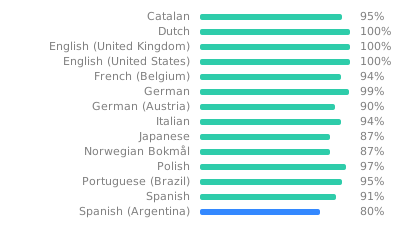
Your language not in the list or not up to date? Create your own language translation
Installation
Base
The installation expects a Pi with working network and ssh. It is tested with
Raspberry Pi OS Lite 32bit.
Desktop images will not work. Installation seems to work, but it will not
work stable. So make sure you download the correct image for the Pi. \
It is possible to use USB or SSD drives to speed things up:
Docker
There is a Docker image which can be used instead of the source code. This should make the installation a bit more easier. More information can be found at: https://theyosh.github.io/TerrariumPI/install/#docker
You can skip the manual installation part.
Manual
- Get a working Raspberry Pi and login as user 'pi' \
ssh pi@[raspberry_ip]
- Install git \
sudo apt -y install git
- Clone this repository and submodules! \
git clone --depth 1 https://github.com/theyosh/TerrariumPI.git
- Enter the new TerrariumPI folder \
cd TerrariumPI
- Run the installer script and wait \
sudo ./install.sh
- Reboot Raspberry PI to get all the needed modules loaded \
sudo reboot (if done manual)
Login
After either docker or manual installation, you should
have a web interface at
All needed options and modules are setup by the installer script. This means that I2C and 1Wire overlay are enabled by default.
Make sure that your Pi is secured when you put it to the Internet. Would be a shame if TerrariumPI gets next victim of 'A smart fish tank left a casino vulnerable to hackers' :P
Updating
This updating is based on that the software is installed with the steps in the Installation above. When updating between release versions it will take more time due to database updates and cleanups. This can be seen in the log file.
Docker
Stop the running container and pull the new image. Then you can start the container again.
Manual
- Get a working Raspberry Pi and login as user 'pi' \
ssh pi@[raspberry_ip]
- Enter the TerrariumPI folder \
cd TerrariumPI
- Update the new code with git \
git pull
- Re-run the installation script in order to update software dependencies \
sudo ./install.sh
- Restart TerrariumPI:
sudo service terrariumpi restart
Hardware
This software requires a Raspberry Pi and some extra hardware in order to run and work. The bare minimum and tested hardware is
- Raspberry PI with at least 4GB SD card running
- Power relay board
- Temperature/humidity/ultrasonic/PH sensors DHT11, DHT22, AM2303, DS1820,
Full list of supported hardware
GPIO numbering
All hardware that connects to the GPIO pins use Physical GPIO numbering (1 - 40). The software will translate it to BCM if needed for a supported device or sensor. More information about GPIO pin numbering
For the analog devices use numbers of the channel on the analog device which is from 0 to 7 (8 channels). Also the software expect the analog MCP3008 on GPIO ports 19,21,23,24 physical (default). More information about GPIO pin numbering
New hardware
If there is some other hardware which is not working with TerrariumPI, open an issue on Github and we will try to support it. We can only test it on a Raspberry PI 4.
Remote data
It is possible to use external sensor data that is available through HTTP(S) in JSON format. This way you can combine multiple Raspberry Pi's with TerrariumPI running to one single system. By using multiple Raspberry PI's you can cover a bigger area. But there are limitations.
Currently it is READONLY. So you can read out remote sensors and switches but you cannot control the remote switches. But this way you can combine the power switches total costs and power usage.
more information is here: Remote data wiki
Contributors
Star History
Screenshots
(made on a very big screen :P )
Dashboard
!TerrariumPI 4.0 Dashboard screenshot
Sensors
!TerrariumPI 4.0 Sensors temperature list screenshot !TerrariumPI 4.0 Sensors humidity list screenshot !TerrariumPI 4.0 Sensors settings screenshot
Relays
!TerrariumPI 4.0 Relays list screenshot !TerrariumPI 4.0 Relays settings screenshot
Enclosure setup
!TerrariumPI 4.0 Enclosure list screenshot !TerrariumPI 4.0 Enclosure setup screenshot
Area setup
!TerrariumPI 4.0 Area Lighting setup screenshot !TerrariumPI 4.0 Area Humidity setup screenshot
System settings
!TerrariumPI 4.0 System setup screenshot
MOTD (Message Of The Day)
!TerrariumPI 4.0 MOTD screenshot
More screenshots can be found here
About
A live version is running at: