

Floe



The open source launcher for macOS.
Download · Install · Features · Integrations · Contributing
[!NOTE]
Floe is part of the Thaw project. Where this repository says nothing, Thaw's rules apply here too.
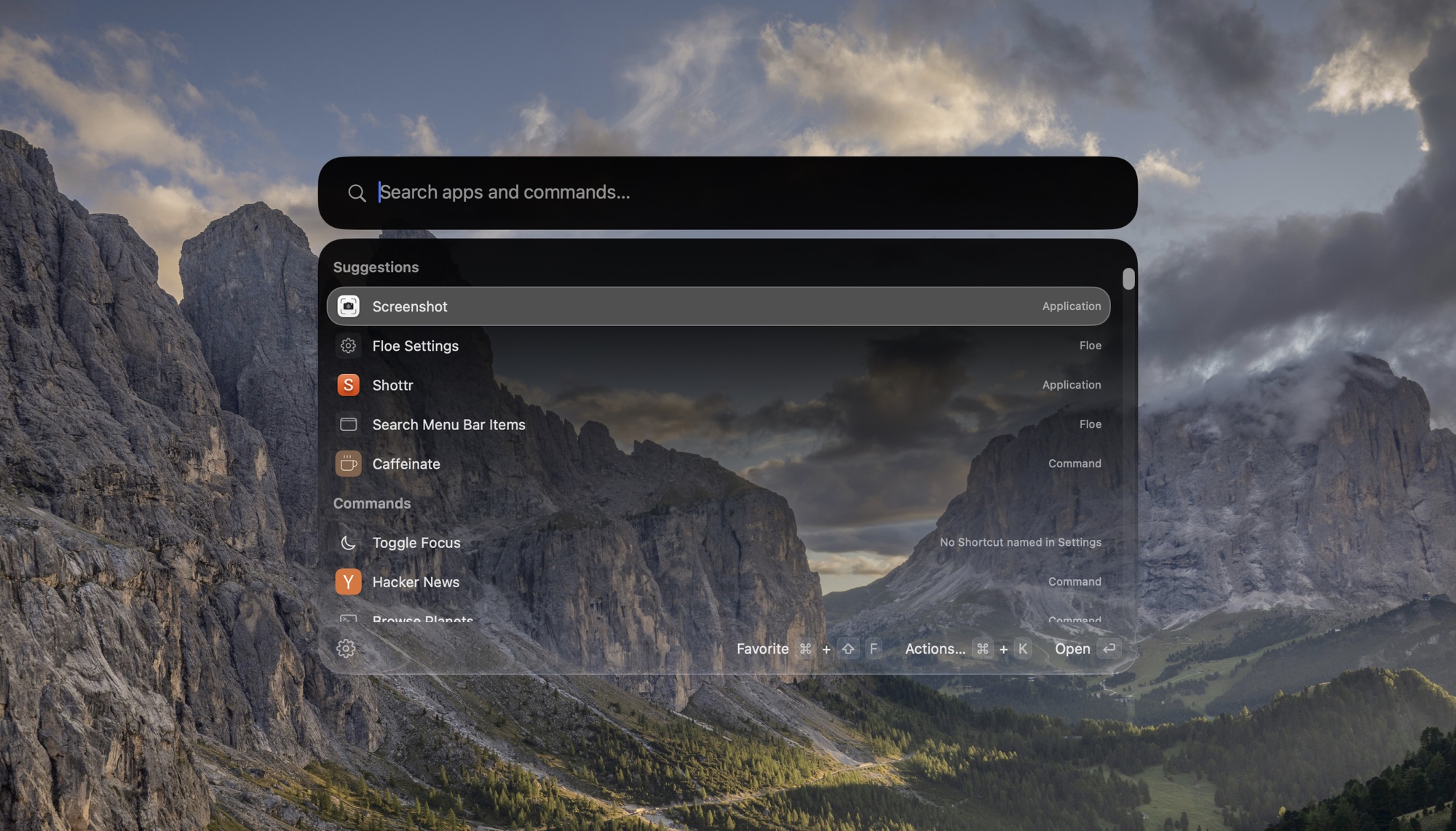
Features
- One hotkey, one search. Applications, commands, quicklinks and System Settings panes, ranked by how often and how recently you use them. Aliases, hotkeys and favorites for the ones you use most.
- Raycast extensions, unmodified. Including the ones Raycast has already installed, on a Bun runtime inside the app, with an Extension Store page to install and update them.
- The basics, built in. Snippets, emoji, file search, calendar, a calculator with unit conversion, system commands, the menu bar's items and the front app's menus from the keyboard, and, once you switch it on, the shortcuts you made in Apple's Shortcuts app, run by name.
- Your own apps, not replacements for them. Pick the terminal, editor, browser, notes app and clipboard manager you already use, and Floe hands work to them, down to a host from your SSH configuration, which opens in your terminal.
- Ask AI.
askand a question shows the answer in the launcher, and you can follow it up there. You choose who answers: a command line tool you are already signed in to (claude,codex,opencodeorpi), Apple Intelligence on your Mac, or an OpenAI-compatible API. A switch keeps all AI on your Mac. - Works with Thaw. Thaw 3's actions are in the search, and the launcher can follow Thaw's menu bar appearance.
- Private. No analytics, no telemetry, no account. The Privacy page in Settings lists every permission and everything Floe contacts.
Full feature list: everything the search answers to, by area
The changelog describes each in more detail.
Search
- Open the search with one global hotkey (⌃⌥Space by default, changeable).
- Find applications, extension commands, script commands, quicklinks, System Settings panes and browser-installed web apps.
- Results are ranked by how often and how recently you use them, with fuzzy matching on scattered letters.
- Give an application or command an alias or a hotkey, and mark favorites that stay at the top.
- Set hotkeys for Emoji, Clipboard History, File Search and the system commands.
- Narrow a search to one place with a scope:
files,menu,menus,tabs,windows,bookmarks,recent. - Type a web address or a path in full to open it (
~/Downloadsgets the file actions). - Type
keywordsor?to list every word the search answers to, with an example of each. - Press the Up arrow to bring back the last 50 searches that opened something.
- Turn on files and open browser tabs (Safari, Dia, Helium) as extra search sources.
- Hide an application or command from the search, and bring it back in Settings.
Results and actions
- Open an Actions menu (⌘K) on applications and files: hide, quit, restart, force quit, show in Finder, open with, copy, move to Trash.
- Open the Finder selection in your chosen terminal or editor.
- Use the search panel as a picker from a script:
Floe --pickreads lines on standard input and prints the one you choose.
Shell commands
- Type
>and a command to run it in the background; the prefix can be$or!. - ⌘Return opens it in your terminal, ⌥Return shows the full output, ⇧Return runs it in the front Finder folder.
- Your shell aliases work.
- Get suggestions from shell history, programs, paths, application names after
open -aand hosts afterssh, with Tab to complete. - Run a command without the prefix when it starts with a program and has a flag, path or pipe.
- Save a command under a name so the search finds it later.
- Type
manand a program name to open its manual. - Run Raycast-style script commands from a Scripts folder, with up to three arguments.
Checkpoints and receipts
pausesaves the Finder selection, the front browser window's tabs and a note.: - Search for the name to resume it; Floe lists anything that has moved or gone.
receiptsshows what Floe changed: commands run, files trashed, processes quit, extensions removed, notes, checkpoints, reminders and events.- Press Return on a receipt to undo what can be undone, such as putting a file back from the Trash or deleting a reminder.
Reminders, calendar, timers, people
remindadds to Apple Reminders, with natural-language dates and an optional list name.eventadds to Apple Calendar, timed or all-day.- See calendar events in the search.
timer 10 minutes teastarts a countdown with a notification and sound;timerslists and stops them.contactfinds people, with actions to call, FaceTime, message, email or copy.mailandmessageopen a draft with an optional recipient.
Media, Focus, system
- Play/Pause, Next, Previous and Now Playing for Spotify or Music.
- Toggle Focus,
focus 1 hourandfocus off, through a Shortcut you name. - Sleep, lock, empty Trash, volume up and down, eject all disks.
- Toggle Wi-Fi, Bluetooth, mute and keeping the Mac awake.
killlists matching processes with their memory, to quit or force quit.portlists what is listening there.
Built-in tools
- Calculator with unit conversion.
- Currency conversion with the European Central Bank's daily rates (opt-in).
defineshows what the Mac's dictionary says about it. Return opens the word in the Dictionary app.windows</code> lists the open windows that match, to switch to one, minimize it or close it.</li> <li>Tab on an application, or <code>recent <app></code>, lists the recently used files that open in it.</li> <li><code>bookmarks <text></code> finds a bookmark of Chrome, Brave, Edge, Arc, Vivaldi, Dia or Helium.</li> <li><code>time in tokyo</code> and <code>time 5pm in berlin</code> show the time somewhere else.</li> <li><code>uuid</code>, <code>password 24</code> and <code>lorem 3</code> make something to paste.</li> <li><code>translate hola mundo</code> and <code>translate to german good morning</code> translate with Apple's translation, on this Mac. The row says it is Apple's, and that it can be rough.</li> <li>Pick Color from Screen shows the system's eyedropper and copies the color as hex.</li> <li>Copy Text from Screen reads the text, or the QR code, in the part of the screen you drag over. It needs Screen Recording.</li> <li><code>qr https://example.com</code> makes a QR code to copy, look at or save.</li> <li><code>maps coffee in lisbon</code> finds places with Apple Maps; Return shows one in Maps. What you type after <code>maps</code> is sent to Apple.</li> <li><code>output</code> and <code>input</code> list the sound devices; Return makes one the device in use. AirPods show their battery.</li> <li><code>battery</code>, <code>disk</code>, <code>memory</code> and <code>ip</code> show a fact about this Mac, under the other results. <code>battery</code> also lists a connected mouse, keyboard or headphones that report one.</li> <li><code>brew ripgrep</code> finds a Homebrew package; Return installs or upgrades it in your terminal. <code>brew</code> alone lists what is installed.</li> <li><code>base64</code>, <code>unbase64</code>, <code>urlencode</code>, <code>urldecode</code>, <code>uppercase</code>, <code>lowercase</code>, <code>titlecase</code> and <code>sha256</code> change the text after them, or the clipboard.</li> <li>Command-Y on a file shows it in Quick Look.</li> <li>Snippets with text expansion.</li> <li>Quicklinks with fallback searches.</li> <li>Emoji and symbols picker with a skin tone setting.</li> <li>File search through Spotlight, or Fast file search from Floe's own index of file names (opt-in).</li> <li>Menu bar item search that opens the items' menus from the keyboard.</li> <li>Search Menu Items lists the commands in the menus of the app in front, with their shortcuts, and runs the one you choose. <code>menus</code> does the same from the search.</li> <li>Run your Apple Shortcuts by name (opt-in).</li> <li>Connect to SSH hosts from <code>~/.ssh/config</code> in your terminal.</li></ul> <h3>Your own apps</h3> <ul><li>Choose a preferred terminal, editor, browser and notes app; files, folders and links open in them.</li> <li>Use a terminal editor (Helix, Neovim, Vim, Emacs and others) as the editor.</li> <li>Send a link to another browser with Open With.</li> <li>Keep a clipboard history: text with its formatting, links, images and files. Return pastes one, and copies marked private by a password manager are left out.</li> <li>Or choose a clipboard manager, and Clipboard History opens it. Floe then saves no copies.</li> <li>Browse Notes reads and writes the notes of a folder you chose, such as an Obsidian vault, in the panel. They are shown as Markdown, the files stay where your notes app keeps them, and the view says which app that is.</li> <li>Floating Note keeps one note in a window above other apps, on every Space. It reads and writes the notes of your folder, or of a Floe folder in Apple Notes. With Antinote or another app, it holds one scratch note until you send it there.</li></ul> <h3>Notes</h3> <ul><li><code>note <text></code> goes to Apple Notes, Antinote, any app with a URL scheme, or a folder of Markdown files.</li> <li><code>append</code>, <code>todo</code> and <code>log</code> write to the day's note in a folder.</li> <li>In an Obsidian vault, the day's note follows the Daily notes folder and date format.</li></ul> <h3>Ask AI</h3> <ul><li><code>ask <question></code>, or the Ask AI row under any search, answers in the launcher.</li> <li>Ask follow-up questions that keep the conversation's context.</li> <li>Choose who answers: a signed-in command line tool (<code>claude</code>, <code>codex</code>, <code>opencode</code>, <code>pi</code>), Apple Intelligence, or an OpenAI-compatible API (OpenAI, OpenRouter, Z.ai, Ollama, LM Studio).</li> <li>Keep all AI on your Mac with one switch.</li> <li>Give one extension an AI source of its own.</li></ul> <h3>Extensions</h3> <ul><li>Run Raycast extensions unmodified, including ones Raycast already installed.</li> <li>Browse, install and update extensions in the Extension Store page.</li> <li>Use their lists, details, forms, preferences, arguments, and background and interval commands.</li> <li>Add extension menu bar commands by hand.</li> <li>Switch off an extension or a single command, and set an alias, hotkey or custom icon per command.</li> <li>Remove an extension, whether Floe or Raycast installed it.</li> <li>See what each extension has reached: hosts contacted, folders touched, programs started.</li> <li>Sign GitHub and GitLab extensions in through <code>gh</code> and <code>glab</code>.</li> <li>Sign other extensions in through the browser, by way of Raycast's sign-in service for now, or enter a token where that cannot be received.</li> <li>See the log and run a command again when it throws, crashes or hangs.</li></ul> <h3>Thaw</h3> <ul><li>Run Thaw 3's actions from the search: hidden sections, swap, Zen Mode, the Thaw Bar, the layout and application menus.</li> <li>Have the launcher follow Thaw's menu bar appearance.</li></ul> <h3>Appearance</h3> <ul><li>Pick a glass style, tint, border and shadow for the launcher, with a live preview.</li> <li>Choose the search field's shape, or float it as its own piece of glass.</li> <li>Use a compact layout that shows only the search bar until you type.</li></ul> <h3>Settings, privacy and sync</h3> <ul><li>Search the settings from the top of the sidebar.</li> <li>See every permission and everything Floe contacts on the Privacy page, and turn sources, search history and receipts on or off there.</li> <li>Export and import settings as one file.</li> <li>Launch at login.</li> <li>Sync settings through iCloud, once a release is signed for it: aliases, hotkeys, favorites, hidden results, appearance, snippets, quicklinks and extension settings.</li> <li>Sync passwords through iCloud Keychain, by a separate switch.</li> <li>Remove Floe's settings from iCloud.</li></ul> <h3>Shortcuts and Siri</h3> <ul><li>Open Floe, run an extension command or search the menu bar from Apple's Shortcuts app.</li></ul> </details> <h2>Transparency</h2> <ul><li>Free. No purchase, no subscription.</li> <li>Open source, AGPL-3.0. Read the code, build it yourself, fork it.</li> <li>No analytics, no telemetry, no account.</li> <li>One permission is required: Accessibility. Calendar, Reminders and Contacts are optional.</li> <li>Off until you turn them on: files, browser tabs, Shortcuts, Fast file search and currency rates.</li> <li>Settings > Privacy lists everything Floe contacts.</li> <li>Extensions are not sandboxed. Settings shows what each one has reached: hosts, folders and programs.</li> <li>Signed and notarized by Apple. Each release carries a build provenance attestation, and the project has an <a href="https://scorecard.dev/viewer/?uri=github.com/thaw-app/Floe" target="_blank" rel="noopener">OpenSSF Scorecard</a>.</li></ul> <h2>Integrations</h2> <ul><li><a href="https://github.com/thaw-app/Thaw" target="_blank" rel="noopener">Thaw</a>: Thaw 3's actions are in the search, and the launcher can follow Thaw's menu bar appearance.</li> <li><a href="https://github.com/raycast/extensions" target="_blank" rel="noopener">Raycast extensions</a>: they run unmodified, including the ones Raycast already installed.</li> <li>Apple's Shortcuts app and Siri: Open Floe, Run Command and Search Menu Bar Items are actions there, and Floe runs the shortcuts you made by name.</li> <li>Your own apps: the terminal, editor, browser, notes app and clipboard manager you choose in Settings.</li> <li>Scripts: <code>Floe --pick</code> lends the search panel to a script.</li></ul> <pre><code class="sh">ls ~/Projects | Floe --pick</code></pre> <p>A tab in a line splits it into a title and what is shown beside it, and the whole line is printed:</p> <pre><code class="sh">gh pr list --json number,title --jq '.[] | "\(.number)\t\(.title)"' | Floe --pick | cut -f1</code></pre> <h2>Install</h2> <p>Download Floe from the <a href="https://github.com/thaw-app/Floe/releases/latest" target="_blank" rel="noopener">releases page</a>, open the disk image and move Floe to Applications.</p> <ul><li>Needs macOS 26 or later.</li> <li>Signed and notarized, and it updates itself.</li> <li>Floe is early. Install only extensions you trust, since they are not sandboxed.</li></ul> To build it from source, see <a href="docs/DEVELOPMENT.md" target="_blank" rel="noopener">Development</a>. <h2>Roadmap</h2> <p>Next, in this order. The order can change.</p> <ol><li><strong>Documentation.</strong> A guide for extension authors first: how to run a local extension in Floe, what works and what does not. Then Floe's section on the Thaw website.</li> <li><strong>Floe's own sign-in service</strong> for extensions, in place of Raycast's.</li> <li><strong>More of the extension API:</strong> the grid layout, <code>launchCommand</code> and deeplinks.</li> <li><strong>Settings sync switched on:</strong> releases signed for iCloud, then the same sync in Thaw.</li></ol> Later: <ul><li>A small <code>@floe/api</code> package for what Raycast's API cannot express.</li> <li>Searching your notes.</li> <li>Calculator history.</li></ul> Not planned: <ul><li>Window management, unless people ask for it. There are many window managers already, and Floe can work with them.</li></ul> <a href="docs/LIMITATIONS.md" target="_blank" rel="noopener">What Floe does not do yet</a> lists the gaps as they stand today. To ask for something, <a href="https://github.com/thaw-app/Floe/issues" target="_blank" rel="noopener">open an issue</a>. Every request is considered during the early releases. <h2>Contributors</h2> <p>Want to contribute? Read the shared <a href="https://github.com/thaw-app/.github/blob/main/.github/CONTRIBUTING.md" target="_blank" rel="noopener">Thaw/Floe contribution policy</a>. Pull requests are welcome against <code>main</code>. Floe's text is translated on <a href="https://crowdin.com/project/floe" target="_blank" rel="noopener">Crowdin</a>.</p> <p>Open to partnerships, integrations, and sponsorships. <a href="https://github.com/sponsors/diazdesandi" target="_blank" rel="noopener">Get in touch</a>.</p> <p><p align="center"> <a href="https://github.com/thaw-app/Floe/graphs/contributors"><picture><source media="(prefers-color-scheme: dark)" srcset="https://shieldcn.dev/contributors/thaw-app/Floe.svg?title=false&size=40&names=true&titleAlign=center&limit=100&mode=dark" /><img alt="Contributors" src="https://shieldcn.dev/contributors/thaw-app/Floe.svg?title=false&size=40&names=true&titleAlign=center&limit=100&mode=light" /></picture></a> </p></p> <h2>Project documentation</h2> <ul><li><a href="https://github.com/thaw-app/.github/blob/main/.github/CONTRIBUTING.md" target="_blank" rel="noopener">Contributing</a></li> <li><a href="docs/DEVELOPMENT.md" target="_blank" rel="noopener">Development</a></li> <li><a href="CHANGELOG.md" target="_blank" rel="noopener">Changelog</a></li> <li><a href="docs/LIMITATIONS.md" target="_blank" rel="noopener">What Floe does not do yet</a></li> <li><a href="CREDITS.md" target="_blank" rel="noopener">Credits</a></li> <li><a href=".github/GOVERNANCE.md" target="_blank" rel="noopener">Governance</a></li> <li><a href="https://github.com/thaw-app/.github/blob/main/.github/SECURITY.md" target="_blank" rel="noopener">Security policy</a></li> <li><a href="https://github.com/thaw-app/.github/blob/main/.github/CODE_OF_CONDUCT.md" target="_blank" rel="noopener">Code of conduct</a></li> <li><a href="LICENSES/README.md" target="_blank" rel="noopener">Licenses of ported code</a></li></ul> <h2>License</h2> <p><a href="LICENSE" target="_blank" rel="noopener">AGPL-3.0</a>. Code ported from other projects keeps its own terms; <a href="LICENSES/README.md" target="_blank" rel="noopener">LICENSES</a> says which license covers which folder.</p> <p><a href="CREDITS.md" target="_blank" rel="noopener">Credits</a> lists what Floe is built from, including <a href="https://github.com/thaw-app/Thaw" target="_blank" rel="noopener">Thaw</a>, <a href="https://getdroppycode.app" target="_blank" rel="noopener">Droppy Code</a> by Jordy Spruit, <a href="https://github.com/mackid1993/Barometer" target="_blank" rel="noopener">Barometer</a> by mackid1993, <a href="https://github.com/camguillory/Audio-Priority-Bar" target="_blank" rel="noopener">Audio Priority Bar</a> by Camille Guillory and <a href="https://github.com/stonerl/CMD-Z" target="_blank" rel="noopener">CMD-Z</a> by Toni Förster. Raycast is a trademark of Raycast Technologies Inc. Floe is not affiliated with Raycast.</p> </article> <!-- Article Completion Section --> <div class="reader-footer mt-5 pt-5"> <div class="reader-completion-box rounded-3 p-4 text-center"> <div class="reader-completion-icon mb-3"> <i class="fas fa-check-circle"></i> </div> <p class="reader-completion-text fw-semibold mb-1" style="font-size: 1rem;">You finished the article!</p> <p class="reader-completion-subtext small mb-4">Want to go deeper or explore more stories?</p> <div class="d-flex justify-content-center gap-3 flex-wrap"> <a href="https://github.com/thaw-app/Floe" target="_blank" rel="noopener noreferrer" class="btn btn-primary-custom btn-sm rounded-pill px-4"> <i class="fas fa-external-link-alt me-2"></i>Full Article on GitHub Trending </a> <a href="https://neshdevtech.com/news" class="reader-back-btn btn btn-sm rounded-pill px-4"> <i class="fas fa-newspaper me-2"></i>More Tech News </a> </div> </div> </div> <!-- Internal Linking CTA --> </div> </div> </div> <!-- Sidebar (desktop only) --> <div class="col-lg-4 col-xl-3 d-none d-lg-block"> <div class="sticky-top" style="top: 80px;"> <!-- Mini Controller Widget --> <div class="card border-0 shadow-sm mb-4 bg-surface"> <div class="card-body p-4"> <h6 class="fw-bold mb-3"><i class="fas fa-glasses me-2 text-primary-custom"></i>Reading Mode</h6> <p class="text-secondary-custom small mb-4">Adjust typography and theme to your preference.</p> <div class="mb-3"> <label class="text-muted-custom small d-block mb-2">Typography</label> <div class="d-flex gap-2"> <button class="btn btn-light btn-sm flex-grow-1 border-custom" id="sidebar-font-serif">Serif</button> <button class="btn btn-light btn-sm flex-grow-1 border-custom" id="sidebar-font-sans">Sans</button> </div> </div> <div class="mb-4"> <label class="text-muted-custom small d-block mb-2">Text Scale</label> <div class="d-flex gap-2"> <button class="btn btn-light btn-sm flex-grow-1 border-custom" id="sidebar-size-dec"><i class="fas fa-minus small"></i></button> <button class="btn btn-light btn-sm flex-grow-1 border-custom" id="sidebar-size-inc"><i class="fas fa-plus small"></i></button> </div> </div> <div class="border-top border-light-custom pt-3"> <a href="https://github.com/thaw-app/Floe" target="_blank" rel="noopener noreferrer" class="btn btn-outline-primary btn-sm w-100 rounded-pill"> View Original <i class="fas fa-external-link-alt ms-1"></i> </a> </div> </div> </div> <!-- Sidebar Related News --> <div class="card border-0 shadow-sm bg-surface"> <div class="card-header bg-transparent border-0 pt-4 pb-0 px-4"> <h5 class="card-title fw-bold mb-0" style="font-size: 1.05rem;"> <i class="fas fa-newspaper me-2 text-primary-custom"></i>Related Stories </h5> </div> <div class="card-body p-0"> <div class="list-group list-group-flush rounded-0 bg-transparent"> <a href="https://neshdevtech.com/news/is-testing-12-other-apps-worth-your-time-K4Ybh" class="list-group-item list-group-item-action border-0 px-4 py-3 bg-transparent border-bottom border-light-custom hover-bg-light"> <h6 class="mb-1 fw-semibold text-truncate-2" style="font-size: 0.875rem; line-height: 1.4;"> Is Testing 12 Other Apps Worth Your Time? </h6> <div class="d-flex align-items-center justify-content-between text-muted-custom mt-1" style="font-size: 0.72rem;"> <span>Dev.to</span> <span>9 hours ago</span> </div> </a> <a href="https://neshdevtech.com/news/introducing-optics-create-a-test-your-way-run-it-forever-SUBvm" class="list-group-item list-group-item-action border-0 px-4 py-3 bg-transparent border-bottom border-light-custom hover-bg-light"> <h6 class="mb-1 fw-semibold text-truncate-2" style="font-size: 0.875rem; line-height: 1.4;"> Introducing Optics: create a test your way, run it forever </h6> <div class="d-flex align-items-center justify-content-between text-muted-custom mt-1" style="font-size: 0.72rem;"> <span>Dev.to</span> <span>1 day ago</span> </div> </a> <a href="https://neshdevtech.com/news/how-do-you-test-spring-compatibility-VDJdp" class="list-group-item list-group-item-action border-0 px-4 py-3 bg-transparent border-bottom border-light-custom hover-bg-light"> <h6 class="mb-1 fw-semibold text-truncate-2" style="font-size: 0.875rem; line-height: 1.4;"> How Do You Test Spring Compatibility? </h6> <div class="d-flex align-items-center justify-content-between text-muted-custom mt-1" style="font-size: 0.72rem;"> <span>Dev.to</span> <span>1 day ago</span> </div> </a> <a href="https://neshdevtech.com/news/a-flutter-tab-shell-that-keeps-every-page-alive-ViagX" class="list-group-item list-group-item-action border-0 px-4 py-3 bg-transparent border-bottom border-light-custom hover-bg-light"> <h6 class="mb-1 fw-semibold text-truncate-2" style="font-size: 0.875rem; line-height: 1.4;"> A Flutter tab shell that keeps every page alive </h6> <div class="d-flex align-items-center justify-content-between text-muted-custom mt-1" style="font-size: 0.72rem;"> <span>Dev.to</span> <span>2 days ago</span> </div> </a> <a href="https://neshdevtech.com/news/your-packages-havent-migrated-to-material-ui-can-you-sOC26" class="list-group-item list-group-item-action border-0 px-4 py-3 bg-transparent border-bottom border-light-custom hover-bg-light"> <h6 class="mb-1 fw-semibold text-truncate-2" style="font-size: 0.875rem; line-height: 1.4;"> # Your packages haven't migrated to `material_ui`. Can you? </h6> <div class="d-flex align-items-center justify-content-between text-muted-custom mt-1" style="font-size: 0.72rem;"> <span>Dev.to</span> <span>2 days ago</span> </div> </a> </div> </div> </div> </div> </div> </div> <!-- Mobile: Related News horizontal scroll strip --> <div class="d-block d-lg-none mt-4"> <h6 class="fw-bold mb-3 px-1"> <i class="fas fa-newspaper me-2 text-primary-custom"></i>Related Stories </h6> <div class="related-scroll-strip"> <a href="https://neshdevtech.com/news/is-testing-12-other-apps-worth-your-time-K4Ybh" class="related-scroll-card"> <p class="related-scroll-title">Is Testing 12 Other Apps Worth Your Time?</p> <div class="related-scroll-meta"> <span>Dev.to</span> <span>9 hours ago</span> </div> </a> <a href="https://neshdevtech.com/news/introducing-optics-create-a-test-your-way-run-it-forever-SUBvm" class="related-scroll-card"> <p class="related-scroll-title">Introducing Optics: create a test your way, run it forever</p> <div class="related-scroll-meta"> <span>Dev.to</span> <span>1 day ago</span> </div> </a> <a href="https://neshdevtech.com/news/how-do-you-test-spring-compatibility-VDJdp" class="related-scroll-card"> <p class="related-scroll-title">How Do You Test Spring Compatibility?</p> <div class="related-scroll-meta"> <span>Dev.to</span> <span>1 day ago</span> </div> </a> <a href="https://neshdevtech.com/news/a-flutter-tab-shell-that-keeps-every-page-alive-ViagX" class="related-scroll-card"> <p class="related-scroll-title">A Flutter tab shell that keeps every page alive</p> <div class="related-scroll-meta"> <span>Dev.to</span> <span>2 days ago</span> </div> </a> <a href="https://neshdevtech.com/news/your-packages-havent-migrated-to-material-ui-can-you-sOC26" class="related-scroll-card"> <p class="related-scroll-title"># Your packages haven't migrated to `material_ui`. Can you?</p> <div class="related-scroll-meta"> <span>Dev.to</span> <span>2 days ago</span> </div> </a> </div> </div> </div> </section> </main> <!-- Footer --> <!-- Footer --> <footer class="py-5 mt-5 position-relative overflow-hidden" style="background: var(--surface); border-top: 1px solid var(--border); box-shadow: var(--shadow-lg);"> <!-- Decorative subtle background gradients --> <div class="position-absolute" style="top: -200px; right: -200px; width: 400px; height: 400px; background: rgba(var(--primary-rgb), 0.03); filter: blur(100px); border-radius: 50%; pointer-events: none;"></div> <div class="position-absolute" style="bottom: -200px; left: -200px; width: 400px; height: 400px; background: rgba(var(--accent-rgb), 0.03); filter: blur(100px); border-radius: 50%; pointer-events: none;"></div> <div class="container position-relative z-3"> <div class="row g-4"> <!-- Column 1: Brand & About --> <div class="col-lg-4 col-md-6"> <div class="d-flex align-items-center mb-3"> <span class="brand-mark me-2" style="width: 42px; height: 42px;" aria-hidden="true"> <svg xmlns="http://www.w3.org/2000/svg" viewBox="0 0 24 24" fill="none" stroke="currentColor" stroke-width="2.2" stroke-linecap="round" stroke-linejoin="round"><polyline points="16 18 22 12 16 6"/><polyline points="8 6 2 12 8 18"/></svg> </span> <span class="fs-4 fw-extrabold text-primary-custom" style="letter-spacing: -0.05em; font-family: 'JetBrains Mono', monospace;">NeshDevTech</span> </div> <p class="text-secondary-custom mb-4 pe-lg-4" style="font-size: 0.95rem; line-height: 1.6;">NeshDevTech is a professional technology firm passionate about creating innovative, high-performance web and mobile solutions.</p> <div class="d-flex gap-2"> </div> </div> <!-- Column 2: Navigation Links --> <div class="col-lg-2 col-md-6 col-6"> <h6 class="text-primary-custom fw-bold text-uppercase mb-3" style="font-size: 0.85rem; letter-spacing: 0.05em;">Quick Navigation</h6> <ul class="list-unstyled mb-0"> <li class="mb-2"><a href="https://neshdevtech.com" class="footer-link text-secondary-custom text-decoration-none d-inline-block">Home</a></li> <li class="mb-2"><a href="https://neshdevtech.com/projects" class="footer-link text-secondary-custom text-decoration-none d-inline-block">Projects</a></li> <li class="mb-2"><a href="https://neshdevtech.com/blog" class="footer-link text-secondary-custom text-decoration-none d-inline-block">Tech Blog</a></li> <li class="mb-2"><a href="https://neshdevtech.com/pricing" class="footer-link text-secondary-custom text-decoration-none d-inline-block">Get Quote</a></li> <li class="mb-2"><a href="https://neshdevtech.com/contact" class="footer-link text-secondary-custom text-decoration-none d-inline-block">Contact Me</a></li> </ul> </div> <!-- Column 3: Tech Stack & Services --> <div class="col-lg-3 col-md-6 col-6"> <h6 class="text-primary-custom fw-bold text-uppercase mb-3" style="font-size: 0.85rem; letter-spacing: 0.05em;">Core Services</h6> <ul class="list-unstyled mb-0"> <li class="text-secondary-custom mb-2 small"><i class="bi bi-rocket-takeoff text-primary-custom me-2"></i>Custom Laravel Apps</li> <li class="text-secondary-custom mb-2 small"><i class="bi bi-laptop text-primary-custom me-2"></i>SPA (React & Vue.js)</li> <li class="text-secondary-custom mb-2 small"><i class="bi bi-phone-vibrate text-primary-custom me-2"></i>Flutter Mobile Apps</li> <li class="text-secondary-custom mb-2 small"><i class="bi bi-search text-primary-custom me-2"></i>SEO & Performance Opt</li> </ul> </div> <!-- Column 4: Contact & Availability --> <div class="col-lg-3 col-md-6"> <h6 class="text-primary-custom fw-bold text-uppercase mb-3" style="font-size: 0.85rem; letter-spacing: 0.05em;">Get in Touch</h6> <ul class="list-unstyled mb-3"> <li class="text-secondary-custom mb-2 small d-flex align-items-center"> <i class="bi bi-geo-alt text-primary-custom me-2 fs-6"></i>Nairobi, Kenya </li> <li class="text-secondary-custom mb-2 small d-flex align-items-center"> <i class="bi bi-envelope-at text-primary-custom me-2 fs-6"></i> <a href="mailto:info@neshdevtech.com" class="text-secondary-custom text-decoration-none footer-link">info@neshdevtech.com</a> </li> </ul> <div class="bg-primary-custom-light border border-primary-custom border-opacity-10 p-3 rounded-3" style="border-radius: 12px !important;"> <small class="d-block fw-semibold text-primary-custom mb-1"><i class="bi bi-patch-check-fill me-1"></i>Available for Projects</small> <p class="mb-0 text-secondary-custom small" style="font-size: 0.8rem; line-height: 1.4;">Need a high-performing system? Let's discuss your project.</p> </div> </div> </div> <hr style="border-color: var(--border); opacity: 0.8; margin: 2.5rem 0 2rem;"> <div class="row align-items-center"> <div class="col-md-6 text-center text-md-start mb-2 mb-md-0"> <p class="mb-0 text-secondary-custom small">© 2026 NeshDevTech. All rights reserved.</p> </div> <div class="col-md-6 text-center text-md-end"> <p class="mb-0 text-secondary-custom small">Built with <i class="bi bi-heart-fill text-danger"></i></p> </div> </div> </div> </footer> <!-- Bootstrap JS --> <script src="https://cdn.jsdelivr.net/npm/bootstrap@5.3.0/dist/js/bootstrap.bundle.min.js"></script> <!-- Custom JavaScript --> <script> // Theme Management System class ThemeManager { constructor() { this.themeToggle = document.getElementById('themeToggle'); this.themeIcon = document.getElementById('theme-icon'); this.mobileThemeToggle = document.getElementById('mobileThemeToggle'); this.mobileThemeIcon = document.getElementById('mobile-theme-icon'); this.init(); } init() { // Get current theme (already applied in head) const currentTheme = document.documentElement.getAttribute('data-theme') || 'light'; // Update icons to match current theme this.updateIcon(currentTheme); // Listen for desktop theme toggle clicks if (this.themeToggle) { this.themeToggle.addEventListener('click', (e) => { e.preventDefault(); this.toggleTheme(); }); } // Listen for mobile theme toggle clicks if (this.mobileThemeToggle) { this.mobileThemeToggle.addEventListener('click', (e) => { e.preventDefault(); this.toggleTheme(); }); } // Listen for system theme changes window.matchMedia('(prefers-color-scheme: dark)').addEventListener('change', (e) => { if (!localStorage.getItem('theme')) { this.setTheme(e.matches ? 'dark' : 'light'); } }); } setTheme(theme) { document.documentElement.setAttribute('data-theme', theme); document.documentElement.setAttribute('data-bs-theme', theme); if (theme === 'dark') { document.documentElement.classList.add('dark'); } else { document.documentElement.classList.remove('dark'); } localStorage.setItem('theme', theme); this.updateThemeColor(theme); this.updateIcon(theme); } updateThemeColor(theme) { document.querySelectorAll('meta[name="theme-color"]').forEach((meta) => { meta.setAttribute('content', theme === 'dark' ? '#1c2028' : '#e4e8f0'); }); } toggleTheme() { const currentTheme = document.documentElement.getAttribute('data-theme'); const newTheme = currentTheme === 'dark' ? 'light' : 'dark'; this.setTheme(newTheme); // Close mobile menu if open const navbarCollapse = document.querySelector('.navbar-collapse'); if (navbarCollapse && navbarCollapse.classList.contains('show') && window.innerWidth < 992) { setTimeout(() => { const bsCollapse = new bootstrap.Collapse(navbarCollapse, { toggle: false }); bsCollapse.hide(); }, 150); } } updateIcon(theme) { const iconClass = theme === 'dark' ? 'bi bi-sun-fill' : 'bi bi-moon-fill'; // Update desktop icon if (this.themeIcon) { this.themeIcon.className = iconClass; } // Update mobile icon if (this.mobileThemeIcon) { this.mobileThemeIcon.className = iconClass; } } } // Initialize theme manager when DOM is loaded document.addEventListener('DOMContentLoaded', () => { new ThemeManager(); // Initialize navbar live clock (function initNavClock(){ const clockEls = Array.from(document.querySelectorAll('[data-clock]')); if (!clockEls.length) return; const locale = navigator.language || 'en-US'; // Detect 12/24h by locale: use resolvedOptions hourCycle when available const dtf = new Intl.DateTimeFormat(locale, { hour: 'numeric' }); const uses12h = (dtf.resolvedOptions().hour12 === true); const fmt = new Intl.DateTimeFormat(locale, { hour: '2-digit', minute: '2-digit', second: '2-digit', hour12: uses12h }); const update = () => { const now = new Date(); const text = fmt.format(now); clockEls.forEach(el => { el.textContent = text; }); }; update(); setInterval(update, 1000); })(); }); // Smooth scrolling for anchor links document.querySelectorAll('a[href^="#"]').forEach(anchor => { anchor.addEventListener('click', function (e) { e.preventDefault(); const target = document.querySelector(this.getAttribute('href')); if (target) { target.scrollIntoView({ behavior: 'smooth', block: 'start' }); } }); }); // Navbar background on scroll window.addEventListener('scroll', () => { const navbar = document.querySelector('.navbar'); if (window.scrollY > 50) { navbar.style.backdropFilter = 'blur(20px)'; navbar.style.backgroundColor = 'rgba(var(--background-rgb), 0.8)'; } else { navbar.style.backdropFilter = 'blur(10px)'; navbar.style.backgroundColor = 'var(--background)'; } }); // Add fade-in animation to elements when they come into view const observerOptions = { threshold: 0.1, rootMargin: '0px 0px -50px 0px' }; const observer = new IntersectionObserver((entries) => { entries.forEach(entry => { if (entry.isIntersecting) { entry.target.classList.add('animate-fade-in-up'); } }); }, observerOptions); // Observe elements with animation class document.addEventListener('DOMContentLoaded', () => { document.querySelectorAll('.animate-on-scroll').forEach(el => { observer.observe(el); }); }); // Enhanced mobile menu functionality document.addEventListener('DOMContentLoaded', function() { const navbarToggler = document.querySelector('.navbar-toggler'); const navbarCollapse = document.querySelector('.navbar-collapse'); const navLinks = document.querySelectorAll('.navbar-nav .nav-link'); const socialLinks = document.querySelectorAll('.navbar-nav .d-flex a'); let isToggling = false; // Prevent rapid clicking // Enhanced menu close function function closeMenu() { if (navbarCollapse && navbarCollapse.classList.contains('show')) { // Use Bootstrap's collapse API for smooth transition const bsCollapse = new bootstrap.Collapse(navbarCollapse, { toggle: false }); bsCollapse.hide(); } // Reset hamburger animation and aria-expanded if (navbarToggler) { navbarToggler.classList.remove('active'); navbarToggler.setAttribute('aria-expanded', 'false'); } } // Enhanced hamburger toggle functionality if (navbarToggler) { navbarToggler.addEventListener('click', function(e) { e.preventDefault(); // Prevent rapid clicking if (isToggling) return; isToggling = true; const isMenuOpen = navbarCollapse.classList.contains('show'); if (isMenuOpen) { closeMenu(); } else { // Open menu const bsCollapse = new bootstrap.Collapse(navbarCollapse, { toggle: false }); bsCollapse.show(); navbarToggler.setAttribute('aria-expanded', 'true'); } // Reset toggle flag after animation setTimeout(() => { isToggling = false; }, 350); }); } // Close menu when clicking outside document.addEventListener('click', function(event) { const isClickInsideNav = navbarCollapse.contains(event.target); const isToggler = navbarToggler.contains(event.target); const isMenuOpen = navbarCollapse.classList.contains('show'); if (!isClickInsideNav && !isToggler && isMenuOpen && window.innerWidth < 992) { closeMenu(); } }); // Close menu when clicking on navigation links (mobile) navLinks.forEach(function(link) { link.addEventListener('click', function(e) { const isMenuOpen = navbarCollapse.classList.contains('show'); if (isMenuOpen && window.innerWidth < 992 && !this.classList.contains('dropdown-toggle')) { // Add a small delay to let the link navigation start setTimeout(() => { closeMenu(); }, 100); } }); }); // Close menu when clicking on social links (mobile) socialLinks.forEach(function(link) { link.addEventListener('click', function() { if (window.innerWidth < 992) { setTimeout(() => { closeMenu(); }, 100); } }); }); // Escape key closes menu document.addEventListener('keydown', function(event) { if (event.key === 'Escape' && window.innerWidth < 992) { closeMenu(); } }); // Handle window resize to close menu when switching to desktop window.addEventListener('resize', function() { if (window.innerWidth >= 992) { closeMenu(); } }); // Theme toggle functionality is handled by ThemeManager class // No separate event listener needed here // Prevent menu items from being too small on touch devices if ('ontouchstart' in window) { navLinks.forEach(function(link) { link.style.minHeight = '44px'; link.style.display = 'flex'; link.style.alignItems = 'center'; }); } // Add smooth scrolling for anchor links within pages navLinks.forEach(function(link) { const href = link.getAttribute('href'); if (href && href.startsWith('#')) { link.addEventListener('click', function(e) { e.preventDefault(); const target = document.querySelector(href); if (target) { target.scrollIntoView({ behavior: 'smooth', block: 'start' }); } closeMenu(); }); } }); }); </script> <script> // Sticky navbar scroll enhancement (desktop only) (function () { const navbar = document.querySelector('.navbar'); if (!navbar) return; let ticking = false; const SCROLL_THRESHOLD = 20; // px function updateNavbar() { if (window.innerWidth >= 992) { if (window.scrollY > SCROLL_THRESHOLD) { navbar.classList.add('scrolled'); } else { navbar.classList.remove('scrolled'); } } else { // Always remove on mobile so it doesn't affect mobile look navbar.classList.remove('scrolled'); } ticking = false; } window.addEventListener('scroll', function () { if (!ticking) { requestAnimationFrame(updateNavbar); ticking = true; } }, { passive: true }); window.addEventListener('resize', updateNavbar, { passive: true }); // Run once on page load in case page is already scrolled (e.g. back-navigation) updateNavbar(); })(); </script> <script> // Lightweight toast badge notifications (function(){ function ensureContainer(){ let c = document.getElementById('toast-badge-container'); if(!c){ c = document.createElement('div'); c.id = 'toast-badge-container'; c.setAttribute('aria-live','polite'); c.setAttribute('aria-atomic','true'); document.body.appendChild(c); } return c; } function iconFor(type){ switch(type){ case 'success': return '<i class="bi bi-check-circle"></i>'; case 'warning': return '<i class="bi bi-exclamation-triangle"></i>'; case 'error': return '<i class="bi bi-x-circle"></i>'; default: return '<i class="bi bi-info-circle"></i>'; } } window.notifyBadge = function(message, opts={}){ const { type = 'success', timeout = 2500 } = opts; const container = ensureContainer(); const el = document.createElement('div'); el.className = 'toast-badge ' + type; el.setAttribute('role','status'); el.innerHTML = '<span class="icon">'+iconFor(type)+'</span><span>'+message+'</span>'; container.appendChild(el); requestAnimationFrame(()=>{ el.classList.add('show'); }); const remove = () => { el.classList.remove('show'); setTimeout(()=> el.remove(), 200); }; setTimeout(remove, timeout); return { remove }; }; // Global copy helper used by inline buttons window.copyToClipboard = function(url){ try { navigator.clipboard.writeText(url).then(()=>{ // Update the clicked button, if available let btn = document.activeElement && document.activeElement.tagName === 'BUTTON' ? document.activeElement : (window.event && window.event.target && window.event.target.closest ? window.event.target.closest('button') : null); if (btn){ const original = btn.innerHTML; btn.innerHTML = '<i class="fas fa-check me-1"></i> Copied!'; btn.classList.remove('btn-outline-secondary'); btn.classList.add('btn-success'); setTimeout(()=>{ btn.innerHTML = original; btn.classList.remove('btn-success'); btn.classList.add('btn-outline-secondary'); }, 2000); } notifyBadge('Link copied to clipboard', { type: 'success' }); }).catch((err)=>{ console.error('Clipboard error:', err); notifyBadge('Could not copy link', { type: 'error' }); }); } catch (e) { console.error(e); notifyBadge('Copy not supported', { type: 'error' }); } }; })(); </script> <a href="https://wa.me/254768033943?text=Hi%2C+I+visited+your+website+and+would+like+to+inquire+about+your+services." class="whatsapp-btn-float" target="_blank" rel="noopener noreferrer" aria-label="Chat on WhatsApp"> <i class="fab fa-whatsapp"></i> <span class="whatsapp-tooltip">Chat with me</span> </a> <style> .whatsapp-btn-float { position: fixed; bottom: 24px; right: 24px; z-index: 1050; display: flex; align-items: center; justify-content: center; background-color: #25d366; color: #fff !important; width: 60px; height: 60px; border-radius: 50%; box-shadow: 0 4px 16px rgba(37, 211, 102, 0.45); text-decoration: none; transition: all 0.3s cubic-bezier(0.175, 0.885, 0.32, 1.275); } .whatsapp-btn-float i { font-size: 32px; transition: transform 0.3s ease; } .whatsapp-btn-float:hover { background-color: #128c7e; transform: scale(1.1); box-shadow: 0 6px 20px rgba(18, 140, 126, 0.6); } .whatsapp-btn-float:hover i { transform: rotate(10deg); } /* Pulsing ring animation */ .whatsapp-btn-float::before { content: ''; position: absolute; width: 100%; height: 100%; border-radius: 50%; background-color: #25d366; opacity: 0.7; z-index: -1; animation: whatsapp-pulse 2s infinite; } @keyframes whatsapp-pulse { 0% { transform: scale(1); opacity: 0.7; } 100% { transform: scale(1.6); opacity: 0; } } /* Tooltip style utilizing site-wide theme colors */ .whatsapp-btn-float .whatsapp-tooltip { position: absolute; right: 76px; background-color: var(--surface); color: var(--text-primary); border: 1px solid var(--border); padding: 8px 14px; border-radius: 20px; font-size: 14px; font-weight: 600; white-space: nowrap; opacity: 0; visibility: hidden; transform: translateX(10px); transition: all 0.3s ease; box-shadow: var(--shadow); pointer-events: none; } .whatsapp-btn-float:hover .whatsapp-tooltip { opacity: 1; visibility: visible; transform: translateX(0); } /* Responsive Design */ @media (max-width: 768px) { .whatsapp-btn-float { bottom: 16px; right: 16px; width: 50px; height: 50px; } .whatsapp-btn-float i { font-size: 26px; } .whatsapp-btn-float .whatsapp-tooltip { display: none; /* Hide tooltip on small screens to prevent overlap issues */ } } </style> <!-- Mobile More Menu (Offcanvas Bottom Sheet) - Auth actions only --> <style> /* ══════════════════════════════════════════════════════════════ NEUMORPHISM REVAMP (front-end only) Soft-extruded UI: same-tone surfaces with dual light/dark shadows. This block sits at the end of the body so it layers over every page's own styles without touching page markup. ══════════════════════════════════════════════════════════════ */ /* ── Buttons: extruded, press-in on click ─────────────────────── */ .btn { box-shadow: var(--shadow) !important; transition: all 0.3s cubic-bezier(0.16, 1, 0.3, 1) !important; } .btn:hover { transform: translateY(-2px) !important; box-shadow: var(--shadow-md) !important; } .btn:active:not(.btn-link), .btn.show { transform: translateY(1px) scale(0.99) !important; box-shadow: var(--shadow-inset) !important; } .btn-primary-custom, .btn-primary, .btn-success { background: var(--primary-color) !important; border-color: var(--primary-color) !important; color: #fff !important; box-shadow: var(--shadow) !important; } .btn-primary-custom:hover, .btn-primary:hover, .btn-success:hover { background: var(--primary-dark) !important; border-color: var(--primary-dark) !important; color: #fff !important; box-shadow: var(--shadow-md) !important; } .btn-outline-primary-custom, .btn-outline-primary, .btn-outline-success, .btn-outline-secondary, .btn-outline-danger, .btn-outline-dark, .btn-light { background-color: var(--surface) !important; border-color: transparent !important; color: var(--text-primary) !important; box-shadow: var(--shadow) !important; } .btn-outline-primary-custom:hover, .btn-outline-primary:hover { background-color: var(--primary-color) !important; border-color: var(--primary-color) !important; color: #fff !important; box-shadow: var(--shadow-md) !important; } .btn-outline-success:hover { background-color: var(--primary-color) !important; border-color: var(--primary-color) !important; color: #fff !important; box-shadow: var(--shadow-md) !important; } .btn-outline-secondary:hover { background-color: var(--text-secondary) !important; border-color: var(--text-secondary) !important; color: #fff !important; box-shadow: var(--shadow-md) !important; } .btn-outline-danger:hover { background-color: #ef4444 !important; border-color: #ef4444 !important; color: #fff !important; box-shadow: var(--shadow-md) !important; } .btn-outline-dark:hover, .btn-light:hover { background-color: var(--text-secondary) !important; border-color: var(--text-secondary) !important; color: var(--background) !important; box-shadow: var(--shadow-md) !important; } .btn-dark { background-color: var(--text-primary) !important; border-color: var(--text-primary) !important; color: var(--background) !important; box-shadow: var(--shadow) !important; } /* ── Forms: pressed-in surfaces ────────────────────────────────── */ .form-control, .form-select { background-color: var(--surface) !important; border: 1px solid transparent !important; color: var(--text-primary) !important; border-radius: 14px !important; box-shadow: var(--shadow-inset) !important; transition: box-shadow 0.3s ease, background-color 0.25s ease !important; } .form-control:focus, .form-select:focus { background-color: var(--surface) !important; border-color: transparent !important; color: var(--text-primary) !important; box-shadow: var(--shadow-inset), 0 0 0 4px rgba(var(--primary-rgb), 0.15) !important; } .form-control::placeholder { color: var(--text-muted) !important; } .input-group-text { background-color: var(--surface-alt) !important; border: 1px solid transparent !important; color: var(--text-secondary) !important; box-shadow: var(--shadow-inset-sm) !important; } /* ── Navbar: floating neumorphic pill (tablet & desktop) ──────── */ .navbar { background-color: rgba(var(--background-rgb), 0.9) !important; border-bottom: 1px solid transparent !important; backdrop-filter: blur(16px) !important; -webkit-backdrop-filter: blur(16px) !important; box-shadow: var(--shadow-md) !important; } [data-theme="dark"] .navbar { box-shadow: var(--shadow-md) !important; } @media (min-width: 768px) { .navbar { top: 14px !important; left: 18px !important; right: 18px !important; width: auto !important; border-radius: 20px !important; padding: 0.6rem 0 !important; box-shadow: var(--shadow-lg) !important; } [data-theme="dark"] .navbar { box-shadow: var(--shadow-lg) !important; } .navbar.scrolled { background-color: rgba(var(--background-rgb), 0.95) !important; border-bottom-color: transparent !important; padding: 0.5rem 0 !important; box-shadow: var(--shadow-lg) !important; } [data-theme="dark"] .navbar.scrolled { background-color: rgba(28, 32, 40, 0.95) !important; box-shadow: var(--shadow-lg) !important; } body { padding-top: 96px !important; } .reading-progress-container { top: 88px !important; } } /* ── Tablet refinements (768px - 991.98px) ────────────────────── */ @media (min-width: 768px) and (max-width: 991.98px) { /* Hamburger dropdown panel blends with the floating pill */ .navbar-collapse { border-radius: 20px !important; border-color: transparent !important; } body { padding-bottom: 0 !important; } .whatsapp-btn-float { bottom: 24px !important; } /* Hero: tighten the inline 80px top padding that assumed a full-height bar, so tablets don't get excessive empty space */ .hero-section-bg { padding-top: 40px !important; } } /* ── Neumorphic brand icon mark ────────────────────────────────── */ .brand-mark { width: 40px; height: 40px; flex-shrink: 0; border-radius: 13px; background-color: var(--surface) !important; color: var(--primary-color) !important; display: inline-flex; align-items: center; justify-content: center; box-shadow: var(--shadow) !important; transition: box-shadow 0.3s cubic-bezier(0.16, 1, 0.3, 1), transform 0.3s cubic-bezier(0.16, 1, 0.3, 1); } .brand-mark svg { width: 21px; height: 21px; } a:hover .brand-mark { box-shadow: var(--shadow-inset-sm) !important; transform: translateY(1px); } .mobile-logo .brand-mark { width: 34px; height: 34px; border-radius: 11px; } .mobile-logo .brand-mark svg { width: 17px; height: 17px; } /* ── Uploaded brand logo image ─────────────────────────────────── */ .brand-img { height: 38px; width: auto; max-width: 160px; object-fit: contain; flex-shrink: 0; } .brand-img-sm { height: 28px; max-width: 120px; } .brand-img-footer { height: 44px; max-width: 180px; } /* ── Mobile bars: floating neumorphic pills (phones) ──────────── */ @media (max-width: 767.98px) { .mobile-top-bar { top: 8px !important; left: 12px !important; right: 12px !important; height: 52px !important; border-radius: 16px !important; border-bottom: none !important; background-color: rgba(var(--surface-rgb), 0.92) !important; box-shadow: var(--shadow-md) !important; } .mobile-bottom-bar { left: 12px !important; right: 12px !important; bottom: 12px !important; height: 58px !important; border-radius: 18px !important; border-top: none !important; background-color: rgba(var(--surface-rgb), 0.92) !important; box-shadow: var(--shadow-md) !important; } body { padding-top: 74px !important; padding-bottom: 86px !important; } .whatsapp-btn-float { bottom: 88px !important; } .reading-progress-container { top: 70px !important; } } /* ── Nav pill widgets: pressed-in ──────────────────────────────── */ .theme-toggle, .mobile-theme-toggle, .nav-clock { background-color: var(--surface) !important; border-color: transparent !important; box-shadow: var(--shadow-inset-sm) !important; } /* ── Icon chips, markers & circles: extruded ───────────────────── */ .icon-wrap, .icon-wrapper, .expertise-card-icon, .timeline-marker, .mobile-more-icon-wrapper, .social-circle, .value-icon, .skill-icon-box { box-shadow: var(--shadow) !important; border-color: transparent !important; } /* ── Panels: extruded ──────────────────────────────────────────── */ .accordion-item { border-color: transparent !important; box-shadow: var(--shadow) !important; } .timeline-content { background: var(--surface) !important; border-radius: 12px !important; padding: 1rem 1.25rem !important; box-shadow: var(--shadow) !important; } .feature-item { background: var(--surface) !important; border-color: transparent !important; box-shadow: var(--shadow) !important; } .feature-item:hover { transform: translateY(-2px) !important; box-shadow: var(--shadow-md) !important; } .progress { background-color: var(--surface-alt) !important; box-shadow: var(--shadow-inset-sm) !important; } /* Card hover: consistent soft neu shadow */ .card-hover:hover, .project-card:hover, .blog-card:hover, .post-card:hover, .news-card:hover, .testimonial-card:hover, .hover-lift:hover, .stats-item:hover { box-shadow: var(--shadow-lg) !important; } </style> <script> document.addEventListener('DOMContentLoaded', function() { const readerCard = document.getElementById('reader-card'); if (!readerCard) return; // Settings Key constants const THEME_KEY = 'reader_mode_theme'; const FONT_KEY = 'reader_mode_font'; const SIZE_KEY = 'reader_mode_size'; // Available Options const themes = ['light', 'sepia', 'dark', 'oled']; const fonts = ['serif', 'sans']; const sizes = ['xs', 'sm', 'md', 'lg', 'xl']; // Default Configs const siteTheme = document.documentElement.getAttribute('data-theme') || 'light'; const defaultTheme = siteTheme === 'dark' ? 'dark' : 'light'; let currentTheme = localStorage.getItem(THEME_KEY) || defaultTheme; let currentFont = localStorage.getItem(FONT_KEY) || 'serif'; let currentSize = localStorage.getItem(SIZE_KEY) || 'md'; // Apply initial config applySettings(); // Register Action Listeners (Toolbar) document.getElementById('btn-font-serif').addEventListener('click', () => setFont('serif')); document.getElementById('btn-font-sans').addEventListener('click', () => setFont('sans')); document.getElementById('btn-size-decrease').addEventListener('click', () => adjustSize(-1)); document.getElementById('btn-size-increase').addEventListener('click', () => adjustSize(1)); document.getElementById('theme-light').addEventListener('click', () => setTheme('light')); document.getElementById('theme-sepia').addEventListener('click', () => setTheme('sepia')); document.getElementById('theme-dark').addEventListener('click', () => setTheme('dark')); document.getElementById('theme-oled').addEventListener('click', () => setTheme('oled')); // Register Action Listeners (Sidebar widgets, if present) const sidebarSerif = document.getElementById('sidebar-font-serif'); const sidebarSans = document.getElementById('sidebar-font-sans'); const sidebarSizeDec = document.getElementById('sidebar-size-dec'); const sidebarSizeInc = document.getElementById('sidebar-size-inc'); if (sidebarSerif) sidebarSerif.addEventListener('click', () => setFont('serif')); if (sidebarSans) sidebarSans.addEventListener('click', () => setFont('sans')); if (sidebarSizeDec) sidebarSizeDec.addEventListener('click', () => adjustSize(-1)); if (sidebarSizeInc) sidebarSizeInc.addEventListener('click', () => adjustSize(1)); // Action Core Functions function setTheme(theme) { currentTheme = theme; localStorage.setItem(THEME_KEY, theme); applySettings(); } function setFont(font) { currentFont = font; localStorage.setItem(FONT_KEY, font); applySettings(); } function adjustSize(delta) { let index = sizes.indexOf(currentSize); index = Math.max(0, Math.min(sizes.length - 1, index + delta)); currentSize = sizes[index]; localStorage.setItem(SIZE_KEY, currentSize); applySettings(); } function applySettings() { // 1. Reset theme classes and apply selected themes.forEach(t => readerCard.classList.remove('reader-theme-' + t)); readerCard.classList.add('reader-theme-' + currentTheme); // Update Theme circles highlight themes.forEach(t => { const circle = document.getElementById('theme-' + t); if (circle) { if (t === currentTheme) { circle.classList.add('active'); } else { circle.classList.remove('active'); } } }); // 2. Reset Font classes and apply selected fonts.forEach(f => readerCard.classList.remove('reader-font-' + f)); readerCard.classList.add('reader-font-' + currentFont); // Highlight Font buttons const serifBtns = [document.getElementById('btn-font-serif'), document.getElementById('sidebar-font-serif')]; const sansBtns = [document.getElementById('btn-font-sans'), document.getElementById('sidebar-font-sans')]; serifBtns.forEach(btn => { if (btn) { if (currentFont === 'serif') { btn.classList.add('btn-primary-custom'); btn.classList.remove('btn-light'); } else { btn.classList.add('btn-light'); btn.classList.remove('btn-primary-custom'); } } }); sansBtns.forEach(btn => { if (btn) { if (currentFont === 'sans') { btn.classList.add('btn-primary-custom'); btn.classList.remove('btn-light'); } else { btn.classList.add('btn-light'); btn.classList.remove('btn-primary-custom'); } } }); // 3. Reset Sizing classes and apply selected sizes.forEach(s => readerCard.classList.remove('reader-size-' + s)); readerCard.classList.add('reader-size-' + currentSize); } // Reading Scroll progress calculation const progressBar = document.getElementById('reading-progress-bar'); window.addEventListener('scroll', () => { const documentHeight = document.documentElement.scrollHeight - window.innerHeight; if (documentHeight > 0) { const scrollProgress = (window.pageYOffset / documentHeight) * 100; progressBar.style.width = scrollProgress + '%'; } }); }); </script> <script> // ══════════════════════════════════════════════════════════════ // PWA: Service Worker registration + install prompt // ══════════════════════════════════════════════════════════════ (function () { const PWA_VERSION = '20260805-1'; // ---- Service worker ------------------------------------ if ('serviceWorker' in navigator) { window.addEventListener('load', () => { navigator.serviceWorker.register('/sw.js?v=' + PWA_VERSION).then((reg) => { // Apply updates (new deploy) on the next load without disruption reg.addEventListener('updatefound', () => { const newWorker = reg.installing; if (!newWorker) return; newWorker.addEventListener('statechange', () => { if (newWorker.state === 'installed' && navigator.serviceWorker.controller) { newWorker.postMessage({ type: 'SKIP_WAITING' }); } }); }); }).catch(() => {}); }); } // ---- Install prompt -------------------------------------- let deferredPrompt = null; const bannerId = 'pwa-install-banner'; const DISMISS_KEY = 'nesh-install-dismissed'; function showInstallBanner() { if (localStorage.getItem(DISMISS_KEY) || document.getElementById(bannerId)) return; const banner = document.createElement('div'); banner.id = bannerId; banner.setAttribute('role', 'dialog'); banner.setAttribute('aria-label', 'Install app'); banner.innerHTML = '<div class="pwa-install-content">' + '<span class="pwa-install-icon">' + '<svg xmlns="http://www.w3.org/2000/svg" viewBox="0 0 24 24" fill="none" stroke="currentColor" stroke-width="2.2" stroke-linecap="round" stroke-linejoin="round"><polyline points="16 18 22 12 16 6"/><polyline points="8 6 2 12 8 18"/></svg>' + '</span>' + '<div class="pwa-install-text">' + '<strong>Install NeshDevTech</strong>' + '<span>Get the app on your device</span>' + '</div>' + '<button type="button" class="pwa-install-btn" id="pwa-install-btn">Install</button>' + '<button type="button" class="pwa-install-close" id="pwa-install-close" aria-label="Dismiss">×</button>' + '</div>'; document.body.appendChild(banner); document.getElementById('pwa-install-btn').addEventListener('click', () => { if (!deferredPrompt) return; deferredPrompt.prompt(); deferredPrompt.userChoice.finally(() => { deferredPrompt = null; hideInstallBanner(); }); }); document.getElementById('pwa-install-close').addEventListener('click', () => { localStorage.setItem(DISMISS_KEY, '1'); hideInstallBanner(); }); requestAnimationFrame(() => banner.classList.add('show')); } function hideInstallBanner() { const banner = document.getElementById(bannerId); if (banner) { banner.classList.remove('show'); setTimeout(() => banner.remove(), 250); } } window.addEventListener('beforeinstallprompt', (e) => { e.preventDefault(); deferredPrompt = e; showInstallBanner(); }); window.addEventListener('appinstalled', () => { deferredPrompt = null; hideInstallBanner(); localStorage.setItem(DISMISS_KEY, '1'); }); })(); </script> <style> .pwa-install-content { display: flex; align-items: center; gap: 12px; padding: 14px 18px; } #pwa-install-banner { position: fixed; left: 50%; transform: translate(-50%, 20px); bottom: 84px; z-index: 1070; background: var(--surface); color: var(--text-primary); border: 1px solid var(--border); border-radius: 18px; box-shadow: var(--shadow-lg); opacity: 0; transition: opacity .25s cubic-bezier(.16, 1, .3, 1), transform .25s cubic-bezier(.16, 1, .3, 1); width: min(420px, calc(100vw - 32px)); } #pwa-install-banner.show { opacity: 1; transform: translate(-50%, 0); } .pwa-install-icon { display: inline-flex; align-items: center; justify-content: center; width: 40px; height: 40px; flex: 0 0 40px; border-radius: 12px; background: rgba(var(--primary-rgb), 0.1); border: 1px solid rgba(var(--primary-rgb), 0.2); color: var(--primary-color); } .pwa-install-icon svg { width: 20px; height: 20px; } .pwa-install-text { display: flex; flex-direction: column; flex: 1; min-width: 0; } .pwa-install-text strong { font-size: 0.92rem; white-space: nowrap; overflow: hidden; text-overflow: ellipsis; } .pwa-install-text span { font-size: 0.78rem; color: var(--text-secondary); } .pwa-install-btn { background: var(--primary-color); border: none; color: #fff; font-weight: 600; font-size: 0.85rem; padding: 8px 18px; border-radius: 9999px; cursor: pointer; white-space: nowrap; box-shadow: 0 4px 12px rgba(var(--primary-rgb), 0.25); transition: all .2s ease; } .pwa-install-btn:hover { background: var(--primary-dark); transform: translateY(-1px); } .pwa-install-close { background: transparent; border: none; color: var(--text-muted); font-size: 1.4rem; line-height: 1; cursor: pointer; padding: 2px 6px; border-radius: 50%; transition: background-color .2s ease, color .2s ease; } .pwa-install-close:hover { background: var(--surface-alt); color: var(--text-primary); } @media (min-width: 992px) { #pwa-install-banner { bottom: 24px; } } </style> </div><!-- /.page-wrapper --> </body> </html>