
neomd
A keyboard-first TUI email: write in Neovim, render as Markdown, screen senders first, organize emails once.
_Neomd is my way of implementing an email TUI based on my experience with Neomutt, focusing on Neovim (input) and reading/writing in Markdown and navigating with Vim Motions with the GTD workflow and HEY-Screener._
The philosophy behind Neomd: What's unique?
The key here is speed in which you can navigate, read, and process your email. Everything is just a shortcut away, and instantly (ms not seconds). It's similar to the foundations that Superhuman was built on: it runs on Gmail and makes it fast with vim commands.
With the HEY-Screener, you get only emails in your inbox that you _screened in_, no spam or sales pitch before you added them. Or don't like them, just screen them out, and they get automatically moved to the "ScreenedOut" folder.
With the GTD approach, using folders such as next (inbox), waiting, someday, scheduled, or archive, you can move them with one shortcut. This allows you quickly to move emails you need to wait for, or deal with later, in the right category. Processing your email only once.
Also, we intentionally don't add more folders to the archive or file emails too, only archive (and work if you use business/personal - but that's not even needed). The goal is to let emails fade out, avoid the "busy work," and file them. We use search when we need it, or copy important information into Obsidian or our daily work. That's why we only have limited folders (and also why we currently can't add additional ones; see FAQ.
But we have two additional Feed and Papertrail, two dedicated folders from HEY where you can read newsletters (just hit F) on them automatically in their separate tab, or move all your receipts into the Papertrail. Once you mark them as feed or papertrail, they will moved there automatically going forward. So you decide whether to read emails or news by jumping to different tabs.
Email Processing Workflow
Here's how neomd combines HEY-Screener + GTD + Feed/Papertrail to process your email:
flowchart TD
    Start([New Email Arrives]) --> AutoScreen{Auto-Screener<br/>Known Sender?}
AutoScreen -->|screened_in.txt| Inbox["📥 Inbox (Next)"]
    AutoScreen -->|screened_out.txt| ScreenedOut[🚫 ScreenedOut]
    AutoScreen -->|feed.txt| Feed[📰 Feed]
    AutoScreen -->|papertrail.txt| PaperTrail[🧾 PaperTrail]
    AutoScreen -->|Unknown| ToScreen[❓ ToScreen]
ToScreen -->|Press I| ClassifyIn[Add to screened_in.txt]
    ToScreen -->|Press O| ClassifyOut[Add to screened_out.txt]
    ToScreen -->|Press F| ClassifyFeed[Add to feed.txt]
    ToScreen -->|Press P| ClassifyPaper[Add to papertrail.txt]
ClassifyIn --> Inbox
    ClassifyOut --> ScreenedOut
    ClassifyFeed --> Feed
    ClassifyPaper --> PaperTrail
Inbox --> Process{Process Email<br/>GTD Decision}
Process -->|< 2 min?<br/>Do it now| Action[Reply/Handle<br/>Immediately]
    Process -->|Waiting for others<br/>Press Mw| Waiting[⏳ Waiting]
    Process -->|Not now, later<br/>Press Mm| Someday[📅 Someday]
    Process -->|Time-specific<br/>Press Mc| Scheduled[🗓️ Scheduled]
    Process -->|Delete<br/>Press x| Trash[🗑️ Trash]
    Process -->|Reference only<br/>Press Mp or P| PaperTrail
    Process -->|Newsletter<br/>Press F or Mf| Feed
Action --> Done{Done?}
    Waiting --> Review[Review Later]
    Someday --> Review
    Scheduled --> Review
    Feed --> ReadLater[Read in<br/>Feed Tab]
    PaperTrail --> SearchLater[Search when<br/>needed]
Done -->|Yes| Archive[📦 Archive]
    Done -->|Not actionable| Archive
    Review --> Archive
    ReadLater --> Archive
classDef folderStyle fill:#54546d,stroke:#7fb4ca,stroke-width:2px,color:#dcd7ba
    class ToScreen,Inbox,ScreenedOut,Feed,PaperTrail,Archive,Waiting,Someday,Scheduled,Trash folderStyle
_all colored boxes represent neomd folders_
Key principles:
- Screener first: Unknown senders never clutter your Inbox, but get automatically wait in ToScreen for classification more
- One-time decision: Once you classify a sender (
I/O/F/P), all future emails from them are automatically routed more - GTD processing: Emails in Inbox are processed once. Inbox acting as want/need to do _Next_, otherwise move to Waiting, Someday, or Scheduled
- Minimal filing: Only Archive when done; no complex folder hierarchies. Use search to find old emails
- Separate contexts: Feed for newsletters (read when you want), PaperTrail for receipts (search when needed)
- See full features list below.
Screenshots
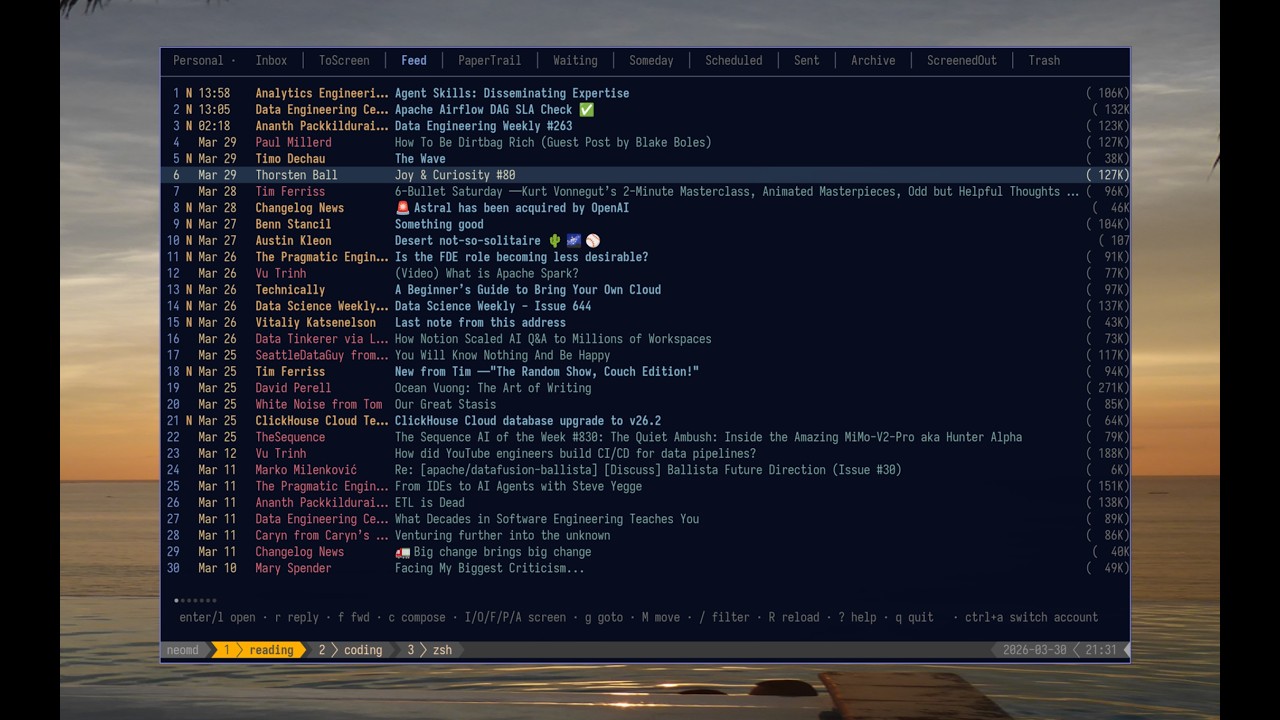
Overview: List-View
Feed view with all Newsletters - also workflow with differnt tabs and unread counter only for certain tabs (not all): !neomd _Features seen: Reading newsletter directly in your email client (feed) - see spy pixel, if you have replied (dot) and thread mode if replied_
Reading Panel
Reading an email with Markdown 💙:
Sent emails
This is the markdown sent:
# [neomd: to: [email protected]]
[neomd: subject: this is an email from neomd!]
This email is from Neomd. Great I can add links such as this with plain Markdown.
E.g. bold or _italic_.
Does headers work too?
this is a text before a h3.
H3 header
how does that look in an email?
Best regards
_Compose emails in your editor, read them rendered with glamour, and manage your inbox with a HEY-style screener — all from the terminal._
Which looks like this:
Or in Gmail: !neomd
Video
YouTube rundown of most features:
Features
What Makes It Different
These features are the one that makes neomd different to other email clients out there.
- Write in Markdown, send beautifully — compose in
$EDITOR(defaults tonvim), send asmultipart/alternative: raw Markdown as plain text + goldmark-rendered HTML so recipients get clickable links, bold, headers, inline code, and code blocks → - HEY-style screener — unknown senders land in
ToScreen; pressI/O/F/Pto approve, block, mark as Feed, or mark as PaperTrail; reuses your existingscreened_in.txtlists from neomutt; also acts as a phishing defense — impersonation emails from senders you've already approved land in ToScreen instead of Inbox, making them immediately suspicious → - Glamour reading — incoming emails rendered as styled Markdown in the terminal →
- Spy pixel blocking — tracking pixels from newsletter services (Mailchimp, SendGrid, HubSpot, etc.) are automatically detected, counted, and stripped in the terminal view;
°indicator in the inbox and tracker domains in the reader header; browser view (O) injects a CSP that blocks scripts and frames — remote images are intentionally allowed there since you're explicitly choosing to see the full email → - GitHub/Obsidian-style callouts — compose emails with callout syntax
> [!note],> [!tip],> [!warning]for styled alert boxes in HTML emails; rendered with colored left borders, subtle backgrounds, and emoji icons → - Server-side email tags (IMAP keywords) —
t f, delete a tag everywhere withD; tags show as coloured chips before the subject (nerd-font pills and glyphs optional), with per-tag display names and colours in config; a local per-account registry (~/.config/neomd/tags/) backs everything up → - Private notes on an email (HEY-style thread notes) —
n eedits it in$EDITORas Markdown. The first line shows muted after the subject (✎), the whole note in the reader header. Stored as a tiny message in aneomd/NotesIMAP folder keyed by Message-ID — the email itself is never touched, and the note syncs to every machine; a local copy lives in~/.config/neomd/notes/→ - Listmonk newsletter integration — compose an email to a virtual address (e.g.
[email protected]) and neomd creates a scheduled campaign in Listmonk via API instead of sending via SMTP; configure multiple trigger addresses to target different subscriber lists; pre-send screen shows campaign details →
Inbox & Screener
Keep your inbox clean without effort.
- Auto-screen on load — screener runs automatically every time the Inbox loads (startup,
R); keeps your inbox clean without pressingS(configurable, on by default) → - Whole-domain screening — list entries beginning with
@(e.g.@ssp.sh) match every address at that domain; per-address entries always win over a domain rule so a single blocked address inside an otherwise-approved domain stays blocked; pressDi/Doto append@to your lists with ay/nconfirm → - Background sync — while neomd is open, inbox is fetched and screened every 5 minutes in the background; interval configurable, set to
0to disable → - Headless daemon mode — run
neomd --headlesson a server to continuously screen emails without the TUI; watches screener list files for changes via Syncthing; perfect for running on a NAS while using the TUI on laptop/Android → - Out-of-office auto-replies (screened-in only) — the headless daemon answers incoming mail with a
[ooo]vacation reply, but only for senders on your screened-in list — spam, sales pitches, and unscreened senders never learn you're away (something server-side autoresponders can't do); one reply per sender per OOO period, RFC 3834 loop protection, markdown body rendered exactly like a hand-written neomd email, auto-expires on theuntildate → - Desktop notifications for VIP senders — opt-in
[notifications]block firesnotify-sendonly for senders/domains you list innotify.txt; independent of screener categories; first run silently records a baseline so you don't get flooded → - Folder tabs — Inbox, ToScreen, Feed, PaperTrail, Archive, Waiting, Someday, Scheduled, Sent, Trash, ScreenedOut →
Composing & Sending
- Pre-send review — after closing the editor, review To/Subject/body before sending; attach files, save to Drafts, or re-open the editor — no accidental sends →
- AI handoff (
iin pre-send) —[ai].command(defaultclaude) wires any LLM CLI (claude, codex, aichat, …) to the pre-sendikey; neomd writes the draft to a temp markdown, spawns the command, and re-reads on exit when you quit the tool — header and body edits round-trip back. No in-app AI dependency → - Attachments — attach files from the pre-send screen via yazi (
a); images appear inline in the email body, other files as attachments; also attach from within Neovim viaa 1–9downloads and opens them → - Emoji reactions — press
ctrl+efrom inbox or reader to react with emoji (👍 ❤️ 😂 🎉 🙏 💯 👀 ✅); instant send with proper threading and quoted message history, no editor needed → - Multi-select —
mmarks emails, then batch-delete, move, or screen them all at once → - Undo —
Ureverses the last move or delete (x,A,M*) using the UIDPLUS destination UID →
Reading
- Threaded inbox — related emails grouped together with a vertical connector line (
│/╰), Twitter-style; threads detected viaIn-Reply-To/Message-IDheaders with a subject+participant fallback; newest reply on top, root at bottom;·reply indicator shows which emails you've answered → - Merge threads (HEY-style) — collapse unrelated emails (mailer-daemon bounces, notification floods) into one titled
≡row: mark withm, run:merge</code>; Enter opens every member across folders, replies to a merged mail are absorbed automatically, and <code>:merge-sender <title></code> makes future mail from that sender join on its own; stored by Message-ID in <code>merges.toml</code> next to your config, so it survives folder moves and lives in dotfiles <a href="https://neomd.ssp.sh/docs/reading/#merge-threads" target="_blank" rel="noopener">→</a></li> <li><strong>iCalendar RSVP</strong> — meeting invites (<code>text/calendar</code> / <code>.ics</code>) show a <code>📅</code> card in the reader; leader chord <code><space> v {a|d|t}</code> sends an RFC 5546/6047 (iMIP) accept/decline/tentative reply; <code><space> v o</code> hands the <code>.ics</code> off to your local calendar app via <code>[calendar].open_command</code> (default <code>xdg-open</code>, set to <code>morgen</code>, <code>khal</code>, etc.) <a href="https://neomd.ssp.sh/docs/configuration/#calendar-invites" target="_blank" rel="noopener">→</a></li> <li><strong>Conversation view</strong> — <code>T</code> or <code>:thread</code> shows the full conversation across folders (Inbox, Sent, Archive, etc.) in a temporary tab with <code>[Folder]</code> prefix; see your replies alongside received emails <a href="https://neomd.ssp.sh/docs/reading/#conversation-view" target="_blank" rel="noopener">→</a></li> <li><strong>Link opener</strong> — links in emails are numbered <code>[1]</code>–<code>[0]</code> in the reader header; press <code>space+digit</code> to open in <code>$BROWSER</code> <a href="https://neomd.ssp.sh/docs/reading/#links" target="_blank" rel="noopener">→</a></li> <li><strong>Everything view</strong> — <code>ge</code> or <code>:everything</code> shows the 50 most recent emails across all folders; find emails that were screened out, moved to spam, or otherwise hard to locate <a href="https://neomd.ssp.sh/docs/keybindings/#folders" target="_blank" rel="noopener">→</a></li></ul> <h3>Search</h3> <ul><li><strong>Search</strong> — <code>/</code> filters loaded emails in-memory; <code>space /</code> or <code>:search</code> runs IMAP SEARCH across all folders (fetching headers, capped at 100 per folder) with results in a temporary "Search" tab; supports <code>from:</code>, <code>subject:</code>, <code>to:</code> prefixes <a href="https://neomd.ssp.sh/docs/keybindings/#leader-key-mappings-space-prefix" target="_blank" rel="noopener">→</a></li></ul> <h3>Standard Email Features</h3> <ul><li><strong>CC, BCC, Reply-all</strong> — optional Cc/Bcc fields (toggle with <code>ctrl+b</code>); <code>R</code> in the reader replies to sender + all CC recipients <a href="https://neomd.ssp.sh/docs/sending/#cc-bcc-reply-all-and-forward" target="_blank" rel="noopener">→</a></li> <li><strong>Drafts</strong> — <code>d</code> in pre-send saves to Drafts (IMAP APPEND); <code>E</code> in the reader re-opens a draft as an editable compose; compose sessions are auto-backed up to <code>~/.cache/neomd/drafts/</code> so you never lose an unsent email (<code>:recover</code> to reopen) <a href="https://neomd.ssp.sh/docs/sending/#drafts" target="_blank" rel="noopener">→</a></li> <li><strong>Send later</strong> — <code>l</code> in pre-send schedules delivery (<code>+2h</code>, <code>17:30</code>, <code>tomorrow 09:00</code>); the message queues in your Scheduled folder and the headless daemon delivers it on time — delete from Scheduled to cancel <a href="https://neomd.ssp.sh/docs/sending/#send-later" target="_blank" rel="noopener">→</a></li> <li><strong>Recipient names & contacts</strong> — names are harvested from email headers (plus an optional contacts file / Google Contacts CSV export), used to find people by name in search and to send <code>Louise Nachname <l@domain.io></code> instead of a bare address <a href="https://neomd.ssp.sh/docs/sending/#recipient-names" target="_blank" rel="noopener">→</a></li> <li><strong>Multiple From addresses</strong> — define SMTP-only <code>[[senders]]</code> aliases (e.g. <code>s@ssp.sh</code> through an existing account); cycle with <code>ctrl+f</code> in compose and pre-send; sent copies always land in the Sent folder <a href="https://neomd.ssp.sh/docs/sending/#multiple-from-addresses" target="_blank" rel="noopener">→</a></li> <li><strong>OS keyring credentials</strong> — set <code>password = "keyring"</code> to fetch the IMAP/SMTP password from your OS keyring (macOS Keychain, Linux Secret Service, Windows Credential Manager); OAuth2 tokens also stored in keyring with file fallback for headless/SSH; resolution happens at config load so <code>[[senders]]</code> aliases inherit the resolved password automatically <a href="https://neomd.ssp.sh/docs/configuration/#storing-passwords-in-the-os-keyring-linux" target="_blank" rel="noopener">→</a></li> <li><strong>HTML signatures</strong> — configure separate text and HTML signatures; text signature appears in editor and plain text part, HTML signature in HTML part only; use <code>[html-signature]</code> placeholder to control inclusion per-email <a href="https://neomd.ssp.sh/docs/configuration/#html-signatures" target="_blank" rel="noopener">→</a></li> <li><strong>Address autocomplete</strong> — To/Cc/Bcc fields autocomplete from screener lists; navigate with <code>ctrl+n</code>/<code>ctrl+p</code>, accept with <code>tab</code></li></ul> <h3>Under the Hood</h3> <ul><li><strong>IMAP + SMTP</strong> — direct connection via RFC 6851 MOVE, no local sync daemon required; stays in sync if you use it on mobile or different device <a href="https://neomd.ssp.sh/docs/configuration/" target="_blank" rel="noopener">→</a></li> <li><strong>RFC 5322 compliant email delivery</strong> — Message-IDs use sender's domain, proper MIME multipart/alternative structure (text/plain before text/html), quoted-printable encoding, and all required headers; ensures deliverability across all providers, spam filter compatibility, and correct email threading <a href="https://neomd.ssp.sh/docs/configuration/email-standards/" target="_blank" rel="noopener">→</a></li> <li><strong>Themes</strong> — six built-in palettes (<code>kanagawa</code> default, <code>kanagawa-paper</code>, <code>kanagawa-light</code> for daylight terminals, <code>rose-pine</code>, <code>gruvbox</code>, <code>osaka-jade</code>); pick via <code>[ui].theme = "..."</code> and override individual colour slots in an optional <code>[theme]</code> block <a href="https://neomd.ssp.sh/docs/configuration/#theming" target="_blank" rel="noopener">→</a></li></ul> <blockquote>[!NOTE]</blockquote> <blockquote>Folder switches you've seen before, deletes/archives/moves, and screening are <strong>instant on any provider</strong> — they're served from cache and update the list before the server answers (optimistic updates + a second IMAP connection). What still depends on your IMAP provider's latency: the <strong>first</strong> visit to a folder, <strong>opening an email</strong>, and <strong>search</strong>. On Hostpoint (the provider I use) those cost about 2 round trips at ~33ms each; on Gmail the same round trips run at ~570ms each. See <a href="#benchmark" target="_blank" rel="noopener">Benchmark</a> for full details and how to test your provider.</blockquote> <h2>Install</h2> <p><strong>Prerequisites:</strong> <a href="https://go.dev/doc/install" target="_blank" rel="noopener">Go 1.22+</a> and <code>make</code>.</p> <blockquote>[!WARNING]</blockquote> <blockquote>neomd moves, deletes, and modifies emails directly on your IMAP server. These operations affect your mailbox across all devices. <strong>Back up important emails before first use.</strong> neomd is experimental software and can't take responsibility for lost or misplaced emails. Consider testing with a secondary email account first.</blockquote> <blockquote>[!NOTE]</blockquote> <blockquote><strong>Optional Neovim & file picker helpers:</strong></blockquote> <blockquote>> - <code>yazi</code> enables the built-in file picker used by pre-send <code>a</code></blockquote> <blockquote>- custom Neovim integration in <a href="https://github.com/sspaeti/dotfiles/blob/master/nvim/.config/nvim/lua/sspaeti/custom.lua" target="_blank" rel="noopener"><code>custom.lua</code></a> enables inline <code><leader>a</code> attachment insertion inside <code>neomd-*.md</code> buffers</blockquote> <blockquote>- a tiny <a href="https://github.com/sspaeti/dotfiles/blob/master/yazi/.config/yazi/init.lua" target="_blank" rel="noopener">yazi <code>init.lua</code></a> snippet (<code>ps.sub("cd", ...)</code> guard on <code>rt.args.chooser_file</code>) is recommended — it clears any stale yazi selection on every <code>cd</code>, so a stray <code><Space></code> (yazi's toggle-selection key) in the picker can't cause <code>--chooser-file</code> to write the wrong path. Only fires in chooser mode; standalone yazi usage is unaffected.</blockquote> <blockquote>- a small <code>markdown.lua</code> plugin spec gives you <strong>live, beautiful rendered Markdown</strong> (headings, code blocks, callouts) while composing — see <a href="https://neomd.ssp.sh/docs/sending/#beautiful-markdown-composer-with-live-preview-in-neovim" target="_blank" rel="noopener">Beautiful Markdown Composer with Live-Preview in Neovim</a></blockquote> <blockquote>- without these, neomd still works; the inline Neovim attachment workflow and live rendering just won't be available</blockquote> <pre><code class="sh">git clone https://github.com/ssp-data/neomd cd neomd make install # installs to ~/.local/bin/neomd</code></pre> <p>Or just build locally:</p> <pre><code class="sh">make build ./neomd</code></pre> <p>Or if on Arch Linux (AUR), you can use my <a href="https://aur.archlinux.org/packages/neomd-bin" target="_blank" rel="noopener">neomd-bin</a> via:</p> <pre><code class="sh">yay -S neomd-bin</code></pre> <p>On first run, neomd:</p> <ol><li>Creates <code>~/.config/neomd/config.toml</code> with placeholders — fill in your IMAP/SMTP credentials</li></ol> - Important: Make sure that the Capitalization and naming of folder in <code>config.toml</code> is accroding to webmail IMAP, e.g. <a href="docs/content/docs/configuration/gmail.md" target="_blank" rel="noopener">Gmails</a> uses <code>sent = "[Gmail]/Sent Mail"</code> and not <code>sent</code> etc. <ol><li>Creates <code>~/.config/neomd/lists/</code> for screener allowlists (or uses your custom paths from config)</li> <li>Creates any missing IMAP folders (ToScreen, Feed, PaperTrail, etc.) automatically</li></ol> Neomd also runs on Android (more for fun) — see <a href="docs/content/docs/configuration/android.md" target="_blank" rel="noopener">docs/content/docs/configuration/android.md</a>. <h2>Configuration</h2> <p>On first run, neomd creates <code>~/.config/neomd/config.toml</code> with placeholders:</p> <pre><code class="toml">[[accounts]] name = "Personal" imap = "imap.example.com:993" # :993 = TLS, :143 = STARTTLS smtp = "smtp.example.com:587" user = "me@example.com" password = "app-password" from = "Me <me@example.com>" starttls = false tls_cert_file = "" # optional PEM cert/CA for self-signed local bridges <h1>Root-level settings</h1> store_sent_drafts_in_sending_account = false # default: Sent/Drafts use first account; true = follow sending account <p>[screener] screened_in = "~/.config/neomd/lists/screened_in.txt" screened_out = "~/.config/neomd/lists/screened_out.txt" feed = "~/.config/neomd/lists/feed.txt" papertrail = "~/.config/neomd/lists/papertrail.txt" spam = "~/.config/neomd/lists/spam.txt"</code></pre></p> <p>Use an app-specific password (Gmail, Fastmail, Hostpoint, etc.) rather than your main account password. The <code>password</code> and <code>user</code> fields support environment variable expansion (<code>$VAR</code> or <code>${VAR}</code>) so you can avoid storing secrets in the config file.</p> <p>For the full configuration reference including multiple accounts, OAuth2 authentication, <code>[[senders]]</code> aliases, folder customization, signatures, and UI options, see <a href="docs/content/docs/configuration/_index.md" target="_blank" rel="noopener">docs/content/docs/configuration</a>.</p> <p><strong>Provider-specific guides:</strong></p> <ul><li>Gmail: <a href="docs/content/docs/configuration/gmail.md" target="_blank" rel="noopener">docs/content/docs/configuration/gmail.md</a> — folder name mapping, app-password setup, and performance notes</li> <li>Proton Mail Bridge: <a href="docs/content/docs/configuration/proton-bridge.md" target="_blank" rel="noopener">docs/content/docs/configuration/proton-bridge.md</a> — non-standard port configuration</li></ul> <h3>Onboarding</h3> <p>On first launch, <strong>auto-screening is paused</strong> because your screener lists are empty — neomd won't move anything until you've classified your first sender. Your Inbox loads normally so you can explore.</p> <p>By default, neomd loads and auto-screens only the newest <code>200</code> emails of a folder by arrival date (<code>[ui].inbox_count</code>). This keeps startup predictable; in a folder with more mail (Archive, Feed, …), moving onto the last row with <code>j</code>, <code>d</code> or <code>ctrl+d</code> loads the next <code>200</code> older emails. If you want to re-screen the entire Inbox on the IMAP server, run <code>:screen-all</code> inside neomd; that scans every Inbox email, not just the loaded subset, and can take a while on large mailboxes.</p> <p><strong>Getting started with the screener:</strong></p> <ol><li>From your Inbox, pick an email and press <code>I</code> (screen <strong>in</strong>) to approve the sender, or <code>O</code> (screen <strong>out</strong>) to block them. This creates your first screener list entry.</li> <li>Once you've classified at least one sender, auto-screening activates on every Inbox load — new emails from known senders are sorted automatically.</li> <li>Unknown senders land in the <code>ToScreen</code> tab. Jump there with <code>gk</code> (or <code>Tab</code>, use <code>L</code> or click the tab) and classify them:</li></ol> - <code>I</code> screen <strong>in</strong> — sender stays in Inbox forever - <code>O</code> screen <strong>out</strong> — sender never reaches Inbox again - <code>F</code> <strong>feed</strong> — newsletters go to the Feed tab - <code>P</code> <strong>papertrail</strong> — receipts go to the PaperTrail tab <ol><li>Use <code>m</code> to mark multiple emails, then <code>I</code> to batch-approve them all at once. From the <code>ToScreen</code> folder, approving/blocking a single unmarked message now applies to all currently queued mail from that sender.</li></ol> <strong>The best part:</strong> all classifications are saved permanently in your screener lists (<code>screened_in.txt</code>, <code>screened_out.txt</code>, etc.). An email address screened in will automatically go to your Inbox, and any email screened out will never be in your Inbox again. <p>You choose who can land in your Inbox. Bye-bye spam. This is the beauty of <a href="https://www.hey.com/features/the-screener/" target="_blank" rel="noopener">HEY-Screener</a>, and neomd implements the same concept.</p> <blockquote>[!TIP]</blockquote> <blockquote>To disable auto-screening entirely, set <strong>both</strong> <code>auto_screen_on_load = false</code> and <code>bg_sync_interval = 0</code> in <code>[ui]</code> config — background sync screens on its own 5-minute timer regardless of the load-time setting. Run <code>:debug</code> inside neomd if something isn't working.</blockquote> <blockquote>[!WARNING]</blockquote> <blockquote><code>:screen-all</code> operates on the full Inbox mailbox on the server, not just the emails currently loaded in the UI. Use it when you intentionally want a mailbox-wide reclassification pass.</blockquote> <h3>Screener Workflow</h3> <p>Find full Screener Workflow at <a href="docs/content/docs/screener.md" target="_blank" rel="noopener">docs/content/docs/screener.md</a>, classification tables, and bulk re-classification instructions.</p> <h3>Keybindings</h3> <p>Press <code>?</code> inside neomd to open the interactive help overlay. Start typing to filter shortcuts.</p> <p>See the <a href="docs/content/docs/keybindings.md" target="_blank" rel="noopener">full keybindings reference</a> (auto-generated from <a href="internal/ui/keys.go" target="_blank" rel="noopener"><code>internal/ui/keys.go</code></a> via <code>make docs</code>).</p> <h3>How Sending Works</h3> <p>Compose in Markdown, send as <code>multipart/alternative</code> (plain text + HTML). Attachments, CC/BCC, multiple From addresses, drafts, and pre-send review are all supported.</p> <p>Discarding unsent mail now asks for confirmation in compose/pre-send, and <code>:recover</code> reopens the latest backup if you want to resume after an abort.</p> <ul><li>See <a href="docs/content/docs/sending.md" target="_blank" rel="noopener">docs/content/docs/sending.md</a> for details on MIME structure, attachments, pre-send review, and drafts.</li> <li>See <a href="docs/content/docs/reading.md" target="_blank" rel="noopener">docs/content/docs/reading.md</a> for the reader: images, inline links, attachments, and navigation.</li></ul> <h3>Dev: Makefile Commands</h3> <pre><code class="">make build compile ./neomd make run build and run make install install to ~/.local/bin make test run unit tests (fast, no network) make test-integration integration tests against real IMAP/SMTP (demo account) make vet go vet make fmt gofmt -w . make fmt-check report unformatted files (nonzero exit if any) — CI/pre-commit make tidy go mod tidy make docs regenerate keybindings.md and sync README to the docs site make docs-serve serve Hugo docs locally at http://localhost:1313 make docs-build build Hugo docs site to docs/public/ make daemon build and run headless (--headless); screener loop, no TUI make demo / demo-hp run with demo configs make benchmark IMAP latency benchmark for Hostpoint and Gmail make android cross-compile ARM64 for Termux make release-notes VERSION=v0.1.0 draft RELEASE_NOTES.md with Claude Code (review, then commit) make release VERSION=v0.1.0 tag and push a new release make clean remove compiled binary make help print this list</code></pre> <h2>Stack</h2> <ul><li><a href="https://github.com/charmbracelet/bubbletea" target="_blank" rel="noopener">Bubble Tea</a> — TUI framework</li> <li><a href="https://github.com/charmbracelet/bubbles" target="_blank" rel="noopener">Bubbles</a> — list, viewport, textinput components</li> <li><a href="https://github.com/charmbracelet/glamour" target="_blank" rel="noopener">Glamour</a> — Markdown → terminal rendering</li> <li><a href="https://github.com/charmbracelet/lipgloss" target="_blank" rel="noopener">Lipgloss</a> — styling</li> <li><a href="https://github.com/emersion/go-imap" target="_blank" rel="noopener">go-imap/v2</a> — IMAP client (RFC 6851 MOVE)</li> <li><a href="https://github.com/emersion/go-message" target="_blank" rel="noopener">go-message</a> — MIME parsing</li> <li><a href="https://github.com/yuin/goldmark" target="_blank" rel="noopener">goldmark</a> — Markdown → HTML for sending</li> <li><a href="https://github.com/BurntSushi/toml" target="_blank" rel="noopener">BurntSushi/toml</a> — config parsing</li></ul> <h2>FAQ</h2> <p>You have more questions, check out the <a href="https://neomd.ssp.sh/" target="_blank" rel="noopener">docs</a> with more information, or check <a href="https://neomd.ssp.sh/docs/faq/" target="_blank" rel="noopener">Frequently Asked Questions</a>.</p> <h2>Changelog</h2> <p>See <a href="CHANGELOG.md" target="_blank" rel="noopener">CHANGELOG.md</a> for what's new.</p> <h2>Benchmark</h2> <p>neomd's responsiveness still depends on your IMAP server for the first visit to a folder, opening an email, and search — folder switches you've already seen, deletes/archives/moves, and screening are instant on any provider (cache + optimistic updates + a second IMAP connection; see the round-trip table below). Here are real per-command measurements from the same machine, same network — note these no longer sum into one serial "folder switch" the way neomd issues them now (SELECT is pipelined with SEARCH/FETCH):</p> <p><strong>Hostpoint</strong> (dedicated email provider) — per-command latency | Operation | Time | |-----------|------| | SELECT | 12ms | | UID SEARCH | 10ms | | FETCH (200 emails) | 76ms | | MOVE (1 email) | 46ms |</p> <p><strong>Gmail</strong> — per-command latency (17x slower than Hostpoint) | Operation | Time | |-----------|------| | SELECT | 200ms | | UID SEARCH | 180ms | | FETCH (2 emails) | 190ms | | MOVE (1 email) | 339ms |</p> <p><strong>Outlook/Office365</strong> (with OAuth2 authentication and different network - not really comparable, but gives a indication) — per-command latency (8x slower than Hostpoint) | Operation | Time | |-----------|------| | SELECT | 45ms | | UID SEARCH | 22ms | | FETCH (10 emails) | 180ms | | MOVE (1 email) | 21ms |</p> <p>What matters more than any single operation's millisecond cost is <strong>how many round trips an action needs before the list redraws</strong> — that count, multiplied by your provider's latency above, is what you feel on every keypress. Round trips listed after the redraw run asynchronously on the same primary connection the next user action uses; only tab counts, the 5-minute sync, spy scan and prefetch use the second connection:</p> <p>| Action | Round trips before | RTTs before redraw (then async on primary) | Perceived | |---|---|---|---| | Folder switch, seen before | 3 (+4 queued) | 0 (2 behind the list, primary connection) | instant | | Folder switch, first time | 3 (+4 queued) | 2 (+1 on bg connection) | ~2 RTT | | Screen-in one row | ~10 | 0 (3 behind the list, primary connection) | instant | | Delete/archive/move N rows | 2N + 7 | 0 (N behind the list, primary connection) | instant | | Open email | 1–2 | 1–2 | unchanged | | Search across folders | 2 per folder | 1 per folder (2 for a folder with hits) | ~halved |</p> <p>Interestingly, Gmail benchmarks fast on a <strong>fresh single connection</strong> (<code>scripts/imap-benchmark.sh</code> shows ~70ms total, same as Hostpoint). But on a <strong>sustained session</strong> with sequential commands — which is how neomd actually uses IMAP — Gmail adds ~180ms latency per command. This is likely Gmail's internal label-to-folder translation and session management overhead. The result: on Gmail, the first visit to a folder, opening an email, and search still feel slower than on Hostpoint; cached folder switches, moves, screening, and <code>n</code> are instant on any provider, Gmail included.</p> <blockquote>[!NOTE]</blockquote> <blockquote><strong>Gmail is not recommended.</strong> If you're on Gmail, consider a dedicated email provider (Hostpoint, Fastmail, HEY, Migadu, etc.) for the best neomd experience. Or use Gmail just for fun :). See <a href="docs/content/docs/configuration/gmail.md" target="_blank" rel="noopener">docs/content/docs/configuration/gmail.md</a> for Gmail-specific folder configuration.</blockquote> <p><strong>Test your own provider:</strong></p> <pre><code class="bash"># With password IMAP_HOST=imap.example.com IMAP_USER=me@example.com IMAP_PASS=secret ./scripts/imap-benchmark.sh <h1>With OAuth2 (reads token from neomd config)</h1> CONFIG=~/.config/neomd/config.toml IMAP_USER=me@gmail.com ./scripts/imap-benchmark.sh</code></pre> <h2>Security</h2> <p>See <a href="SECURITY.md" target="_blank" rel="noopener">SECURITY.md</a> for how credentials, screener lists, temp files, and network connections are handled — with links to the relevant source files.</p> <h2>Inspirations</h2> <ul><li><a href="https://neomutt.org" target="_blank" rel="noopener">Neomutt</a> — the gold standard terminal email client; neomd reuses its screener list format and borrows keybindings (though most are <a href="https://github.com/sspaeti/dotfiles/blob/master/mutt/.config/mutt/muttrc" target="_blank" rel="noopener">custom made</a> and what I use). I implemented the <a href="https://www.ssp.sh/brain/hey-screener-in-neomutt" target="_blank" rel="noopener">HEY screener for Neomutt</a>, see note for more information.</li> <li><a href="https://www.hey.com/features/the-screener/" target="_blank" rel="noopener">HEY</a> — the Screener concept: unknown senders wait for a decision before reaching your inbox</li> <li><a href="https://github.com/basecamp/hey-cli" target="_blank" rel="noopener">hey-cli</a> — a Go CLI for HEY; provided the bubbletea patterns used here</li> <li><a href="https://newsboat.org" target="_blank" rel="noopener">newsboat</a> — RSS reader whose <code>O</code> open-in-browser binding and vim navigation feel inspired neomd's reader view</li> <li><a href="https://www.emailmd.dev" target="_blank" rel="noopener">emailmd.dev</a> — the idea that email should be written in Markdown when seen on <a href="https://news.ycombinator.com/item?id=47505144" target="_blank" rel="noopener">HN</a></li> <li><a href="https://github.com/charmbracelet/pop" target="_blank" rel="noopener">charmbracelet/pop</a> — minimal Go email sender from Charm</li> <li><a href="https://github.com/charmbracelet/glamour" target="_blank" rel="noopener">charmbracelet/glamour</a> — Markdown rendering in the terminal</li> <li><a href="https://github.com/rebelot/kanagawa.nvim" target="_blank" rel="noopener">kanagawa.nvim</a> — the color palette used for the inbox</li> <li><a href="https://github.com/wesm/msgvault" target="_blank" rel="noopener">msgvault</a> — Go IMAP archiver; the IMAP client code in neomd is adapted from it</li></ul> <h2>Disclaimer</h2> <p>This TUI is mostly <a href="https://www.ssp.sh/brain/vibe-coding" target="_blank" rel="noopener">vibe-coded</a> in the sense that all code is written with Claude Code, but guided by very detailed instructions to make the workflow as I use it and like it to be.</p> <p>I used my experience with Neomutt, TUIs, and the GTD workflow for handling emails with HEY Screener, and added some (hopefully) _taste_ using my favorite tools and aesthetics. Find the full history at <a href="https://xcancel.com/sspaeti/status/2036539855182627169#m" target="_blank" rel="noopener">Twitter</a> - inspired by seeing <a href="https://www.emailmd.dev/" target="_blank" rel="noopener">Email.md</a> on HackerNews.</p> <p>If you <a href="https://www.ssp.sh/brain/id-rather-read-the-prompt" target="_blank" rel="noopener">rather read the prompt</a>, check out my <a href="https://github.com/ssp-data/neomd/blob/main/docs/initial-prompt/prompt.md" target="_blank" rel="noopener">initial prompt</a> and its generated <a href="https://github.com/ssp-data/neomd/blob/main/docs/initial-prompt/prompt-plan.md" target="_blank" rel="noopener">plan</a> - which I have iterated and added features by the 100s since then.</p> <h2>Roadmap</h2> <p>See at my second brain at <a href="https://www.ssp.sh/brain/neomd#roadmap" target="_blank" rel="noopener">Roadmap</a>.</p> </article> <!-- Article Completion Section --> <div class="reader-footer mt-5 pt-5"> <div class="reader-completion-box rounded-3 p-4 text-center"> <div class="reader-completion-icon mb-3"> <i class="fas fa-check-circle"></i> </div> <p class="reader-completion-text fw-semibold mb-1" style="font-size: 1rem;">You finished the article!</p> <p class="reader-completion-subtext small mb-4">Want to go deeper or explore more stories?</p> <div class="d-flex justify-content-center gap-3 flex-wrap"> <a href="https://github.com/ssp-data/neomd" target="_blank" rel="noopener noreferrer" class="btn btn-primary-custom btn-sm rounded-pill px-4"> <i class="fas fa-external-link-alt me-2"></i>Full Article on GitHub Trending </a> <a href="https://neshdevtech.com/news" class="reader-back-btn btn btn-sm rounded-pill px-4"> <i class="fas fa-newspaper me-2"></i>More Tech News </a> </div> </div> </div> <!-- Internal Linking CTA --> </div> </div> </div> <!-- Sidebar (desktop only) --> <div class="col-lg-4 col-xl-3 d-none d-lg-block"> <div class="sticky-top" style="top: 80px;"> <!-- Mini Controller Widget --> <div class="card border-0 shadow-sm mb-4 bg-surface"> <div class="card-body p-4"> <h6 class="fw-bold mb-3"><i class="fas fa-glasses me-2 text-primary-custom"></i>Reading Mode</h6> <p class="text-secondary-custom small mb-4">Adjust typography and theme to your preference.</p> <div class="mb-3"> <label class="text-muted-custom small d-block mb-2">Typography</label> <div class="d-flex gap-2"> <button class="btn btn-light btn-sm flex-grow-1 border-custom" id="sidebar-font-serif">Serif</button> <button class="btn btn-light btn-sm flex-grow-1 border-custom" id="sidebar-font-sans">Sans</button> </div> </div> <div class="mb-4"> <label class="text-muted-custom small d-block mb-2">Text Scale</label> <div class="d-flex gap-2"> <button class="btn btn-light btn-sm flex-grow-1 border-custom" id="sidebar-size-dec"><i class="fas fa-minus small"></i></button> <button class="btn btn-light btn-sm flex-grow-1 border-custom" id="sidebar-size-inc"><i class="fas fa-plus small"></i></button> </div> </div> <div class="border-top border-light-custom pt-3"> <a href="https://github.com/ssp-data/neomd" target="_blank" rel="noopener noreferrer" class="btn btn-outline-primary btn-sm w-100 rounded-pill"> View Original <i class="fas fa-external-link-alt ms-1"></i> </a> </div> </div> </div> <!-- Sidebar Related News --> <div class="card border-0 shadow-sm bg-surface"> <div class="card-header bg-transparent border-0 pt-4 pb-0 px-4"> <h5 class="card-title fw-bold mb-0" style="font-size: 1.05rem;"> <i class="fas fa-newspaper me-2 text-primary-custom"></i>Related Stories </h5> </div> <div class="card-body p-0"> <div class="list-group list-group-flush rounded-0 bg-transparent"> <a href="https://neshdevtech.com/news/kubernetes-controller-manager-explained-k8s-with-pravesh-episode-6-tEPsM" class="list-group-item list-group-item-action border-0 px-4 py-3 bg-transparent border-bottom border-light-custom hover-bg-light"> <h6 class="mb-1 fw-semibold text-truncate-2" style="font-size: 0.875rem; line-height: 1.4;"> Kubernetes Controller Manager Explained | K8s With Pravesh - Episode 6 </h6> <div class="d-flex align-items-center justify-content-between text-muted-custom mt-1" style="font-size: 0.72rem;"> <span>Dev.to</span> <span>23 hours ago</span> </div> </a> <a href="https://neshdevtech.com/news/implementing-safe-opentofu-state-locking-with-redis-backed-circuit-breakers-NzETG" class="list-group-item list-group-item-action border-0 px-4 py-3 bg-transparent border-bottom border-light-custom hover-bg-light"> <h6 class="mb-1 fw-semibold text-truncate-2" style="font-size: 0.875rem; line-height: 1.4;"> Implementing Safe OpenTofu State Locking with Redis-Backed Circuit Breakers </h6> <div class="d-flex align-items-center justify-content-between text-muted-custom mt-1" style="font-size: 0.72rem;"> <span>Dev.to</span> <span>1 day ago</span> </div> </a> <a href="https://neshdevtech.com/news/the-zero-downtime-cloud-migration-playbook-moving-legacy-monoliths-to-containerized-cloud-instances-gXfHV" class="list-group-item list-group-item-action border-0 px-4 py-3 bg-transparent border-bottom border-light-custom hover-bg-light"> <h6 class="mb-1 fw-semibold text-truncate-2" style="font-size: 0.875rem; line-height: 1.4;"> The Zero-Downtime Cloud Migration Playbook: Moving Legacy Monoliths to Containerized Cloud Instances </h6> <div class="d-flex align-items-center justify-content-between text-muted-custom mt-1" style="font-size: 0.72rem;"> <span>Dev.to</span> <span>1 day ago</span> </div> </a> <a href="https://neshdevtech.com/news/multi-tenant-mcp-isolation-patterns-that-hold-up-MQgCx" class="list-group-item list-group-item-action border-0 px-4 py-3 bg-transparent border-bottom border-light-custom hover-bg-light"> <h6 class="mb-1 fw-semibold text-truncate-2" style="font-size: 0.875rem; line-height: 1.4;"> Multi-Tenant MCP: Isolation Patterns That Hold Up </h6> <div class="d-flex align-items-center justify-content-between text-muted-custom mt-1" style="font-size: 0.72rem;"> <span>Dev.to</span> <span>5 days ago</span> </div> </a> <a href="https://neshdevtech.com/news/stop-using-cat-for-everything-9-better-ways-to-read-linux-files-FPwDp" class="list-group-item list-group-item-action border-0 px-4 py-3 bg-transparent border-bottom border-light-custom hover-bg-light"> <h6 class="mb-1 fw-semibold text-truncate-2" style="font-size: 0.875rem; line-height: 1.4;"> Stop Using cat for Everything: 9 Better Ways to Read Linux Files </h6> <div class="d-flex align-items-center justify-content-between text-muted-custom mt-1" style="font-size: 0.72rem;"> <span>Dev.to</span> <span>5 days ago</span> </div> </a> </div> </div> </div> </div> </div> </div> <!-- Mobile: Related News horizontal scroll strip --> <div class="d-block d-lg-none mt-4"> <h6 class="fw-bold mb-3 px-1"> <i class="fas fa-newspaper me-2 text-primary-custom"></i>Related Stories </h6> <div class="related-scroll-strip"> <a href="https://neshdevtech.com/news/kubernetes-controller-manager-explained-k8s-with-pravesh-episode-6-tEPsM" class="related-scroll-card"> <p class="related-scroll-title">Kubernetes Controller Manager Explained | K8s With Pravesh - Episode 6</p> <div class="related-scroll-meta"> <span>Dev.to</span> <span>23 hours ago</span> </div> </a> <a href="https://neshdevtech.com/news/implementing-safe-opentofu-state-locking-with-redis-backed-circuit-breakers-NzETG" class="related-scroll-card"> <p class="related-scroll-title">Implementing Safe OpenTofu State Locking with Redis-Backed Circuit Bre...</p> <div class="related-scroll-meta"> <span>Dev.to</span> <span>1 day ago</span> </div> </a> <a href="https://neshdevtech.com/news/the-zero-downtime-cloud-migration-playbook-moving-legacy-monoliths-to-containerized-cloud-instances-gXfHV" class="related-scroll-card"> <p class="related-scroll-title">The Zero-Downtime Cloud Migration Playbook: Moving Legacy Monoliths to...</p> <div class="related-scroll-meta"> <span>Dev.to</span> <span>1 day ago</span> </div> </a> <a href="https://neshdevtech.com/news/multi-tenant-mcp-isolation-patterns-that-hold-up-MQgCx" class="related-scroll-card"> <p class="related-scroll-title">Multi-Tenant MCP: Isolation Patterns That Hold Up</p> <div class="related-scroll-meta"> <span>Dev.to</span> <span>5 days ago</span> </div> </a> <a href="https://neshdevtech.com/news/stop-using-cat-for-everything-9-better-ways-to-read-linux-files-FPwDp" class="related-scroll-card"> <p class="related-scroll-title">Stop Using cat for Everything: 9 Better Ways to Read Linux Files</p> <div class="related-scroll-meta"> <span>Dev.to</span> <span>5 days ago</span> </div> </a> </div> </div> </div> </section> </main> <!-- Footer --> <!-- Footer --> <footer class="py-5 mt-5 position-relative overflow-hidden" style="background: var(--surface); border-top: 1px solid var(--border); box-shadow: var(--shadow-lg);"> <!-- Decorative subtle background gradients --> <div class="position-absolute" style="top: -200px; right: -200px; width: 400px; height: 400px; background: rgba(var(--primary-rgb), 0.03); filter: blur(100px); border-radius: 50%; pointer-events: none;"></div> <div class="position-absolute" style="bottom: -200px; left: -200px; width: 400px; height: 400px; background: rgba(var(--accent-rgb), 0.03); filter: blur(100px); border-radius: 50%; pointer-events: none;"></div> <div class="container position-relative z-3"> <div class="row g-4"> <!-- Column 1: Brand & About --> <div class="col-lg-4 col-md-6"> <div class="d-flex align-items-center mb-3"> <span class="brand-mark me-2" style="width: 42px; height: 42px;" aria-hidden="true"> <svg xmlns="http://www.w3.org/2000/svg" viewBox="0 0 24 24" fill="none" stroke="currentColor" stroke-width="2.2" stroke-linecap="round" stroke-linejoin="round"><polyline points="16 18 22 12 16 6"/><polyline points="8 6 2 12 8 18"/></svg> </span> <span class="fs-4 fw-extrabold text-primary-custom" style="letter-spacing: -0.05em; font-family: 'JetBrains Mono', monospace;">NeshDevTech</span> </div> <p class="text-secondary-custom mb-4 pe-lg-4" style="font-size: 0.95rem; line-height: 1.6;">NeshDevTech is a professional technology firm passionate about creating innovative, high-performance web and mobile solutions.</p> <div class="d-flex gap-2"> </div> </div> <!-- Column 2: Navigation Links --> <div class="col-lg-2 col-md-6 col-6"> <h6 class="text-primary-custom fw-bold text-uppercase mb-3" style="font-size: 0.85rem; letter-spacing: 0.05em;">Quick Navigation</h6> <ul class="list-unstyled mb-0"> <li class="mb-2"><a href="https://neshdevtech.com" class="footer-link text-secondary-custom text-decoration-none d-inline-block">Home</a></li> <li class="mb-2"><a href="https://neshdevtech.com/projects" class="footer-link text-secondary-custom text-decoration-none d-inline-block">Projects</a></li> <li class="mb-2"><a href="https://neshdevtech.com/blog" class="footer-link text-secondary-custom text-decoration-none d-inline-block">Tech Blog</a></li> <li class="mb-2"><a href="https://neshdevtech.com/pricing" class="footer-link text-secondary-custom text-decoration-none d-inline-block">Get Quote</a></li> <li class="mb-2"><a href="https://neshdevtech.com/contact" class="footer-link text-secondary-custom text-decoration-none d-inline-block">Contact Me</a></li> </ul> </div> <!-- Column 3: Tech Stack & Services --> <div class="col-lg-3 col-md-6 col-6"> <h6 class="text-primary-custom fw-bold text-uppercase mb-3" style="font-size: 0.85rem; letter-spacing: 0.05em;">Core Services</h6> <ul class="list-unstyled mb-0"> <li class="text-secondary-custom mb-2 small"><i class="bi bi-rocket-takeoff text-primary-custom me-2"></i>Custom Laravel Apps</li> <li class="text-secondary-custom mb-2 small"><i class="bi bi-laptop text-primary-custom me-2"></i>SPA (React & Vue.js)</li> <li class="text-secondary-custom mb-2 small"><i class="bi bi-phone-vibrate text-primary-custom me-2"></i>Flutter Mobile Apps</li> <li class="text-secondary-custom mb-2 small"><i class="bi bi-search text-primary-custom me-2"></i>SEO & Performance Opt</li> </ul> </div> <!-- Column 4: Contact & Availability --> <div class="col-lg-3 col-md-6"> <h6 class="text-primary-custom fw-bold text-uppercase mb-3" style="font-size: 0.85rem; letter-spacing: 0.05em;">Get in Touch</h6> <ul class="list-unstyled mb-3"> <li class="text-secondary-custom mb-2 small d-flex align-items-center"> <i class="bi bi-geo-alt text-primary-custom me-2 fs-6"></i>Nairobi, Kenya </li> <li class="text-secondary-custom mb-2 small d-flex align-items-center"> <i class="bi bi-envelope-at text-primary-custom me-2 fs-6"></i> <a href="mailto:info@neshdevtech.com" class="text-secondary-custom text-decoration-none footer-link">info@neshdevtech.com</a> </li> </ul> <div class="bg-primary-custom-light border border-primary-custom border-opacity-10 p-3 rounded-3" style="border-radius: 12px !important;"> <small class="d-block fw-semibold text-primary-custom mb-1"><i class="bi bi-patch-check-fill me-1"></i>Available for Projects</small> <p class="mb-0 text-secondary-custom small" style="font-size: 0.8rem; line-height: 1.4;">Need a high-performing system? Let's discuss your project.</p> </div> </div> </div> <hr style="border-color: var(--border); opacity: 0.8; margin: 2.5rem 0 2rem;"> <div class="row align-items-center"> <div class="col-md-6 text-center text-md-start mb-2 mb-md-0"> <p class="mb-0 text-secondary-custom small">© 2026 NeshDevTech. All rights reserved.</p> </div> <div class="col-md-6 text-center text-md-end"> <p class="mb-0 text-secondary-custom small">Built with <i class="bi bi-heart-fill text-danger"></i></p> </div> </div> </div> </footer> <!-- Bootstrap JS --> <script src="https://cdn.jsdelivr.net/npm/bootstrap@5.3.0/dist/js/bootstrap.bundle.min.js"></script> <!-- Custom JavaScript --> <script> // Theme Management System class ThemeManager { constructor() { this.themeToggle = document.getElementById('themeToggle'); this.themeIcon = document.getElementById('theme-icon'); this.mobileThemeToggle = document.getElementById('mobileThemeToggle'); this.mobileThemeIcon = document.getElementById('mobile-theme-icon'); this.init(); } init() { // Get current theme (already applied in head) const currentTheme = document.documentElement.getAttribute('data-theme') || 'light'; // Update icons to match current theme this.updateIcon(currentTheme); // Listen for desktop theme toggle clicks if (this.themeToggle) { this.themeToggle.addEventListener('click', (e) => { e.preventDefault(); this.toggleTheme(); }); } // Listen for mobile theme toggle clicks if (this.mobileThemeToggle) { this.mobileThemeToggle.addEventListener('click', (e) => { e.preventDefault(); this.toggleTheme(); }); } // Listen for system theme changes window.matchMedia('(prefers-color-scheme: dark)').addEventListener('change', (e) => { if (!localStorage.getItem('theme')) { this.setTheme(e.matches ? 'dark' : 'light'); } }); } setTheme(theme) { document.documentElement.setAttribute('data-theme', theme); document.documentElement.setAttribute('data-bs-theme', theme); if (theme === 'dark') { document.documentElement.classList.add('dark'); } else { document.documentElement.classList.remove('dark'); } localStorage.setItem('theme', theme); this.updateThemeColor(theme); this.updateIcon(theme); } updateThemeColor(theme) { document.querySelectorAll('meta[name="theme-color"]').forEach((meta) => { meta.setAttribute('content', theme === 'dark' ? '#1c2028' : '#e4e8f0'); }); } toggleTheme() { const currentTheme = document.documentElement.getAttribute('data-theme'); const newTheme = currentTheme === 'dark' ? 'light' : 'dark'; this.setTheme(newTheme); // Close mobile menu if open const navbarCollapse = document.querySelector('.navbar-collapse'); if (navbarCollapse && navbarCollapse.classList.contains('show') && window.innerWidth < 992) { setTimeout(() => { const bsCollapse = new bootstrap.Collapse(navbarCollapse, { toggle: false }); bsCollapse.hide(); }, 150); } } updateIcon(theme) { const iconClass = theme === 'dark' ? 'bi bi-sun-fill' : 'bi bi-moon-fill'; // Update desktop icon if (this.themeIcon) { this.themeIcon.className = iconClass; } // Update mobile icon if (this.mobileThemeIcon) { this.mobileThemeIcon.className = iconClass; } } } // Initialize theme manager when DOM is loaded document.addEventListener('DOMContentLoaded', () => { new ThemeManager(); // Initialize navbar live clock (function initNavClock(){ const clockEls = Array.from(document.querySelectorAll('[data-clock]')); if (!clockEls.length) return; const locale = navigator.language || 'en-US'; // Detect 12/24h by locale: use resolvedOptions hourCycle when available const dtf = new Intl.DateTimeFormat(locale, { hour: 'numeric' }); const uses12h = (dtf.resolvedOptions().hour12 === true); const fmt = new Intl.DateTimeFormat(locale, { hour: '2-digit', minute: '2-digit', second: '2-digit', hour12: uses12h }); const update = () => { const now = new Date(); const text = fmt.format(now); clockEls.forEach(el => { el.textContent = text; }); }; update(); setInterval(update, 1000); })(); }); // Smooth scrolling for anchor links document.querySelectorAll('a[href^="#"]').forEach(anchor => { anchor.addEventListener('click', function (e) { e.preventDefault(); const target = document.querySelector(this.getAttribute('href')); if (target) { target.scrollIntoView({ behavior: 'smooth', block: 'start' }); } }); }); // Navbar background on scroll window.addEventListener('scroll', () => { const navbar = document.querySelector('.navbar'); if (window.scrollY > 50) { navbar.style.backdropFilter = 'blur(20px)'; navbar.style.backgroundColor = 'rgba(var(--background-rgb), 0.8)'; } else { navbar.style.backdropFilter = 'blur(10px)'; navbar.style.backgroundColor = 'var(--background)'; } }); // Add fade-in animation to elements when they come into view const observerOptions = { threshold: 0.1, rootMargin: '0px 0px -50px 0px' }; const observer = new IntersectionObserver((entries) => { entries.forEach(entry => { if (entry.isIntersecting) { entry.target.classList.add('animate-fade-in-up'); } }); }, observerOptions); // Observe elements with animation class document.addEventListener('DOMContentLoaded', () => { document.querySelectorAll('.animate-on-scroll').forEach(el => { observer.observe(el); }); }); // Enhanced mobile menu functionality document.addEventListener('DOMContentLoaded', function() { const navbarToggler = document.querySelector('.navbar-toggler'); const navbarCollapse = document.querySelector('.navbar-collapse'); const navLinks = document.querySelectorAll('.navbar-nav .nav-link'); const socialLinks = document.querySelectorAll('.navbar-nav .d-flex a'); let isToggling = false; // Prevent rapid clicking // Enhanced menu close function function closeMenu() { if (navbarCollapse && navbarCollapse.classList.contains('show')) { // Use Bootstrap's collapse API for smooth transition const bsCollapse = new bootstrap.Collapse(navbarCollapse, { toggle: false }); bsCollapse.hide(); } // Reset hamburger animation and aria-expanded if (navbarToggler) { navbarToggler.classList.remove('active'); navbarToggler.setAttribute('aria-expanded', 'false'); } } // Enhanced hamburger toggle functionality if (navbarToggler) { navbarToggler.addEventListener('click', function(e) { e.preventDefault(); // Prevent rapid clicking if (isToggling) return; isToggling = true; const isMenuOpen = navbarCollapse.classList.contains('show'); if (isMenuOpen) { closeMenu(); } else { // Open menu const bsCollapse = new bootstrap.Collapse(navbarCollapse, { toggle: false }); bsCollapse.show(); navbarToggler.setAttribute('aria-expanded', 'true'); } // Reset toggle flag after animation setTimeout(() => { isToggling = false; }, 350); }); } // Close menu when clicking outside document.addEventListener('click', function(event) { const isClickInsideNav = navbarCollapse.contains(event.target); const isToggler = navbarToggler.contains(event.target); const isMenuOpen = navbarCollapse.classList.contains('show'); if (!isClickInsideNav && !isToggler && isMenuOpen && window.innerWidth < 992) { closeMenu(); } }); // Close menu when clicking on navigation links (mobile) navLinks.forEach(function(link) { link.addEventListener('click', function(e) { const isMenuOpen = navbarCollapse.classList.contains('show'); if (isMenuOpen && window.innerWidth < 992 && !this.classList.contains('dropdown-toggle')) { // Add a small delay to let the link navigation start setTimeout(() => { closeMenu(); }, 100); } }); }); // Close menu when clicking on social links (mobile) socialLinks.forEach(function(link) { link.addEventListener('click', function() { if (window.innerWidth < 992) { setTimeout(() => { closeMenu(); }, 100); } }); }); // Escape key closes menu document.addEventListener('keydown', function(event) { if (event.key === 'Escape' && window.innerWidth < 992) { closeMenu(); } }); // Handle window resize to close menu when switching to desktop window.addEventListener('resize', function() { if (window.innerWidth >= 992) { closeMenu(); } }); // Theme toggle functionality is handled by ThemeManager class // No separate event listener needed here // Prevent menu items from being too small on touch devices if ('ontouchstart' in window) { navLinks.forEach(function(link) { link.style.minHeight = '44px'; link.style.display = 'flex'; link.style.alignItems = 'center'; }); } // Add smooth scrolling for anchor links within pages navLinks.forEach(function(link) { const href = link.getAttribute('href'); if (href && href.startsWith('#')) { link.addEventListener('click', function(e) { e.preventDefault(); const target = document.querySelector(href); if (target) { target.scrollIntoView({ behavior: 'smooth', block: 'start' }); } closeMenu(); }); } }); }); </script> <script> // Sticky navbar scroll enhancement (desktop only) (function () { const navbar = document.querySelector('.navbar'); if (!navbar) return; let ticking = false; const SCROLL_THRESHOLD = 20; // px function updateNavbar() { if (window.innerWidth >= 992) { if (window.scrollY > SCROLL_THRESHOLD) { navbar.classList.add('scrolled'); } else { navbar.classList.remove('scrolled'); } } else { // Always remove on mobile so it doesn't affect mobile look navbar.classList.remove('scrolled'); } ticking = false; } window.addEventListener('scroll', function () { if (!ticking) { requestAnimationFrame(updateNavbar); ticking = true; } }, { passive: true }); window.addEventListener('resize', updateNavbar, { passive: true }); // Run once on page load in case page is already scrolled (e.g. back-navigation) updateNavbar(); })(); </script> <script> // Lightweight toast badge notifications (function(){ function ensureContainer(){ let c = document.getElementById('toast-badge-container'); if(!c){ c = document.createElement('div'); c.id = 'toast-badge-container'; c.setAttribute('aria-live','polite'); c.setAttribute('aria-atomic','true'); document.body.appendChild(c); } return c; } function iconFor(type){ switch(type){ case 'success': return '<i class="bi bi-check-circle"></i>'; case 'warning': return '<i class="bi bi-exclamation-triangle"></i>'; case 'error': return '<i class="bi bi-x-circle"></i>'; default: return '<i class="bi bi-info-circle"></i>'; } } window.notifyBadge = function(message, opts={}){ const { type = 'success', timeout = 2500 } = opts; const container = ensureContainer(); const el = document.createElement('div'); el.className = 'toast-badge ' + type; el.setAttribute('role','status'); el.innerHTML = '<span class="icon">'+iconFor(type)+'</span><span>'+message+'</span>'; container.appendChild(el); requestAnimationFrame(()=>{ el.classList.add('show'); }); const remove = () => { el.classList.remove('show'); setTimeout(()=> el.remove(), 200); }; setTimeout(remove, timeout); return { remove }; }; // Global copy helper used by inline buttons window.copyToClipboard = function(url){ try { navigator.clipboard.writeText(url).then(()=>{ // Update the clicked button, if available let btn = document.activeElement && document.activeElement.tagName === 'BUTTON' ? document.activeElement : (window.event && window.event.target && window.event.target.closest ? window.event.target.closest('button') : null); if (btn){ const original = btn.innerHTML; btn.innerHTML = '<i class="fas fa-check me-1"></i> Copied!'; btn.classList.remove('btn-outline-secondary'); btn.classList.add('btn-success'); setTimeout(()=>{ btn.innerHTML = original; btn.classList.remove('btn-success'); btn.classList.add('btn-outline-secondary'); }, 2000); } notifyBadge('Link copied to clipboard', { type: 'success' }); }).catch((err)=>{ console.error('Clipboard error:', err); notifyBadge('Could not copy link', { type: 'error' }); }); } catch (e) { console.error(e); notifyBadge('Copy not supported', { type: 'error' }); } }; })(); </script> <a href="https://wa.me/254768033943?text=Hi%2C+I+visited+your+website+and+would+like+to+inquire+about+your+services." class="whatsapp-btn-float" target="_blank" rel="noopener noreferrer" aria-label="Chat on WhatsApp"> <i class="fab fa-whatsapp"></i> <span class="whatsapp-tooltip">Chat with me</span> </a> <style> .whatsapp-btn-float { position: fixed; bottom: 24px; right: 24px; z-index: 1050; display: flex; align-items: center; justify-content: center; background-color: #25d366; color: #fff !important; width: 60px; height: 60px; border-radius: 50%; box-shadow: 0 4px 16px rgba(37, 211, 102, 0.45); text-decoration: none; transition: all 0.3s cubic-bezier(0.175, 0.885, 0.32, 1.275); } .whatsapp-btn-float i { font-size: 32px; transition: transform 0.3s ease; } .whatsapp-btn-float:hover { background-color: #128c7e; transform: scale(1.1); box-shadow: 0 6px 20px rgba(18, 140, 126, 0.6); } .whatsapp-btn-float:hover i { transform: rotate(10deg); } /* Pulsing ring animation */ .whatsapp-btn-float::before { content: ''; position: absolute; width: 100%; height: 100%; border-radius: 50%; background-color: #25d366; opacity: 0.7; z-index: -1; animation: whatsapp-pulse 2s infinite; } @keyframes whatsapp-pulse { 0% { transform: scale(1); opacity: 0.7; } 100% { transform: scale(1.6); opacity: 0; } } /* Tooltip style utilizing site-wide theme colors */ .whatsapp-btn-float .whatsapp-tooltip { position: absolute; right: 76px; background-color: var(--surface); color: var(--text-primary); border: 1px solid var(--border); padding: 8px 14px; border-radius: 20px; font-size: 14px; font-weight: 600; white-space: nowrap; opacity: 0; visibility: hidden; transform: translateX(10px); transition: all 0.3s ease; box-shadow: var(--shadow); pointer-events: none; } .whatsapp-btn-float:hover .whatsapp-tooltip { opacity: 1; visibility: visible; transform: translateX(0); } /* Responsive Design */ @media (max-width: 768px) { .whatsapp-btn-float { bottom: 16px; right: 16px; width: 50px; height: 50px; } .whatsapp-btn-float i { font-size: 26px; } .whatsapp-btn-float .whatsapp-tooltip { display: none; /* Hide tooltip on small screens to prevent overlap issues */ } } </style> <!-- Mobile More Menu (Offcanvas Bottom Sheet) - Auth actions only --> <style> /* ══════════════════════════════════════════════════════════════ NEUMORPHISM REVAMP (front-end only) Soft-extruded UI: same-tone surfaces with dual light/dark shadows. This block sits at the end of the body so it layers over every page's own styles without touching page markup. ══════════════════════════════════════════════════════════════ */ /* ── Buttons: extruded, press-in on click ─────────────────────── */ .btn { box-shadow: var(--shadow) !important; transition: all 0.3s cubic-bezier(0.16, 1, 0.3, 1) !important; } .btn:hover { transform: translateY(-2px) !important; box-shadow: var(--shadow-md) !important; } .btn:active:not(.btn-link), .btn.show { transform: translateY(1px) scale(0.99) !important; box-shadow: var(--shadow-inset) !important; } .btn-primary-custom, .btn-primary, .btn-success { background: var(--primary-color) !important; border-color: var(--primary-color) !important; color: #fff !important; box-shadow: var(--shadow) !important; } .btn-primary-custom:hover, .btn-primary:hover, .btn-success:hover { background: var(--primary-dark) !important; border-color: var(--primary-dark) !important; color: #fff !important; box-shadow: var(--shadow-md) !important; } .btn-outline-primary-custom, .btn-outline-primary, .btn-outline-success, .btn-outline-secondary, .btn-outline-danger, .btn-outline-dark, .btn-light { background-color: var(--surface) !important; border-color: transparent !important; color: var(--text-primary) !important; box-shadow: var(--shadow) !important; } .btn-outline-primary-custom:hover, .btn-outline-primary:hover { background-color: var(--primary-color) !important; border-color: var(--primary-color) !important; color: #fff !important; box-shadow: var(--shadow-md) !important; } .btn-outline-success:hover { background-color: var(--primary-color) !important; border-color: var(--primary-color) !important; color: #fff !important; box-shadow: var(--shadow-md) !important; } .btn-outline-secondary:hover { background-color: var(--text-secondary) !important; border-color: var(--text-secondary) !important; color: #fff !important; box-shadow: var(--shadow-md) !important; } .btn-outline-danger:hover { background-color: #ef4444 !important; border-color: #ef4444 !important; color: #fff !important; box-shadow: var(--shadow-md) !important; } .btn-outline-dark:hover, .btn-light:hover { background-color: var(--text-secondary) !important; border-color: var(--text-secondary) !important; color: var(--background) !important; box-shadow: var(--shadow-md) !important; } .btn-dark { background-color: var(--text-primary) !important; border-color: var(--text-primary) !important; color: var(--background) !important; box-shadow: var(--shadow) !important; } /* ── Forms: pressed-in surfaces ────────────────────────────────── */ .form-control, .form-select { background-color: var(--surface) !important; border: 1px solid transparent !important; color: var(--text-primary) !important; border-radius: 14px !important; box-shadow: var(--shadow-inset) !important; transition: box-shadow 0.3s ease, background-color 0.25s ease !important; } .form-control:focus, .form-select:focus { background-color: var(--surface) !important; border-color: transparent !important; color: var(--text-primary) !important; box-shadow: var(--shadow-inset), 0 0 0 4px rgba(var(--primary-rgb), 0.15) !important; } .form-control::placeholder { color: var(--text-muted) !important; } .input-group-text { background-color: var(--surface-alt) !important; border: 1px solid transparent !important; color: var(--text-secondary) !important; box-shadow: var(--shadow-inset-sm) !important; } /* ── Navbar: floating neumorphic pill (tablet & desktop) ──────── */ .navbar { background-color: rgba(var(--background-rgb), 0.9) !important; border-bottom: 1px solid transparent !important; backdrop-filter: blur(16px) !important; -webkit-backdrop-filter: blur(16px) !important; box-shadow: var(--shadow-md) !important; } [data-theme="dark"] .navbar { box-shadow: var(--shadow-md) !important; } @media (min-width: 768px) { .navbar { top: 14px !important; left: 18px !important; right: 18px !important; width: auto !important; border-radius: 20px !important; padding: 0.6rem 0 !important; box-shadow: var(--shadow-lg) !important; } [data-theme="dark"] .navbar { box-shadow: var(--shadow-lg) !important; } .navbar.scrolled { background-color: rgba(var(--background-rgb), 0.95) !important; border-bottom-color: transparent !important; padding: 0.5rem 0 !important; box-shadow: var(--shadow-lg) !important; } [data-theme="dark"] .navbar.scrolled { background-color: rgba(28, 32, 40, 0.95) !important; box-shadow: var(--shadow-lg) !important; } body { padding-top: 96px !important; } .reading-progress-container { top: 88px !important; } } /* ── Tablet refinements (768px - 991.98px) ────────────────────── */ @media (min-width: 768px) and (max-width: 991.98px) { /* Hamburger dropdown panel blends with the floating pill */ .navbar-collapse { border-radius: 20px !important; border-color: transparent !important; } body { padding-bottom: 0 !important; } .whatsapp-btn-float { bottom: 24px !important; } /* Hero: tighten the inline 80px top padding that assumed a full-height bar, so tablets don't get excessive empty space */ .hero-section-bg { padding-top: 40px !important; } } /* ── Neumorphic brand icon mark ────────────────────────────────── */ .brand-mark { width: 40px; height: 40px; flex-shrink: 0; border-radius: 13px; background-color: var(--surface) !important; color: var(--primary-color) !important; display: inline-flex; align-items: center; justify-content: center; box-shadow: var(--shadow) !important; transition: box-shadow 0.3s cubic-bezier(0.16, 1, 0.3, 1), transform 0.3s cubic-bezier(0.16, 1, 0.3, 1); } .brand-mark svg { width: 21px; height: 21px; } a:hover .brand-mark { box-shadow: var(--shadow-inset-sm) !important; transform: translateY(1px); } .mobile-logo .brand-mark { width: 34px; height: 34px; border-radius: 11px; } .mobile-logo .brand-mark svg { width: 17px; height: 17px; } /* ── Uploaded brand logo image ─────────────────────────────────── */ .brand-img { height: 38px; width: auto; max-width: 160px; object-fit: contain; flex-shrink: 0; } .brand-img-sm { height: 28px; max-width: 120px; } .brand-img-footer { height: 44px; max-width: 180px; } /* ── Mobile bars: floating neumorphic pills (phones) ──────────── */ @media (max-width: 767.98px) { .mobile-top-bar { top: 8px !important; left: 12px !important; right: 12px !important; height: 52px !important; border-radius: 16px !important; border-bottom: none !important; background-color: rgba(var(--surface-rgb), 0.92) !important; box-shadow: var(--shadow-md) !important; } .mobile-bottom-bar { left: 12px !important; right: 12px !important; bottom: 12px !important; height: 58px !important; border-radius: 18px !important; border-top: none !important; background-color: rgba(var(--surface-rgb), 0.92) !important; box-shadow: var(--shadow-md) !important; } body { padding-top: 74px !important; padding-bottom: 86px !important; } .whatsapp-btn-float { bottom: 88px !important; } .reading-progress-container { top: 70px !important; } } /* ── Nav pill widgets: pressed-in ──────────────────────────────── */ .theme-toggle, .mobile-theme-toggle, .nav-clock { background-color: var(--surface) !important; border-color: transparent !important; box-shadow: var(--shadow-inset-sm) !important; } /* ── Icon chips, markers & circles: extruded ───────────────────── */ .icon-wrap, .icon-wrapper, .expertise-card-icon, .timeline-marker, .mobile-more-icon-wrapper, .social-circle, .value-icon, .skill-icon-box { box-shadow: var(--shadow) !important; border-color: transparent !important; } /* ── Panels: extruded ──────────────────────────────────────────── */ .accordion-item { border-color: transparent !important; box-shadow: var(--shadow) !important; } .timeline-content { background: var(--surface) !important; border-radius: 12px !important; padding: 1rem 1.25rem !important; box-shadow: var(--shadow) !important; } .feature-item { background: var(--surface) !important; border-color: transparent !important; box-shadow: var(--shadow) !important; } .feature-item:hover { transform: translateY(-2px) !important; box-shadow: var(--shadow-md) !important; } .progress { background-color: var(--surface-alt) !important; box-shadow: var(--shadow-inset-sm) !important; } /* Card hover: consistent soft neu shadow */ .card-hover:hover, .project-card:hover, .blog-card:hover, .post-card:hover, .news-card:hover, .testimonial-card:hover, .hover-lift:hover, .stats-item:hover { box-shadow: var(--shadow-lg) !important; } </style> <script> document.addEventListener('DOMContentLoaded', function() { const readerCard = document.getElementById('reader-card'); if (!readerCard) return; // Settings Key constants const THEME_KEY = 'reader_mode_theme'; const FONT_KEY = 'reader_mode_font'; const SIZE_KEY = 'reader_mode_size'; // Available Options const themes = ['light', 'sepia', 'dark', 'oled']; const fonts = ['serif', 'sans']; const sizes = ['xs', 'sm', 'md', 'lg', 'xl']; // Default Configs const siteTheme = document.documentElement.getAttribute('data-theme') || 'light'; const defaultTheme = siteTheme === 'dark' ? 'dark' : 'light'; let currentTheme = localStorage.getItem(THEME_KEY) || defaultTheme; let currentFont = localStorage.getItem(FONT_KEY) || 'serif'; let currentSize = localStorage.getItem(SIZE_KEY) || 'md'; // Apply initial config applySettings(); // Register Action Listeners (Toolbar) document.getElementById('btn-font-serif').addEventListener('click', () => setFont('serif')); document.getElementById('btn-font-sans').addEventListener('click', () => setFont('sans')); document.getElementById('btn-size-decrease').addEventListener('click', () => adjustSize(-1)); document.getElementById('btn-size-increase').addEventListener('click', () => adjustSize(1)); document.getElementById('theme-light').addEventListener('click', () => setTheme('light')); document.getElementById('theme-sepia').addEventListener('click', () => setTheme('sepia')); document.getElementById('theme-dark').addEventListener('click', () => setTheme('dark')); document.getElementById('theme-oled').addEventListener('click', () => setTheme('oled')); // Register Action Listeners (Sidebar widgets, if present) const sidebarSerif = document.getElementById('sidebar-font-serif'); const sidebarSans = document.getElementById('sidebar-font-sans'); const sidebarSizeDec = document.getElementById('sidebar-size-dec'); const sidebarSizeInc = document.getElementById('sidebar-size-inc'); if (sidebarSerif) sidebarSerif.addEventListener('click', () => setFont('serif')); if (sidebarSans) sidebarSans.addEventListener('click', () => setFont('sans')); if (sidebarSizeDec) sidebarSizeDec.addEventListener('click', () => adjustSize(-1)); if (sidebarSizeInc) sidebarSizeInc.addEventListener('click', () => adjustSize(1)); // Action Core Functions function setTheme(theme) { currentTheme = theme; localStorage.setItem(THEME_KEY, theme); applySettings(); } function setFont(font) { currentFont = font; localStorage.setItem(FONT_KEY, font); applySettings(); } function adjustSize(delta) { let index = sizes.indexOf(currentSize); index = Math.max(0, Math.min(sizes.length - 1, index + delta)); currentSize = sizes[index]; localStorage.setItem(SIZE_KEY, currentSize); applySettings(); } function applySettings() { // 1. Reset theme classes and apply selected themes.forEach(t => readerCard.classList.remove('reader-theme-' + t)); readerCard.classList.add('reader-theme-' + currentTheme); // Update Theme circles highlight themes.forEach(t => { const circle = document.getElementById('theme-' + t); if (circle) { if (t === currentTheme) { circle.classList.add('active'); } else { circle.classList.remove('active'); } } }); // 2. Reset Font classes and apply selected fonts.forEach(f => readerCard.classList.remove('reader-font-' + f)); readerCard.classList.add('reader-font-' + currentFont); // Highlight Font buttons const serifBtns = [document.getElementById('btn-font-serif'), document.getElementById('sidebar-font-serif')]; const sansBtns = [document.getElementById('btn-font-sans'), document.getElementById('sidebar-font-sans')]; serifBtns.forEach(btn => { if (btn) { if (currentFont === 'serif') { btn.classList.add('btn-primary-custom'); btn.classList.remove('btn-light'); } else { btn.classList.add('btn-light'); btn.classList.remove('btn-primary-custom'); } } }); sansBtns.forEach(btn => { if (btn) { if (currentFont === 'sans') { btn.classList.add('btn-primary-custom'); btn.classList.remove('btn-light'); } else { btn.classList.add('btn-light'); btn.classList.remove('btn-primary-custom'); } } }); // 3. Reset Sizing classes and apply selected sizes.forEach(s => readerCard.classList.remove('reader-size-' + s)); readerCard.classList.add('reader-size-' + currentSize); } // Reading Scroll progress calculation const progressBar = document.getElementById('reading-progress-bar'); window.addEventListener('scroll', () => { const documentHeight = document.documentElement.scrollHeight - window.innerHeight; if (documentHeight > 0) { const scrollProgress = (window.pageYOffset / documentHeight) * 100; progressBar.style.width = scrollProgress + '%'; } }); }); </script> <script> // ══════════════════════════════════════════════════════════════ // PWA: Service Worker registration + install prompt // ══════════════════════════════════════════════════════════════ (function () { const PWA_VERSION = '20260805-1'; // ---- Service worker ------------------------------------ if ('serviceWorker' in navigator) { window.addEventListener('load', () => { navigator.serviceWorker.register('/sw.js?v=' + PWA_VERSION).then((reg) => { // Apply updates (new deploy) on the next load without disruption reg.addEventListener('updatefound', () => { const newWorker = reg.installing; if (!newWorker) return; newWorker.addEventListener('statechange', () => { if (newWorker.state === 'installed' && navigator.serviceWorker.controller) { newWorker.postMessage({ type: 'SKIP_WAITING' }); } }); }); }).catch(() => {}); }); } // ---- Install prompt -------------------------------------- let deferredPrompt = null; const bannerId = 'pwa-install-banner'; const DISMISS_KEY = 'nesh-install-dismissed'; function showInstallBanner() { if (localStorage.getItem(DISMISS_KEY) || document.getElementById(bannerId)) return; const banner = document.createElement('div'); banner.id = bannerId; banner.setAttribute('role', 'dialog'); banner.setAttribute('aria-label', 'Install app'); banner.innerHTML = '<div class="pwa-install-content">' + '<span class="pwa-install-icon">' + '<svg xmlns="http://www.w3.org/2000/svg" viewBox="0 0 24 24" fill="none" stroke="currentColor" stroke-width="2.2" stroke-linecap="round" stroke-linejoin="round"><polyline points="16 18 22 12 16 6"/><polyline points="8 6 2 12 8 18"/></svg>' + '</span>' + '<div class="pwa-install-text">' + '<strong>Install NeshDevTech</strong>' + '<span>Get the app on your device</span>' + '</div>' + '<button type="button" class="pwa-install-btn" id="pwa-install-btn">Install</button>' + '<button type="button" class="pwa-install-close" id="pwa-install-close" aria-label="Dismiss">×</button>' + '</div>'; document.body.appendChild(banner); document.getElementById('pwa-install-btn').addEventListener('click', () => { if (!deferredPrompt) return; deferredPrompt.prompt(); deferredPrompt.userChoice.finally(() => { deferredPrompt = null; hideInstallBanner(); }); }); document.getElementById('pwa-install-close').addEventListener('click', () => { localStorage.setItem(DISMISS_KEY, '1'); hideInstallBanner(); }); requestAnimationFrame(() => banner.classList.add('show')); } function hideInstallBanner() { const banner = document.getElementById(bannerId); if (banner) { banner.classList.remove('show'); setTimeout(() => banner.remove(), 250); } } window.addEventListener('beforeinstallprompt', (e) => { e.preventDefault(); deferredPrompt = e; showInstallBanner(); }); window.addEventListener('appinstalled', () => { deferredPrompt = null; hideInstallBanner(); localStorage.setItem(DISMISS_KEY, '1'); }); })(); </script> <style> .pwa-install-content { display: flex; align-items: center; gap: 12px; padding: 14px 18px; } #pwa-install-banner { position: fixed; left: 50%; transform: translate(-50%, 20px); bottom: 84px; z-index: 1070; background: var(--surface); color: var(--text-primary); border: 1px solid var(--border); border-radius: 18px; box-shadow: var(--shadow-lg); opacity: 0; transition: opacity .25s cubic-bezier(.16, 1, .3, 1), transform .25s cubic-bezier(.16, 1, .3, 1); width: min(420px, calc(100vw - 32px)); } #pwa-install-banner.show { opacity: 1; transform: translate(-50%, 0); } .pwa-install-icon { display: inline-flex; align-items: center; justify-content: center; width: 40px; height: 40px; flex: 0 0 40px; border-radius: 12px; background: rgba(var(--primary-rgb), 0.1); border: 1px solid rgba(var(--primary-rgb), 0.2); color: var(--primary-color); } .pwa-install-icon svg { width: 20px; height: 20px; } .pwa-install-text { display: flex; flex-direction: column; flex: 1; min-width: 0; } .pwa-install-text strong { font-size: 0.92rem; white-space: nowrap; overflow: hidden; text-overflow: ellipsis; } .pwa-install-text span { font-size: 0.78rem; color: var(--text-secondary); } .pwa-install-btn { background: var(--primary-color); border: none; color: #fff; font-weight: 600; font-size: 0.85rem; padding: 8px 18px; border-radius: 9999px; cursor: pointer; white-space: nowrap; box-shadow: 0 4px 12px rgba(var(--primary-rgb), 0.25); transition: all .2s ease; } .pwa-install-btn:hover { background: var(--primary-dark); transform: translateY(-1px); } .pwa-install-close { background: transparent; border: none; color: var(--text-muted); font-size: 1.4rem; line-height: 1; cursor: pointer; padding: 2px 6px; border-radius: 50%; transition: background-color .2s ease, color .2s ease; } .pwa-install-close:hover { background: var(--surface-alt); color: var(--text-primary); } @media (min-width: 992px) { #pwa-install-banner { bottom: 24px; } } </style> </div><!-- /.page-wrapper --> </body> </html>