
shpyrd
Opensource PaaS. Manage applications and agents stack from one place, from deploy to monitoring: cluster bootstrap, buildpack and Dockerfile builds, releases and rollbacks, URLs with TLS, config vars, logs and metrics, from one CLI and one dashboard on top of Kubernetes.
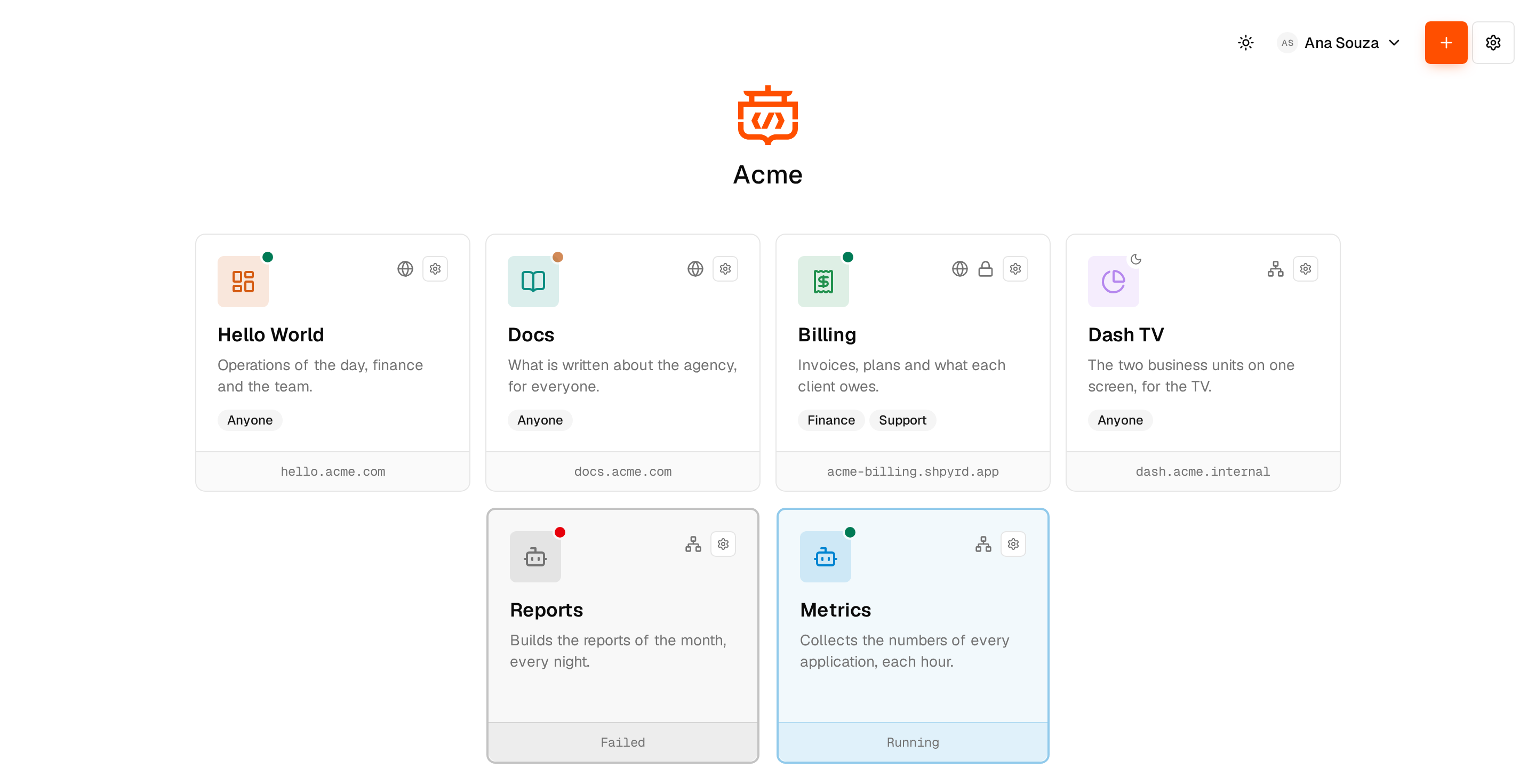
Status: beta. It runs on a local kind cluster and on Oracle Cloud (OKE); the design record and roadmap live in rfcs/. Website: https://shpyrd.io
Quick start (local)
Requirements: Docker (Docker Desktop with 6-8 GB of memory), macOS or Linux.
brew install shpyrd-io/tap/shpyrd    # macOS; or: curl -fsSL https://shpyrd.io/install.sh | sh
shpyrd cluster create                # kind cluster + base stack (10-20 min first time)
shpyrd cluster trust-ca              # trust the development CA (asks for sudo; undo with untrust-ca)
shpyrd cluster status
shpyrd cluster dashboard             # opens https://shpyrd.127.0.0.1.nip.io signed in
Releases publish the CLI for macOS and Linux (amd64, arm64) with checksums and
the server image ghcr.io/shpyrd-io/shpyrd-server:; the CLI installs
the image of its own version. Building from source: make cli (Go 1.27) builds
bin/shpyrd and bin/shpyrd-ctl; run ./bin/shpyrd-ctl cluster create --set
SHPYRD_SERVER_IMAGE=... to use your own server build
(see Developing).
cluster create runs kind through its Go library
and installs the base stack in dependency-ordered runlevels:
| Level | Components |
|-------|------------|
| rc0 | Prometheus Operator CRDs |
| rc1 | cert-manager |
| rc2 | development CA ClusterIssuer, trust-manager, ingress-nginx (host ports 80/443), in-cluster registry |
| rc3 | kpack (Paketo buildpacks builder), kube-prometheus-stack + Grafana, the control-plane database (PostgreSQL: teams, grants, the workspace) |
| rc4 | shpyrd server (API, controller, dashboard) |
Everything is reachable under a wildcard domain that resolves to your machine
(127.0.0.1.nip.io by default, --domain to change it):
https://shpyrd.127.0.0.1.nip.iodashboardhttps://grafana.127.0.0.1.nip.ioGrafana (admin / shpyrd on the local profile)localhost:30050registry (in-cluster address10.96.0.50:5000)
cluster create offers to make it the front door: kind takes high ports,
Caddy proxies *.shpyrd.test to it with certificates from its own trusted CA,
and URLs carry no port (https://shpyrd.shpyrd.test). *.shpyrd.test resolves
locally through dnsmasq (--local-dns, one sudo prompt, macOS). cluster status
shows the choice: Names: dnsmasq (*.shpyrd.test) · Front door: Caddy on 443 -> kind :8080.
Useful commands:
shpyrd cluster create --http-port 8080 --https-port 8443   # when 80/443 are taken
shpyrd cluster create --front-door caddy --local-dns       # behind an existing Caddy, *.shpyrd.test
shpyrd cluster init --only shpyrd            # re-apply one component
shpyrd cluster init --skip monitoring        # lighter install
shpyrd cluster export -o ./gitops            # render everything for Flux / Argo CD
shpyrd cluster destroy                       # the kind cluster; --context <cloud> empties a cloud cluster first
Docker Desktop must use cgroup v2 (the default). With the deprecated cgroup v1 setting enabled the CLI applies a kubelet override and warns.
Deploying apps
Try the bundled example first (a Go HTTP server rendering an HTML "Hello world"):
shpyrd projects create hello-world
cd examples/hello && shpyrd deploy  # shpyrd.yaml names the app; ~1 min for the first build
shpyrd open                         # https://hello-world.127.0.0.1.nip.io
shpyrd secrets set GREETING="Olá mundo"   # the page picks it up
shpyrd scale web=3                        # reload: another instance answers
Then your own code:
cd my-service                       # any repo a Paketo buildpack understands (Go, Node, Java, Python, Ruby, .NET, static) or with a Dockerfile
shpyrd projects create "My Service" --save # slug my-service: namespace app-my-service, App resource, shpyrd.yaml
shpyrd deploy                       # archive HEAD, build in-cluster (buildpacks, or the Dockerfile when there is one), roll out
shpyrd deploy --working-tree        # ...or the directory as is, uncommitted changes included
shpyrd open                         # https://my-service.127.0.0.1.nip.io
shpyrd deploy --git https://github.com/org/repo --ref main --path services/api   # build from Git; new commits rebuild (buildpacks)
shpyrd deploy --git https://github.com/org/repo --dockerfile             # ...or build the repository's Dockerfile with BuildKit
shpyrd secrets set DATABASE_URL=postgres://...   # config vars -> new release, rolling restart (values are never shown again)
shpyrd scale web=2 worker=1         # process types come from the buildpack (Procfile / launch.toml)
shpyrd resize web=shared-l          # sizes: shpyrd sizes list (shared = burstable CPU, dedicated = guaranteed)
shpyrd logs -f --process web        # JSON lines render readably on a terminal; --json passes them through
shpyrd shell --instance web.2       # bash in a running instance, with the buildpack environment
shpyrd run rails db:migrate         # one-off instance of the current release; exit code passes through
shpyrd releases && shpyrd rollback 2     # re-releases v2: its build and its config vars
shpyrd volumes create data --size 5Gi    # persistent disk; mount with processes.web.volumes: [{name: data, path: /data}]
A project is a namespace with its resources; today that is one app resource
(kubectl get apps -A) that the controller in shpyrd-server turns into kpack
builds or rootless BuildKit Jobs, Deployments, Services and Ingresses with
certificates. Databases, caches and volumes join as further resource types
(see rfcs/0002).
Dockerfile builds (build.strategy: dockerfile in shpyrd.yaml, detected
automatically for local deploys) support multi-stage targets, build args
(build.env), .dockerignore and a registry layer cache between builds. Their
images have one entrypoint, so process types other than web declare a
command; see examples/hello-docker.
shpyrd projects info and the project page list every resource of the project
(the app, volumes, databases and caches) with its status and what uses it.
Attaching a resource to the app injects its connection details as read-only
config vars, recorded in a release like any config change and restored by
rollback:
shpyrd extensions enable postgres        # CloudNativePG operator
shpyrd extensions enable redis           # Valkey/Redis run by the controller, no operator
shpyrd pg create db --size shared-m --storage 10Gi --project shop
shpyrd redis create cache --project shop   # or --persistent for a queue
shpyrd attach db && shpyrd attach cache  # DATABASE_URL, DATABASE_HOST, ... and REDIS_URL, ...
shpyrd pg psql db --project shop         # psql on the primary; shpyrd redis cli cache
shpyrd detach db
Databases run one CloudNativePG cluster each (1 instance, or 2-3 for HA), with a memory floor of 256 MiB whatever the size; caches are single-instance Valkey (BSD) or Redis with LRU eviction, or persistent with an append-only file on a volume. Deleting a resource is refused while an app is attached to it.
Volumes are persistent disks of a project (shpyrd volumes create|list|resize|delete,
a Volume resource backed by a PersistentVolumeClaim it owns). A volume is
single-instance by default: the process mounting it runs one instance with
Recreate rollouts, and scaling it up is refused with an explanation. --shared
volumes (ReadWriteMany) can be mounted by many instances but need a provisioner
that offers it (on Oracle Cloud, File Storage; see contrib/oci). Data survives
deploys, scaling and crashes; only volumes delete and projects destroy
remove it (on kind, cluster destroy too). Cloud profiles round a request up
to the provider's minimum and say so (Oracle Cloud block volumes start at
50Gi), and offer snapshots: shpyrd volumes snapshot data, then shpyrd volumes
restore data --from restores into a new volume
or in place (the mounting process stops while the disk is swapped).
Sign-in for your app
New projects ask visitors to sign in. Who may open an app is decided at the
edge, before a request reaches it: grant a team the user role (shpyrd members
add expenses --team finance --role user) and its members get in; everyone else
is asked to sign in or told which team the app is available to. The app receives
who they are on every request (X-Shpyrd-User, X-Shpyrd-Teams, X-Shpyrd-Roles
and a signed JWT verifiable at /.well-known/jwks.json) and needs no sign-in code
of its own. shpyrd access set public makes a site anyone can open; Open as on the
project page shows builders the app the way a team sees it (RFC-0033).
Platform backups
On cloud profiles the platform backs itself up every night: an archive of every
project (config vars, apps, resources, the sources they build from), sign-in
users, teams and members, encrypted with a passphrase and written to a bucket in
the provider's object storage that outlives the cluster (contrib/*/terraform/backups
creates it; cluster init --backup-target … [--backup-credentials-file …] points
the platform at it). shpyrd cluster backup runs one now, shpyrd cluster backups
lists them, shpyrd cluster backup key prints the passphrase to keep elsewhere,
and shpyrd cluster restore --from s3://… --passphrase-file … brings the state
back into a new cluster (or one project into the same cluster with --project).
Volume and database contents are not in the archive (RFC-0037).
Dashboard
shpyrd cluster dashboard opens the web UI signed in with the admin token
(shpyrd cluster token prints it). Apps are listed as projects. From the UI you can create them, deploy
them from a Git repository, scale processes, roll back (build and config), edit
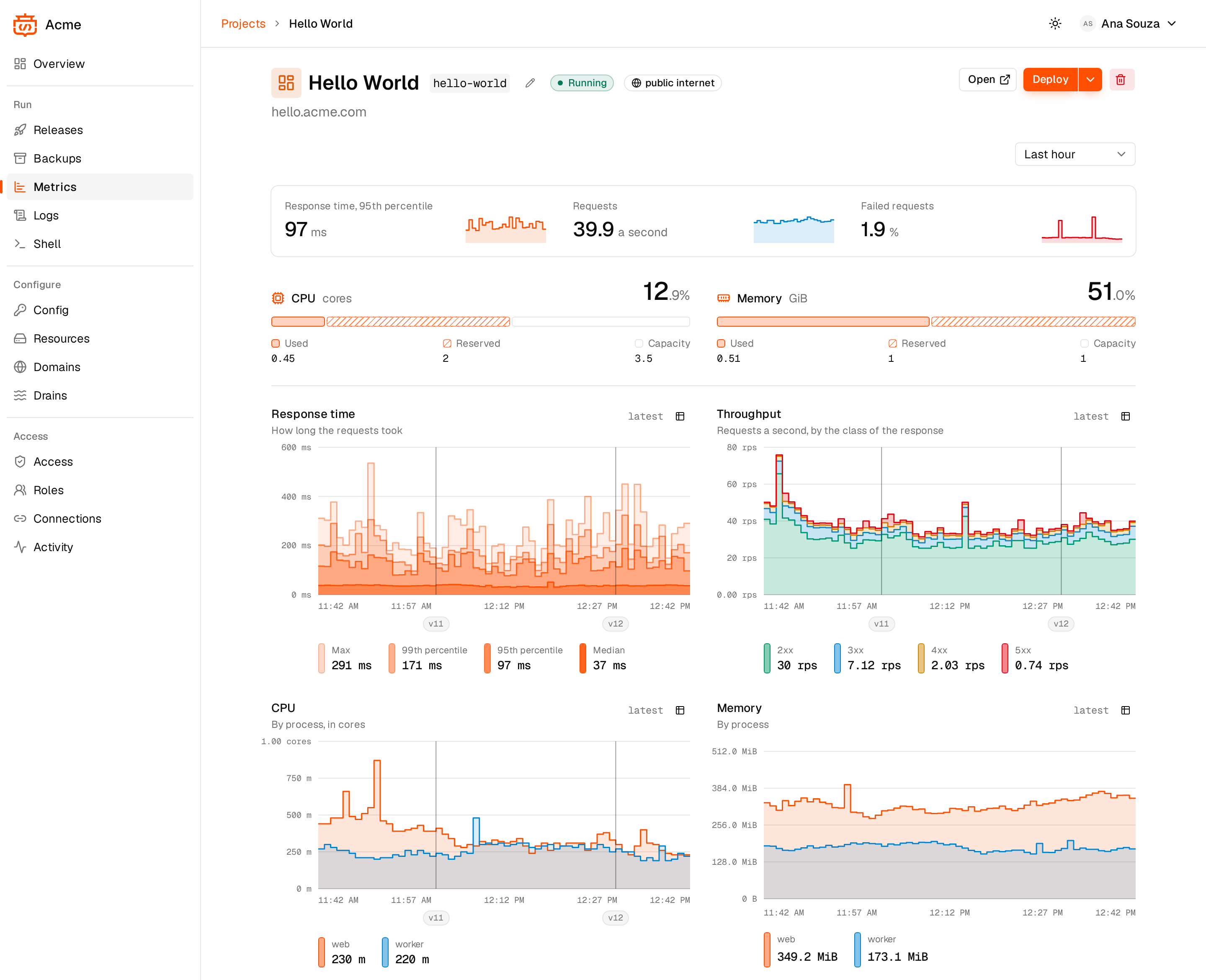
config vars and destroy apps. Per app it shows: metrics modelled on Heroku/Fly
(throughput by status class, p50/p95/p99 response time, instances, CPU and
memory as a percentage of each process' allocation, network, with release
markers), a live build log while building, the
build history, logs from every instance (web.1, worker.2...) with level
highlighting, filtering and live tail (JSON lines read as their level and
message, with the rest of the fields one click away), and the config var names.
Config var values are write-only: they can be added, replaced or removed but
never read back, in the UI or the CLI. The cluster page shows capacity: CPU and
memory used versus reserved by instance requests, per node and in total, plus
the installed components and the available extensions.
Extensions and sign-in
Optional capabilities are extensions compiled into shpyrd and switched on
per cluster (shpyrd extensions list|enable|disable; rfcs/0002). Enabling
installs the extension's component with the same runlevel installer and
restarts the server with it; disabling removes the component and is refused
while resources of the extension exist.
The first extension is auth-local (rfcs/0007): a bundled Dex
issuer at https://auth. with local email/password accounts. The server
is an OpenID Connect relying party (authorization code with PKCE, session
cookie, CSRF protection), so any OIDC provider can follow as configuration.
shpyrd extensions enable auth-local
shpyrd users add [email protected]          # prompts for the password; also from the Users page
shpyrd users list | passwd | rm
The dashboard then offers "Sign in with email and password" next to the admin
token. The token is a shared platform-admin credential meant for bootstrap and
automation: rotate it with shpyrd cluster token --rotate, and once accounts
and a platform-admin team exist switch it off with shpyrd cluster token
--disable (the API then refuses it). shpyrd cluster dashboard never sends
the token to the browser: it mints a one-time, 60-second login ticket in the
cluster that the browser exchanges for a normal session attributed to you.
Wrong tokens are audited and throttled per client.
Teams, roles and security
Users belong to teams; projects grant roles to users or teams
(rfcs/0008): viewer sees everything and changes nothing, developer deploys,
rolls back, scales, edits config vars and opens shells, admin also manages
members and resources and can destroy the project. Two platform roles exist:
platform-admin (everything, including the cluster page, extensions, teams and
users) and platform-viewer (read-only everywhere). The API refuses what the
role cannot do with a plain explanation, the dashboard hides it beforehand, and
a controller mirrors the grants into Kubernetes RBAC (RoleBindings per
project, ClusterRoleBindings for platform roles) so kubectl users
authenticated by the same identity provider see the same.
shpyrd teams create platform --platform-role platform-admin --member [email protected]
shpyrd teams create web --member [email protected] --group engineering   # groups: your IdP's groups claim
shpyrd members add shop --team web --role developer
shpyrd members add shop --user [email protected] --role viewer
shpyrd members list shop
Until the first team or member exists every signed-in user is a platform admin, so a fresh cluster stays usable; the dashboard says so. The admin token is always a platform admin.
For CI and scripts, people create API tokens (rfcs/0031) in the dashboard
(Workspace → API tokens) or with shpyrd tokens create ci --project shop --role
developer --expires 90d. A token carries at most the role its owner holds
when it is used (a demoted or suspended owner's tokens follow), expires when
told to, is shown once and can be revoked at any time. shpyrd login --url
https://shpyrd.example.com signs the CLI in from the browser, as you;
--token shp_... signs it in with a token, or set SHPYRD_TOKEN and
SHPYRD_URL in CI.
Hardening that needs no extension: a NetworkPolicy per project (ingress only
from the project itself, the ingress controller and monitoring; egress to the
project, platform namespaces and the internet, never to other projects), the
restricted Pod Security Standard in warn/audit mode with app containers run
non-root without capabilities (Dockerfiles need a numeric USER), security
headers and a strict CSP on the dashboard, rate-limited sign-in, and an audit
trail of every mutation from the API and the CLI ({who, what, target, when,
from} as Kubernetes Events, shown on the project page).
Instance sizes
Processes run with a named instance size from a cluster-wide catalog
(shpyrd sizes list, editable with shpyrd sizes set|delete|default or on the
dashboard's Cluster page). Two kinds: shared sizes get a guaranteed CPU share
that can burst up to 4x; dedicated sizes get whole cores with requests equal
to limits. The default catalog goes from shared-xs (0.25 CPU, 32 MiB) to
dedicated-2xl (16 CPU, 32 GiB); the default size is shared-s (0.5 CPU,
64 MiB). Pick one per process with size: in shpyrd.yaml, shpyrd resize
web=shared-m, or the project page; every change is a release. Metrics show CPU
and memory as a percentage of the size.
Global config vars
Settings every project should have (an OPENAI_API_KEY, a region) are set
once by a platform admin and injected into every process of every project:
shpyrd globals set OPENAI_API_KEY=... REGION=eu, shpyrd globals unset,
shpyrd globals list, or the Cluster page's card. They come first in the
environment, so a project's own config var of the same name wins and attached
resources win over both; a change is a "Global config change" release in every
project (the card says how many before it applies). Values are write-only.
shpyrd secrets list and the Config tab show globals as "provided by cluster"
and mark project vars that override one. A project opts out in shpyrd.yaml
with globals: false or globals: {exclude: [OPENAI_API_KEY]} (RFC-0016).
Logs: agent and drains
The logs-agent extension runs Vector on every node: it reads container logs,
labels every line with project, process and instance (web.1), parses
JSON lines (level, msg), and forwards them to log drains (RFC-0022a,
RFC-0023). Each node keeps at most 20 MiB of logs per container. A drain is
an HTTPS receiver (JSON, one object per line, custom headers for API keys) or
a syslog receiver (RFC 5424 over TCP, syslog+tls:// for TLS), per project or
for the whole cluster:
shpyrd extensions enable logs-agent
shpyrd drains add https://in.logs.betterstack.com/ --header "Authorization: Bearer ..." --project shop
shpyrd drains add syslog+tls://logs.papertrailapp.com:6514 --cluster    # every project, labelled
shpyrd drains list --project shop        # delivery status and last delivery
The project page and the Cluster page have a Log drains card with the same
form. Header values are stored in the cluster and never shown again. Log
storage with a time range (--since) is RFC-0022b, a drain to Loki plus a
query API, still to come.
The API behind the dashboard (/api/...) requires the token; only /api/healthz,
/api/config and content-addressed source archives are public.
Layout
cmd/shpyrd            CLI
cmd/shpyrd-server     in-cluster server (API + App controller + embedded UI)
api/v1alpha1          App CRD types (kubebuilder layout; make generate)
internal/controller   App reconciler
pkg/install           runlevel installer: embedded Kustomize + Helm SDK + server-side apply
pkg/kind              kind cluster provisioning
pkg/localca           development root CA
pkg/configvars        config vars (names + metadata, values are write-only)
pkg/ext               extension interfaces; pkg/ext/all the registry; pkg/ext/authlocal the first extension
pkg/authz             roles and actions (RFC-0008); pkg/audit the audit trail
pkg/api               HTTP API, OIDC relying party and sessions, the applications served by host
deploy/               components and profiles embedded in the binary (incl. extension components such as dex)
design/               the identity: design/ui the component library and its gallery (@shpyrd/ui), design/brand the mark
apps/                 the applications (Next, static files): apps/console, apps/workspace, apps/shared; pkg/ui embeds their builds
apps/website/         shpyrd.io: the site and the docs (Next + design/ui)
content/              the documentation and the texts of the site
examples/             sample projects: shop (Go, web + worker, Postgres + Redis), blog (Node, volume), api (Python Dockerfile), hello, hello-docker
rfcs/                 design documents
Developing
make dev-cluster     # cluster with everything except the shpyrd server
make dev-deploy      # build the server image, load it into the cluster, apply the shpyrd component
make test vet
The applications are Next applications compiled to static files: apps/console
(the console door) and apps/workspace (a workspace's), with apps/shared and
the component library in design/ui, all members of the npm workspace at the
repository root. make ui builds both into pkg/ui/dist/, which the server
embeds; run it before make dev-deploy when an application changed. On a
cluster the server reads them from SHPYRD_UI_DIR when it is set (an init
container writes them there) and falls back to the embedded ones.
They are developed without rebuilding or uploading anything: each has a
development server with hot reload that proxies /api to a shpyrd server.
Point it at a cluster's door with SHPYRD_DEV_API, and at the CA that signs the
door's certificate with SHPYRD_DEV_CA (for a kind cluster,
~/.shpyrd/ca/rootCA.pem; by default, the CA of a local Caddy):
npm install                                                                # at the repository root, once
shpyrd-ctl cluster create --name dev --enable auth-local,postgres,redis   # once
export SHPYRD_DEV_CA=~/.shpyrd/ca/rootCA.pem
SHPYRD_DEV_API=https://shpyrd.127.0.0.1.nip.io npm --prefix apps/console run dev   # http://localhost:4326
SHPYRD_DEV_API=https://127.0.0.1.nip.io npm --prefix apps/workspace run dev        # http://localhost:4325
The server sees the target's host, so the door follows the URL: the console's
host answers as the console, a workspace address as that workspace. Sign in
with email and password or the admin token (shpyrd-ctl cluster token);
sign-in through an external provider redirects back to the real host. Without a
server at all, npm --prefix apps/ answers from the Mock
(apps/). A local cluster is switched off and on with make dev-pause
CLUSTER=dev / make dev-resume CLUSTER=dev (the kind nodes stop in place, state
kept) and deleted with shpyrd-ctl cluster destroy --name dev --yes.
The website is a Next application built from the repository root:
make website-dev serves shpyrd.io on
http://localhost:4324. Documentation pages are Markdown under content/docs/;
see apps/website/README.md.
CI runs go vet, go test, the dashboard lint, tests and build, and an
end-to-end job on a kind cluster (.github/workflows/ci.yml); the website
builds separately (.github/workflows/website.yml). Each workflow is filtered
to its own paths, so a documentation change does not run the end-to-end job.
A tag vX.Y.Z releases:
GoReleaser builds the CLI archives, checksums, release notes and the Homebrew
cask in shpyrd-io/homebrew-tap;
buildx pushes the multi-arch server image to GHCR (release.yml).
Contributing
See CONTRIBUTING.md. Commits follow
Conventional Commits and need a DCO
sign-off (git commit -s).
License
MPL-2.0: the platform, the CLI, the dashboard, the site, the examples and the RFCs.
The enterprise features are the one exception: ee/ is governed by
ee/LICENSE. Its source is public, and running it in production
needs an agreement and a license; without a license it is built in and does
nothing. go build -tags foss ./... builds without any of it.