
quackd
One CLI for all your robots. Connect them, command them, and let them work together, each with an LLM for a brain.
quackd, pronounced “quacked”, began as the brain daemon the Microduck was missing, named like that robot's own robotd, mediad, padd and tofd. That is where the ducks come from: a task is a .duck file and a group of robots is a flock. Nine robots today, one of them driven on real hardware and the other eight still in a simulator or a mock, and one of them a duck you can print and build yourself.
Register each robot once, by name. Then state a goal from a terminal or from a chat with Claude, to one robot or to a flock of them, and the same contract decides which of each robot's skills its model may use, how many steps it gets, and when it has to ask you first.






Hey, my name is Rok and this is why I built quackd 👋
I see quackd as a ChatGPT like moment for robotics. Let me explain what I mean.
> LLMs existed long before ChatGPT. What ChatGPT actually did was take LLMs and hand them to ordinary people in a chat interface everyone already knew, like Facebook Messenger or Instagram. That was the real unlock.
> Right now, in 2026, most people still think robots belong in science fiction movies or in a lab at Tesla. That is not true anymore. There are already open source robots you can build yourself for under $1000. And they actually work. They can go to your fridge, open it, grab a can of Coke, close the fridge and bring it to you.
> The problem is they have a huge limitation. You can teach them dozens of moves, like "get a coke". But the robot itself is still dumb. It knows the moves, it just cannot connect them on its own. For robots to become truly useful, they need to become AI first and agentic. You give them a goal and they figure out the steps themselves.
> To get there, robots need a brain. And here is the catch. Today's robots simply do not have enough hardware on board to think, reason and plan. Their skull is too small for the brain this kind of intelligence needs. So the brain has to live outside the robot, in the cloud or on your own computer, where it can grow as big as you need. The robot itself stays small and light while all the heavy thinking happens somewhere else. That is what quackd started as. A brain for one robot.
> But here is what I think comes next. In the future everyone will have a flock of robots. At home, in the office, wherever. And they will not all be the same robot. Different types, different capabilities, even different companies. The first challenge is having all of them in ONE place to command. That is what quackd is now. You connect every robot you own to one CLI, and you command all of them from there, with an LLM as the brain of each one.
> But even when you have them all in one place, that is still not enough. What you ask for will be complex, and robots will probably be very specialized. One can walk, one can grab, one can carry. For a bunch of different robots to be useful with as little of your involvement as possible, they need to start working together towards the goals you give them. Which means they need to communicate between each other. So that is the other half of quackd. You give the flock a goal, each robot's brain reads what the others can do, and they divide the work between themselves.
> Imagine telling your robots "I want to eat and drink something". The one with wheels goes to the fridge, checks what is inside and tells the others what it found. The one with arms grabs a plate and some cutlery. One of them brings it all to you and asks what you would like, you choose, and they go back for the food and wish you a good meal. Sounds like science fiction, right? We are closer than you think!
> That is basically what ChatGPT did for LLMs. It took something powerful and put it in one place everyone could reach. And that is why I see quackd as a ChatGPT like moment for robotics.
> — Rok Benko, September 2026
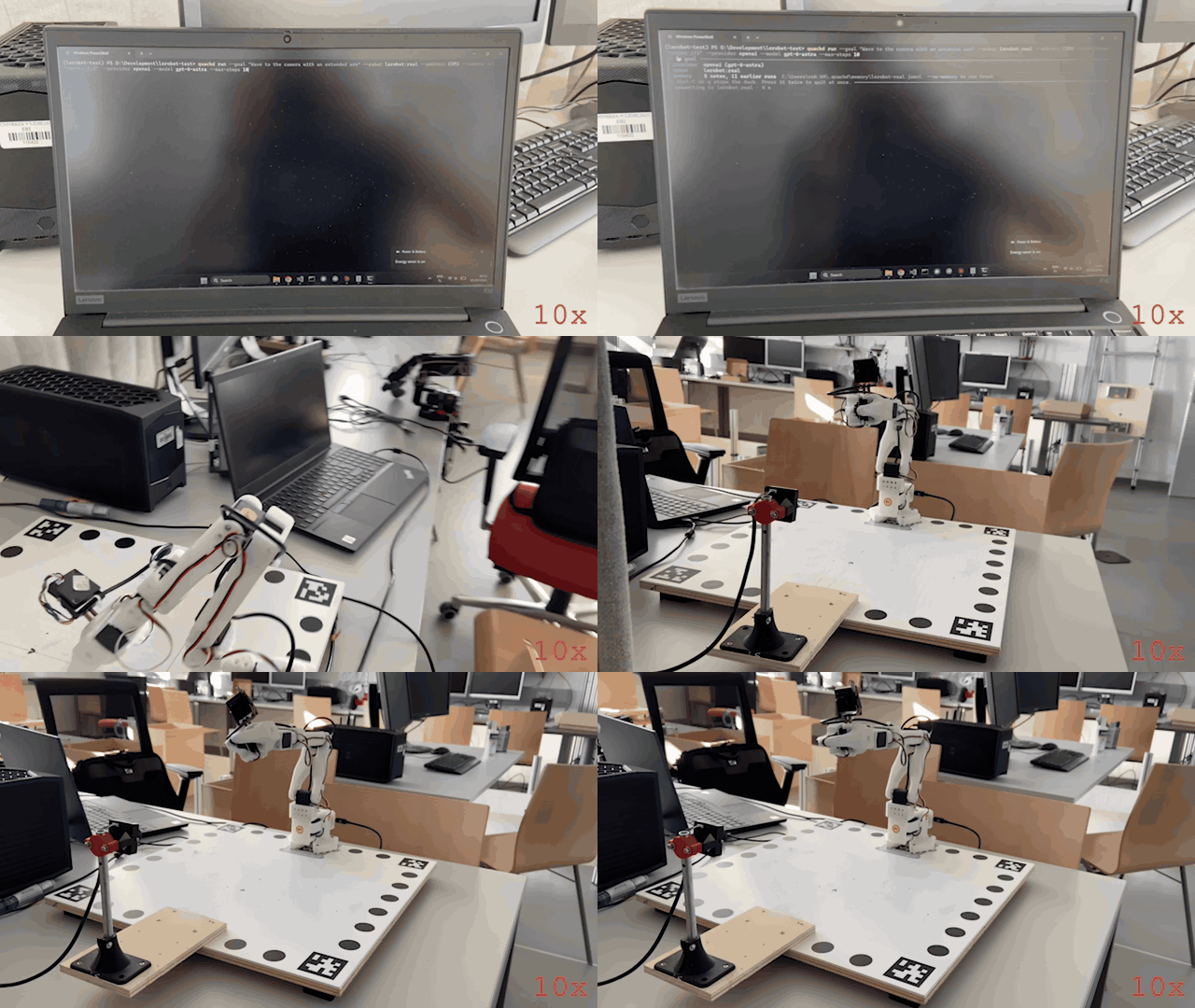
A real arm, a real model, one sentence. An SO-101 follower arm on 2026-09-15, piloted by OpenAI's gpt-6-astra through quackd run --goal "Wave to the camera with an extended arm". The model was handed the arm's five verbs and its datasheet and chose one call at a time: raise the shoulder and elbow, roll the wrist four times, return, stop. Nobody wrote a wave. The whole run at ten times speed, filmed on a phone: it opens on the command going into a terminal, watches the run scroll, then pans to the bench, and the wave itself is the part where the wrist rocks. What the model was told, all ten of its calls and what went wrong are in What happened in that run, and how every recording here was made is in docs/assets.
quackd is a command line for the robots you own. Each one joins through an adapter that declares, as a manifest, what the body is and what it can do, and you register it once by name with how to reach it. Give a robot a goal like "find the ball and kick it" and a large language model picks one skill at a time from the list that manifest declares, quackd runs it, looks at the camera, and asks again until the job is done or clearly impossible. Give the same goal to a flock and every robot in it gets a model of its own, and they divide the work by telling each other what they are going to do. A goal can arrive from a chat, a command line or a .duck task file, and whichever way it comes, quackd enforces a contract the model cannot talk its way out of: which skills are allowed, how many steps, when a human must say yes, when to abort. Claude, OpenAI, Gemini, Grok, Mistral, DeepSeek, Cohere, Qwen, Kimi, GLM and Meta work over their APIs, and so do the models OpenRouter routes to, behind one key of its own. Open source models work on your own machine through Ollama, vLLM, llama.cpp or LM Studio, with no key. A model is the pilot on every run. --decision-llm optionally puts something in front of it that is not a language model and cannot be used as one: a decision LLM generates no text at all, it scores a fixed set of options against a state and returns which one with a probability for each, so it answers the turns that are a choice among calls the robot already has and can no more write a joint angle than a thermometer can. TypeSafe's Jev was the first of them and is hosted, OpenAI's Decisions API is the other hosted one, and the rest quackd names are open servers you run yourself or a checkpoint loaded into this process, each with a page of its own. Off unless you name one, and --decision-mode shadow records what one would have chosen without letting it change a thing (docs/guides/decision-llms/README.md). On the SO-101 arm a learned policy from Hugging Face's Hub, NVIDIA's GR00T and Physical Intelligence's pi0 among them, can drive the arm for one short segment at a time, and Which models work lists every model of all three kinds and how to name each one.
The first robot is the Microduck from Pollen Robotics: a 25 cm, 800 g biped with fifteen small servos, a camera in its head, a depth sensor, a speaker and an onboard computer, open source and about $399, which already knows how to walk, turn, kick, scoop something off the floor, look around and quack at 50 Hz on its own hardware. It is the robot quackd started on, independently and unofficially. Eight more bodies follow it through adapters that declare what each can do: an Open Duck Mini v2 you can print and build yourself, an SO-101 class arm through LeRobot, any wheeled base over rosbridge, an XLeRobot dual-arm cart, an AlohaMini with two arms on a lift, a ToddlerBot humanoid, a Huebot, a 25 cm biped with behaviour code of its own, whose maker is writing a shim for it that is to answer the Microduck's calls the same way, and MOSS, a small tracked rover that picks up litter, reached through its own cockpit and a bridge quackd ships for it.
One of the nine bodies runs on real hardware, and the recording above is it. On 2026-09-15 an SO-101 follower arm ran quackd over lerobot:real through twelve --goal runs in one afternoon, piloted by OpenAI's gpt-6-astra from a Windows laptop with a USB webcam: it waved with its wrist, reached out with its shoulder and elbow, opened and closed its gripper, and once mimed a duck quacking with it. The GIF is the last of the twelve, and What happened in that run reads its transcript call by call. The honest half is there too. The arm fell at the end of every one of those runs, because LeRobot drops torque when it disconnects, which is what the rest pose was written afterwards to stop, and the camera framed the gripper and cropped the raised arm, so the model checked its own waves against joint readings rather than against the picture. On 2026-09-23 the same arm ran again, registered as arm-01 with a rest pose, through 26 runs on quackd 0.12.0, and 23 of them came from ten task files written for that afternoon, which now sit among the 223 in docs/examples/lerobot/. Its rest pose could not reach a fold that lay past the travel its calibration recorded, 19 of the 26 runs never moved the arm at a pilot's request, and what quackd changed in answer has not run on an arm yet. The other eight bodies have not met hardware. Their real backends speak names read from upstream source at a pinned commit and have only ever talked to fakes, and for the Open Duck Mini and the ToddlerBot those fakes are the daemons quackd itself ships for the robot, exercised over loopback, so there only the body is untested. MOSS's bridge is quackd's own too, exercised the same way beside a fake of MOSS's cockpit. No flock has yet crossed from one machine to a second. Goals like "find my keys", handed to a flock that sorts out who does what, are where this is going, not what it does yet. The honest label for today is LLM driven, goal directed control of one real arm and eight simulated or mocked bodies, alone or in flocks, and Which robots work says exactly how far each one has got.
No robot yet? You do not need one to try it. Two simulators for the duck, and they come from different places. The cartoon is the core's own arena, which is why the three other bodies that have a simulator use it too, along with every seeded sweep in CI: it starts in a second and downloads nothing, and quackd[microduck] is what gives it a duck to put in it. The physics one is quackd[mujoco], which puts the real Microduck in MuJoCo and runs alpha_walking.onnx, a walking policy Pollen trained for it before the velstand.onnx a robot on a current release walks on, so the duck walks instead of sliding and a command below its gait floor produces nothing at all. These goals succeed on 10 of 10 seeds with the scripted pilot and a ground truth check:
"Find the ball and kick it." · "Find the ball, walk up to it and say where it is." (an Open Duck Mini v2, which cannot kick) · "Split the search, the closest duck kicks." (a flock)
The first of those has passed 10 of 10 on the physics simulator too, with the duck on its own gait rather than a sprite on rails, though not on every run: that is test_find_and_kick_on_the_real_duck, which needs upstream's model in the cache, so a nightly job fetches it the way your first run would and CI's own gating job runs the stand-in. The Status section below says what that sweep actually returns. The rest are cartoon only. Of the other eight bodies only the arm has a physics model here, and its simulator is for rehearsing an arm's own task files before they meet the arm.
Table of Contents
* From the terminal * From Claude, over MCP * What happened in that run- No robot yet? Try it in 60 seconds
- Why?
- How it works (the simple version)
- Example
- Status
- Which robots work
- Which models work
.duck file
* Pilot it from Claude (MCP)
* Drive it yourself
* From a browser or a phone
* What it remembers
* Why it exists
* Which robots carry one
* Putting a passport on a robot
* How a meeting works
* What a passport says
* How robots find each other
* Who vouches for whom
* Talking, once they have met
* What a stranger can make your robot do
* Privacy
* Robot Passport in quackd
* The specification and its tests
* Why a new protocol, and why this name
- The browser demo
- Configuration
- Performance
- Limitations
- Roadmap
- Contributing
- Safety
- Acknowledgements
- Star history
- License
Quickstart: a LeRobot SO-101 arm
Two ways to drive the same arm, and the steps that set the arm up are shared between them. From the terminal is the path the recording at the top of this page took, in ten steps, with the arm calibrated, named and parked before anything you type can move it. From Claude, over MCP is the same arm reached from a chat instead, where the model you are already talking to is the pilot. Either way you need the arm and its serial port, a USB webcam, and Python 3.12 or newer, because LeRobot itself needs it. Only the terminal path needs a key for one cloud vendor, because only that one brings a model of its own.
From the terminal
- Install the arm and a pilot into one environment. Below Python 3.12 the
lerobotextra resolves to nothing while the install still reports success, so pin the interpreter.
uv venv --python 3.12
uv pip install "quackd[lerobot,openai]" # or anthropic, gemini, grok, and so on- Put the key where quackd reads it. One line in a
.envfile, in the folder you run from or in the venv root:OPENAI_API_KEY=sk-....quackd doctorprints the key it found for each provider, masked to its ends, which is the quickest way to see that the file was read at all.
- Find the port, then calibrate under the name you will register. Calibration is LeRobot's own tool and it asks you to move each joint through its range by hand. Take each one all the way into the fold you will rest the arm in, because the travel it records is written into the servos as limits they are never driven past, and a fold outside it is a pose the arm cannot be driven back to. quackd reads every joint limit out of the file it writes, and refuses an arm that has none.
lerobot-find-port
lerobot-calibrate --robot.type=so101_follower --robot.port=COM3 --robot.id=arm-01- First contact, which moves nothing. Connect, read the joints, temperatures and torque back, disconnect. Support the arm while it starts, because connecting releases torque for a moment. A spec on its own carries no name, so it reads the calibration saved as
arm-01whatever name you calibrated under. If you chose another, do step 5 first and runquackd doctor --robotwith that name instead, which reads the calibration kept under it.
quackd doctor --robot lerobot:real --address COM3- Name it. The registry keeps the port, the camera and the pilot under one name, so every command after this is
--robot arm-01. Register it under the id you calibrated as.
quackd robot add arm-01 lerobot:real --address COM3 --llm openai:gpt-6-astra- Fold the arm by hand, then record where it rests. An SO-101 has no brake and LeRobot releases torque when it disconnects, so without this the arm would drop from wherever a run left it, and quackd refuses to run it at all. With it, every run starts at this pose and returns to it before quackd lets go. This pose is where every run starts and ends unless the run itself says otherwise, and the one flag that says otherwise is just below step 10, where it changes the start and leaves the end alone. If it warns that a joint is recorded past what this calibration lets its servo be driven to, your fold lies outside the travel step 3 recorded: a run parks that joint at the edge of its travel and lets it settle from there, and calibrating again with the joint taken all the way into the fold, then recording the pose again, makes the fold itself reachable. Record the pose again after any new calibration too, because a calibration can move a joint's zero and the pose is kept as angles.
quackd robot rest-pose arm-01- The first task moves nothing either.
lerobot-lookoutallowsreport_stateandstopand nothing else: it reads the arm and says what it found. There is nothing to improvise, so the scripted pilot is enough and this costs no tokens.
quackd run lerobot-lookout --robot arm-01 --llm fake- Add the webcam.
lerobot-find-cameras opencvprints the indices and saves a frame from each, so you can see which is which. Point it at the space the arm moves through rather than at the gripper, which is the mistake the run above made.
quackd robot edit arm-01 --camera-url "opencv://2"- Rehearse it. With
--dry-runthe arm is connected and read, and not one command reaches it, so you see which verbs the model reaches for and with what numbers before a joint moves.
quackd run --goal "Wave to the camera with an extended arm" --robot arm-01 --max-steps 10 --dry-run- Then let it move. A hand near the power switch, the arm's whole sweep clear, and the same sentence without the flag. This run starts at the rest pose you recorded in step 6 and folds back to it when it is over, which is the default and the first of the two choices below rather than the only way a run can begin. If the arm cannot get back to its rest pose at the end, the run says it is holding itself up and asks you to clear whatever is in its way and press Enter, and it tries the fold once more. Only if that fold misses too does it ask again, and Enter at that second question takes torque off where the arm stands, so the arm drops: hold it first. Leave either question for 60 seconds and torque stays on. After that,
quackd robot release arm-01folds the arm to its rest pose and lets go of it there, asking the same two questions if its fold misses: support the arm while it connects, because connecting takes torque off for a moment, then take your hands away when it says so, in the 3 seconds it waits before it folds. None of this has run on a real arm yet.
quackd run --goal "Wave to the camera with an extended arm" --robot arm-01 --max-steps 10Or start from a pose you set by hand. --by-hand gives you the arm before the pilot gets it. The arm is driven to the rest pose from step 6 first, torque comes off there, and quackd waits: lift the arm, put whatever the task needs into the gripper, close the gripper on it, hold the arm where the run should begin, and press Enter. Lift it out of its fold before you press Enter, even where the run should begin next to it, because a fold that lies past the travel step 3 recorded is let go of at the edge of that travel and is free to settle back past it. quackd writes the pose you left as the goal, puts torque back on, reads the joints again to check nothing sagged, and prints the angles it is now holding so you know you can let go. The pilot works from there. A joint outside its calibrated travel when you press Enter is the exception, whether you placed it there or never lifted it out of the fold: nothing can hold it where it is, so torque stays off, quackd names the joint and its travel, and the run ends with the arm limp, in your hands or still lying at its rest pose. Nothing moves the arm or puts torque on it after that, so the gripper does not open and the arm is not folded: take out whatever is in the gripper yourself. At the other end the arm is still holding whatever it ended on, so it is handed back to you before anything opens: take hold of what is in the gripper and press Enter, the gripper opens all the way, and 3 seconds later the arm folds back to the rest pose, with a Ctrl-C or q holding it where it is. Leave it alone and it folds up with the gripper still shut. This needs the rest pose from step 6, because the rest pose is the one place quackd will drop torque and an arm released anywhere else falls, and it needs a terminal, because somebody has to press Enter.
quackd run --goal "draw a circle on the paper in front of you" --robot arm-01 --by-handGive it a picture. --image hands a file to the task itself, which is not the same thing as what the robot can see. The pilot gets each picture on its first turn, labelled with the file's own name, and keeps it in front of it for the whole run. That is what makes it different from a camera frame: a frame is perception, it arrives again every step and it shows the room as it is now, while a task picture never changes and is what the task is about. The flag repeats, so a run can carry several. It needs a pilot that takes images, quackd list-models marks the models that take no frames, and a local model needs --vision.
quackd run --goal "draw what is in the picture" --robot arm-01 --image sketch.pngOr put a stepper in front of the model. --decision-llm is optional, off unless you name one, and needs no change to any of the ten steps above. With --decision-mode shadow a run is exactly the run it would have been, and the transcript also records what the decision LLM would have chosen on each turn, which is how you find out whether it is worth switching on for your bench. With --decision-mode on it answers the turns whose answer is a choice among calls the arm already has, and every joint angle is still the model's. jev is TypeSafe's hosted one and wants quackd[decision] and TYPESAFE_API_KEY (docs/guides/decision-llms/jev.md), openai is OpenAI's Decisions API and wants the quackd[openai] and OPENAI_API_KEY a pilot through OpenAI already has (docs/guides/decision-llms/openai.md), and every other name quackd knows, what it wants and where it runs, is one table in docs/guides/decision-llms/README.md, a page each.
quackd run arm-grip-check --robot arm-01 --by-hand --decision-llm jev --decision-mode shadowPut the two together and you have the drawing case: you set the arm down holding a pen where the paper is, and the model is looking at the sketch it has to copy.
quackd run --goal "draw what is in the picture" --robot arm-01 --image sketch.png --by-handOr rehearse a task at home first. quackd[lerobot-sim] is the arm's simulator, lerobot:mujoco: the real backend's own code over the maker's model of the SO-101 in MuJoCo, and it installs on Python 3.11 with no LeRobot and no torch. quackd robot twin arm-01 registers arm-01-sim on the calibration file step 3 wrote, with the rest pose from step 6, the pilot and the cameras. quackd preflight then runs a task file on it seed after seed and says whether every run ended at its rest pose and did what the task's arm-01 itself before connecting to anything. It rehearses the code and the task, not the arm, and the arm's simulator says what it proves and what it does not.
uv pip install "quackd[lerobot-sim]"
quackd robot twin arm-01
quackd preflight lerobot-lookout --robot arm-01-sim --llm fake
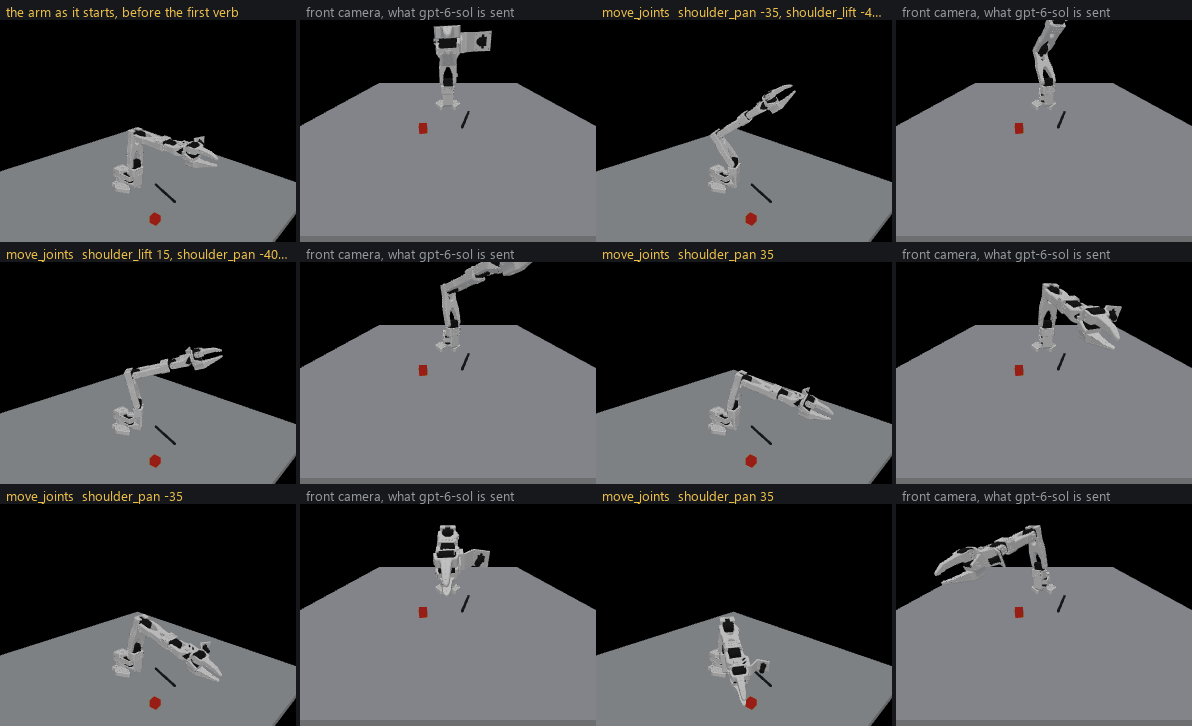
The hero's sentence on lerobot:mujoco, piloted by OpenAI's gpt-6-sol on 2026-09-28 in 7 steps, 9 model calls, 69 seconds and $0.05, and shown at twice the simulator's speed (how it was made).
Two of those steps were not taken in the recording at the top of this page. The run in that GIF was reached as --robot lerobot:real --address COM3, with no registered name and no rest pose. Step 5 existed that day and simply was not used. Step 6 did not exist at all: the rest pose was written after that afternoon, in answer to it. Both were taken on the same arm on 2026-09-23, and the rest pose could not be reached there, because the arm's calibration had never seen the shoulder folded all the way back and the fold lay past its travel. What quackd does with a fold like that now, and why step 3 asks you to calibrate folded, is A pose past the travel. That has been exercised against lerobot:mock and in the test suite, and not yet on the arm. The arm in the recording is held up by torque alone, which is why it fell when the run ended. The two options after step 10 postdate that afternoon as well, and --by-hand and --image have both been exercised against lerobot:mock and in the test suite, and not yet on a real arm. Walk all ten and you are the second person down this path, so what differs on your bench is the part worth writing down.
docs/adapters/lerobot/first-run.md is the long way round the same path: every refusal you can hit and what it means, the safety checks worth running before a wave, what the camera can and cannot see with each kind of pilot, and what to report afterwards. Nothing moves until step 10 of the hardware checklist.
From Claude, over MCP
Steps 3 to 8 above are the same whichever way you drive the arm, because they are about the body rather than about the pilot: find the port and calibrate, connect once, name it, record a rest pose, add the webcam. Two of the others change. Step 1 needs no pilot extra, so it is uv pip install "quackd[lerobot]" on its own, and step 2 goes away, because quackd picks no model in this mode and reads no key. The model you are already chatting with is the pilot, so there is no --llm here at all.
Steps 9 and 10 become one thing: point your client at the arm, then ask it in the chat. In Claude Code that is one command, and what it names is the quackd inside the venv from step 1, by its absolute path.
claude mcp add arm -- D:\Development\lerobot-test\.venv\Scripts\quackd.exe serve-mcp --robot arm-01That path is a Windows one, and elsewhere it is the same venv's bin/quackd. Use the venv rather than uvx, which builds a second environment on whichever interpreter it picks: on a machine whose default Python is 3.11 the LeRobot half of that extra resolves to nothing, silently, and you get a server with no arm backend in it. Claude Desktop takes the same command and arguments in claude_desktop_config.json, under Settings, then Developer, then Edit Config, and wants a full restart of the app afterwards.
Either way nine robot_* tools appear, and behind them is the executor the rest of this page describes: the same allowlist, the same budgets, the same feasibility verdict before anything moves, and the same refusal for a joint goal outside the range your calibration recorded. What you gain over a --goal run is that you choose each verb and each number yourself, which is the only way to ask for one verb and stop, and the only way to ask a real arm for a camera frame on purpose.
Two things are worth knowing before the first session. Starting the server moves the arm, because connecting drives it to the rest pose from step 6 and refuses to start at all if it cannot get there, so nobody should be in reach when a client spawns it. And there is no Ctrl-C: between verbs the brake is asking for stop, and during one it is the power switch.
Part 2 of docs/adapters/lerobot/first-run.md is that path in fifteen steps, with both clients configured, what each tool answers, what every refusal means, and which moments move the arm without anybody asking. No MCP session has yet driven a real arm, so that half of the page is the half with the least behind it.
What happened in that run
The command, as it was typed on the laptop in the recording:
quackd run --goal "Wave to the camera with an extended arm" --robot lerobot:real --address COM3 --camera-url "opencv://2" --llm openai:gpt-6-astra --max-steps 10No task file, no registered name, no rest pose, which is why quackd refuses that command today: a real arm with no rest pose has nothing to fold to when its run ends, and this one fell where its run ended. --goal writes a contract on the spot: the arm's own five verbs allowed, gripper, move_joints, place, report_state and stop, plus the four the loop always offers, assess_task, declare_success, declare_failure and remember. Exactly one of them per turn, and anything else refused. It was the last of twelve runs that afternoon, so the memory quackd keeps per robot handed it five notes and how the last five of the eleven before it had ended, which is the whole of what it carries.
What the model was told. About a third of the system prompt as it read that day, cut where marked, with the two lines that were wrong left in:
You are the brain of a six-joint desktop robot arm with a parallel gripper (an SO-101 class
arm driven by LeRobot), bolted to a table. You are a high-level pilot: you choose ONE verb per
turn; the robot's own controllers handle the motion. Do not micro-manage.
Rules (enforced by the executor — not optional)
- Call exactly one tool per turn. Never zero, never two.
- Only these verbs are allowed: gripper, move_joints, place, report_state, stop. Anything else is refused.
- Budgets: 40 steps, 5 minutes, 40 LLM calls. The run stops when any is hit.
- Before the first verb that moves the body, call
assess_task with your verdict on whether
this body can do this task at all, judged against its datasheet below: feasible,
infeasible (the run ends, nothing moves) or uncertain (a human is asked). [...]
Your body: what it can and cannot do
- Height: 0.53 m (estimate: one vendor's listing; reaching straight up)
- Actuated joints: 6 (official: the LeRobot SO-101 docs; five joints and a gripper)
- Payload: 0.5 kg (estimate: one vendor's listing)
- Not published: mass, reach. Decline any task that hinges on any of them.
- Each joint's travel in degrees, read from its own calibration, and the only goals quackd
will send: shoulder_pan -120 to 120, shoulder_lift -84.2 to 84.2, elbow_flex -96.5 to 96.5,
wrist_flex -103.2 to 103.2, wrist_roll -180 to 180, gripper 0 to 100.
Whatever the task says, this body cannot:
- go anywhere: it is bolted to a table and has no base
- feel what it holds: nothing reports grip force, so holding is inferred from the gripper
stopping short of shut, which an empty hand that binds also does
[...]
What you remember from earlier runs on this robot
- [2026-09-15] An extended-pose gesture reached shoulder_lift −40°, elbow_flex 24°, and
wrist_flex 1° before wrist-roll waving; the available camera view did not show the whole
arm to verify extension visually.
- [2026-09-15] A wrist-roll wave commanded alternately at +30° and −30° reached reported
angles of +26–27° and −26–27°.
[... three more notes, and how the last five runs ended ...]
Task file: goal — Wave to the camera with an extended arm
Task
Wave to the camera with an extended arm
Strategy
Use the available verbs. Look before you act (observe or search_scan), prefer composite
verbs like go_to, verify with a fresh frame, then remember one fact and declare success.The ten calls. Model seconds is how long the model took to answer. Arm seconds is how long the verb then took on the arm.
| Call | Tool | What it asked for | What the arm reached | Model s | Arm s |
|---|---|---|---|---|---|
| 1 | report_state | a reading before anything moves | folded: shoulder_lift -38.2°, elbow_flex 85.1°, torque on, hottest servo 37 °C | 8.2 | 0.0 |
| 2 | assess_task | feasible, for the reason below | nothing moves on this call | 7.0 | |
| 3 | move_joints | shoulder_lift -40°, elbow_flex 25°, wrist_flex 0° | -38.6°, 30.0°, 0.4°, in 32 commands over 4.1 s | 8.0 | 4.1 |
| 4 | move_joints | wrist_roll +30° | 28.0° | 6.9 | 1.2 |
| 5 | move_joints | wrist_roll -30° | -25.4° | 5.7 | 2.1 |
| 6 | move_joints | wrist_roll +30° | 25.4° | 5.1 | 2.0 |
| 7 | move_joints | wrist_roll -30° | -25.3° | 3.3 | 1.9 |
| 8 | move_joints | wrist_roll 0° | -4.2° | 5.1 | 0.9 |
| 9 | stop | hold it where it is | held | 5.8 | 0.0 |
| 10 | declare_success | the reason below | | 7.0 | |
The numbers.
- 78.8 seconds of run, after 10.3 seconds to open the serial port.
- Ten model calls, 3.3 to 8.2 seconds each, 62.1 seconds in all, which is 79% of the run. The arm moved for 12.2 seconds, which is 15%.
- 49,096 tokens in, 491 out, 22 of them reasoning, and not one word of prose: the model's only sentences in the whole run are the two below.
- Eight verbs, 97 commands to the arm, every one accepted. No gate fired, nothing was clipped to a joint limit, and no servo read above 37 °C.
- No
remember, and rightly. Two of the five notes already in its prompt described this manoeuvre from earlier runs that afternoon, one giving the extended pose and one the wrist angles it would reach, and its last sentence says so.
assess_task, feasible: An unloaded extended-arm gesture and wrist wave need no target reach
or lifting. The visible arm is empty, and the planned shoulder_lift -40°, elbow_flex 25°,
wrist_flex 0° and wrist_roll ±30° are inside the calibrated travel limits.
declare_success: Completed the extended-pose wrist wave: shoulder_lift reached -39°,
elbow_flex 30°, wrist_flex 0°, and wrist_roll alternated +28°, -25°, +25°, -25°. Returned
wrist_roll to -4° and stopped. The fresh camera shows the raised arm, but crops its upper end,
so full extension is supported by joint state rather than fully verified visually. This
strategy is already recorded in memory.
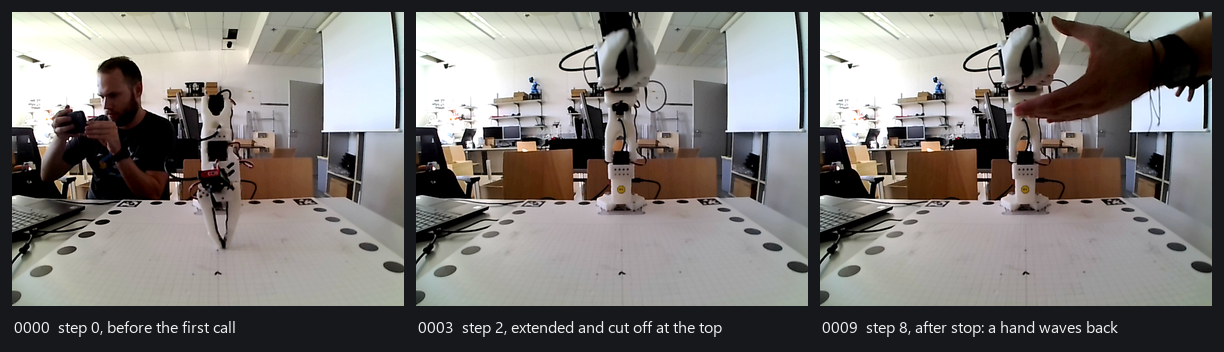
What the pilot saw. Three of the ten frames the model was sent, 640x480 from one USB webcam at table height behind a calibration mat. From the third frame on, the arm it had just raised runs off the top of the picture, which is exactly what it reported. The hand in the last frame reached the model as pixels and never as a word: the detector that turns a frame into text called a blue figurine on a shelf a person on eight of the ten steps, and never saw anybody actually in the room.
The honest half. Each frame was between 5.6 and 12.5 seconds old at the moment the model was handed it, about eight on average, and older still by the time the move it prompted had finished, so the model was always looking at where the arm had been. The colour detector that turns a frame into a line of text reported a ball that was not there on every step, called a small blue figurine on a shelf a person about 8.5 metres away on eight of the ten, and never once saw the actual people in the room. The model ignored all of it, and used the picture for exactly one thing: noticing that the raised arm ran off the top of the frame, and saying so rather than claiming a wave it could not see. It asked for elbow_flex 25° and the arm settled at 30°, and it reported the 30. The arm fell when the run ended, because this was before the rest pose existed. And reading this transcript to write this section turned up two bugs, both fixed alongside it: the prompt said Budgets: 40 steps while the command and every observation said ten, because it was built from the task file's own contract rather than from the one the run was enforcing, and the strategy paragraph told this arm to look with observe or search_scan and to prefer go_to, three verbs it does not have and the allowlist at the top of the same prompt did not list. The model worked around the second one by looking with report_state, which is not a thing to rely on.
Two more lines of that prompt read differently now, for reasons a later day on the bench found. Not published: mass, reach. Decline any task that hinges on any of them. forbids an arm whose reach nobody published to reach for anything, and on 2026-09-23 it was one of the lines a run with a pen ended on. The line now tells the pilot to answer uncertain and name the figure rather than decline, and the arm's sheet publishes a reach of 0.4 m, an estimate summed from the link lengths in the maker's URDF (docs/adapters/lerobot/README.md). And the travel line has a second sentence the model above never saw: a joint can read past its travel when it was folded or placed there with torque off, which is where a rest pose usually is, and goals are still limited to the travel. On 2026-09-23 the arm's recorded fold lay past the travel of its shoulder, and three pilots gave a reading there, against a travel that left it out, as a reason not to move the arm at all (A pose past the travel).
No robot yet? Try it in 60 seconds
uvx --from "quackd[mujoco]" quackd run --goal "walk in a square" --robot microduck:mujoco --llm fake   # the duck below: real physics, its own trained gait (first run fetches about 10 MB)
uvx --from "quackd[microduck]" quackd run find-and-kick --llm fake             # the cartoon: no download, done in a second
claude mcp add quackd -- uvx --from "quackd[microduck]" quackd serve-mcp --robot microduck:sim2d   # or just chat with it: "find the ball and kick it"
uvx --from "quackd[open_duck]" quackd run open-duck-scout --llm fake           # a duck you can build: it finds the ball and walks up, no kick
uvx --from "quackd[mujoco,anthropic]" quackd run find-and-kick --llm anthropic --robot microduck:mujoco   # a real model on the real gait, needs ANTHROPIC_API_KEY
uvx --from "quackd[microduck,openai]" quackd run find-and-kick --llm ollama:qwen3:8b   # local model, no key
open runs/*/run.gif                                                                 # a GIF in either simulator, a transcript every time
Every quackd line there names a body with --from, because quackd itself ships none: the core is the loop, the executor and the contract, and each robot is a package the extra of the same name pulls in (Installation).
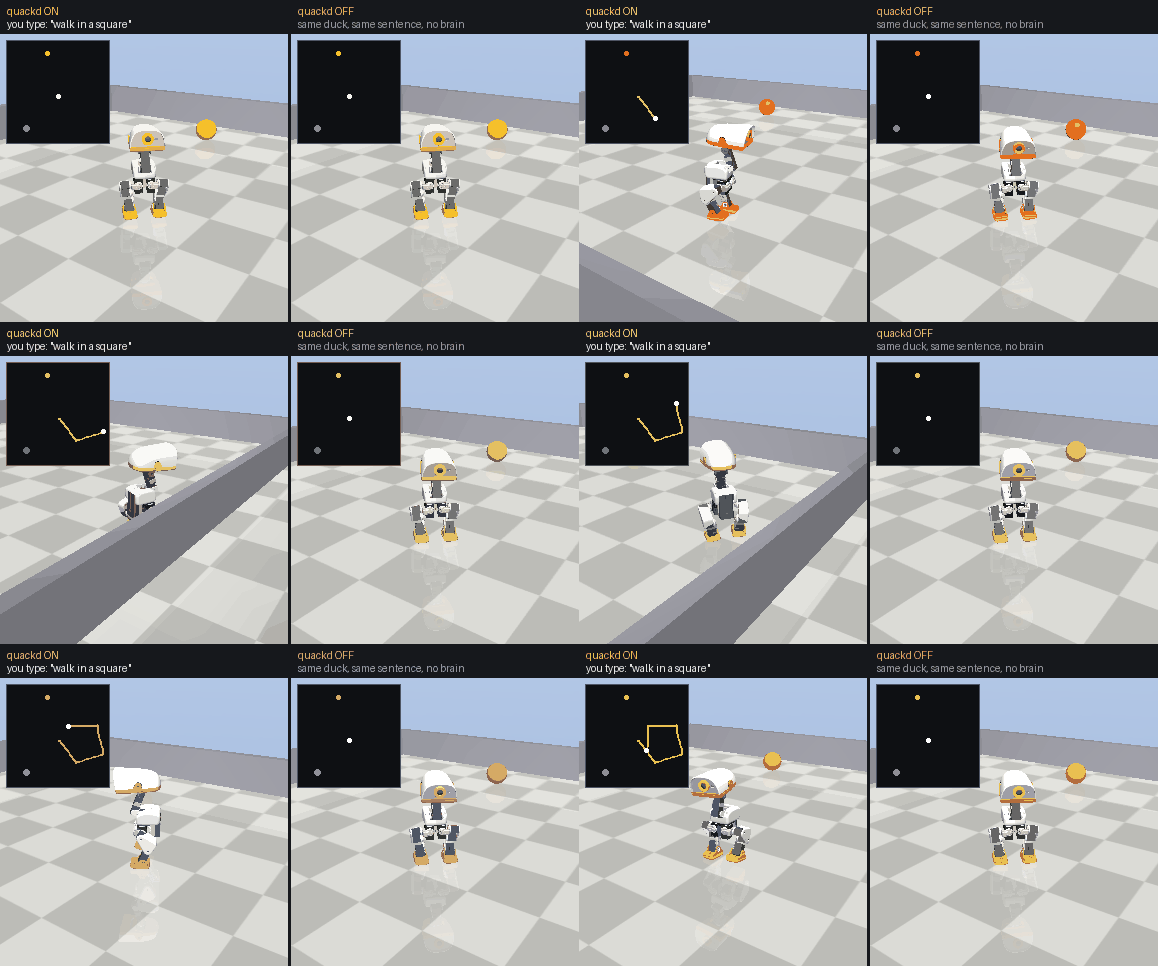
The first line above, with and without quackd. Left: you type walk in a square and a pilot picks the robot's own verbs one at a time, correcting as it reads the pose it actually reached. Nobody wrote a square. Right: the identical world, robot and walking policy, minus quackd. A Microduck takes a twist, which is three numbers, so an English sentence has nowhere to go and it stands there. The pilot here is scripted, so this needs no API key, and the duck is a render of Pollen's model under its CC BY-NC-SA terms. How it was made.
Or open the browser demo and install no quackd at all. It is live at
Put keys in the environment or in a .env file (copy .env.example), either in the folder you run the command in or in the venv root quackd is installed into. quackd doctor tells you what is missing. Needs Python 3.11 or newer and uv, nothing else.
Why?
A modern robot is not short of skills. The Microduck's onboard controllers already balance it, walk, kick, sit and scoop with its beak, and Pollen says its newest walking policy gets the duck back up after a fall. An arm picks with its own learned policy, a wheeled base drives. Each is the robot's own skill, trained, written or recorded, and each works without any help from an AI model. What the robot lacks is any idea of what those skills are for.
Traditional control:   walk forward, turn left, walk, look down, scoop, ...   (you plan every step)
One robot:             "Pick up the ball."                                    (you state the goal)
A flock of them:       "Pick up the ball."                                    (they also settle who does it)
Low level skills and high level goals are different layers. The robot knows the words, but it cannot hold a conversation. quackd is an open source attempt to connect the two layers, with an LLM doing the planning and the robot's own controllers doing the moving.
The second gap opens with the second robot. Every body speaks its own protocol, the arm's SDK, the cart's ZeroMQ host, the base's ROS topics, and every body has a different set of skills, so the robots you own end up commanded from as many terminals as there are robots and none of them knows the others exist. quackd puts them behind one command line, under names you choose, and lets one goal go to several of them at once. Each robot's pilot is told what the others are and what they can do, so the work gets divided on data rather than on guesses.
How it works (the simple version)
flowchart TD
    YOU["You<br/>“find the ball and kick it”"]
    LLM["LLM<br/>looks at the camera, the robot's state and the last result<br/>picks ONE of the robot's own skills (a verb) and its parameters"]
    Q["quackd<br/>checks the rules: allowed? task judged possible? budget left? needs confirmation?<br/>then runs the verb"]
    R["Robot or simulator<br/>executes the skill with its own controllers<br/>(walking, grasping and looking are not the LLM's job)"]
    O["quackd observes the result<br/>new camera frame, new state"]
    YOU --> LLM --> Q --> R --> O
    O -- "next verb, until done or impossible" --> LLM
The verbs the model can pick from are the robot's real, existing capabilities and nothing more. They come from its manifest, and a verb that is not in the manifest does not exist:
| Kind | Verbs | What they are |
|---|---|---|
| Core | observe report_state stop say move go_to search_scan approach_and map mark_place forget_place go_to_place | on any robot whose manifest satisfies their requirements (a camera, a twist intent, a sound intent). The last four name the spots a robot stood on, list them and walk back to them, on a robot whose connection says where it is: a Microduck by its own odometry, or in a room in its simulators (docs/concepts/places.md) |
| Microduck | sit stand stand_up kick grab gaze quack watch explore find | one each per behaviour the robot ships with, each an intent the robot's own controllers execute. watch is quackd's own reflex and moves the head alone: it keeps something you describe in view for up to 30 seconds by asking a decision LLM that can see where it is in each camera frame, and it is there only on a run started with --decision-llm openai --decision-frames, and on a real duck only through mediad's /frame (docs/adapters/microduck/README.md). explore is quackd's own too, and walks the duck to what its own map has not seen and stops so the map can look, for up to 8 minutes, and asks first. find explores the same way, a camera frame at every look, until it has seen what it was asked to look for, faced it and seen it again, and marked where it stood. Both are there in a simulator given --room, and not yet on a real duck, whose body radius nothing publishes (docs/adapters/microduck/README.md) |
| LeRobot arm | move_joints gripper place pick manipulate | an SO-101 class arm. pick and manipulate are each one skill intent the arm's own learned policy executes, confirm gated and present when a run names a policy server with --policy-url, and always on the mock, which scripts its own. manipulate hands it one short subtask and never says the task is done |
| rosbridge base | introspect | a wheeled base over ROS 2. It gets move, stop and report_state, plus observe, go_to, search_scan and approach_and once an image topic is configured. `introspec
... (README truncated for length)