

My blog just scored a perfect 100 on every Lighthouse category. I love blogging. I wanted to build a blog that’s light, fast, free of clutter, able to run multiple blogs, and fully accessible on top of that. And finally, at long last, I’ve more or less pulled it off. It was quite a tedious process. Ugh… and I even had to remove Next.js, the framework I’d been using most. It was far, far more painful than I expected. I’d like to share the journey of improving performance while building this blog.
Why did I decide to build my own blog?
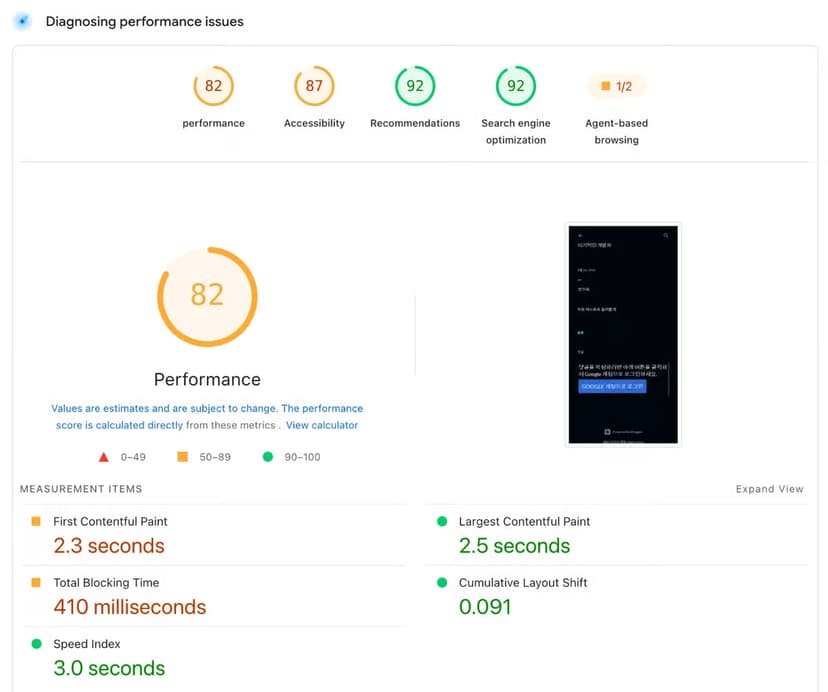
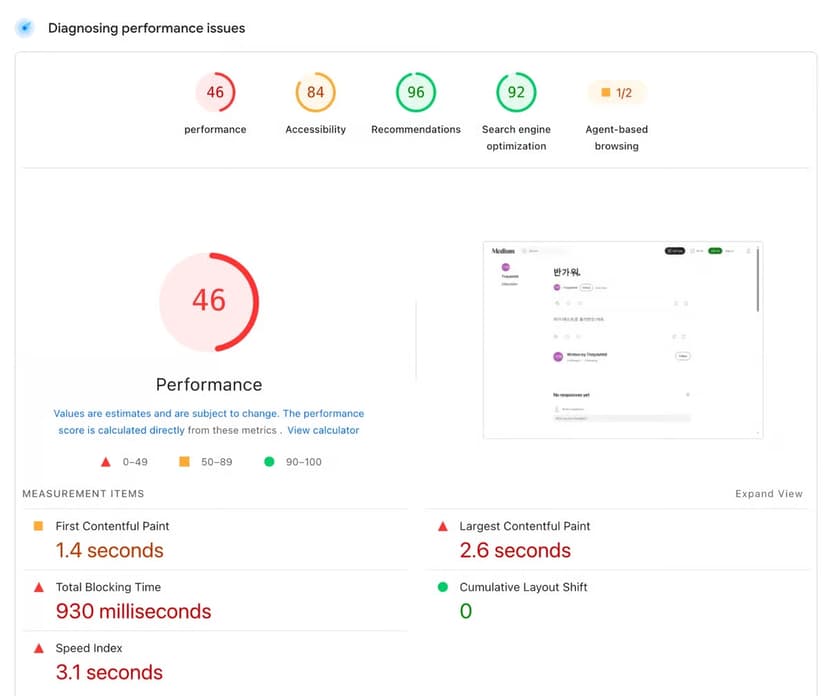
When you think of blogs, a few names come to mind. Medium, Blogger, Ghost… But none of them satisfied me. Medium and Blogger are bloated with features, and their actual performance wasn’t satisfying either.
Blogger
Medium

Hmm…… And there was another problem: it’s a hassle to work directly with the markup and raw code we all love (Markdown, HTML, CSS).
For the record, all performance measurements were taken with pagespeed.web.dev.
Of course, there are plenty of alternatives: WordPress, Ghost, Hugo. I didn’t like WordPress’s plugin hell. Ghost has to be self-hosted (there’s ghost.org too, but it’s way too expensive…), and every version upgrade broke something in the editor, so keeping it up to date was a chore. Hugo is the best of the bunch, but in the end, setting it up is still a hassle. Looking back, I guess what I really wanted was SaaS.
The one I liked most was Bear Blog. Great performance. I love its product philosophy, too. But its extreme minimalism was a downside for me. The editor UX didn’t work for me, either.
If it at least let me add AdSense and attach images for free, I probably would’ve just used Bear Blog.
As fast as Bear Blog, but with a bit more functionality and better usability. That’s the blog I wanted to build. Oh, and if you’re curious, you can check it out at bloffy.co.
Anyway. Enough about me. Let me share how I actually improved the performance.
Let’s hit 100 on Lighthouse Performance.

Obviously, caching is a must.
It goes without saying that caching is essential. Get caching right and performance improves dramatically. And Next.js makes caching really convenient.
There’s ISR, and it also extends fetch with a next option for caching. Handy. Using these well alone gets you a long way on performance.
Unfortunately, though, our site can be reached from anywhere in the world. Why is that unfortunate? Within the same region, caching makes things fast, but visitors from other regions still end up eating the network latency.
No, silly. That’s what a CDN is for.
Yes. That’s why we use a CDN. And if you deploy a Next.js app to Vercel, you get a CDN out of the box. I don’t dislike Vercel; it’s incredibly convenient. But the Pro plan is pricey right from the start, there’s the serverless cold start problem, and the dependency on the Vercel ecosystem isn’t something you can ignore either.
So why not use a different CDN service? Cloudflare, for example. I honestly think Cloudflare is a genuinely nice company. You can run large-scale infrastructure and most apps on it for free. But then I figured I didn’t really need Next.js’s caching anymore. Having to invalidate two caches every time I publish a post makes things a pain to manage.
In short, for a static website, I figured a CDN alone is enough. And that’s reason number one why I didn’t need Next.js.
Image optimization.
Images these days run over 10MB. Serve those on the web as-is and your performance will go completely off the rails.

Optimizing images is quite a hassle. You have to resize per device, compress, and then handle the CDN on top of that. On a previous project, I had a serverless function (AWS Lambda) compress and resize images whenever one landed in storage (S3), and I put CloudFront in front as the CDN. It was a pretty reasonable setup for tailoring things exactly the way I wanted. But it’s also a setup that needs a fair amount of upkeep.
So this time I went with Cloudflare’s Image Transformations. Even on the free tier you get 5,000 images, so I use it without a second thought.
At this point I sound like a Cloudflare sales rep. I’m just an ordinary solo developer.
Ta-da. Here’s the Next.js blog’s performance after all that caching and image optimization.
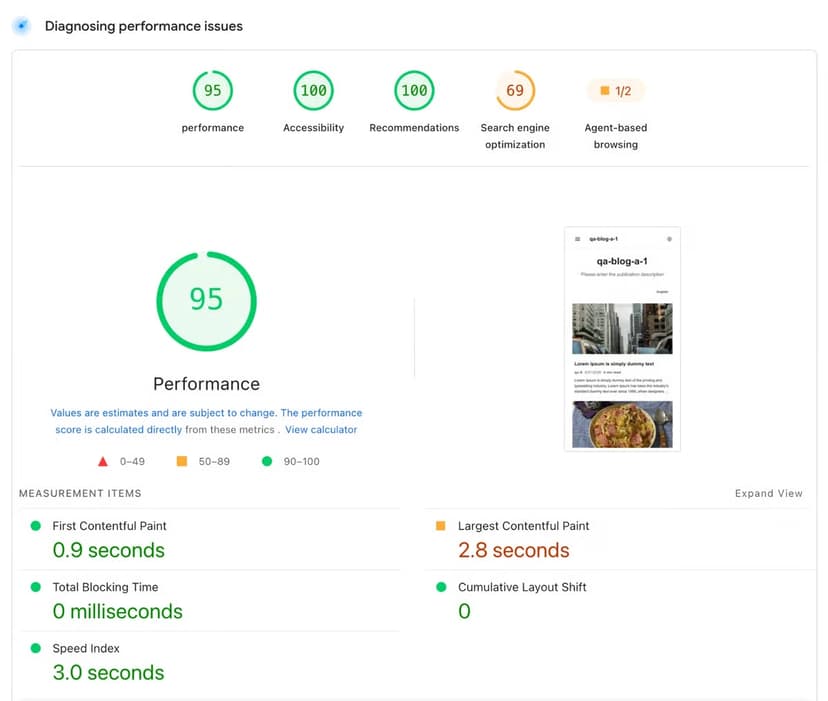
For reference, this was Next.js 16.1.6.
Pretty high scores. But this isn’t enough. We want 100. A clean, no-asterisks 100. So I dug into what the problem was.
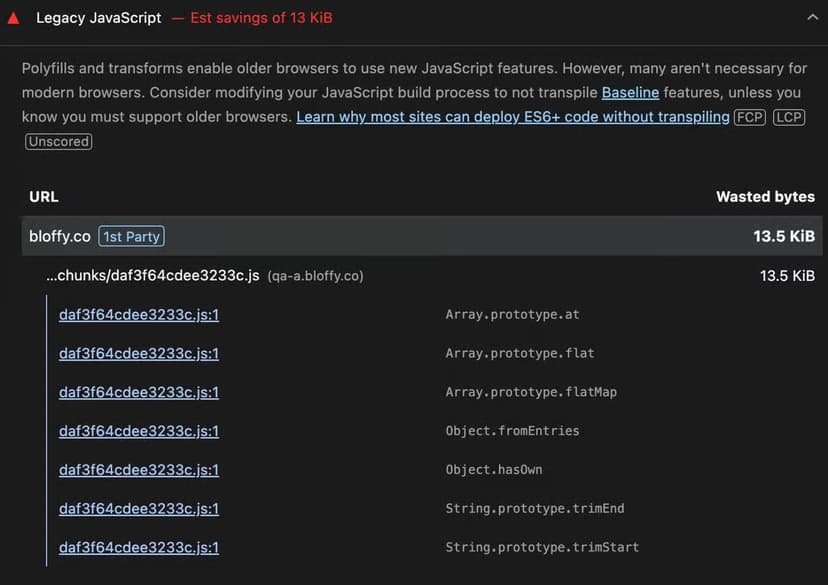
It said a substantial amount of legacy JavaScript was found, and it wasn’t code I wrote. It came from the framework runtime that Next.js ships in its bundle.
But this page is a static page with zero interaction. Every page is pre-rendered with ISR, and I thought I’d followed the Next.js guidelines well. So as an experiment, I ripped out every client component the app had, left only server components, and measured again. The score didn’t budge.
At first I suspected hydration, but once I dug in, the problem wasn’t hydration alone. The cause was the client runtime that Next.js always ships, even for static pages. Even with only server components, the runtime chunks, hydration, and the RSC payload for the router all stay. That’s because next/link and next/image are themselves client components ('use client'), so having just those two is enough to pull in the runtime and trigger hydration.
So what if I strip out next/link and next/image too? The App Router’s own runtime, the router and error boundaries, still remains. There’s no official way to get it down to zero; the only option was a hack: stripping the scripts out of the rendered HTML. That’s when it hit me: “If I’m going to do that, why am I even using Next.js?”
And then, the unused code.
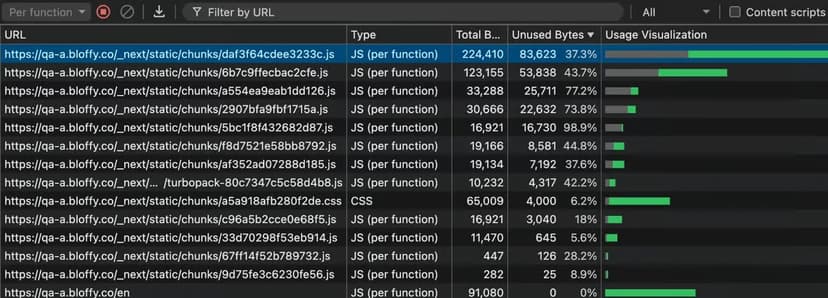
You can see that the bulk of the JavaScript is code that isn’t needed. Unused code alone comes to 230,460 bytes. That’s not good. Most static websites don’t need JavaScript at all. Unused JavaScript is needed even less.
This is where I really agonized. Is dropping Next.js for the sake of 100 points the right call? I’d spent a lot of time building the public-facing web app.
Let’s remove Next.js.
In the end, for the quality of the blog (even if it’s just 5 points), I decided to rip Next.js out entirely. My judgment was that I wouldn’t need Next.js’s excess features in the long run either. I considered going fully vanilla, but I didn’t want to give up the productivity and infrastructure benefits of a framework. I needed to find the right one.
I chose Hono. I liked its technical philosophy. “Fast and simple” was exactly the solution I needed most, and JSX support was a bonus. The migration cost didn’t look too big, either.
Ta-da. Finally, 100.
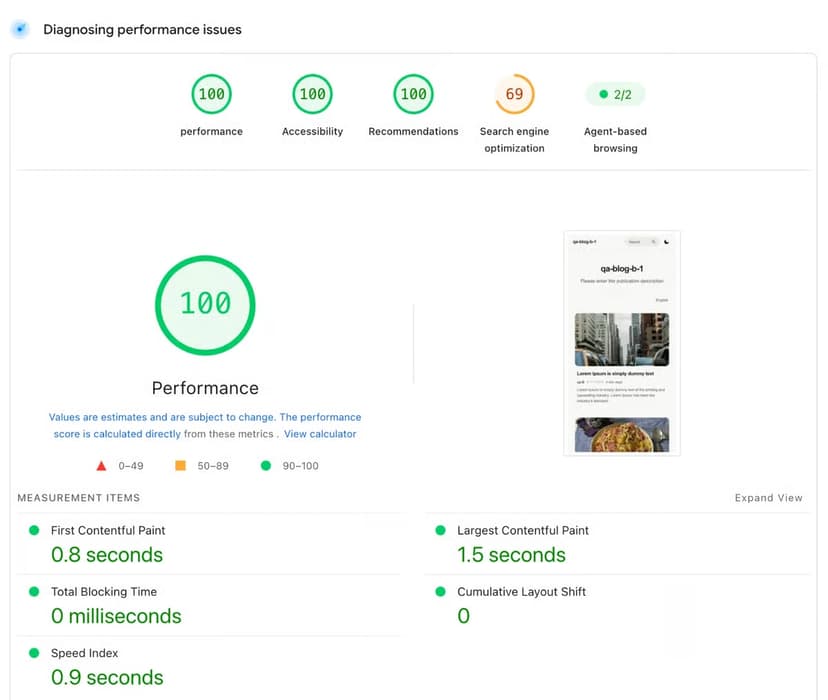
Tada. And just like that, 100 across the board. Go ahead and run the very page you’re reading right now through pagespeed.web.dev.

There’s no JavaScript, and unused code dropped sharply to 407 bytes. As a bonus, build time went down by about 40% too.
Oh, why is SEO at 69? That site was built for testing, and it deliberately blocks search indexing. That’s why it’s 69.

By the way, if you score 100 on everything in DevTools, Lighthouse actually sets off fireworks for you. 🎉🎉
Hono vs. Next.js Performance
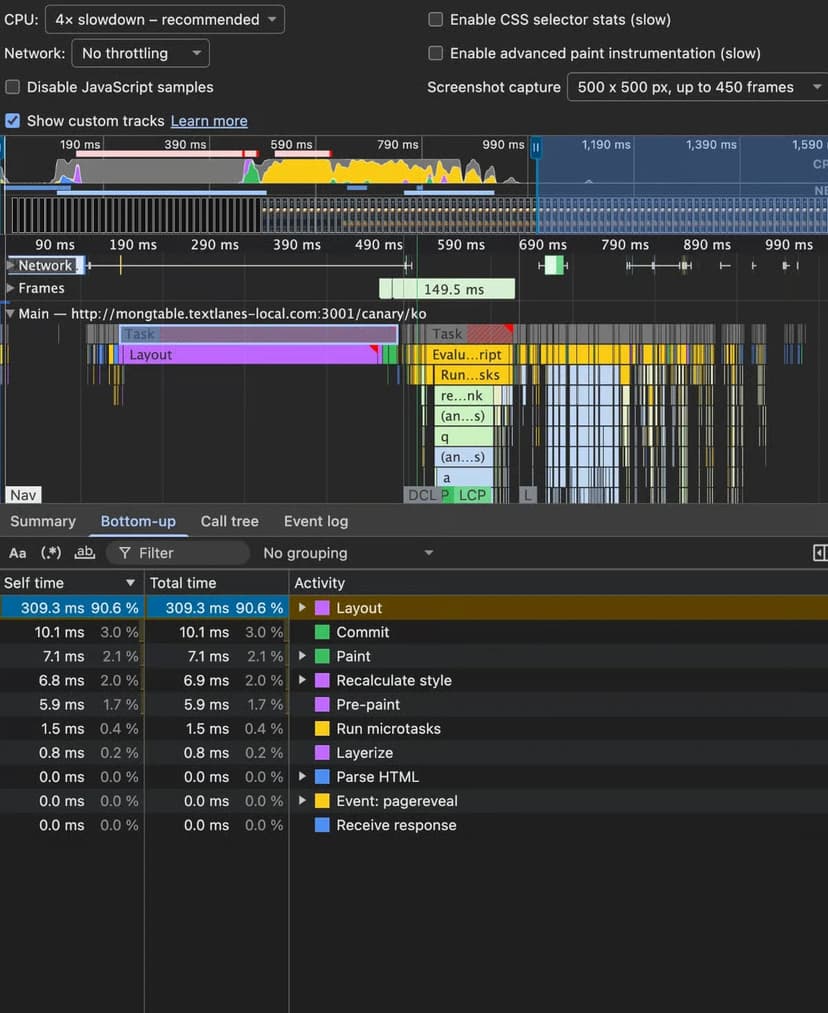
Next.js Performance (server components only)
Hono Performance
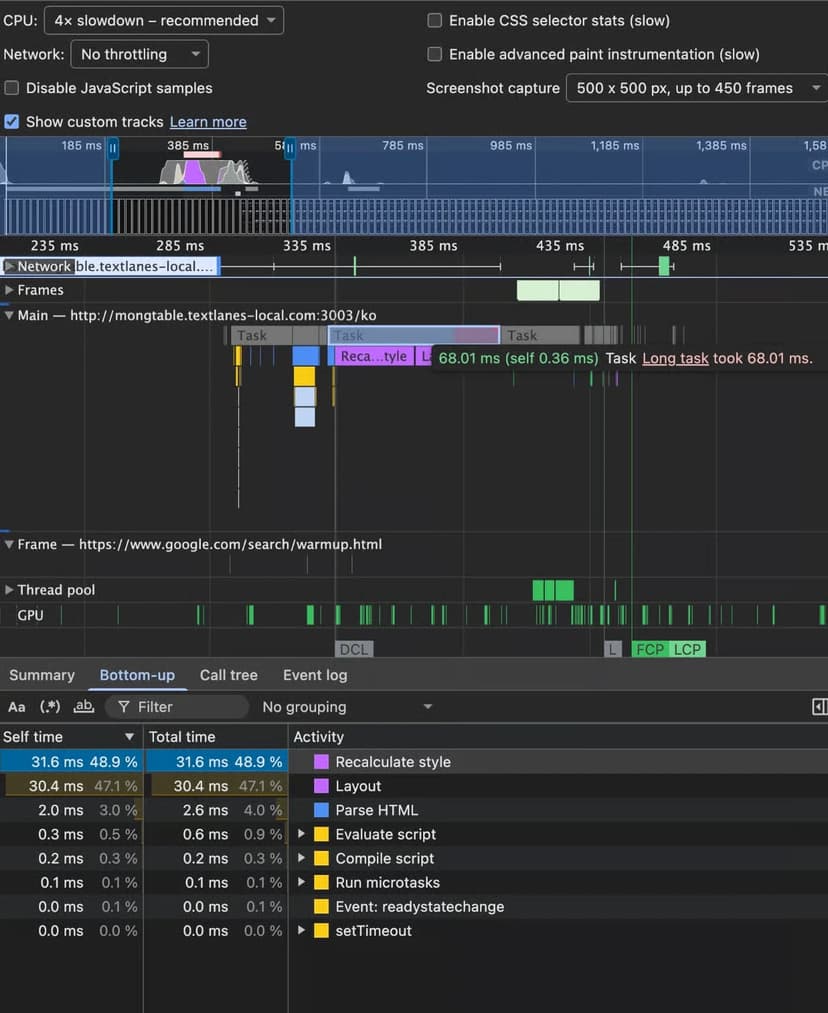
The long task that runs before anything is rendered on screen took 309.3ms on Next.js, and when I built the same page with Hono, it took 68.01ms. That’s roughly a 78% improvement.
Does your static site really need Next.js?
Is a JS payload, hydration included, really doing a static site any good? I don’t think so. It leaves behind unnecessary JavaScript, so in most cases I think it’s simply not needed.
That said, for an interaction-heavy app, I think Next.js can be a great framework. In fact, the management app for this very blog is built with Next.js!