
leaflet-elevation.js


A Leaflet plugin that allows to add elevation profiles using native SVG and Canvas elements.
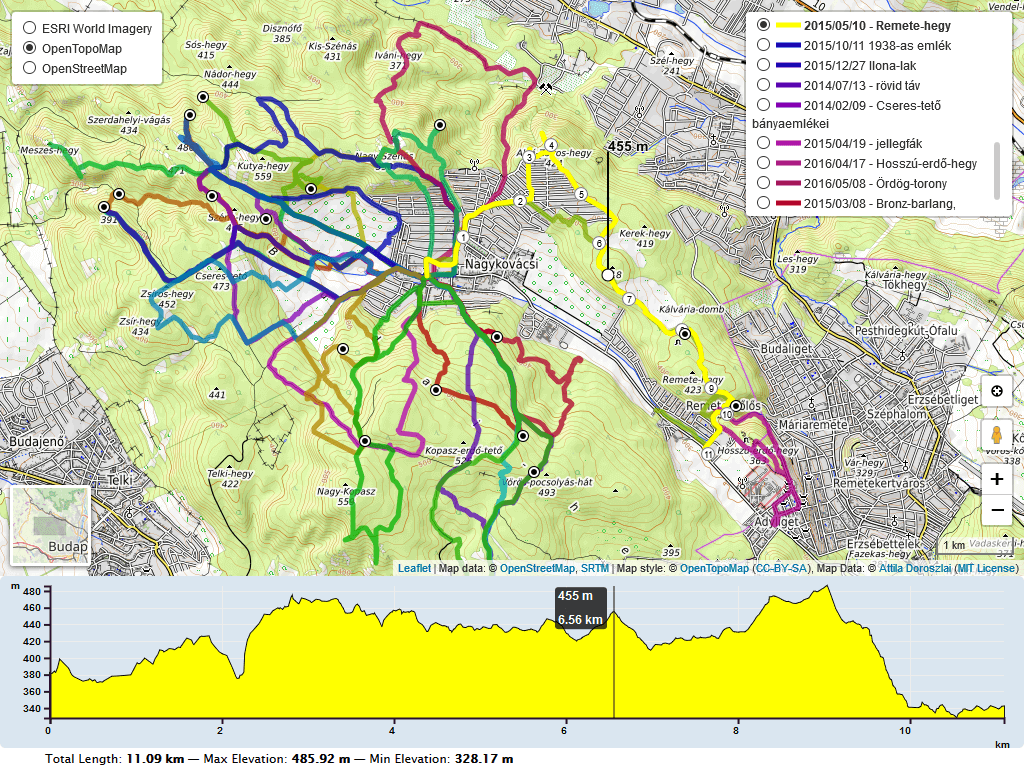
Examples
| Topic | Demos | |---|---| | Data sources | GPX, GeoJSON, KML, TCX, file upload, textarea | | Multiple tracks | GeoJSON tracks, GPX tracks, hover to toggle, click to toggle | | Profiles | Slope, speed, temperature, cadence, heart rate and pace, bathymetry | | Appearance | Colors, gradient, summary, chart labels, translations | | Layout and controls | Multiple maps, stacked charts, hide map, hide chart, clear button, collapse button | | Map interaction | Follow marker, near-track hover, edge scale, GPX waypoints, GeoJSON waypoints | | Live data and animation | Live tracking, walking marker |
Initially based on the work of Felix “MrMufflon” Bache
How to use
- include CSS & JavaScript
<head>
    ...
    <style> html, body, #map, #elevation-div { height: 100%; width: 100%; padding: 0; margin: 0; } #map { height: 75%; } #elevation-div {	height: 25%; font: 12px/1.5 "Helvetica Neue", Arial, Helvetica, sans-serif; } </style>
<!-- leaflet-ui -->
    <script src="https://unpkg.com/[email protected]/dist/leaflet.js"></script>
    <script src="https://unpkg.com/[email protected]/dist/leaflet-ui.js"></script>
<!-- leaflet-elevation -->
    <link rel="stylesheet" href="https://unpkg.com/@raruto/leaflet-elevation/dist/leaflet-elevation.css" />
    <script src="https://unpkg.com/@raruto/leaflet-elevation/dist/leaflet-elevation.js"></script>
    ...
    </head>
- choose the div container used for the slippy map
<body>
    ...
    <div id="map"></div>
    ...
</body>- create your first simple “leaflet-elevation” slippy map
<script>
      // Instantiate map (leaflet-ui).
      const map = new L.Map('map', { mapTypeId: 'terrain', center: [41.4583, 12.7059], zoom: 5 });
// Instantiate elevation control.
      const controlElevation = L.control.elevation({
        theme: "lightblue-theme",       // set chart and track colors.
        detached: true,                 // display the chart outside the map.
        elevationDiv: "#elevation-div", // optional: chart container (if missing, the chart is placed after the map).
      }).addTo(map);
// Load a URL containing GeoJSON, GPX, KML, or TCX data.
      controlElevation.load("https://raruto.github.io/leaflet-elevation/examples/via-emilia.gpx");
</script>
Options
| Option | Default | Description |
|---|---|---|
| detached | true | Render the chart outside the map. |
| elevationDiv | "#elevation-div" | Selector for the detached chart container; if missing, the chart is placed after the map. |
| position | "topright" | Map corner for the control when detached: false. |
| collapsed | false | Start with the map-attached chart collapsed. |
| closeBtn | true | Show the chart toggle button. |
| autohide | false | Hide the map-attached chart when the pointer leaves it. |
| autohideMarker | true | Hide the map indicator when it is not in use. |
| autofitBounds | true | Fit the map to a loaded track. |
| followMarker | true | Center the map on the chart's current point. |
| zFollow | false | When numeric, minimum zoom while following the current point; change with setZFollow(). |
| theme | "lightblue-theme" | Chart and track theme: "lightblue-theme", "lime-theme", "steelblue-theme", "purple-theme", "yellow-theme", "red-theme", or "magenta-theme". Custom CSS themes are also supported. |
| altitude | true | Elevation: true shows the profile and statistics; "summary" keeps statistics/tooltips without the profile axis or plot; "disabled" initially hides the plot, which can be enabled from the legend; false disables the profile. |
| distance | true | Distance: true shows the axis, grid, tooltip, and summary; "summary" omits the axis; false hides distance information but retains distance calculations. |
| time | true | Time: true shows the time axis, tooltip, and summary; "summary" omits the axis; false hides time information. The time axis is omitted on mobile. |
| slope | false | Slope: true shows the profile and statistics, including ascent/descent; "summary" keeps statistics/tooltips without the profile axis or plot; "disabled" initially hides the plot, which can be enabled from the legend; false disables slope calculations and statistics. |
| speed | false | Speed: true shows the profile and statistics; "summary" keeps statistics/tooltips without the profile axis or plot; "disabled" initially hides the plot, which can be enabled from the legend; false hides speed information (speed is still calculated when acceleration requires it). |
| acceleration | not set | Acceleration: true shows the profile and statistics; "summary" keeps statistics/tooltips without the profile axis or plot; "disabled" initially hides the plot, which can be enabled from the legend; false disables acceleration calculations and statistics. |
| summary | "inline" | Summary layout: "inline", "multiline", or false. |
| imperial | false | Use miles, feet, and imperial speed units. |
| timestamps | false | Include recorded date/time in chart tooltips. |
| timeFactor | 3600 | Seconds per time unit used for derived speed and elapsed time. |
| downloadLink | "link" | Download UI: "link", "modal", or false. |
| ruler | true | Enable the ruler cursor on the chart. |
| legend | true | Show the chart legend and allow toggling profiles. |
| dragging | enabled except on mobile | Enable chart range selection. |
| zooming | enabled except on mobile | Enable chart zooming and panning. |
| preferCanvas | false | Render chart profiles with Canvas instead of SVG. |
| width, height | screen-based | Chart dimensions in pixels. Detached container dimensions take precedence when available. |
| margins | {top: 30, right: 30, bottom: 30, left: 40} | Chart margins in pixels. |
| xTicks, yTicks | automatic | Approximate number of axis ticks. |
| xAttr, yAttr | "dist", "z" | Data fields used for the horizontal and vertical axes. |
| xLabel, yLabel | "km", "m" | Distance and elevation units/labels. |
| xAxisMin, xAxisMax | automatic | Set horizontal axis bounds. |
| decimalsX, decimalsY | 2, 0 | Decimal places in axis tooltips. |
| yAxisMin, yAxisMax | automatic | Set vertical axis bounds. |
| forceAxisBounds | false | Keep configured axis bounds when data changes. |
| interpolation | "curveLinear" | D3 curve interpolation used for the chart. |
| reverseCoords | false | Interpret coordinates as [lat, lng] instead of GeoJSON's [lng, lat]. |
| polyline | Leaflet style object | Leaflet style for track lines. |
| polylineSegments | Leaflet style object | Style for the highlighted chart-selected segment. |
| trkStart, trkEnd | green/red circle styles | Start/end marker styles; set to false to disable either marker. |
| marker | "elevation-line" | Map indicator style; "position-marker" uses a Leaflet marker. |
| markerIcon | Leaflet DivIcon | Icon used when marker: "position-marker". |
| waypoints | true | Waypoint display: true, "markers", "dots", or false. |
| wptIcons | default icon mapping | true uses built-in waypoint icons; false hides map waypoint markers without hiding chart dots. An object maps normalized waypoint symbols to L.Icon / L.DivIcon instances; see Custom waypoint icons. Requires waypoints: true or "markers" for map markers. |
| wptLabels | true | Waypoint labels: true, "markers", "dots", or false. |
| handlers | distance, time, altitude, slope, speed, acceleration | Data handlers to load; built-in optional handlers include cadence, heart rate, pace, and temperature. |
| almostOver | true | Enable near-line hover interaction on the map (disabled on mobile). |
| hotline | "elevation" | Color the track by elevation, or by another track statistic; set false to disable. |
| distanceMarkers | {lazy: true, distance: true, direction: true} | Add distance/direction markers to the track; set false to disable. |
| edgeScale | {bar: true, icon: false, coords: false} | Enable the map edge scale/coordinate control; accepts the control's options object or false. |
| colors | theme defaults | Override Canvas track colors by theme name. |
| srcFolder | inferred from script URL | Base URL used to load optional modules and assets; set for custom hosting or ES module builds. |
Custom locales (i18n)
Use L.registerLocale(code, strings) to register translations and L.setLocale(code) to select the language before creating the elevation control. These functions require leaflet-i18n, included by leaflet-ui; when using plain Leaflet, load it separately.
L.registerLocale("it", {
  "Altitude": "Altitudine",
  "Slope": "Pendenza",
  "Total Length: ": "Distanza: ",
  "Max Elevation: ": "Altezza Max: ",
  "y: ": "Altitudine: ",
  "x: ": "Distanza: ",
});
L.setLocale("it");
const elevation = L.control.elevation().addTo(map);
Keys must match the original strings exactly, including capitalization, punctuation, and trailing spaces. The selected locale is shared by controls using leaflet-i18n, not set per elevation control.
See the translation example for more keys.
Custom formats
Set these options in L.control.elevation({...}) to customize units and time labels. Labels change text only; factors convert numeric values.
| Option | What it changes | Example |
|---|---|---|
| timeFormat | Date/time shown in the tooltip when timestamps: true. Accepts "time", "date", or a function receiving the point's timestamp. | timeFormat: "time" shows only the clock time. |
| xTimeFormat | Labels on the chart's time axis. The function receives elapsed milliseconds. | xTimeFormat: (ms) => Math.round(ms / 60000) + " min" |
| timeAVGSpeed | Assumed speed in km/h when timestamps are missing; default 3.6. Estimated times are not recorded measurements. | timeAVGSpeed: 18 estimates times at cycling speed. |
| speedLabel | Speed unit text; does not convert values. | speedLabel: "km/h" |
| slopeLabel | Slope unit text; does not convert values. | slopeLabel: "%" |
| accelerationLabel | Acceleration unit text; does not convert values. | accelerationLabel: "m/s²" |
| paceLabel | Pace unit text; does not convert values. | paceLabel: "min/km" |
| altitudeFactor | Multiplies elevation values; default 1 in metric mode. | altitudeFactor: 0.001 converts meters to kilometers; also set yLabel: "km". |
| distanceFactor | Multiplies distance values; default 1 in metric mode. | distanceFactor: 1000 converts kilometers to meters; also set xLabel: "m". |
| speedFactor | Multiplies calculated speed; default 1. | speedFactor: 1 / 3.6 converts km/h to m/s; also set speedLabel: "m/s". |
| accelerationFactor | Multiplies calculated acceleration; default 1. | accelerationFactor: 100 converts m/s² to cm/s²; also change accelerationLabel. |
| paceFactor | Divisor used to express pace in minutes rather than seconds; default 60. | paceFactor: 1 uses seconds; also set paceLabel: "s/km". |
| temperatureFactor1, temperatureFactor2 | Convert source temperatures using value * temperatureFactor1 + temperatureFactor2. | 1 and 0 keep Celsius; 1.8 and 32 convert Celsius to Fahrenheit. |
With imperial: true, distance and elevation use the built-in miles/feet conversions instead of distanceFactor and altitudeFactor. Changing distance or speed factors also affects other calculated measurements, such as slope, speed, pace, and acceleration.
Custom waypoint icons
Keys come from GPX properties.sym, falling back to the waypoint name. They are lowercased, spaces become hyphens, and single/double quotes are removed: Drinking Water becomes drinking-water.
L.control.elevation({
  waypoints: true,
  wptIcons: {
    "": L.divIcon({
      className: "elevation-waypoint-marker",
      html: '<i class="elevation-waypoint-icon default"></i>',
      iconSize: [30, 30],
      iconAnchor: [8, 30],
    }),
    "drinking-water": L.icon({
      iconUrl: "water.png",
      iconSize: [24, 24],
      iconAnchor: [12, 24],
    }),
  },
}).addTo(map);
Keep the "" entry: unlisted symbols generate a DivIcon from its options with HTML , allowing symbol-specific CSS styling. wptLabels controls labels independently of icons.
Custom handlers
Add a function to handlers and enable its name as a control option. Keep the default handlers when adding your own; order matters for handlers that depend on previously calculated values.
This example reads power values from GeoJSON properties.coordinateProperties.powers and adds a profile, tooltip, and maximum-power summary:
function Power() {
  const { iMax } = L.Control.Elevation.Utils;
return {
    name: "power",
    unit: "W",
    coordinateProperties: ["powers"],
    pointToAttr: (point) => point.meta.power ?? NaN,
    stats: { max: iMax },
    scale: {
      axis: "y",
      position: "right",
      scale: { min: 0 },
    },
    path: {
      label: "Power",
      yAttr: "power",
      scaleX: "distance",
      scaleY: "power",
      color: "#ffa500",
      fillOpacity: 0.3,
    },
    tooltip: {
      chart: (item) => "Power: " + item.power + " W",
    },
    summary: {
      maxpower: {
        label: "Max Power: ",
        value: (track, unit) => (track.power_max ?? "—") + " " + unit,
      },
    },
  };
}
var controlElevation = L.control.elevation({
  handlers: [
    "Distance", "Time", "Altitude", "Slope", "Speed", "Acceleration", Power,
  ],
  power: true,
}).addTo(map);
| Handler field | Purpose |
|---|---|
| name | Control option and output data field ("power" in the example). |
| coordinateProperties | Source property names; values are copied to point.meta[name]. Arrays must match the track coordinates. |
| pointToAttr(point, index) | Calculate each point's value. Return NaN for missing data rather than treating it as zero. |
| stats | Statistic functions from L.Control.Elevation.Utils, such as iMin, iMax, and iAvg; results appear in track_info as scale, path | Profile axis and plot configuration. |
| tooltip | chart and/or marker formatter functions receiving a normalized data point. |
| summary | Named entries with a label and value(track_info, unit) formatter. |
- Use a regular function for the handler factory:
thisis the elevation control. - To load an external module, export one named handler function and pass
import("./power.js")inhandlersinstead ofPower. - For more configurations, see the built-in handlers and extended profiles example.
Methods
| Method | Description |
|---|---|
| load(urlOrString) | Load a GPX, TCX, KML, or GeoJSON URL/string. Returns no promise; wait for eledata_loaded. |
| addData(data, layer?) | Add GeoJSON or a Leaflet layer to the profile, optionally associating its map layer. Returns a promise. |
| clear() | Remove loaded profile data, tracks, and markers. |
| redraw() | Resize and redraw the chart. |
| show() / hide() | Show or hide the chart container. |
| fitBounds(bounds?) | Fit the map to the supplied bounds or current track bounds. |
| getBounds(data?) | Return the bounds for loaded data (or the supplied normalized point array). |
| enableBrush() / disableBrush() | Enable or disable selecting a distance range on the chart. |
| enableZoom() / disableZoom() | Enable or disable chart zooming and panning. |
| getZFollow() / setZFollow(zoom) | Read or set the zoom used by followMarker. |
Events
Listen with controlElevation.on(name, handler).
| Event | Payload | When it fires |
|---|---|---|
| eledata_loaded | {data, layer, name, track_info} | A URL or string has been parsed and its track added. Fired on the control and map. |
| eledata_added | {data, layer, track_info} | Data is added with addData(). Fired on the control and map. |
| eledata_clear | — | clear() removes the current data. Fired on the control and map. |
| elepoint_init | {point, props, id, isMulti} | Before a point is converted into chart data; useful to inspect or adjust source metadata. |
| elepoint_added | {point, index} | After a point is added and converted. |
| eletrack_added | {coords, index} | After a coordinate sequence is processed. |
| eledata_updated | {index} | A raw chart point is appended, before handler-derived attributes are finalized. |
| elechart_init | — | The chart is initialized. |
| elechart_updated | — | The chart is redrawn with current data. |
| elechart_change | {data, xCoord} | The current point changes on chart hover or track hover on the map. |
| elechart_hover | {data, xCoord} | The current point changes while hovering over the chart. |
| elechart_enter | — | Pointer enters the chart. |
| elechart_leave | — | Pointer leaves the chart or a hovered track on the map. |
| elechart_dragged | — | A chart range is dragged; the map bounds are fitted to the selected range. |
| elechart_axis, elechart_summary | — | Chart extension hooks, fired before axes or summary values are registered. |
| eletrack_download | {downloadLink, confirm} | Download action; fired on the control. Also dispatched on document as a CustomEvent when downloadLink: "modal". |
Example:
controlElevation.on('eledata_loaded', ({ name, track_info }) => {
  console.log(name, track_info.distance);
});
Additional libraries
You can include this scripts as standalone plugins; some are load on demand.
leaflet-hotline.js
Track color gradients, enabled by hotline: "elevation".
- API:
L.hotline(latlngs, options); coordinates are[lat, lng, value]. - Options:
min,max,palette(color stops from0to1),weight,outlineColor,outlineWidth.
L.hotline([
  [41.9, 12.5, 120],
  [42.0, 12.6, 240],
], {
  min: 0,
  max: 500,
  palette: { 0: "green", 0.5: "yellow", 1: "red" },
}).addTo(map);
leaflet-distance-marker.js and leaflet-distance-marker.css
Distance labels and direction arrows along a track.
- Options:
offset(spacing in meters; default1000),showAll(zoom showing all markers),distance,direction,textFunction(distance, index, offset),arrowUrl,arrowSize. - API: set a polyline's
distanceMarkersoption; useaddDistanceMarkers()/removeDistanceMarkers()to toggle markers. - Rendering: use
map.options.preferCanvas: truefor Canvas markers. DOM markers need the CSS file; rotated DOM arrows also needleaflet-rotate.
L.polyline(coords, {
  distanceMarkers: { offset: 500, distance: true, direction: true },
}).addTo(map);
leaflet-edgescale.js
Map edge scale, center crosshair, and center coordinates.
- API:
L.control.edgeScale(options).addTo(map). - Options:
bar,icon,coords,position,latlngFormat("DD","DM","DMS"),projected,template,latLngFormatter.
L.control.edgeScale({
  position: "bottomleft",
  latlngFormat: "DMS",
  icon: true,
  coords: true,
  bar: true,
}).addTo(map);
leaflet-gpxgroup.js
Multi-track selection with an elevation profile and optional legend.
- API:
L.gpxGroup(tracks, options), wheretrackscontains URLs or parsed GeoJSON objects. CalladdTo(map)to load them. - Options:
legend(defaultfalse),flyToBounds(defaulttrue),elevation_options,legend_options,highlight(hover style),points/points_options(named POIs),distanceMarkers/distanceMarkers_options. - Selection: click a route; with
legend: true, hover also selects it. UsegetSelection()/setSelection(route)programmatically. - Events:
loaded,route_loaded({route}),route_mouseover/route_mouseout({route, polyline}),selection_changed.
L.gpxGroup(["route-a.gpx", "route-b.gpx"], {
  legend: true,
  elevation_options: { detached: true, elevationDiv: "#elevation-div" },
}).addTo(map);
leaflet-ruler.js and leaflet-ruler.css
Map distance and bearing measurements, separate from the chart's ruler option.
- API:
L.control.ruler(options).addTo(map); include the accompanying CSS. - Interaction: click the control to toggle measurement; double-click or press Escape to finish the current path.
- Options:
position,circleMarker,lineStyle,lengthUnit,angleUnit. - Units: both unit objects accept
display,decimal,factor,label. Distancefactormultiplies meters; anglefactordefines a full turn (360for degrees).
L.control.ruler({
  lengthUnit: { display: "m", decimal: 0, factor: 1, label: "Distance:" },
  angleUnit: { display: "°", decimal: 1, factor: 360, label: "Bearing:" },
}).addTo(map);
Performance
For large tracks, try Canvas rendering on both the map and the chart:
const map = new L.Map("map", {
  mapTypeId: "terrain",
  center: [41.4583, 12.7059],
  zoom: 5,
  preferCanvas: true,
});
const controlElevation = L.control.elevation({
  preferCanvas: true,
}).addTo(map);
| Setting | Scope | Effect |
|---|---|---|
| Map preferCanvas: true | Leaflet paths and distance markers | Prefer Canvas over SVG/DOM rendering. Does not change tile layers or ordinary L.Marker icons. |
| Control preferCanvas: true | Chart profiles | Draw profiles on Canvas; axes, labels, and interactions remain SVG. |
| Control almostOver: false | Near-track hover | Avoid scanning track segments for nearby pointer positions; direct track hover remains available. |
| Control hotline: false | Track gradient | Skip the separate gradient renderer when a solid-color track is sufficient. |
- Canvas changes rendering, not data size: parsing, statistics, and hover lookups still process track points.
- Benchmark with representative tracks and target browsers; Canvas is not always faster. Safari uses an image snapshot on each chart redraw, which adds overhead.
- Canvas-drawn profiles and markers cannot be styled through SVG/DOM selectors; use the supported theme,
colors, and layer options.
Build Guide
Within your local development environment:
git clone [email protected]:Raruto/leaflet-elevation.git
cd ./leaflet-elevation
npm i         # install dependencies
npm run dev   # start dev server at: http://localhost:8080
npm run build # generate "dist" files (once)
npm test      # run all cucumber tests
After that you can start developing inside the src and test folders (eg. open "http://localhost:8080/test" in your browser to preview changes). Check also CONTRIBUTING.md file for some information about it.
FAQ
1. How can I change the color of the elevation plot?
There are multiple options to achieve this:
- Set
themeto one of the built-in presets listed in Options, for exampletheme: "lime-theme". - check out this example
- Or add the following lines for custom colors.
.elevation-control .area {
    fill: red;
}
.elevation-control .background {
    background-color: white;
}
2. How to enable/disable the leaflet user interface customizations?
These customizations are actually part of the leaflet-ui and can be toggled on/off using e.g. the following options:
const map = new L.Map('map', {
    center: [41.4583, 12.7059],  // needs value to initialize
    zoom: 5,                     // needs value to initialize
    mapTypeId: 'topo',
    mapTypeIds: ['osm', 'terrain', 'satellite', 'topo'],
    gestureHandling: false,     // zoom with Cmd + Scroll
    zoomControl: true,          // plus minus buttons
    pegmanControl: false,
    locateControl: false,
    fullscreenControl: true,
    layersControl: true,
    minimapControl: false,
    editInOSMControl: false,
    loadingControl: false,
    searchControl: false,
    disableDefaultUI: false,
    printControl: false,
});
3. How can I import this library as ES module?
Usually, when working with a js bundler like Vite or Webpack, you need to provide to this library the full path to some dynamically imported files from the srcFolder:
import './your-custom-style.css';
import 'leaflet/dist/leaflet.css';
import L from 'leaflet';
import '@raruto/leaflet-elevation/src/index.js';
import '@raruto/leaflet-elevation/src/index.css';
const map = new L.Map('map', {
    center: [41.4583, 12.7059],
    zoom: 5,
});
const controlElevation = L.control.elevation({
    // CHANGE ME: with your own http server folder (eg. "http://custom-server/public/path/to/leaflet-elevation/src/")
    srcFolder: 'http://unpkg.com/@raruto/leaflet-elevation/src/'
}).addTo(map);
// Load track from url (allowed data types: ".geojson", ".gpx", "*.tcx")
controlElevation.load("https://raruto.github.io/leaflet-elevation/examples/via-emilia.gpx");
For more info about disabling built-in lazy loading, see #280 and track-loading.steps.js.
4. Some real world projects based on this plugin?
- https://parcours.scasb.org/
- https://velocat.ru/velo/phpBB3/map.php
- https://plugins.qgis.org/plugins/track_profile_2_web/
- https://wordpress.org/plugins/os-datahub-maps/
- https://wordpress.org/plugins/extensions-leaflet-map/
- https://github.com/der-stefan/OpenTopoMap
- https://gpx.n-peloton.fr/
- https://walkaholic.me/map
_Related: Leaflet-UI presets, QGIS Integration_
Changelog
All notable changes to this project are documented in the releases page.
Compatible with:



Contributors: MrMufflon, HostedDinner, ADoroszlai, Raruto
License: GPL-3.0+