
Protoconf

codify configuration, instant delivery
Introduction
Modern services are comprised of many dynamic variables, that need to be changed regularly. Today, the process is unstructured and error prone. From ML model variables, kill switches, gradual rollout configuration, A/B experiment configuration and more - developers want their code to allow to be configured to the finer details.
Protoconf is a modern approach to software configuration, inspired by Facebook's Configerator.
Using Protoconf enables:
- Code review for configuration changes
- No service restart required to pick up changes
- Clear representation of complex configuration
- Automated validation
Configuration update flow
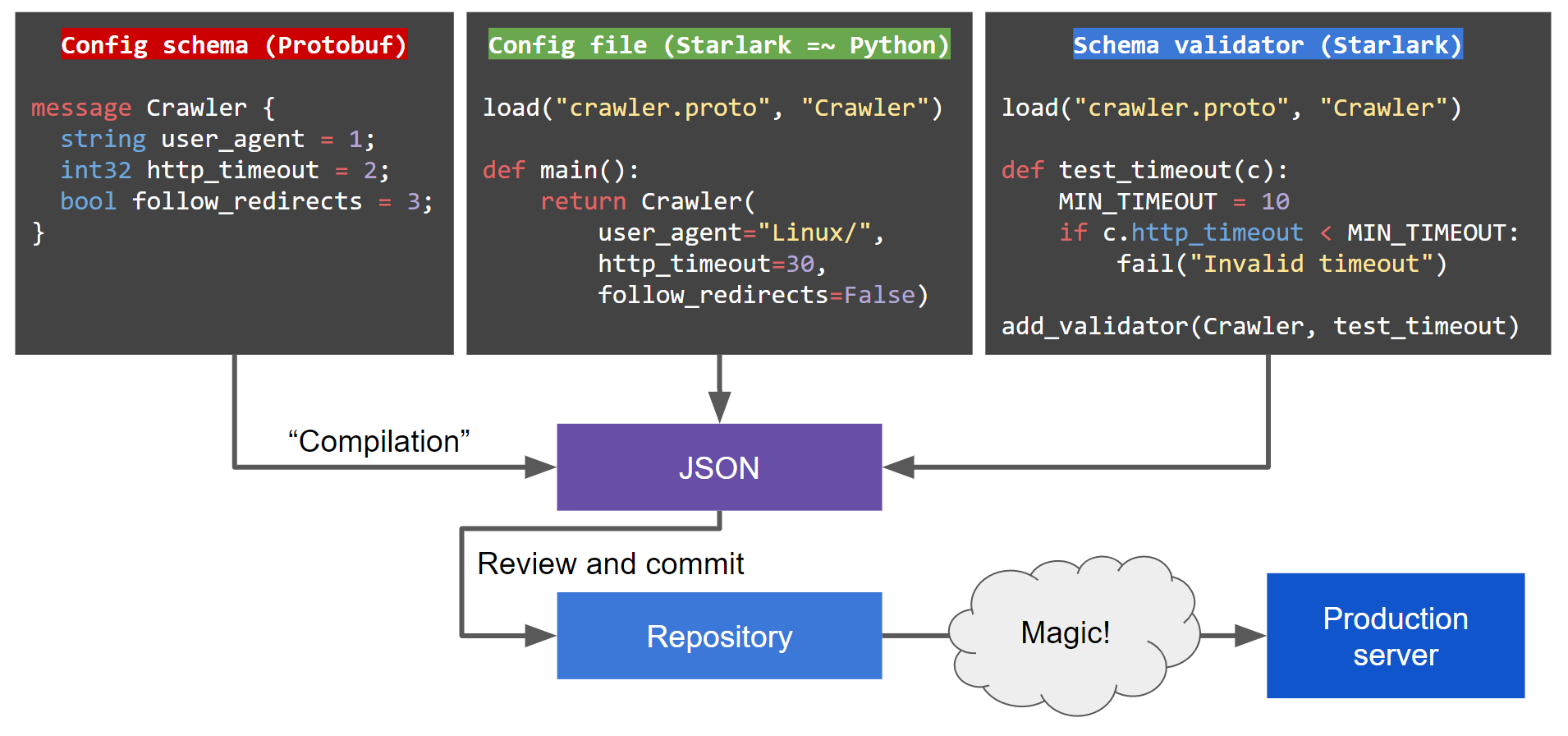
How this looks from the service's eyes
This is roughly how configuration is consumed by a service. This paradigm encourages you to write software that can reconfigure itself in runtime rather than require a restart:
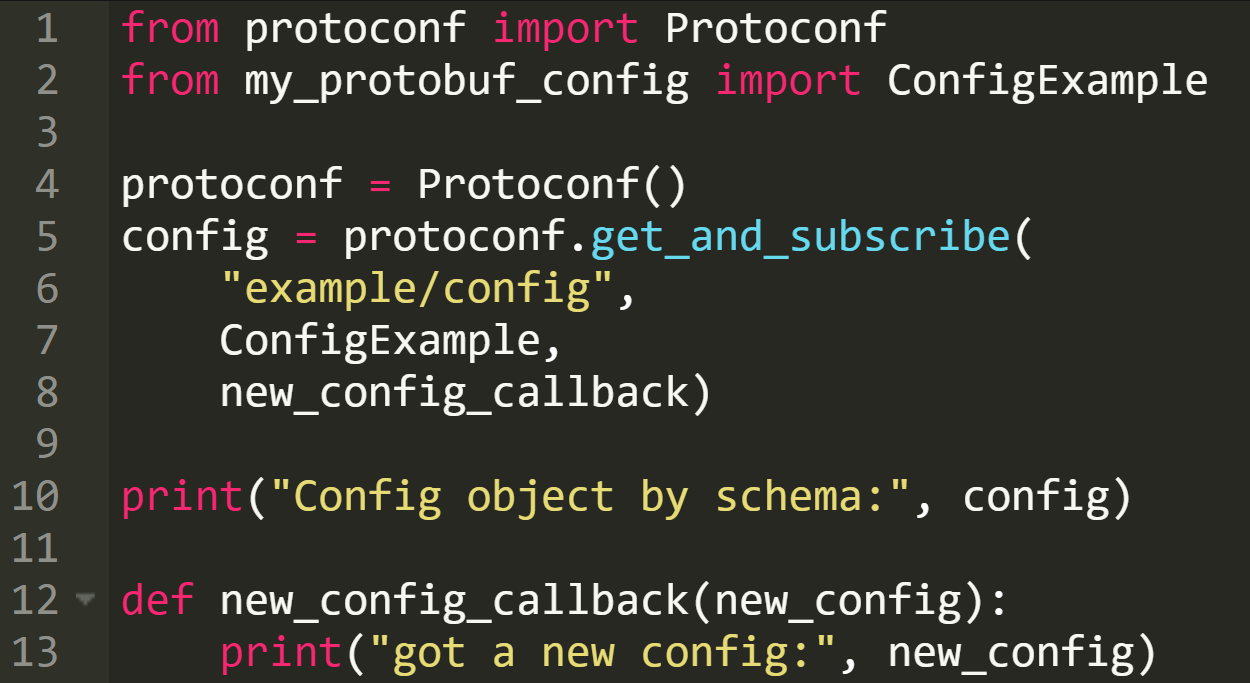
As Protoconf uses Protobuf and gRPC, it supports delivering configuration to all major languages. See also: Protobuf overview.
Quick start
Step by step instructions to start developing with Protoconf, with an example from an imaginary Python web crawler service. See full example under examples/.
- Install the
protoconfbinary (see build from source)
- Write a Protobuf schema under
protoconf/src/(syntax guide https://developers.google.com/protocol-buffers/docs/proto3)
protoconf/src/crawler/crawler.proto
syntax = "proto3";
message Crawler {
     string user_agent = 1;
     int32 http_timeout = 2;
     bool follow_redirects = 3;
   }
message CrawlerService {
     repeated Crawler crawlers = 1;
     enum AdminPermission {
       READ_WRITE = 0;
       GOD_MODE = 1;
     }
     map<string, AdminPermission> admins = 2;
     int32 log_level = 3;
   }
2. Pro tip: adding fields to an existing schema? Don't worry, Protobuf is backward and forward compatible (https://en.wikipedia.org/wiki/Protocol_Buffers)
- Write validators _(optional)_
.proto file, with a .proto-validator suffix
2. For example: protoconf/src/crawler/crawler.proto-validator
load("crawler.proto", "Crawler", "CrawlerService")
def test_crawlers_not_empty(cs):
       if len(cs.crawlers) < 1:
           fail("Crawlers can't be empty")
add_validator(CrawlerService, test_crawlers_not_empty)
def test_http_timeout(c):
       MIN_TIMEOUT = 10
       if c.http_timeout < MIN_TIMEOUT:
           fail("Crawler HTTP timeout must be at least %d, got %d" % (MIN_TIMEOUT, c.http_timeout))
add_validator(Crawler, test_http_timeout)
- Write a config
.pconf file. Your code can be modular, export functions (ideally in .pinc files), and build a complete custom stack for your configuration needs.
2. For example: protoconf/src/crawler/text_crawler.pconf
load("crawler.proto", "Crawler", "CrawlerService")
def default_crawler():
          return Crawler(user_agent="Linux", http_timeout=30)
def main():
          crawlers = []
for i in range(3):
              crawler = default_crawler()
              crawler.http_timeout = 30 + 30*i
                  if i == 0:
                      crawler.follow_redirects = True
              crawlers.append(crawler)
admins = {'superuser': CrawlerService.AdminPermission.GOD_MODE}
          return CrawlerService(crawlers=crawlers, admins=admins, log_level=2)
3. Compile with protoconf compile, this will create a materialized config file under protoconf/materialized_configs/
4. For example: protoconf compile protoconf/ crawler/text/crawler will create protoconf/materialized_config/crawler/text_crawler.materialized_JSON
{
     "protoFile": "crawler/crawler.proto",
     "value": {
       "@type": "https://CrawlerService",
       "admins": {
         "superuser": "GOD_MODE"
       },
       "crawlers": [
         {
           "userAgent": "Linux",
           "httpTimeout": 30,
           "followRedirects": true
         },
         {
           "userAgent": "Linux",
           "httpTimeout": 60
         },
         {
           "userAgent": "Linux",
           "httpTimeout": 90
         }
       ],
       "logLevel": 2
     }
}- Run the Protoconf agent in dev mode
protoconf agent protoconf/- Prepare your application to work with Protobuf configs coming from Protoconf
.proto schema, this will generate an object to work with.
For Python you can use grpcio-tools, for example:
pip3 install grpcio-tools
      python3 -m grpc_tools.protoc --python_out=. -I../protoconf/src ../protoconf/src/crawler/crawler.proto
Other languages can use the protoc binary (https://developers.google.com/protocol-buffers/docs/tutorials).
2. Install the Protoconf Python library:
pip3 install -r python/requirements.txt python/3. In your code, setup a connection to Protoconf and get the config. See full example under examples/. The code mainly consists of:
from protoconf import ProtoconfSync
   from crawler.crawler_pb2 import CrawlerService
protoconf = ProtoconfSync()
   crawler_service = protoconf.get_and_subscribe("crawler/text_crawler", CrawlerService, got_config)
   print("config:", crawler_service)
def got_config(new_crawler_service):
       print("got a new config:", new_crawler_service)
- Commit all changes under
protoconf/(including the.materialized_JSONfiles)
What protoconf compile validates
protoconf compile parses and links only the .proto files a config
transitively loads. Protos under src/ that no config reaches are not
parsed, and errors in them — a syntax mistake, a broken reference — are not
reported at compile time.
This is deliberate, not an oversight: compile cost is proportional to what the config actually demands, not to how many protos happen to live in the repository. On a 799-proto reference corpus this took startup from 6.97s to under 200ms.
The error still surfaces — the first time a config loads that proto.
For whole-tree validation across every proto in your repository, run
buf lint against your own config repository, as a step in your own CI.
Protoconf does not do this for you: this repository's own CI runs
buf breaking and does not run buf lint, and this repository's buf.yaml
covers protoconf's own protos, not a downstream config repository. Nothing
in protoconf runs whole-tree validation on an operator's behalf.
Production setup
- Run your preferred key-value store (e.g. Consul)
- Run the Protoconf agent:
protoconf agent - Setup a commit hook in your repository server (e.g. Github) that runs
protoconf updateon changed.materialized_JSONfiles
Build from source
- Clone Protoconf:
git clone https://github.com/protoconf/protoconf.git - Build the binary:
cd protoconf && go install ./cmd/protoconf - Ensure that GOPATH/bin is in your path
Trying the example
- Make sure Consul is listening locally on default port (you can achieve this with
consul agent -dev) - Run the agent:
bazel run protoconf agent - Compile the Protoconf config:
bazel run protoconf compile "$(pwd)/examples/protoconf" crawler/text_crawler.pconf - Insert the Protoconf config to Consul:
bazel run protoconf insert "$(pwd)/examples/protoconf" crawler/text_crawler.materialized_JSON - Run the Go client:
bazel run //examples/grpc_clients/go_client, the client will get the config from the agent and will listen to changes - Change the config file at
examples/protoconf/src/crawler/text_crawler.pconf - Repeat steps 4 & 5 to recompile and re-insert the config, observe the client got the updated config