
apple-liquid-glass-webgl
Apple-style liquid glass for the web, rendered with WebGL2. Point it at an element and it refracts what is actually behind that element on the page, while it scrolls, resizes and animates.
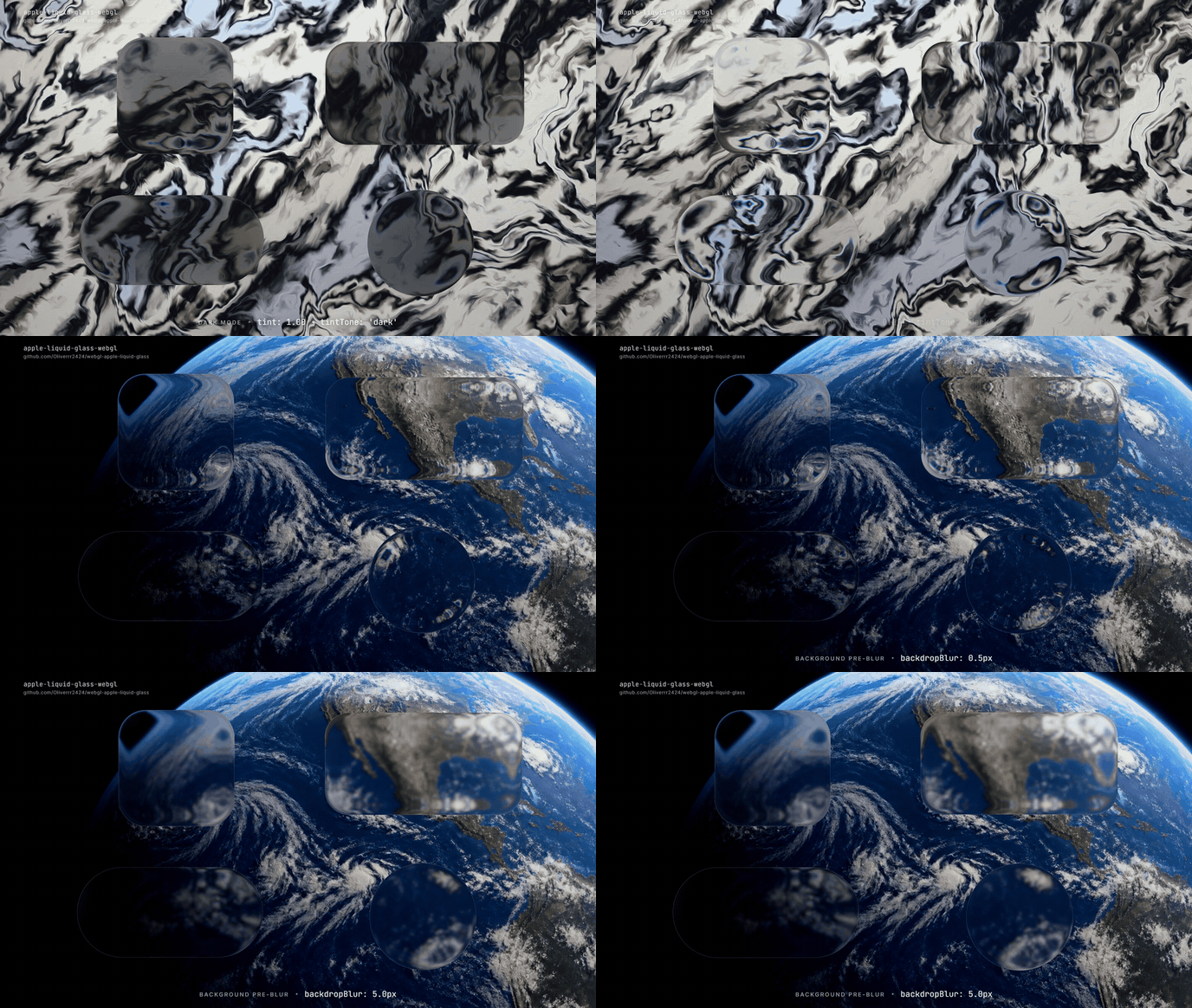
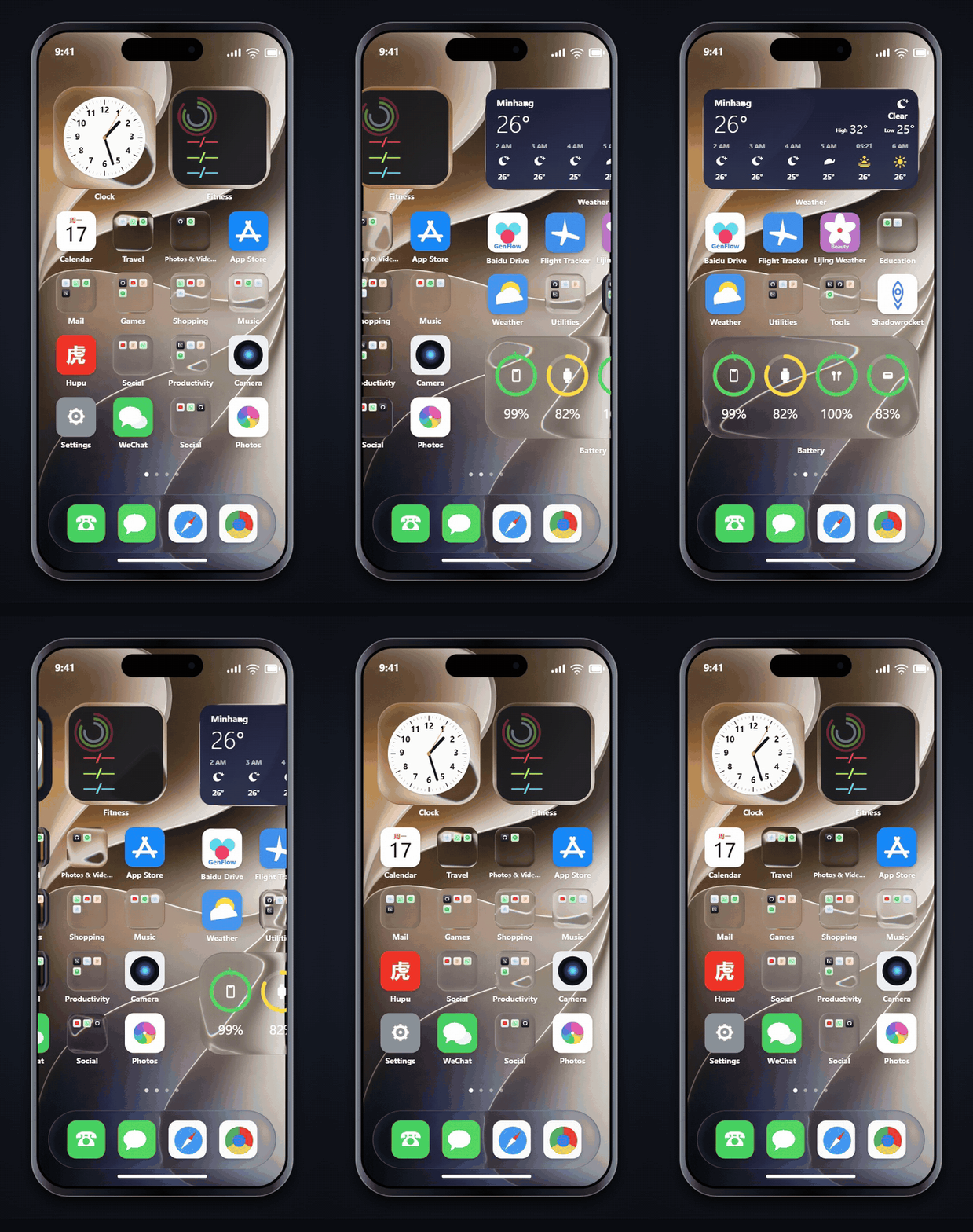
|
|
Playground · Landing page example
Install
npm install apple-liquid-glass-webglQuick start
import { LiquidGlass } from 'apple-liquid-glass-webgl';
new LiquidGlass('.navbar');
That is the whole integration:
- The element keeps its content, layout and events. The glass is drawn behind its children.
- Shape and corner radius come from its CSS
border-radius. - It follows the element through scrolling, resizing, CSS transitions and JS animation.
- Without WebGL2 it falls back to
backdrop-filter. The element getsdata-liquid-glass="webgl"or"fallback"for styling.
What is behind the glass
Browsers do not let WebGL read page pixels, so the library repaints what is behind the glass itself. The default, backdrop: 'auto', paints the page below the element in CSS paint order, z-index included: backgrounds (colors, images, gradients), borders, , and text. A heading that scrolls under a fixed navbar shows up in the glass, aligned with the rest of it. To use something else, say what is behind:
| backdrop | Use it for |
| --- | --- |
| 'auto' | the page below the element (default) |
| '#hero-video' or an element | a specific , , or an element's CSS background, where it sits on the page |
| '/wallpaper.jpg' | an image covering the viewport, like a fixed wallpaper |
| { source, fit, position, anchor } | an image/canvas/video fitted like object-fit into 'viewport', 'document' or an element |
| (ctx, region) => { … } | anything else: draw it yourself in page coordinates |
| [ … ] | several of the above, bottom to top |
Everything is registered in page coordinates, so the part of the photo under a card is the part of the photo under that card. Images from another origin have to allow CORS (auto does not reproduce ::before/::after, shadows, CSS filters, SVG or form controls; add those with a painter (see Anything auto misses).
Options
new LiquidGlass(element, {
  tint: 0.2,            // milky layer, 0–1.5 (default 0: clear)
  tintTone: 'dark',     // 'light' (default), 'dark', or 'auto' from the backdrop
  frost: 0.3,           // blur behind the lens, as a ratio of the short side (default 0)
  backdrop: 'auto',
  material: { refraction: 70 },   // partial material, see below
});
| Option | Default | |
| --- | --- | --- |
| tint, tintTone, frost, opacity | 0, 'light', 0, 1 | The look. Use tintTone: 'dark' behind white text. |
| backdrop | 'auto' | See above. |
| material | package default | Partial material. Unknown keys throw. |
| targets | — | Selector or elements: draw several descendants as glass on one canvas. |
| shape, radius | from CSS | 'rect' \| 'pill' \| 'circle', CSS px. |
| live | 'auto' | Redraw every frame. auto turns itself on while a below the glass is in view or a there is playing, including ones auto found for you. |
| fallback | 'css' | 'css', 'none', or (element) => {}. |
| maxDpr | 2 | Resolution cap. |
| zIndex | -1 | Glass layer inside the element: behind its content. |
| respectReducedTransparency | true | Near-opaque glass under prefers-reduced-transparency. |
const glass = new LiquidGlass('.card', options);
await glass.ready;                 // first frame drawn, images loaded
glass.update({ tint: 0.4 });       // merge options
glass.refresh();                   // re-read selectors and repaint
glass.destroy();                   // restores the element, frees the WebGL context
LiquidGlass.isSupported();         // WebGL2 available
LiquidGlass.from('.card');         // the instance on an element
LiquidGlass.refreshAll();          // repaint everything next frame
Recipes
Readable text
Clear glass over a busy photo is beautiful and unreadable. Give text a body. tint ramps in gently, so readable values sit around 0.5–0.8:
new LiquidGlass('.panel', { frost: 0.45, tint: 0.5, tintTone: 'light' }); // dark text
new LiquidGlass('.toast', { frost: 0.3, tint: 0.7, tintTone: 'dark' });   // white text
A grid of cards
Each LiquidGlass uses one WebGL context, and browsers allow about 16. Put a group on one canvas:
new LiquidGlass('.card-grid', { targets: '.card', frost: 0.3, tint: 0.2 });Cards added or removed later are picked up. For per-card looks, pass targets: [{ element, tint, frost }].
Video, canvas and WebGL backgrounds
A or below the glass is painted by auto and redrawn every frame while it plays or animates. To refract only that source, point at it: backdrop: '#bg-video'.
A WebGL canvas (three.js, Pixi, …) is cleared after each frame. Create it with preserveDrawingBuffer: true, or call LiquidGlass.refreshAll() right after you render.
React, Vue, Svelte
Mount after the element exists and destroy on unmount. This is safe under React StrictMode's double mount.
function Glass({ options, ...props }) {
  const ref = useRef(null);
  useEffect(() => {
    const glass = new LiquidGlass(ref.current, options);
    return () => glass.destroy();
  }, []);
  return <div ref={ref} {...props} />;
}
// Vue
onMounted(() => { glass = new LiquidGlass(el.value, { tint: 0.2 }); });
onBeforeUnmount(() => glass.destroy());
// Svelte action: <nav use:liquidGlass={{ tint: 0.2 }}>
export const liquidGlass = (node, options) => {
const glass = new LiquidGlass(node, options);
return { update: (next) => glass.update(next), destroy: () => glass.destroy() };
};
Importing is safe during server rendering. Construct only in the browser (effects, onMounted).
Anything auto misses
Add a painter after 'auto'. Its context is already in page coordinates, so getBoundingClientRect() values land where they are on screen. An inline SVG logo, for example:
const logo = document.querySelector('svg.logo');
const image = new Image();
image.onload = () => LiquidGlass.refreshAll();
image.src = data:image/svg+xml,${encodeURIComponent(new XMLSerializer().serializeToString(logo))};
new LiquidGlass('.navbar', {
  backdrop: ['auto', (ctx) => {
    const box = logo.getBoundingClientRect();
    ctx.drawImage(image, box.left, box.top, box.width, box.height);
  }],
});
Changes the page does not announce
Scroll, resize, font loading, DOM, class and style changes, and the end of CSS transitions are all picked up, and canvases and playing videos redraw every frame. Content that moves behind the glass during a transition or JS animation catches up when it stops; to follow it frame by frame, call LiquidGlass.refreshAll() from the animation's update callback.
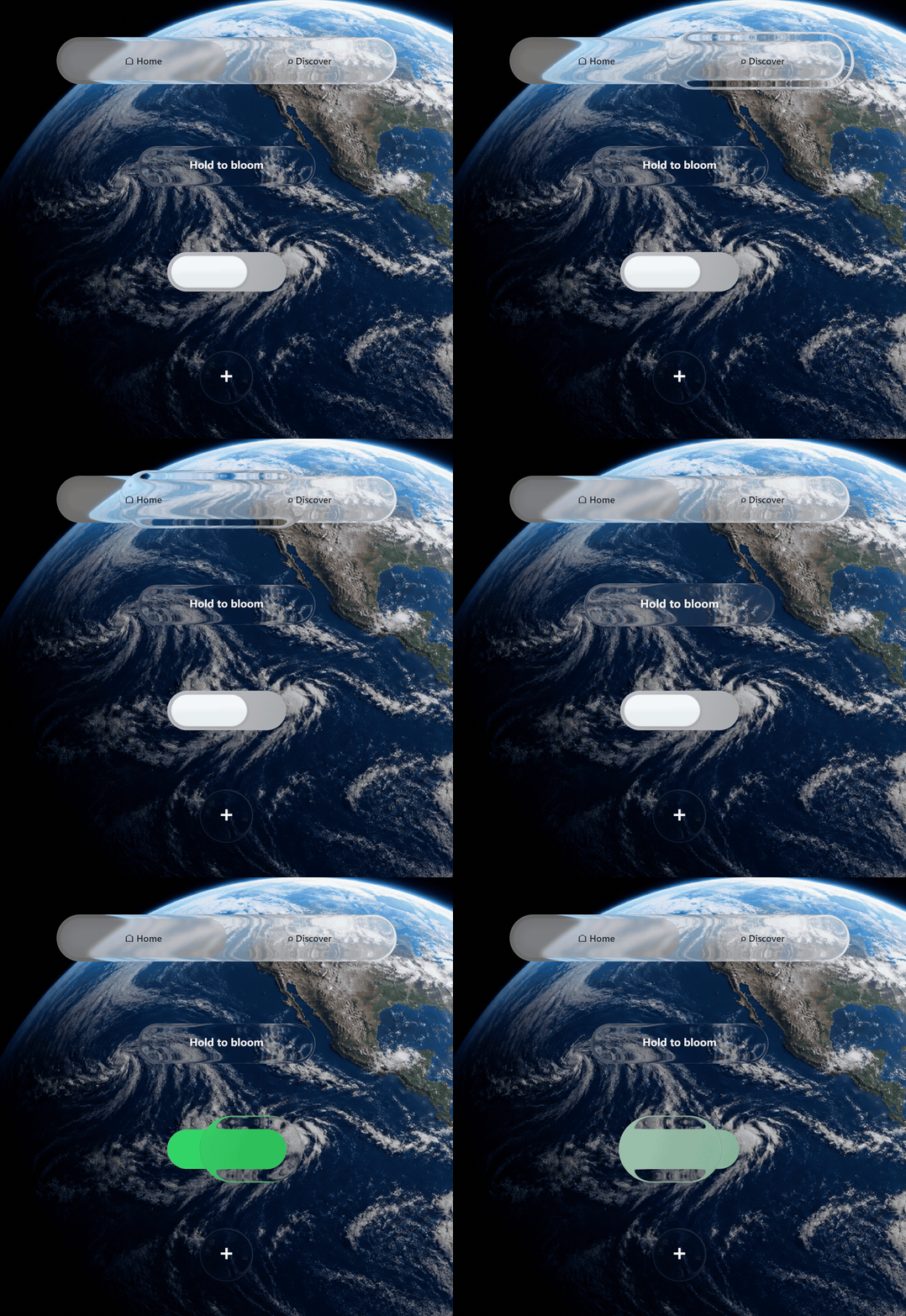
Navbar and switch
Ready-made controls with the pressed liquid lens, drag, springs, keyboard and ARIA. Size them with CSS; like LiquidGlass, they read the page behind them.
import { LiquidGlassNavbar, LiquidGlassSwitch } from 'apple-liquid-glass-webgl';
const nav = new LiquidGlassNavbar('#nav', {        // your CSS: #nav { width: 330px; height: 56px }
  items: [
    { value: 'home', label: 'Home' },
    { value: 'work', label: 'Work', icon: '▣' },
    { value: 'read', label: 'Read' },
  ],
  value: 'home',
  onChange: (value, index) => router.push(value),
});
const toggle = new LiquidGlassSwitch('#dark-mode', { // your CSS: #dark-mode { width: 84px; height: 28px }
  checked: false,
  onChange: (checked) => document.documentElement.classList.toggle('dark', checked),
});
nav.setValue('work');                  // controlled update, no onChange
nav.setLens({ outerWidth: 0.16 });     // live geometry update
nav.setTintTone('dark');               // live track + label tone update
toggle.setChecked(true, { notify: true });
The interaction is the playground's Press scene because the scene uses these public controls directly. Pressing blooms the switch knob in place; dragging it across the midpoint changes its state, and clicking the opposite half selects that side on release. Clicking the already-selected half is a no-op. Navbar items use the same select-an-item rule, and Arrow keys, Home/End and Space keep both controls keyboard-accessible. Controls can sit inside a LiquidGlass element; they refract its glass.
Options shared with LiquidGlass: backdrop, material, live. The navbar also takes tint (track, default 0.86), tintTone ('dark' also darkens the selection and turns labels white), labelColor, fontSize and lens. The switch takes color for its on state. Both take disabled and ariaLabel, and dispatch a bubbling change event.
Control containers carry data-liquid-glass="webgl" | "fallback" too, so one CSS rule can style both fallbacks. The control uses its container as the hit target. The switch keeps the playground's flatter 3 : 1 visible-track ratio inside that box, so a taller CSS box does not stretch its glass; without a CSS size the navbar gets 312×72 and the switch 84×28. Leave overflow visible and some room around it: the pressed glass grows beyond the track while held.
Material
getDefaultMaterial() returns a fresh copy. Ratios are relative to each surface's short side, so one material works from a 40 px toggle to a 400 px card.
| Group | Key | Default | Meaning |
| --- | --- | ---: | --- |
| Transmission | refraction | 84 | Body bending strength (0–110) |
| | edgeReach | 0.14 | Edge capture distance / short side. 0 disables capture |
| | edgeWidth | 0.21 | Capture band width / short half-side |
| | dispersion | 2.0 | RGB split, display px |
| | frost | 0 | Pre-blur radius / short side (per-element frost overrides) |
| | backdropBlur | 0 | Pre-blur radius in CSS px; combines with frost |
| | body | 0.72 | Glass body density |
| | absorption | 0.58 | Path absorption |
| | tint | 0 | Tint opacity (per-element tint overrides) |
| Reflection | rim | 0.24 | Edge light |
| | reflection | 0.31 | Backdrop reflection in the rim |
| | highlight | 0.34 | Specular highlight; 0 removes it |
| | lightAngle | 136 | Fallback light direction, degrees |
| | echo | 0.28 | Inner echo |
| Interface | hairline | 0.92 | Contour line strength |
| | hairWidth | 0.52 | Contour line width |
| | roundness | 0.47 | Corner radius / short half-side, when there is no CSS radius |
The playground edits every value live; Copy code gives you the material.
Canvas renderer
LiquidGlassWebGL is the renderer underneath. Use it when you own the canvas and compose the frame yourself: canvas apps, games, WebGL scenes. Coordinates are canvas CSS pixels, and the backdrop is whatever you hand it.
import { LiquidGlassWebGL } from 'apple-liquid-glass-webgl';
const glass = new LiquidGlassWebGL(canvas, { compositeMode: 'overlay' });
glass.setBackdrop(sceneCanvas);         // canvas/video: live, image: static
glass.setElements([
  { id: 'bar', shape: 'pill', x: 100, y: 28, width: 560, height: 66, tint: 0.2 },
  { id: 'lens', shape: 'circle', x: 300, y: 200, size: 120, pressure: 0.6 },
]);
glass.render();
- Elements:
{ id, shape: 'rect' | 'pill' | 'circle', x, y, width, height | size, radius, tint, tintTone, frost, opacity, pressure, pressureAxes }.pressure(0–1) squashes what is seen through a held control;pressureAxesweights it per axis. - Backdrop:
setBackdrop(source, { update: 'auto' | 'static' | 'live' }),loadBackdrop(url),updateBackdrop()after you draw into a static source.compositeMode: 'replace'(default) paints the backdrop too;'overlay'leaves the rest of the canvas transparent. - Frames:
render()is a no-op when nothing changed, andrender({ force: true })always draws.start()/stop()run a loop for live sources. - Hit testing:
hitTestEvent(event),hitTest(x, y)anddistanceAt(x, y)use the shader's own geometry. - Also:
setMaterial(partial),updateElement(id, patch),resize(),destroy(),onContextLost/onContextRestored(context loss is handled),effectiveMaterial(after reduced transparency).
Limits
- About 16 WebGL contexts per page. A
LiquidGlasselement or switch uses one and a navbar uses two (it has more canvases; the rest are 2D). Group withtargets. autoskips::before/::after, shadows, filters, SVG and form controls, and draws rotated or scaled text unrotated. Use a painter for those.- Scale and translate transforms are followed; rotation is not.
- Cross-origin images need CORS headers.
Development
npm install
npm run serve             # playground at http://localhost:8765, example at /examples/landing/
npm test                  # unit tests + browser pages in headless Chromium
npm run test:visual       # golden screenshots; --update to re-record
Pushes to main run CI; publish-npm.yml publishes when package.json is ahead of npm.
License
MIT