
RunCVM Container Runtime
Introduction
RunCVM (Run Container Virtual Machine) is an experimental open-source Docker container runtime for Linux, created by Struan Bartlett at NewsNow Labs, that makes launching standard containerised workloads and system workloads (e.g. Systemd, Docker, even OpenWrt) in VMs as easy as launching a container.
Quick start
Install:
curl -s -o - https://raw.githubusercontent.com/newsnowlabs/runcvm/main/runcvm-scripts/runcvm-install-runtime.sh | sudo shNow launch an nginx VM listening on port 8080:
docker run --runtime=runcvm --name nginx1 --rm -p 8080:80 nginxLaunch a MariaDB VM, with 2 cpus and 2G memory, listening on port 3306:
docker run --runtime=runcvm --name mariadb1 --rm -p 3306:3306 --cpus 2 --memory 2G --env=MARIADB_ALLOW_EMPTY_ROOT_PASSWORD=1 mariadbLaunch a vanilla ubuntu VM, with interactive terminal:
docker run --runtime=runcvm --name ubuntu1 --rm -it ubuntuGain another interactive console on ubuntu1:
docker exec -it ubuntu1 bashLaunch with VNC:
docker run --runtime=runcvm --name ubuntu2 --env=RUNCVM_DISPLAY_MODE=vnc -p 5900:5900 ubuntuLaunch a VM with 1G memory and a 1G ext4-formatted backing file mounted at /var/lib/docker and stored in the underlying container's filesystem:
docker run -it --runtime=runcvm --init --memory=1G --env=RUNCVM_DISKS=/disks/docker,/var/lib/docker,ext4,1G <docker-image>Launch a VM with 2G memory and a 5G ext4-formatted backing file mounted at /var/lib/docker and stored in a dedicated Docker volume on the host:
docker run -it --runtime=runcvm --init --memory=2G --mount=type=volume,src=runcvm-disks,dst=/disks --env=RUNCVM_DISKS=/disks/docker,/var/lib/docker,ext4,5G <docker-image>Launch a 3-node Docker Swarm on a network with 9000 MTU and, on the swarm, an http global service:
git clone https://github.com/newsnowlabs/runcvm.git && \
cd runcvm/tests/50-http-docker-swarm && \
NODES=3 MTU=9000 ./test
Graphical workloads with VNC
Launch Ubuntu:
cat <<EOF | docker build --tag=ubuntu-x -
FROM ubuntu:jammy
ENV DEBIAN_FRONTEND=noninteractive
RUN apt update && apt -y install --install-recommends apt-utils kmod wget iproute2 systemd ca-certificates curl gnupg udev dbus lightdm
ENTRYPOINT ["/lib/systemd/systemd"]
ENV RUNCVM_DISPLAY_MODE=vnc
EOF
docker run -d --runtime=runcvm -m 2g --name=vnc -p 5900:5900 ubuntu-x
System workloads
Docker+Sysbox runtime demo - Launch Ubuntu running Systemd and Docker with Sysbox runtime; then within it run an Alpine _Sysbox_ container; and, _within that_ install dockerd and run a container from the 'hello-world' image:
cat <<EOF | docker build --tag=ubuntu-docker-sysbox -
FROM ubuntu:jammy
RUN apt update && apt -y install apt-utils kmod wget iproute2 systemd \
    ca-certificates curl gnupg udev dbus && \
    curl -fsSL https://get.docker.com | bash
RUN wget -O /tmp/sysbox.deb \
    https://downloads.nestybox.com/sysbox/releases/v0.6.2/sysbox-ce_0.6.2-0.linux_amd64.deb && \
    apt -y install /tmp/sysbox.deb
ENTRYPOINT ["/lib/systemd/systemd"]
ENV RUNCVM_DISKS='/disks/docker,/var/lib/docker,ext4,1G;/disks/sysbox,/var/lib/sysbox,ext4,1G'
VOLUME /disks
EOF
docker run -d --runtime=runcvm -m 2g --name=ubuntu-docker-sysbox ubuntu-docker-sysbox
docker exec ubuntu-docker-sysbox bash -c "docker run --rm --runtime=sysbox-runc alpine ash -x -c 'apk add docker; dockerd &>/dev/null & sleep 5; docker run --rm hello-world'"
docker rm -fv ubuntu-docker-sysbox
cat <<EOF | docker build --tag=ubuntu-docker-runcvm -
FROM ubuntu:jammy
RUN apt update && apt -y install apt-utils kmod wget iproute2 systemd \
    ca-certificates curl gnupg udev dbus && \
    curl -fsSL https://get.docker.com | bash
COPY --from=newsnowlabs/runcvm:latest /opt /opt/
RUN rm -f /etc/init.d/docker && \
    bash /opt/runcvm/scripts/runcvm-install-runtime.sh --no-dockerd && \
    echo kvm_intel >>/etc/modules
ENTRYPOINT ["/lib/systemd/systemd"]
ENV RUNCVM_DISKS='/disks/docker,/var/lib/docker,ext4,1G'
VOLUME /disks
EOF
docker run -d --runtime=runcvm -m 2g --name=ubuntu-docker-runcvm ubuntu-docker-runcvm
docker exec ubuntu-docker-runcvm bash -c "docker run --rm --runtime=runcvm alpine ash -x -c 'apk add docker; dockerd &>/dev/null & sleep 5; docker run --rm hello-world'"
docker rm -fv ubuntu-docker-runcvm
Docker+GVisor runtime demo - Launch Ubuntu running Systemd and Docker with GVisor runtime; then within it run the 'hello-world' image in a _GVisor_ container:
cat <<EOF | docker build --tag=ubuntu-docker-gvisor -
FROM ubuntu:jammy
RUN apt update && apt -y install apt-utils kmod wget iproute2 systemd \
    ca-certificates curl gnupg udev dbus jq && \
    curl -fsSL https://get.docker.com | bash
RUN curl -fsSL https://gvisor.dev/archive.key | gpg --dearmor -o /usr/share/keyrings/gvisor-archive-keyring.gpg
RUN echo "deb [arch=amd64 signed-by=/usr/share/keyrings/gvisor-archive-keyring.gpg] https://storage.googleapis.com/gvisor/releases release main" >/etc/apt/sources.list.d/gvisor.list && \
    apt update && \
    apt-get install -y runsc
RUN [ ! -f /etc/docker/daemon.json ] && echo '{}' > /etc/docker/daemon.json; cat /etc/docker/daemon.json | jq '.runtimes.runsc.path="/usr/bin/runsc"' | tee /etc/docker/daemon.json
ENTRYPOINT ["/lib/systemd/systemd"]
ENV RUNCVM_DISKS='/disks/docker,/var/lib/docker,ext4,1G'
VOLUME /disks
EOF
docker run -d --runtime=runsc -m 2g --name=ubuntu-docker-gvisor ubuntu-docker-gvisor
docker exec ubuntu-docker-gvisor bash -c "docker run --rm --runtime=runsc hello-world"
docker rm -fv ubuntu-docker-gvisor
Launch OpenWrt - with port forward to LuCI web UI on port 10080:
docker import --change='ENTRYPOINT ["/sbin/init"]' https://archive.openwrt.org/releases/23.05.2/targets/x86/generic/openwrt-23.05.2-x86-generic-rootfs.tar.gz openwrt-23.05.2 && \
docker network create --subnet 172.128.0.0/24 runcvm-openwrt && \
echo -e "config interface 'loopback'\n\toption device 'lo'\n\toption proto 'static'\n\toption ipaddr '127.0.0.1'\n\toption netmask '255.0.0.0'\n\nconfig device\n\toption name 'br-lan'\n\toption type 'bridge'\n\tlist ports 'eth0'\n\nconfig interface 'lan'\n\toption device 'br-lan'\n\toption proto 'static'\n\toption ipaddr '172.128.0.5'\n\toption netmask '255.255.255.0'\n\toption gateway '172.128.0.1'\n" >/tmp/runcvm-openwrt-network && \
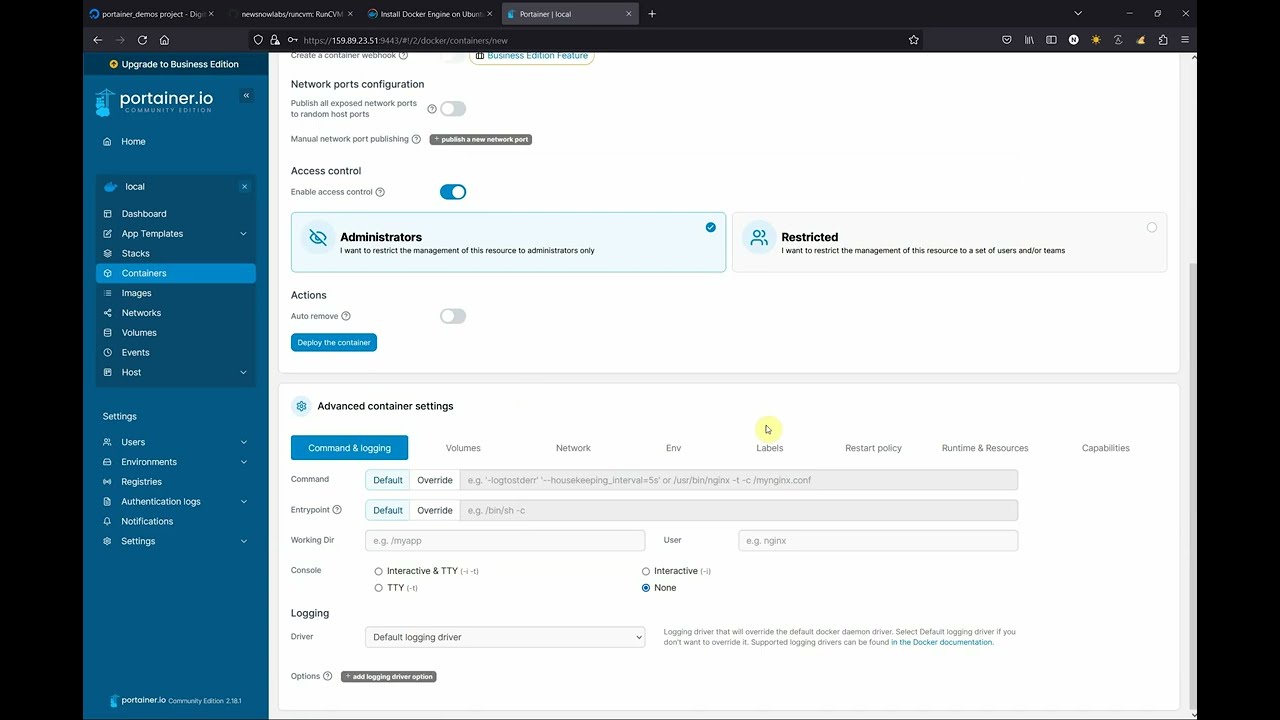
docker run -it --rm --runtime=runcvm --name=openwrt --network=runcvm-openwrt --ip=172.128.0.5 -v /tmp/runcvm-openwrt-network:/etc/config/network -p 10080:80 openwrt-23.05.2RunCVM-in-Portainer walk-through
Motivation
RunCVM was born out of difficulties experienced using the Docker and Podman CLIs to launch Kata Containers v2, and a belief that launching containerised workloads in VMs using Docker needn't be so complicated.
Motivations included: efforts to re-add OCI CLI commands for docker/podman to Kata v2 to support Docker & Podman; other Kata issues #3358, #1123, #1133, #3038; #5321; #6861; Podman issues #8579 and #17070; and Kubernetes issue #40114; though please note, since authoring RunCVM some of these issues may have been resolved.
Like Kata, RunCVM aims to be a secure container runtime with lightweight virtual machines that feel and perform like containers, but provide stronger workload isolation using hardware virtualisation technology.
However, while Kata aims to launch standard container images inside a restricted-privileges namespace inside a VM running a single fixed and heavily customised kernel and Linux distribution optimised for this purpose, RunCVM intentionally aims to launch container _or VM_ images as the _VM's root filesystem_ using stock or bespoke Linux kernels, the upshot being RunCVM's can run VM workloads that Kata's security and kernel model would explicitly prevent.
For example:
- RunCVM can launch system images expecting to interface directly with hardware, like OpenWRT
- RunCVM can launch VMs nested inside a RunCVM VM - i.e. an 'inner' RunCVM Container/VM guest can be launched by Docker running within an 'outer' RunCVM Container/VM guest (assuming the host supports nested VMs) - in this sense, RunCVM is 'reentrant'.
- Compatible with
docker run(with experimental support forpodman run). - Uses a lightweight 'wrapper-runtime' technology that subverts the behaviour of the standard container runtime
runcto cause a VM to be launched within the container (making its code footprint and external dependencies extremely small, and its internals extremely simple and easy to understand and tailor for specific purposes). - Highly portable among Linux distributions and development platforms providing KVM. Can even be installed on GitHub Codespaces!
- Written, using off-the-shelf open-source components, almost entirely in shell script for simplicity, portability and ease of development.
RunCVM makes some trade-offs in return for this simplicity. See the full list of features and limitations.
Contents
- Introduction
- Quick start
- Motivation
- Licence
- Project aims
- Project ambitions
- Applications for RunCVM
- How RunCVM works
- System requirements
- Supported distributions
- Installation
- Upgrading
- Features and Limitations
- RunCVM vs Kata comparison
- Kernel selection
- Option reference
- Advanced usage
- Developing
- Building
- Testing
- Contributing
- Support
- Uninstallation
- Legals
Licence
RunCVM is free and open-source, licensed under the Apache Licence, Version 2.0. See the LICENSE file for details.
Project aims
- Run any standard container workload in a VM using
docker runwith no need to customise images or the command line (except adding--runtime=runcvm) - Run unusual container workloads, like
dockerdandsystemdthat will not run in standard container runtimes - Maintain a similar experience within a RunCVM VM as within a container: process table, network interfaces, stdio, exit code handling should be broadly similar to maximise compatibility
- Container start/stop/kill semantics respected, where possible providing clean VM shutdown on stop
- VM console accessible as one would expect using
docker run -it,docker start -aianddocker attach(and so on), generally good support for otherdocker containersubcommands - Efficient container startup, by using virtiofs to serve a container's filesystem directly to a VM (instead of unpacking an image into a backing file)
- Improved security compared to the standard container runtime, and as much security as possible without compromising the simplicity of the implementation
- Command-line and image-embedded options for customising the a container's VM specifications, devices, kernel
- Intelligent kernel selection, according to the distribution used in the image being launched
- No external dependencies, except for Docker/Podman and relevant Linux kernel modules (
kvmandtun) - Support multiple Docker network interfaces attached to a created (but not yet running) container using
docker run --network=anddocker network connect - Dual-stack (IPv4 and IPv6) networking, where the host and Docker are already configured to support it
Project ambitions
- Support for booting VM with a file-backed disk root fs generated from the container image, instead of only virtiofs root
- Support running foreign-architecture VMs by using QEMU dynamic CPU emulation for the entire VM (instead of the approach used by https://github.com/multiarch/qemu-user-static which uses dynamic CPU emulation for each individual binary)
- Support for QEMU microvm or potentially Amazon Firecracker
- More natural console support with independent stdout and stderr channels for
docker run -it - Improve VM boot time and other behaviours using custom kernel
- Support for specific hardware e.g. graphics display served via VNC
Applications for RunCVM
The main applications for RunCVM are:
- Running and testing applications that:
systemd, dockerd, Docker swarm services, Kubernetes)
- require a running kernel, or a kernel version or modules not available on the host
- require specific hardware that can be emulated e.g. disks, graphics displays
- Running existing container workloads with increased security
- Testing container workloads that are already intended to launch in VM environments, such as on fly.io
- Developing any of the above applications in Dockside (see RunCVM and Dockside)
How RunCVM works
RunCVM's 'wrapper' runtime, runcvm-runtime, receives container create commands triggered by docker run/create commands, modifies the configuration of the requested container in such a way that the created container will launch a VM that boots from the container's filesystem, and then passes the request on to the standard container runtime (runc) to actually create and start the container.
For a deep dive into RunCVM's internals, see the section on Developing RunCVM.
System requirements
RunCVM should run on any amd64 (x86_64) hardware (or VM) running Linux Kernel >= 5.10, and that supports KVM and Docker. So if your host can already run KVM VMs and Docker then it should run RunCVM.
RunCVM has no other host dependencies, apart from Docker (or experimentally, Podman) and the kvm and tun kernel modules. RunCVM comes packaged with all binaries and libraries it needs to run (including its own QEMU binary).
RunCVM is tested on x86-64 hosts with KVM running Debian 12 (Bookworm) and Ubuntu 24.04 LTS (Noble Numbat), with Docker Engine, both Docker's own packages and Ubuntu's docker.io. The integration tests can also run where KVM is unavailable, under software emulation (see Testing).
rp_filter sysctl settings
For RunCVM to support Docker DNS within Container/VMs, the following condition on /proc/sys/net/ipv4/conf/ must be met:
- the max of
all/rp_filterand/rp_filter
This means that:
- if
all/rp_filterwill be set to 0, then/rp_filter
default/rp_filter must be set to 0 or 2)
- if
all/rp_filterwill be set to 1, then/rp_filter
default/rp_filter must be set to 2)
- if
all/rp_filterwill be set to 2, then no further action is needed
- the Debian default is
0; - the Ubuntu default is
2; - the Google Cloud Debian image has default
1andrp_filtersettings in/etc/sysctl.d/60-gce-network-security.confmust be modified or overridden to support RunCVM.
all/rp_filter be set to 2, as this is the simplest change and provides a good balance of security.
This requirement concerns IPv4 only. A dual-stack Container/VM's DNS requests and docker exec connections still use IPv4, and Linux has no IPv6 equivalent of rp_filter, so IPv6 needs no further host configuration.
Supported distributions
RunCVM aims to support each distribution's latest release and one or two before it (for Ubuntu, its LTS releases), while they remain supported upstream, as the image a Container/VM runs. It bundles a kernel for each of these distributions, built from the release shown, which a Container/VM boots unless its image has a kernel of its own (see Kernel auto-detection). The table lists the image releases that the integration tests (tests/25-images-kernels) boot:
| Distribution | Image releases tested | RunCVM's kernel (RUNCVM_KERNEL) | Kernel built from | Kernel series | Module compression | Image releases whose own modprobe can load the kernel's modules |
|---|---|---|---|---|---|---|
| Debian | 12 (Bookworm) | debian | Debian 12 (Bookworm) | 6.1 | none | all |
| Ubuntu | 24.04 LTS (Noble Numbat) | ubuntu | Ubuntu 22.04 LTS (Jammy Jellyfish) | 5.15 | none | all |
| Oracle Linux | none (the kernel is tested with an Alpine Linux image) | ol | Oracle Linux 9 | 5.14 | xz | 7 and later (9 and 10 once kmod is installed) |
| Alpine Linux | the latest (the alpine image) | alpine | Alpine Linux 3.19 (linux-virt) | 6.6 | gzip | all |
| OpenWrt | none (the kernel is tested with an Alpine Linux image) | openwrt | Alpine Linux 3.19 (linux-virt) | 6.6 | none | all |
Each kernel comes from the release in the "Kernel built from" column, which stays fixed for a given RunCVM version: its series (as shown) does not change, and each build of RunCVM takes that release's newest kernel update (e.g. Debian 12's newest 6.1 kernel).
The last column concerns the workload's own module loading, e.g. modprobe, or dockerd loading overlay or br_netfilter, in the VM. It reflects which compressed formats each release's kmod (or, for Alpine Linux, BusyBox) can read: for example, Debian 9 (Stretch), Ubuntu 16.04 LTS (Xenial Xerus) and Ubuntu 18.04 LTS (Bionic Beaver) read only uncompressed modules, Debian 10 (Buster), Debian 11 (Bullseye) and Ubuntu 20.04 LTS (Focal Fossa) also read xz, and later releases also read zstd. Oracle Linux 9 and 10 images include no kmod until it is installed. RunCVM itself loads the modules it needs, while the VM boots, with its own bundled BusyBox modprobe, which reads uncompressed, gzip and xz modules, whatever the image.
Other releases of these distributions, including the older releases RunCVM aims to support, may work, but are not yet tested.
Other distributions
RunCVM bundles no kernel for other distributions. How it treats some popular ones, as named by their images' /etc/os-release:
| Distribution | ID | ID_LIKE | Status |
|---|---|---|---|
| Rocky Linux | rocky | rhel centos fedora | Refused, unless launched with --env=RUNCVM_KERNEL= (e.g. ol) |
| AlmaLinux | almalinux | rhel centos fedora | Refused, unless launched with RUNCVM_KERNEL |
| CentOS Stream | centos | rhel fedora | Refused, unless launched with RUNCVM_KERNEL |
| Red Hat Universal Base Image (UBI) | rhel | fedora | Refused, unless launched with RUNCVM_KERNEL |
| Amazon Linux | amzn | fedora | Refused, unless launched with RUNCVM_KERNEL |
| Fedora | fedora | | Refused, unless launched with RUNCVM_KERNEL |
| openSUSE Leap, openSUSE Tumbleweed | opensuse-leap, opensuse-tumbleweed | suse opensuse | Refused, unless launched with RUNCVM_KERNEL |
| Arch Linux | arch | | Refused, unless launched with RUNCVM_KERNEL |
| Kali Linux | kali | debian | Refused, unless launched with RUNCVM_KERNEL (e.g. debian) |
| Wolfi (Chainguard) | wolfi | | Refused, unless launched with RUNCVM_KERNEL |
| Distroless (Debian-based, e.g. gcr.io/distroless/base-debian12) | debian | | Debian's kernel, as for Debian |
| BusyBox, and images built FROM scratch | (no /etc/os-release) | | Debian's kernel |
A Container/VM launched with RUNCVM_KERNEL boots the named kernel, whatever the image.
Installation
Run:
curl -s -o - https://raw.githubusercontent.com/newsnowlabs/runcvm/main/runcvm-scripts/runcvm-install-runtime.sh | sudo shThis will:
- Install the RunCVM software package to
/opt/runcvm(installation elsewhere is currently unsupported) - For Docker support:
/etc/docker/daemon.json to add runcvm to the runtimes property
- Restart dockerd, if it can be detected how for your system (e.g. systemctl restart docker)
- Verify that RunCVM is recognised via docker info
- For Podman support (experimental)
/etc/containers/containers.conf
- Check your system network device
rp_filtersettings, and amend them if necessary
docker run --runtime=runcvm --rm -it hello-worldInstall on Google Cloud
Create an image that will allow instances to have VMX capability:
gcloud compute images create debian-12-vmx --source-image-project=debian-cloud --source-image-family=debian-12 --licenses="https://compute.googleapis.com/compute/v1/projects/vm-options/global/licenses/enable-vmx"Now launch a VM, install Docker and RunCVM:
cat >/tmp/startup-script.sh <<EOF
#!/bin/bash
apt update && apt -y install apt-utils kmod wget iproute2 systemd \
    ca-certificates curl gnupg udev dbus jq && \
    mkdir -p /etc/docker && echo '{"userland-proxy": false}' >/etc/docker/daemon.json && \
    curl -fsSL https://get.docker.com | bash && \
    curl -s -o - https://raw.githubusercontent.com/newsnowlabs/runcvm/main/runcvm-scripts/runcvm-install-runtime.sh | sudo REPO=newsnowlabs/runcvm:latest sh
EOF
gcloud compute instances create runcvm-vmx-test --zone=us-central1-a --machine-type=n2-highmem-2 --network-interface=network-tier=PREMIUM,stack-type=IPV4_ONLY,subnet=default --metadata-from-file=startup-script=/tmp/startup-script.sh --no-restart-on-failure --maintenance-policy=TERMINATE --provisioning-model=SPOT --instance-termination-action=STOP  --no-service-account --no-scopes --create-disk=auto-delete=yes,boot=yes,image=debian-12-vmx,mode=rw,size=50,type=pd-ssd --no-shielded-secure-boot --shielded-vtpm --shielded-integrity-monitoring --labels=goog-ec-src=vm_add-gcloud --reservation-affinity=any
Upgrading
To upgrade, follow this procedure:
- Stop all RunCVM containers.
- Run
/opt/runcvm/scripts/runcvm-install-runtime.sh(or rerun the installation command - which runs the same script) - Start any RunCVM containers.
Features and limitations
In the below summary of RunCVM's current main features and limitations, [+] is used to indicate an area of compatibility with standard container runtimes and [-] is used indicate a feature of standard container runtimes that is unsupported.
N.B.docker runanddocker execoptions not listed below are unsupported and their effect, if used, is unspecified.
docker run
--mount (or -v) is supported for volume mounts, tmpfs mounts, and host file and directory bind-mounts (the dst mount path /disks is reserved)
- [-] Bind-mounting host sockets or devices, and --device is unsupported
- Networking
- [+] The default bridge network is supported
- [+] Custom/user-defined networks specified using --network are supported, including Docker DNS resolution of container names and respect for custom network MTU
- [+] Multiple network interfaces - when attached via docker run --network or docker network connect (but only to a created and not yet running container) - are supported (including scope=overlay networks and those with multiple subnets)
- [+] --publish (or -p) is supported
- [+] --dns, --dns-option, --dns-search are supported
- [+] --ip is supported
- [+] --hostname (or -h) is supported
- [-] docker network connect on a running container is not supported
- [-] --network=host and --network=container:name|id are not supported (--network=host is rejected when the Container/VM is created)
- [-] --network=none, and attaching only to --internal networks, are not supported: a Container/VM needs a network that provides a default route, over which docker exec reaches the VM
- [+] Dual-stack (IPv4 and IPv6) networking is supported, automatically, where the host and Docker are already configured for IPv6 (see --env=RUNCVM_IPV6=<0|1>)
- [-] IPv6-only networks (i.e. with no IPv4 connectivity at all) are not supported: a working IPv4 leg is required
- [-] --dns= is not supported: the VM's DNS requests are proxied via dnsmasq running in the container, whose own traffic reaches the network only over IPv4 (as with IPv4, the VM holds the container's Docker-assigned address, and the container has no IPv6 address or route of its own)
- Execution environment
- [+] --user (or -u) is supported
- [?] --workdir (or -w) is supported
- [+] --env (or -e), --env-file is supported
- [+] --entrypoint is supported
- [+] --init - is supported (but runs RunCVM's own VM init process rather than Docker's default, tini)
- stdio/Terminals
- [+] --detach (or -d) is supported
- [+] --interactive (or -i) is supported
- [+] --tty (or -t) is supported (but to enter CTRL-T one must press CTRL-T twice)
- [+] --attach (or -a) is supported
- [+] Stdout and Stderr output should be broadly similar to running the same workload in a standard runc container
- [-] Stdout and Stderr are not independently multiplexed so docker run --runtime=runcvm debian bash -c 'echo stdout; echo stderr >&2' >/tmp/stdout 2>/tmp/stderr does not produce the expected result
- [-] Stdout and Stderr sent very soon after VM launch might be corrupted due to serial console issues
- [-] Stdout and Stderr sent immediately before VM shutdown might not always be fully flushed
- Resource allocation and limits
- [+] --cpus is supported to specify number of VM CPUs
- [+] --memory (or -m) is supported to specify VM memory (and limit container memory to this value plus a 256Mb contingency)
- [-] Other container resource limit options such as (--cpu-), block IO (--blkio-), kernel memory (--kernel-memory) are unsupported or untested
- Exit code
- [+] Returning an exit code is supported, but it currently requires application support, which must either write the exit code to /.runcvm/exitcode (supported exit codes 0-255) or call /.runcvm/guest/sbin/qemu-exit /.runcvm is accessible only to root. Automatic handling of exit codes from the entrypoint may be provided in a later release.
- Disk performance
- [+] No mountpoints are required for basic operation for most applications. Volume or disk mountpoints may be needed for running dockerd or to improve disk performance
- [-] dockerd mileage will vary unless a volume or disk is mounted over /var/lib/docker
docker exec
- [+] --user (or -u), --workdir (or -w), --env (or -e), --env-file, --detach (or -d), --interactive (or -i) and --tty (or -t) are all supported
- [+] Stdout and Stderr _are_ independently multiplexed so docker exec bash -c 'echo stdout; echo stderr >&2' >/tmp/stdout 2>/tmp/stderr _does_ produce the expected result
- Security
- The RunCVM software package at /opt/runcvm is mounted read-only within RunCVM containers. Container applications cannot compromise RunCVM, but they can execute binaries from within the RunCVM package. The set of binaries available to the VM may be reduced to a minimum in a later version.
- Kernels
- [+] Use any kernel, either one pre-packaged with RunCVM or roll your own
- [+] RunCVM will try to select an appropriate kernel to use based on examination of /etc/os-release within the image being launched.
- Firmware
- [+] SeaBIOS
- [+] OVMF EFI
RunCVM vs Kata comparison
This table provides a high-level comparison of RunCVM and Kata across various features like kernels, networking/DNS, memory allocation, namespace handling, method of operation, and performance characteristics:
| Feature | RunCVM | Kata |
|---------|--------|------|
| Methodology | Boots VM from distribution kernels with container's filesystem directly mounted as root filesystem, using virtiofs. VM setup code and kernel modules are bind-mounted into the container. VM's PID1 runs setup code to reproduce the container's networking environment within the VM before executing the container's original entrypoint. | Boots VM from custom kernel with custom root disk image, mounts the virtiofsd-shared host container filesystem to a target folder and executes the container's entrypoint within a restricted namespace having chrooted to that folder. |
| Privileges/restrictions | Container code has full root access to VM and its devices. It may run anything that runs in a VM, mounting filesystems, installing kernel modules, accessing devices. RunCVM helper processes are visible to ps etc. | Runs container code inside a VM namespace with restricted privileges. Use of mounts, kernel modules is restricted. Kata helper processes (like kata-agent and chronyd) are invisible to ps.|
| Kernels | Launches stock Alpine, Debian, Ubuntu kernels. Kernel /lib/modules automatically mounted within VM. Install any needed modules without host reconfiguration. | Launches custom kernels. Kernel modules aren't mounted and need host reconfiguration to be installed. |
| Networking/DNS | Docker container networking + internal/external DNS out-of-the-box. No support for docker network connect/disconnect | DNS issues presented: with custom network, external ping works, but DNS lookups fail both for internal docker hosts and external hosts.[^1] |
| Memory | VM assigned and reports total memory as per --memory | VM total memory reported by free appears unrelated to --memory specified [^2] |
| CPUs | VM assigned and reports CPUs as per --cpus | CPUs must be hardcoded in Kata host config |
| Performance | | Custom kernel optimisations may deliver improved startup (~3.2s) or operational performance (~15%) |
| virtiofsd | Runs virtiofsd in container namespace | Unknown |
[^1]: docker network create --scope=local testnet >/dev/null && docker run --name=test --rm --runtime=kata --network=testnet --entrypoint=/bin/ash alpine -c 'for n in test google.com 8.8.8.8; do echo "ping $n ..."; ping -q -c 8 -i 0.5 $n; done'; docker network rm testnet >/dev/null succeeds on runc and runcvm but at time of writing (2023-12-31) the DNS lookups needed fail on kata.
$ docker network create --scope=local testnet >/dev/null && docker run --name=test --rm -it --runtime=kata --network=testnet --entrypoint=/bin/ash alpine -c 'for n in test google.com 8.8.8.8; do echo "ping $n ..."; ping -q -c 8 -i 0.5 $n; done'; docker network rm testnet >/dev/null
ping test ...
ping: bad address 'test'
ping google.com ...
ping: bad address 'google.com'
ping 8.8.8.8 ...
PING 8.8.8.8 (8.8.8.8): 56 data bytes
--- 8.8.8.8 ping statistics ---
8 packets transmitted, 8 packets received, 0% packet loss
round-trip min/avg/max = 0.911/1.716/3.123 ms
$ docker network create --scope=local testnet >/dev/null && docker run --name=test --rm -it --runtime=runcvm --network=testnet --entrypoint=/bin/ash alpine -c 'for n in test google.com 8.8.8.8; do echo "ping $n ..."; ping -q -c 8 -i 0.5 $n; done'; docker network rm testnet >/dev/null
ping test ...
PING test (172.25.8.2): 56 data bytes
--- test ping statistics ---
8 packets transmitted, 8 packets received, 0% packet loss
round-trip min/avg/max = 0.033/0.085/0.137 ms
ping google.com ...
PING google.com (172.217.16.238): 56 data bytes
--- google.com ping statistics ---
8 packets transmitted, 8 packets received, 0% packet loss
round-trip min/avg/max = 8.221/8.398/9.017 ms
ping 8.8.8.8 ...
PING 8.8.8.8 (8.8.8.8): 56 data bytes
--- 8.8.8.8 ping statistics ---
8 packets transmitted, 8 packets received, 0% packet loss
round-trip min/avg/max = 1.074/1.491/1.801 ms
[^2]: docker run --rm -it --runtime=kata --entrypoint=/bin/ash -m 500m alpine -c 'free -h; df -h /dev/shm'
$ docker run --rm --runtime=kata --name=test -m 2g --env=RUNCVM_KERNEL_DEBUG=1 -it alpine ash -c 'free -h'
total used free shared buff/cache available
Mem: 3.9G 94.4M 3.8G 0 3.7M 3.8G
Swap: 0 0 0
$ docker run --rm --runtime=kata --name=test -m 3g --env=RUNCVM_KERNEL_DEBUG=1 -it alpine ash -c 'free -h'
total used free shared buff/cache available
Mem: 4.9G 107.0M 4.8G 0 3.9M 4.8G
Swap: 0 0 0
$ docker run --rm --runtime=kata --name=test -m 0g --env=RUNCVM_KERNEL_DEBUG=1 -it alpine ash -c 'free -h'
total used free shared buff/cache available
Mem: 1.9G 58.8M 1.9G 0 3.4M 1.9G
Swap: 0 0 0
Kernel auto-detection
When creating a container, RunCVM will examine the image being launched to try to determine a suitable kernel to boot the VM with. Its process is as follows:
- If
--env=RUNCVM_KERNEL=[/] specified, use the indicated kernel
- Otherwise, identify distro from
/etc/os-release
1. If one is found in the appropriate distro-specific location in the image, select an in-image kernel. The locations are:
- Debian: /vmlinuz and /initrd.img
- Ubuntu: /boot/vmlinuz and /boot/initrd.img
- Alpine: /boot/vmlinuz-virt /boot/initramfs-virt
2. Otherwise, select the latest RunCVM kernel for the distro: debian, ubuntu, ol (Oracle Linux), alpine or openwrt
3. If the image has no /etc/os-release, or it gives no ID, use the Debian kernel from the RunCVM package
An image whose /etc/os-release ID is none of debian, ubuntu, ol, alpine and openwrt (e.g. Fedora) cannot be launched without --env=RUNCVM_KERNEL=, even if it has a kernel of its own.
Option reference
RunCVM options are specified either via standard docker run options or via --env== options on the docker run
command line. The following env options are user-configurable:
--env=RUNCVM_KERNEL=[/]
Specify with which RunCVM kernel (from /opt/runcvm/kernels) to boot the VM. Values must be of the form / /opt/runcvm/kernels and latest will be assumed. Here is an example command that will list available values of /
$ find /opt/runcvm/kernels/ -maxdepth 2 | sed 's!^/opt/runcvm/kernels/!!; /^$/d'
debian
debian/latest
debian/5.10.0-16-amd64
alpine
alpine/latest
alpine/5.15.59-0-virt
ubuntu
ubuntu/latest
ubuntu/5.15.0-43-generic
ol
ol/5.14.0-70.22.1.0.1.el9_0.x86_64
ol/latest
Example:
docker run --rm --runtime=runcvm --env=RUNCVM_KERNEL=ol hello-world
--env=RUNCVM_KERNEL_APPEND=1
Any custom kernel command line options e.g. apparmor=0 or systemd.unified_cgroup_hierarchy=0.
--env='RUNCVM_DISKS=[;;...]'
Automatically create, format, prepopulate and mount backing files as virtual disks on the VM.
Each
- positional:
,[::...],[,][,layout=subdirs|root]
- keyed:
src=,dst=[,dst=...],fs=[,size=][,layout=subdirs|root] , with the fields in any order, recognised by its first field beginning with one of these keys and =; as in Docker's --mount, source may be given for src, and target or destination for dst
where:
--mount=type=volume).: in the positional form, or each given by its own dst= in the keyed form, where a destination may also contain :.ext4, xfs or btrfs (see Disk filesystems below).truncate format), and must be specified if layout=subdirs or layout=root chooses the disk's layout (see Disk layouts below). It applies when the disk is created, and defaults to subdirs.
In the keyed form, each field is split at its first =, so values may contain =; only dst may be given more than once. In either form, no value may contain , or ;, and an unknown or repeated option is rejected.
When first created, the backing file will be created as a sparse file to the specified ext4 disk is formatted and prepopulated in the container, by mke2fs. A disk with another filesystem is formatted empty in the container, then prepopulated when the VM first boots with it, before anything is mounted over the destinations, by copying each cp -a. (trusted.* extended attributes are copied only if the container has CAP_SYS_ADMIN, e.g. with --cap-add=SYS_ADMIN, because mke2fs runs in the container. For a disk with another filesystem, they are copied only with --env=RUNCVM_SYS_ADMIN=1 as well, as the VM reads the container's files through virtiofsd, which otherwise drops the capability.)
RunCVM formats disks with its own bundled mkfs commands, and ext4 disks with its own mke2fs.conf, ignoring any /etc/mke2fs.conf in the container's image, so a disk is formatted the same way whatever the image. For ext4, the configuration leaves out the orphan_file and metadata_csum_seed features, as Debian's and Ubuntu's do, so that the disk can also be checked, resized and tuned with older versions of e2fsprogs: orphan_file needs e2fsprogs 1.47 or later, and metadata_csum_seed 1.43 or later.
When RunCVM creates a Container/VM, fstab entries will be drafted, identifying each disk by its filesystem's UUID. After the VM boots, the fstab entries will be mounted, in order. Typically, the first disk will be mounted as /dev/vda, the second as /dev/vdb, and so on. RunCVM finds each disk with its own bundled blkid.conf, which scans the VM's block devices and keeps no cache, ignoring any /etc/blkid.conf in the image.
Warning: launch with --init if a disk's contents must survive the VM ending. Data written to a disk stays in the VM's memory until the VM's kernel writes it out, so whether it reaches the backing file depends on how the VM ends:
> - With --init, the VM's init syncs its file systems before powering off, both when the entrypoint exits and on docker stop.
- Without --init, docker stop runs poweroff in the VM, which also syncs file systems first. But when the entrypoint exits by itself, the VM ends at once: the entrypoint is the VM's PID 1, and nothing runs after it. Data not yet written out is lost, and the file system needs journal recovery when next mounted.
- docker kill ends the VM at once in either mode.
- Launch an image whose entrypoint is its own init, such as systemd, without --init, which would displace it as the VM's PID 1. Such an init normally runs until docker stop, which syncs file systems as above.
> To keep a disk's data without --init, the workload must flush the disk before its entrypoint exits, with sync -f for one umount does so only where the disk is mounted directly at umount removes only the bind mount and leaves the disk mounted, unflushed. A plain sync also works, but flushes every file system in the VM, including its root file system, whether that is shared with the container or is a whole-root disk.
> A disk whose contents are thrown away after each run, such as a /var/lib/docker for a disposable test, needs no flushing.
Disk layouts
A disk with layout subdirs, the default, holds a top-level directory for each destination, prepopulated from it. On every boot, the disk is mounted at a hidden mountpoint, /.runcvm/disks/ (where RUNCVM_DISKS order), and each directory is bind-mounted over its destination. Such a disk is created with the filesystem label runcvm-subdirs (rcvm-subdirs for xfs, whose labels are at most 12 characters), by which RunCVM recognises its layout thereafter; relabelling the disk would change how it is mounted.
Each directory is named after its destination: the path without its leading /, with each %, - and = encoded as %25, %2D and %3D, and then each / replaced by -. For example, /var/lib/docker is held in var-lib-docker, /a/b in a-b, and /a-b in a%2Db. The name depends only on the destination, so it is the same on every boot, and distinct destinations always have distinct names.
The destinations of a disk with layout subdirs:
- must be absolute paths other than
/, without . or .. components, whitespace or \;
- must not overlap: no destination may be the same as, or an ancestor of, another, once any symbolic links in the image are resolved (e.g.
/var/lib and /var/lib/docker are rejected, as are /var/run and /run in an image where /var/run links to /run);
- must not be
/lost+found, whose directory name would clash with the lost+found that mke2fs creates in every filesystem's root (use layout=root for it).
Destinations may be left out of an existing disk's spec, leaving their directories on the disk unmounted, so long as at least one remains; but destinations cannot be added: when a destination has no directory on an existing disk, the VM reports the error and powers off with exit status 1.
A disk with layout root has exactly one destination, holds its files at its root, and is mounted directly at the destination. Any existing disk without its filesystem's subdirs label, including any disk created by an earlier RunCVM release, has layout root.
An existing disk keeps its layout and filesystem: a spec giving a different layout, several destinations for a disk with layout root, or a different
Disk filesystems
The filesystems a disk may have are listed in runcvm-etc/disk-filesystems, which is installed with RunCVM as /opt/runcvm/etc/disk-filesystems. Each line gives a filesystem's name, its kernel modules, the Alpine packages that provide its mkfs command, the mkfs option that sets a label, the label that marks layout subdirs, and the mkfs command with its options. The build installs the packages and bundles each mkfs command; RunCVM accepts only the filesystems listed, and loads each disk's modules in the VM before mounting it. To support another filesystem, add its line to the file before building RunCVM.
By default, the list holds:
| Filesystem | mkfs command | Notes |
|---|---|---|
| ext4 | mke2fs (RunCVM's own build) | The only filesystem a whole-root disk may have. |
| xfs | mkfs.xfs, from xfsprogs | mkfs.xfs rejects a disk smaller than 300M. |
| btrfs | mkfs.btrfs, from btrfs-progs | mkfs.btrfs rejects a disk smaller than 114294784 bytes (109M). Formatted without subvolumes. |
The VM's kernel must provide each filesystem used. RunCVM's Alpine, Debian, Ubuntu and OpenWrt kernels provide all three; its Oracle Linux kernel provides ext4 and xfs, but not btrfs. A disk whose filesystem the kernel lacks stops the VM at boot, reporting the missing module.
Whole-root disks
A disk with destination / is a _whole-root disk_: it holds the VM's whole root filesystem. For example:
docker run -it --runtime=runcvm --init --mount=type=volume,src=runcvm-disks,dst=/disks --env=RUNCVM_DISKS=/disks/root,/,ext4,40G <docker-image>
A whole-root disk must have / as its only destination, filesystem ext4 and layout root (layout=root may be given, but need not be). Only one disk may have destination /; other disks in RUNCVM_DISKS are mounted onto it as usual.
When first created, a whole-root disk is prepopulated with a copy of the container's filesystem: the image and any changes made to it in the container. The copy leaves out everything that must stay live, as it is mounted from the container: /.runcvm, volumes, bind mounts, the files Docker mounts such as /etc/hosts, /etc/hostname and /etc/resolv.conf, and the kernel modules. Each mountpoint that is a directory is left as an empty directory. The copy also leaves out every disk's backing file, so that a backing file in the container's own filesystem is not copied into the disk, and the image's files at other disks' destinations, which those disks hold instead, leaving an empty directory at each.
The VM still boots from the container's filesystem over virtiofs. Early in boot, before setting up the network, mounting the other disks or starting the entrypoint, runcvm-vm-init mounts the whole-root disk, binds everything that must stay live onto it, and switches to it as the root filesystem with pivot_root. Everything after that, including the entrypoint and docker exec, sees the disk as /.
The disk is populated only when it is created. While it exists, later changes to the image, or to the container's own filesystem, are not seen in the VM; and changes the VM makes outside volumes are made to the disk, not the container's filesystem, so docker diff, docker cp, docker commit and docker export do not see them. To start afresh from the image, remove the disk's backing file.
Every write outside volumes goes to the disk, so the warning above on keeping a disk's data applies to all of them. With --init, or an image whose entrypoint is its own init (such as systemd), the VM syncs its filesystems when it powers off. Without either, a workload whose data must survive should run sync -f / before it exits. This flushes the whole-root disk only.
Compared with disks whose destinations are other paths, such as /var/lib/docker or /home (here called multi-path disks):
| | Multi-path disk | Whole-root disk |
|---|---|---|
| What must be specified | Each path that needs the disk | Only the disk and its size |
| I/O on the block device | The listed paths | Everything except volumes, bind mounts and other live mounts |
| Creation cost | Copying the listed paths' contents | Copyi
... (README truncated for length)