
🎬 The Anime Scripter
Free, open-source AI video enhancement for anime and beyond.
Upscale, interpolate, restore and dedup in a single GPU pass from the CLI, a Windows desktop app, or directly inside After Effects.



720p master → Adore 2x. More demos
✨ Why TAS
- Anime-first models. Line-art-tuned upscalers (ShuffleCUGAN, Adore, Fallin, AniScale 2, Cyte), RIFE up to 4.26, anime depth (Limbo) and anime segmentation, plus general-purpose models for live action and games.
- One pass, in memory. Decode → dedup → restore → interpolate ↔ upscale → encode runs as one pipeline with no intermediate files. NVDEC decoding, TensorRT engines and CUDA graphs keep the GPU busy.
- Built for animation.
--smooth_dedupdetects frames held on twos and threes and interpolates across them while keeping the original length and audio.--scenechangeholds the frame at hard cuts so nothing morphs between shots.--maskkeeps HUDs and hardsubs from warping. - Runs on most GPUs. CUDA, TensorRT, DirectML, OpenVINO, NCNN/Vulkan, Apple Silicon (MPS) and AMD ROCm on Linux.
- Works where you edit. A native After Effects panel, a standalone Windows app and a scriptable CLI with presets, batch input and YouTube URLs.
🧰 What it does
| Feature | Flag | Models | Backends |
|---|---|---|---|
| Upscale | --upscale | ShuffleCUGAN, Adore, Fallin Soft/Strong, Cyte, SPAN, Open-Proteus, AniScale 2, RTMoSR, Saryn, Gauss, SmoSR, FigSR, AnimeSR, ArtCNN, NVIDIA Maxine VSR, your own Spandrel/ONNX model | CUDA · TRT · DML · OpenVINO · NCNN · MPS · ROCm |
| Interpolate | --interpolate | RIFE 4.6 – 4.26 (lite / heavy), RIFE Elexor, DistilDRBA, GMFSS Fortuna, NVIDIA Maxine Frame Generation | CUDA · TRT · DML · OpenVINO · NCNN · MPS · ROCm |
| Restore (chainable) | --restore | Anime1080Fixer, SCUNet, NAFNet, DPIR, DeJPEG, DeH264, GaterV3, HurrDeblur, DeHalo, deepDeband, FastLineDarken, LineThinner, AutoCAS, Maxine denoise/deblur | CUDA · TRT · DML · OpenVINO · MPS · ROCm |
| Dedup | --dedup / --smooth_dedup | SSIM, MSE, VMAF, FlowNetS | CPU · CUDA · ROCm |
| Depth maps | --depth | Depth Anything V2 & 3, Video Depth Anything, Limbo V1/V2 (anime), DA3 streaming | CUDA · TRT · DML · OpenVINO · MPS · ROCm |
| Segmentation | --segment | Anime Segmentation, BiRefNet (anime) | CUDA · TRT · DML · ROCm |
| Object detection | --obj_detect | YOLOv9 (MIT) S / M / L | TRT · DML · OpenVINO |
| Scene detection | --autoclip / --scenechange | PySceneDetect, TransNetV2, MaxxViT, SSIM/MSE | CPU · CUDA · TRT · DML · ROCm |
| Stabilize | --stabilize | Classic (feature tracking), DUT (deep mesh warp) | CPU · CUDA · ROCm |
| Motion blur | --moblur | RIFE-driven shutter simulation | CUDA · TRT · DML · MPS · ROCm |
Output goes through FFmpeg or TAS's in-process Nelux encoders: x264/x265/AV1/VP9, NVENC, QSV, AMF, ProRes (with alpha), lossless, GIF and PNG/JPEG sequences.
PARAMETERS.MD has every flag, every model with its backends, and recommendations by content type.
📦 Get TAS
| Edition | Platform | What it is | |---|---|---| | TAS-Standalone | Windows | Desktop app with its own backend: no Python, no terminal. Toggle steps into a chain, watch the live preview and save presets. | | TAS-AdobeEdition | Windows, macOS | After Effects 2022+ panel. Follow the installation guide or the video tutorial. | | CLI | Windows, macOS (Apple Silicon), Linux (source) | Every option, scriptable. Nightly builds carry the newest features. |
 TAS-Standalone |
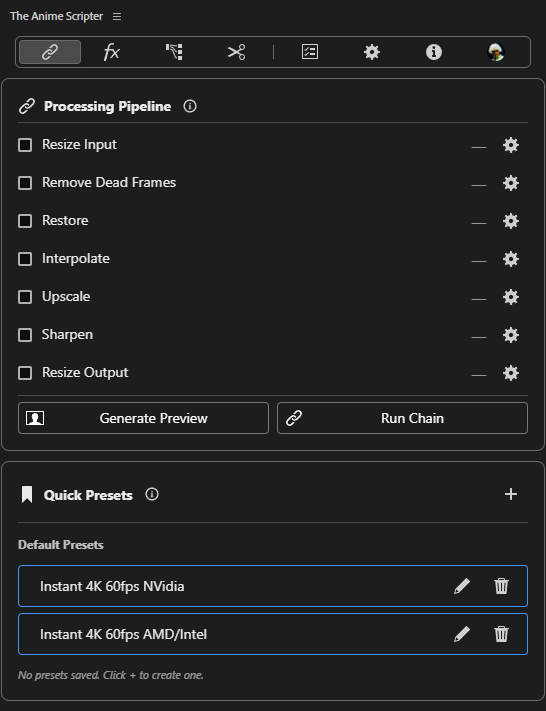 After Effects panel |
Models download on first use, so the first run with a new model takes longer.
Which backend fits your GPU
| Hardware | Use |
|---|---|
| NVIDIA RTX 20 – 50 / GTX 16 | CUDA (default) or -tensorrt for maximum speed |
| NVIDIA GTX 10 and older | -directml |
| AMD / Intel on Windows | -directml, or -openvino on Intel |
| AMD on Linux | -rocm (experimental) |
| Apple Silicon (M1+) | -mps |
| Anything with Vulkan | -ncnn (RIFE, ShuffleCUGAN, SPAN) |
NVIDIA Maxine methods need an RTX card (Frame Generation needs an RTX 40 or 50).
🚀 Quick start
Windows CLI one-liner. It installs into a TheAnimeScripter folder in the current directory and asks whether to add that folder to PATH:
iwr -useb https://tas.nevermindnilas.dev/install.ps1 | iexThen run it. Without the installer, use python main.py in place of tas:
# 2x upscale + 2x interpolation, anime defaults
tas --input episode.mp4 --upscale --interpolate
Picking a method enables its step: TensorRT upscale + RIFE 4.25, scaled to 4K
tas --input episode.mp4 --upscale_method shufflecugan-tensorrt --interpolate_method rife4.25-tensorrt --output_scale 3840x2160
Anime on twos → smooth motion, same length, cuts left untouched
tas --input episode.mp4 --smooth_dedup --scenechange
Chain restorers, encode 10-bit
tas --input old_show.mkv --restore_method deh264_real anime1080fixer --encode_method x265_10bit
Temporally stable depth map
tas --input clip.mp4 --depth_method video_small_v2
--input also takes folders, ;-separated lists, .txt batch files and URLs. Run tas --list_presets and tas --list_methods to explore, or tas -h for every option.
Run from source
TAS targets Python 3.14. Install the base requirements plus the profile for your platform:
python -m pip install -r requirements.txt -r extra-requirements-windows.txt
python main.py -h
| Profile | For |
|---|---|
| extra-requirements-windows.txt / -linux.txt | NVIDIA: CUDA, TensorRT, Maxine, plus everything in lite |
| extra-requirements-windows-lite.txt / -linux-lite.txt | No CUDA: DirectML/OpenVINO, NCNN, CPU |
| extra-requirements-linux-rocm.txt | AMD ROCm (experimental) |
| extra-requirements-macos.txt | Apple Silicon (MPS) |
Or let TAS install a profile for you: python main.py --download_requirements (it asks which to use), or pass one by name, e.g. --download_requirements linux-rocm.
On macOS TAS uses Homebrew's FFmpeg and runs brew install ffmpeg on first launch if it is missing. FFmpeg is GPL, so TAS does not ship it. Homebrew itself must already be installed.
Portable builds: see BUILD.md.
🙏 Credits
TAS builds on the work of many model authors and open-source projects. Third-party license notices are in THIRD_PARTY_NOTICES.md.
Models & research
| Contributor | Contribution |
|---|---|
| hzwer | RIFE interpolation |
| Elexor | Modified RIFE (RIFE Elexor) |
| routineLife1 | DistilDRBA |
| 98mxr / HolyWu | GMFSS Fortuna, vs-gmfss_fortuna, vs-animesr |
| TencentARC | AnimeSR |
| styler00dollar (SUDO) | ShuffleCUGAN & ONNX models (VSGAN-tensorrt-docker) |
| renarchi | Adore, Fallin Soft & Strong |
| Sirosky | Open-Proteus, AniScale 2 (Upscale-Hub) |
| umzi | RTMoSR, GaterV3 |
| Kim2091 | DIS architecture (Gauss) |
| Artoriuz | ArtCNN |
| Phhofm | DeJPEG & DeH264 restoration |
| Zarxrax | Anime1080Fixer, BiRefNet-Real_Anime |
| ZhengPeng7 | BiRefNet architecture |
| SkyTNT | Anime segmentation |
| Raymond Zhou et al. | deepDeband |
| DepthAnything / ByteDance | Depth Anything V2, Video Depth Anything, Depth Anything 3 |
| Annbless | DUT video stabilization |
| soCzech | TransNetV2 shot detection |
| MultimediaTechLab / ibaiGorordo | YOLOv9 (MIT), ONNX port |
| AMD GPUOpen | FidelityFX CAS (AutoCAS) |
| NVIDIA | Maxine Video Effects SDK (VSR, denoise/deblur, Frame Generation) via nvidia-vfx |
Frameworks & tools
| Project | Used for | |---|---| | FFmpeg | Encoding, muxing, audio | | spandrel (chaiNNer-org; vendored TNTwise fork) | Model architectures, custom models | | rife-ncnn-vulkan (nihui), TNTwise fork, Python wrapper (media2x) | NCNN/Vulkan RIFE | | yt-dlp | URL input | | PySceneDetect | Scene detection | | bolt-cep (Hyperbrew) | After Effects panel framework |
Collaborators: Trentonom0r3 (TAS Adobe Edition) · Adegerard (architecture & optimization suggestions)
Missing someone? Email [email protected] or open an issue.