

Multilingual, non-autoregressive System 1 decision engine. Typed decisions over 100+ languages in a single forward pass — 33 ms — trained with reinforcement learning against strictly proper scoring rules (RLCD), with a router that picks the right checkpoint per request.


Installation
python -m pip install layaWith uv, run uv add laya in a uv project or uv pip install laya in a virtual environment.
Python 3.10 or newer. Optional extras: laya[serve] (HTTP server), laya[mcp] (MCP server), laya[langchain] (LangChain and LangGraph), laya[llamaindex] (LlamaIndex selectors), laya[crewai] (CrewAI routing), laya[onnx] (ONNX Runtime), laya[fast] (TileLang GPU fast path), laya[structured] (pydantic models in decide), laya[vision] (Pillow and torchvision, for predict(image=...) and predict(video=...)), laya[audio] (soundfile, to decode audio files). Step-by-step setup for each platform, CPU-only or GPU PyTorch builds, and troubleshooting are in Installation details.
For TypeScript / Node.js / browser, see laya-ts/. npm releases (npm install laya-ts) are published from this repository's laya-ts-v* release tags.
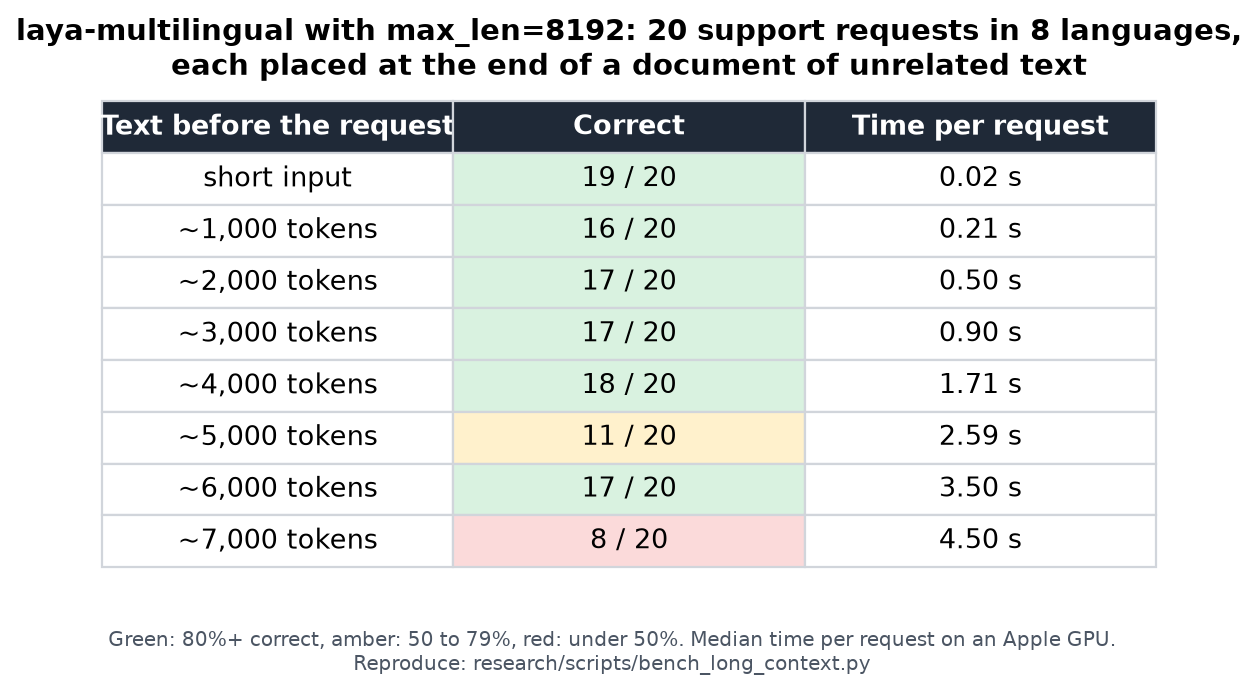
Long documents. laya-multilingual reads up to 8,192 tokens with max_len=8192. Measured accuracy and time by document length, reproducible with research/scripts/bench_long_context.py:
Quickstart
One argument puts vegaml's engine under laya's names: a frozen 0.8B reader with a small physics engine on top, so every answer carries a conformal prediction set, an abstain flag, an out-of-distribution flag and a route decided without a threshold you had to guess at. Text, images, speech and 73k-token documents go through the same call. Python 3.10 or newer; details in vega inside laya.
python -m pip install -U laya # 0.4.23 or newer: vegaml comes with itimport laya
agent = laya.Agent(vegaml=True) # the 0.8B universal reader (nandakishorm/vega-U), the default
Switching the model underneath is one string. Every option keeps the same engine, questions and fields:
laya.Agent(vegaml="4b") # the Qwen3.5-4B reader from the same Hub repo
laya.Agent(vegaml="gemma-1b") # the gemma-3-1b-it reader, same repo
laya.Agent(vegaml="nandakishorm/vega-U") # any Hub repo id holding a vega-U checkpoint
laya.Agent(vegaml="./my-reader/") # a local dir from VegaAgent.attach(...), your own LLM ported in
laya.Agent(vegaml=True, backbone="Qwen/Qwen3.5-0.8B") # name the reader weights explicitly, e.g. a mirror
Without the argument, laya's own encoders, also by Hub name:
laya.Agent("convaiinnovations/laya") # English, 33 ms on a T4
laya.Agent("convaiinnovations/laya-multilingual") # 100+ languages, up to 8,192 tokens with max_len=8192
laya.Agent("convaiinnovations/laya-typed-decisions") # fine-tuned for the typed-decisions workflows
state = "Hi, we were billed twice for March. Please refund the duplicate today or we will cancel our plan."
questions = {
"department": {"type": "choice", "instructions": "Which department should handle this?",
"criteria": {"billing": "invoices, payments, refunds",
"technical": "bugs, outages, system errors",
"other": "everything else"}},
"urgency": {"type": "score", "instructions": "How urgent is this?",
"criteria": ["not urgent", "soon", "blocking"]},
"churn_risk": {"type": "noul", "instructions": "Does the user threaten to cancel or leave?"},
}
out = agent.predict(state, questions)
ans = out["answers"]["department"]
print(ans["choice"]) # billing
print(ans["probabilities"]) # {"billing": 0.91, "technical": 0.04, "other": 0.05}
print(ans["prediction_set"]) # ["billing"]: the options the answer could still be, at alpha 0.1
print(ans["abstain"]) # False: the engine is not refusing this one
print(ans["unbound"]) # False: the state looks like something it has seen
print(ans["route"]) # "auto"; "review" when the set, abstain or unbound say so
print(out["answers"]["churn_risk"]["noul"]) # probability the answer is yes
The output keeps laya's shape (choice, score, noul, probabilities, answer_confidence) and adds vega's fields. Gate on route, not on a confidence number: it comes from the conformal set and the fitted band, which stay right on answers where the top probability does not.
Model switching. Keep a laya encoder for short English text and let vega take the rest:
from laya.vega import Router
router = Router(fast=laya.Agent(), vega=agent)
out = router.predict(state, questions)
print(out["routing"])            # {"model": "fast", "reason": "short English text, no fitted head: the fast encoder is enough"}
out = router.predict("मुझसे मार्च में दो बार शुल्क लिया गया, कृपया डुप्लिकेट राशि वापस करें।", questions)
print(out["routing"]["model"])   # vega: non-English goes to the reader
The rule, in order: an image or audio goes to vega; text longer than the fast model's context goes to vega; non-English or non-Latin text goes to vega; a question with a fitted head goes to vega; everything else goes to the encoder. model="vega" or model="fast" forces one.
Images, speech, video, long documents. The questions and the answer shape do not change with the input:
# text: up to 73,728 tokens in one pass; usage["truncated"] says if a state hit the limit
agent.predict_long(seventy_page_contract, questions)
image: PIL image, path or HxWx3 array, any format Pillow opens; scaled to ~1 megapixel, no file-size cap
       needs pip install 'laya[vision]' (Pillow and torchvision), as does video
agent.predict(image="invoice.png", questions=questions)
audio: path or bytes (wav, flac, ogg, mp3; needs pip install 'laya[audio]') or a 1-D waveform with sampling_rate=;
       any length, resampled to 16 kHz, transcribed in 30 s windows, transcript counts toward the 73,728 tokens
agent.predict(audio=wave, questions=questions, sampling_rate=16000)
video: path or bytes, any container ffmpeg opens, any length and resolution (needs the ffmpeg binary);
       speech is transcribed and decided as text, a silent clip is decided on 4 sampled frames as one image
agent.predict(video="call.mp4", questions=questions)
Fit and calibrate on your own labels. Seconds, no gradient step, and the route is decided for you. Labels are a CSV with a state column and one column per question id; examples/data/routing_labels.csv is a 60-row example that routes messages to billing, HR, PR, sales or technical and rates their urgency:
state,team,urgency
"We were charged twice for the March invoice, please refund the duplicate.",billing,2
"I would like to apply for the open backend engineer role. Where do I send my CV?",hr,0
"A journalist from the Economic Times is asking for a comment on today's outage.",pr,2
The whole loop, from import to the answer, is examples/42_fit_and_calibrate_vegaml.py. It holds out 4 rows per team (20), fits on the other 40, and measures the same 20 rows before and after. Condensed:
import csv, laya
questions = {
    "team": {"type": "choice", "instructions": "Which team should handle this message?",
             "criteria": {"billing": "invoices, payments, refunds", "hr": "jobs, payroll, leave, policy",
                          "pr": "press, media, public statements", "sales": "pricing, demos, quotes, trials",
                          "technical": "bugs, outages, API and product questions"}},
    "urgency": {"type": "score", "instructions": "How soon does this need a reply?",
                "criteria": ["can wait", "this week", "today"]},
}
rows = list(csv.DictReader(open("examples/data/routing_labels.csv")))
held, fit_rows = rows[-20:], rows[:-20]            # the script holds out 4 per team; same idea
agent = laya.Agent(vegaml=True)
print(laya.VegaAgent.min_rows(questions))         # 35: the fewest rows fit() accepts for these questions
before = agent.predict(held[0]["state"], questions)["answers"]["team"]       # the cold engine
report = agent.fit([{"state": r["state"], "gold": {"team": r["team"], "urgency": r["urgency"]}}
                    for r in fit_rows], questions=questions)                # or agent.fit("examples/data/routing_labels.csv", questions=questions)
print(report["n_fit"], report["n_calibrate"])     # 30 fit the heads, 10 are held out inside fit() to calibrate on
print(report["serving"])                          # the questions whose head beat the engine on the same rows
print(report["calibration"]["band"])              # the review line per question, or None where it could not hold
after = agent.predict(held[0]["state"], questions)["answers"]["team"]
agent.save_calibration("fit-routing/")            # heads + calibration; agent.load_calibration("fit-routing/") later
What the script printed on a laptop GPU, every number measured in that run:
minimum rows fit() accepts for these questions: 35 (5 per option of the widest question for the heads, plus a quarter held out to calibrate on, never fewer than 10)
== before: the cold engine, 20 held-out rows
   team accuracy      0.600   ECE 0.221   mean confidence 0.629
   urgency accuracy   0.400   ECE 0.412   MAE 0.65 levels
   team set sizes     {1: 13, 2: 7}   abstain 12   route {'auto': 6, 'review': 14}
== fit + calibrate on 40 rows in 9s: 30 fit the heads, 10 held out to calibrate on
   team     head cv 0.767 vs engine 0.633 on the same rows  ->  SERVED
   urgency  head cv 0.400 vs engine 0.400 on the same rows  ->  left to the engine
   team     temperature 0.83  conformal q-hat 0.987  ECE on the calibration rows 0.281 -> 0.241
   urgency  temperature 6.44  conformal q-hat 0.741  ECE on the calibration rows 0.515 -> 0.142
   review line per question: {'team': None, 'urgency': None}
   ['team', 'urgency']: no line holds precision 0.95 with a 95% bound on 10 calibration rows, so the conformal set routes those answers
== after: heads + calibration, 20 held-out rows
   team accuracy      0.900   ECE 0.206   mean confidence 0.749
   urgency accuracy   0.400   ECE 0.059   MAE 0.65 levels
   team set sizes     {2: 2, 3: 2, 4: 6, 5: 10}   abstain 0   route {'review': 20}
== change on held-out rows: team accuracy +0.300, team ECE -0.015, urgency MAE +0.00
== one held-out message: "Why was a late fee added to this month's bill when we paid on the due "  (gold: billing)
   before: {"choice": "billing", "probabilities": {"billing": 0.999995, "hr": 3e-06, "pr": 0.0, "sales": 1e-06, "technical": 1e-06}, "answer_confidence": 0.999995, "prediction_set": ["billing"], "abstain": false, "unbound": false, "readout": "engine", "route": "auto", "route_reason": "conformal singleton, not abstaining, in distribution"}
   after:  {"choice": "billing", "probabilities": {"billing": 0.674496, "hr": 0.186172, "pr": 0.068743, "sales": 0.041369, "technical": 0.029221}, "answer_confidence": 0.674496, "prediction_set": ["billing", "hr", "pr", "sales", "technical"], "abstain": false, "unbound": null, "readout": "ttt", "route": "review", "route_reason": "band could not hold precision 0.95 on 10 calibration rows, so the conformal rule decides: conformal set at alpha 0.1 holds 5 options"}
== ablation: fitting rows per team, same 20 held-out rows
   per team  rows  team acc  team ECE  urg. acc  urg. MAE  route
   cold      0     0.600     0.221     0.400     0.65      {'auto': 6, 'review': 14}
   7         35    0.800     0.111     0.400     0.65      {'auto': 14, 'review': 6}
   8         40    0.900     0.206     0.400     0.65      {'review': 20}
Read it honestly. The head took routing from 0.600 to 0.900 on rows it never saw, and was refused for urgency because it did not beat the engine on the same rows, so that question stayed exactly where it was. The urgency ECE fell from 0.412 to 0.059 from a temperature alone, with the argmax untouched. Routing is where 10 calibration rows are too few: at alpha 0.1 the conformal quantile on 10 rows is the largest score, so the sets are wide, and no review line can certify 0.95 precision with a 95% bound on fewer than about 50 rows; the output says so in route_reason instead of pretending. The floor of 35 rows gets you a served head; a route you can act on wants a few hundred rows, and report["calibration"]["band"] tells you when you are there.
How this differs from fine-tuning: a fine-tune runs a gradient through the model until it agrees with your labels, which changes every answer the model gives, invalidates any calibration fitted before, and leaves you a new checkpoint to validate. fit never touches the reader. It fits a small logistic head per question over the frozen features, a convex problem with one solution, keeps the head only if it beats chance under cross-validation and serves it only if it also beats the zero-shot engine on the same rows, so a fit can lose and say so, as urgency did above. A quarter of the rows is held out inside fit and calibrate refits three numbers per question on them: a temperature, a conformal threshold so the prediction set covers at 90%, and the review line, placed where precision holds at 0.95 with a 95% Wilson bound to spare. Every other question is untouched by construction, nothing is forgotten, and agent.thresholds() prints what decides route right now.
The laya checkpoints, without vegaml
Leave the argument out and laya is the ModernBERT family it always was: ~150M to 421M parameters, 33 ms a decision on a T4, 100+ languages through the Router.
from laya import Router
router = Router()  # downloads a checkpoint on first use; Router(preload=True) loads all three up front
result = router.predict(state, questions)
print(result["answers"]["department"]["choice"])  # billing
print(result["answers"]["churn_risk"]["noul"])    # probability the answer is yes
print(result["routing"]["model"])                 # english
The Router detects the script and language and sends non-English text to laya-multilingual:
for text in ["मुझसे मार्च में दो बार शुल्क लिया गया, कृपया डुप्लिकेट राशि वापस करें।",
             "La aplicación se cierra cada vez que abro la configuración."]:
    r = router.predict(text, {"department": questions["department"]})
    print(r["routing"]["model"], r["answers"]["department"]["choice"])
multilingual billing
multilingual technical
Long documents on the checkpoints:laya-multilingualreads up to 8,192 tokens. It ships with a 1,024-token limit that cuts long documents off, so passmax_len=8192for them:
>>> result = router.predict(long_document, questions, model="multilingual", max_len=8192)
> In the table above, 16 to 18 of 20 requests were answered correctly with up to about 4,000 tokens of text before them; beyond that results vary (8 to 17 of 20), so check long-document accuracy on your own data. Short inputs give identical answers withmax_len=8192, and speed follows the input's real length, not the limit: short inputs are unchanged, and a 4,000-token input takes about 1.7 s on an Apple GPU. Name the checkpoint withmodel="multilingual", since long mostly-English text would otherwise route to the English checkpoint. Withvegaml=Truenone of this applies: the reader takes 73,728 tokens whole.
From the command line, laya "My payment failed twice" --preset triage answers a ready-made question set. More in the full quickstart and the docs.
Fine-tune for better accuracy
The shipped checkpoints work zero-shot, but fine-tuning on decisions from your own domain is where accuracy jumps. On the typed-decisions benchmark (2,000 decisions across four workflows), the fine-tuned laya-typed-decisions checkpoint scores 0.766 accuracy, against 0.362 for the base English checkpoint on the same decisions.
Fine-tuning notebook (Kaggle 2xT4) and Apple Silicon script (MPS / CPU): run the whole loop (build dataset, train with RLCD, calibrate temperatures, evaluate, export). Details in Fine-Tuning.
Documentation
nandhakishorm.github.io/laya: guides for prediction hooks, schema-driven decisions, Docker and LangChain and LangGraph, plus a full API reference.
What's new in 0.4.30
Agent(vegaml=True)refuses bad input by name instead of training on it. A yes/no gold
1.0 used to train as false; fit golds are now read the way laya's fine-tune reads them
(#1474), a gold keyed to no question is refused (#1477), and a malformed question is refused
through laya's own question check (#1476). A non-finite number from the engine is refused
before it can become a confident auto decision (#1475).
- Hooks run on vega.
on_predict_start,on_predict_endandon_error, plus
hooks_raise and hooks_timeout, now work on VegaAgent.predict as on every laya surface
(#1480).
- Video and policies. Frame times report the frame each one came from (#1481), a clip with
PolicyError (#1487). Loading a trained policy and how routing works are in
docs/vegaml.md.
Where to go next
| document | what is in it |
|---|---|
| Quickstart below | the shortest path to a working call |
| examples/README.md | 41 runnable examples as an eight-stage learning path: first call → schema design → production service |
| LOCAL_SETUP.md | running this checkout on macOS/Intel: pinned stack, checkpoint manifest, the two portability fixes, every verification run and its result |
| BENCHMARKS.md | every benchmark run consolidated, all 51 languages, with the limits stated plainly |
| research/README.md | the harnesses that produce those numbers, and how to re-run them |
Installation details
Python 3.10 or newer. The dependencies set that floor: huggingface_hub 1.x, transformers 5.x and torch 2.14 all require 3.10.
Optional PyTorch build selection: If you need a CPU-only or GPU-specific PyTorch build, follow PyTorch's installation guide after creating your virtual environment and before installing Laya. Replace pip or pip3 in the selected command with the environment's Python executable followed by -m pip.
If you already use a virtual environment, install the PyPI release with:
python -m pip install layaFor a new environment, choose the commands for your platform below. Run them from your project directory; the explicit Python paths keep installation and verification in the same environment.
macOS / Linux (with Python 3.10 or newer):
On Debian/Ubuntu, the system Python may require sudo apt install python3-venv before creating a virtual environment. If venv reports that ensurepip is unavailable, install that package and retry.
python3 -m venv .venv
.venv/bin/python -m pip install laya
.venv/bin/python -I -c "import laya; print(laya.__version__)"
Windows PowerShell (this example uses an installed Python 3.11):
py -3.11 -m venv .venv
.\.venv\Scripts\python.exe -m pip install laya
.\.venv\Scripts\python.exe -I -c "import laya; print(laya.__version__)"
Both checks print the installed Laya version without loading a checkpoint. -I excludes the current directory from the import search path, so a local source copy cannot mask a missing installation. Keep using the same virtual environment's Python when running your application.
Intel GPU (XPU)
Install a supported Intel GPU driver first. For an XPU-enabled PyTorch build, install its wheel before Laya; the default PyPI wheel may be CPU-only. PyTorch's validated hardware and OS list is in the Intel GPU guide.
.\.venv\Scripts\python.exe -m pip install torch --index-url https://download.pytorch.org/whl/xpu
.\.venv\Scripts\python.exe -m pip install laya
.\.venv\Scripts\python.exe -c "import torch; print(torch.xpu.is_available())"
For a source checkout, replace pip install laya with pip install -e .. Laya automatically selects an available XPU when no device is specified; you can also request one explicitly with device="xpu" in laya.load() or Router(device="xpu").
Install from GitHub
To use the development version instead of the PyPI release, create the virtual environment above and replace its installation command with the appropriate command below. Git must be installed.
# macOS / Linux
.venv/bin/python -m pip install "git+https://github.com/NandhaKishorM/laya.git"
# Windows PowerShell
.\.venv\Scripts\python.exe -m pip install "git+https://github.com/NandhaKishorM/laya.git"Run the same version check afterward. The GitHub version follows the repository's default branch and may differ from the published release.
Install with uv
uv creates the virtual environment, downloads a matching Python if none is installed, and installs into it. The commands are the same on macOS, Linux and Windows PowerShell:
uv venv --python 3.12
uv pip install laya
uv pip install targets the .venv in the current directory without activating it, so run the version check for your platform above afterward. Extras and the GitHub version install the same way: uv pip install "laya[serve]", uv pip install "git+https://github.com/NandhaKishorM/laya.git". For a CPU-only or GPU-specific PyTorch build, add --torch-backend=auto to pick the build that matches the machine's GPU driver, or name one such as --torch-backend=cpu; uv's PyTorch guide has the list.
If your application is a uv project, add Laya as a dependency instead:
uv add laya
uv run python -I -c "import laya; print(laya.__version__)"
--torch-backend applies to uv pip only; in a uv project, uv's PyTorch guide shows how to set the PyTorch index in pyproject.toml.
Model setup and troubleshooting
Continue with the Router quickstart to run inference. Loading a Hub checkpoint requires access to Hugging Face on its first download; the quickstart's Router(preload=True) loads all three configured checkpoints at construction.
ModuleNotFoundError: No module named 'laya': run both installation and your script with the same virtual environment's Python executable shown above. In an editor, select that interpreter as well.- Missing
rl_agent_config.json: this file ships with a Laya checkpoint alongsidemodel.safetensors; it is not a configuration file you need to create in the source repository. For a local model, pass the directory containing those checkpoint files. - Checkpoint downloads and cache:
Router()is lazy: the first prediction downloads only the
HF_HUB_CACHE to move that cache.
The English and typed-decisions checkpoints have about 421M parameters each; multilingual has
about 322M (see the table above). Download sizes also depend on weight precision and files.
- Memory limits:
Router()keeps up to two checkpoints resident by default (max_loaded=2),
Router(max_loaded=1) to reduce resident
memory, at the cost of reloads when switching checkpoints. Router(preload=True) loads all
three up front and raises the resident limit to fit them; it is not an out-of-memory remedy.
- Windows + Python 3.14: the model-construction crash reported in
-m pip install -U laya.
Command line
Installing the package also installs a laya command for quick local testing, no script needed:
laya "I was charged twice, please refund"            # routing decision only; works offline, no download
laya "Refactor this service" --predict               # full answers (downloads the checkpoint on first use)
laya "Mein Konto wurde zweimal belastet" --lang de   # force a language instead of detecting it
laya "My payment failed twice" --lang-guess en        # a soft hint: nudge routing, still fall through to detection
laya "My payment failed twice" --model ml            # pin a checkpoint: names, aliases and casing all resolve as the SDK resolves them
laya "My payment failed twice" --preset triage       # answer a ready-made preset (triage, email, guard, moderation, router)
laya --batch tickets.txt --predict                   # score a file of requests, one per line, in one batch
cat tickets.txt | laya --batch - --predict --json    # stdin; one JSON line of answers per request
laya "Where is my card" --questions intents.json     # answer your own questions, written in a JSON file
laya "Refund my card" --predict --min-confidence 0.9 # mark an answer the model is unsure of
laya --image invoice.png --preset triage              # a picture, a recording (--audio) or a clip (--video) on the vega lane
laya                                                 # interactive mode
--lang is decisive: a real code picks the checkpoint and skips detection. --lang-guess is the
soft sibling core checks in between, so a probable-but-uncertain language can nudge routing without
forcing it — and a hint that resolves to nothing falls through to the built-in detector, exactly the
Router(lang_guess=...) behaviour the library offers. Neither flag changes the routing decision's
precedence rules; --lang-guess just adds a hint those rules read before detection.
Routing alone never downloads a checkpoint, so it returns in milliseconds. --predict loads the routed checkpoint, which needs network access to the Hugging Face hub the first time; if a checkpoint cannot be downloaded, the CLI says so instead of crashing. --batch (with or without --predict) sends the whole file through Router.predict_batch in one process, so the requests share checkpoint loads and forward passes — measured 2.6x on 20 tickets vs looping predict one by one, with --batch-size N to bound the forward pass, --sort-by-length to group similarly sized requests inside it, and --json for JSONL output. Batch routing (laya --batch FILE, no --predict) likewise answers with route_batch in one pass, still without loading anything.
--sort-by-length reaches the length grouping Agent.predict_batch has done since #294, which
until now only the library call in Batch Mode
could ask for. A forward pass pads every state in it to the longest one, so a two-line request
sharing a pass with a two-paragraph one spends most of its compute on padding; grouping by length
first puts comparable sizes together. Measured on 128 real Yelp reviews of 69-2,293 characters,
run as laya --batch FILE --predict --model laya --batch-size 8 with and without the flag, four
interleaved rounds on an Apple-silicon Mac at the CLI's own device pick: 41.25 s median unsorted
against 29.23 s sorted, a paired median of 1.42x (1.39-1.44x across the four pairs), with all
128 decisions identical and still in input order. research/ measures the same knob at 2.15x over
10,000 synthetic multilingual tickets. It needs --batch-size N with 1 < N < the number of
requests — a single pass over the whole file has no group to reorder — and the CLI says so on
stderr rather than printing a same-speed result and leaving you to notice.
--questions takes the same question dict the SDK takes, as JSON: either the mapping itself, or
{"state_key": "body", "questions": {...}} when the question's instructions name a field other than
request. It implies --predict, and a question set with many labels usually wants
--head-max-len with it: on 58 MASSIVE-INTENT labels written as one choice question, the English
checkpoint goes from 24/58 correct at its default 192-token option budget to 34/58 at
--head-max-len 384, for about 1.4x the per-request time on CPU. Widening it further costs the
accuracy back, because max_len then leaves fewer tokens for the request itself. Honest
limits describes the same budget ceiling for a 77-option question.
Device selection is automatic, in this order: CUDA → MPS → XPU → CPU. Mixed precision is used on
CUDA; CPU and MPS run fp32. Override with device=, which is accepted by both entry points:
agent = laya.load("convaiinnovations/laya", device="cpu")      # or "cuda", "mps", "xpu"
router = Router(preload=True, device="mps")
Eager CPU fp32 inference combines packed decision-head projections and SDPA with selective outputs in the final head layer: option markers and token zero for the action head. Every unmasked token remains a head attention key/value. On Transformers 5, supported ModernBERT encoders also compute their existing local attention windows in blocks for sequences of at least 512 tokens; global layers retain full attention. No allowed attention connection or input token is removed. Training, autocast, other devices, compilation/export, custom hooks and unsupported encoders retain the corresponding original execution paths. This uses the same weights and calibration, adds no dependency or external service, and keeps request tensors local to each call without a shared request cache. Floating-point results can differ slightly, including decisions at exact ties. The existing CPU/device, routing-latency and long-context benchmarks provide the before/after evidence. The separate CPU regression harness checks unrounded outputs and public answers against the original execution path.
macOS, including Intel Macs
PyTorch stops publishing macOS x86_64 wheels at 2.2.2 (2.3 and later are Apple-silicon only),
while transformers 5.x requires torch >= 2.4 and torch 2.2.2 was built against NumPy 1.x. A plain
pip install laya on an Intel Mac therefore resolves a stack that cannot run — torch 2.2.2 with
transformers 5.x and NumPy 2.x, and torch fails to initialise NumPy 2, which predict() needs for
its final .numpy() conversion. Pin the stack:
pip install "numpy<2" "torch==2.2.2" "transformers==4.57.6" layatransformers 4.57.x is the last 4.x line and the newest one that runs on torch 2.2.2. The
transformers-5 checkpoints load on it unchanged: build_model maps their rope_parameters onto
the RoPE attributes 4.x reads, which mmBERT needs because both of its bases are 160000 rather
than the 4.x defaults. Apple-silicon and CUDA machines need none of this pinning.
Running from this checkout
setup_laya.sh stands the whole thing up in the checkout: an isolated .venv with the pinned
stack, the three checkpoints under models/ (gitignored, ~2.3 GB), and a verification run. It is
idempotent, so re-running only fills in what is missing. The numbers below are from the machine it
was developed on — an Intel Mac Pro, no CUDA, AMD Radeon GPUs reachable through Metal (MPS); the
script itself is not Intel-specific. Commands are relative to the repository root.
./setup_laya.sh                                    # venv + pinned deps + checkpoints + verify
.venv/bin/python verify/laya_smoke_test.py --models ./models            # real weights, device auto -> MPS
.venv/bin/python verify/laya_smoke_test.py --models ./models --device cpu
.venv/bin/python verify/numerics_check.py          # RoPE bases, determinism, SDPA vs eager
.venv/bin/python verify/bench_devices.py           # CPU vs MPS, thread scaling
.venv/bin/python verify/edge_sweep.py              # edge cases: option budgets, truncation, router lifecycle
.venv/bin/python verify/checkpoints.py             # weights vs the recorded sha256 hashes
.venv/bin/python verify/soak_check.py              # drift, RSS and concurrency over 200 calls
.venv/bin/python tests/test_local_e2e.py ./models             # the repo's own e2e suite
./examples/run_all.sh                              # all 41 examples, pass/fail
Measured here, one predict() call answering 4 questions about a short email (median of 10,
after warm-up):
| checkpoint | CPU (28 threads) | MPS (Radeon Pro Vega II) |
|---|---|---|
| laya (421M) | 453 ms — 113 ms/question | 146 ms — 37 ms/question |
| laya-multilingual (322M) | 192 ms — 48 ms/question | 121 ms — 30 ms/question |
| laya-typed-decisions (421M) | 441 ms — 110 ms/question | 145 ms — 36 ms/question |
MPS is 1.6-3x this 56-core CPU and matches the T4 reference quoted below (32.8 ms/question for
laya-multilingual). CPU-only work runs fastest around 16 threads (OMP_NUM_THREADS=16); the
default 28 already over-subscribes. The first MPS call pays ~13 s of Metal kernel compilation,
so warm up before timing. Individual runs move by a few percent with machine load.
To keep the router fully offline, point it at the local checkpoints rather than the hub repos:
from laya import Router
router = Router(models={"english": "models/laya",
                        "multilingual": "models/laya-multilingual",
                        "typed-decisions": "models/laya-typed-decisions"},
                preload=True)
Full notes — version rationale, the two portability fixes this needed, and every verification
run — are in LOCAL_SETUP.md.
Try it locally: web GUI + JSON API
examples/server.py is a self-contained FastAPI app for testing Laya without writing any code:
a two-pane playground (edit the request as a form or as JSON, run it with Ctrl+Enter, read each
answer's full distribution and calibrated confidence, copy it as curl or Python), plus a plain
JSON API (/predict, /predict/batch) for scripting against.
pip install "laya[serve]"
python examples/server.py               # http://127.0.0.1:8000
On Windows, start.bat does the same from a clone: it creates .venv with whichever supported
Python is installed, installs CPU torch and the serve extra on first run, then starts the server
and opens the browser. start.bat 8080 picks a different port.
Open http://127.0.0.1:8000 in a browser for the playground, or hit it directly:
curl -s localhost:8000/predict -H 'content-type: application/json' -d '{
  "state": {"body": "We were billed twice for March. Please refund it today."},
  "questions": {
    "department": {"type": "choice",
                   "instructions": "Which department should handle this?",
                   "criteria": {"billing": "invoices, payments, refunds", "other": "everything else"}},
    "urgency": {"type": "score",
                "instructions": "How urgent is this?",
                "criteria": ["not urgent", "soon", "critical"]}
  }
}' | python -m json.tool
--no-preload loads checkpoints lazily instead of all three up front; --device cuda|cpu|mps
pins the device. See python examples/server.py --help for the rest.
A request body may carry model to pin a checkpoint instead of letting the router choose, and it
takes exactly the spellings laya --model takes: names, aliases and casing all resolve through
laya.router. GET /models lists the checkpoints and the aliases alongside them.
Both /predict and /predict/batch also accept the four per-call controls laya-serve
forwards on /v1/systemone: lang_guess (a soft ISO hint that participates in routing, where
lang skips detection entirely), max_len and head_max_len (per-call token-budget overrides,
capped by LAYA_MAX_TOKEN_BUDGET), and min_confidence (core's abstention threshold; the answer
comes back with abstention and abstention_threshold fields naming whether it fired). An absent key means "inherit what the
Router was built with", so a caller never has to send them back as null; a body that names
hooks, hooks_raise, hooks_timeout, on_predict_start, or on_predict_end is refused with
422 rather than silently dropped, matching what laya-serve does for the same fields. On
/predict/batch the controls are read once, from the batch body: min_confidence becomes a call
argument to Router.predict_batch, and the other three are copied into every request dict, so all
states in one call share one budget. A max_len written inside a state is not a control there --
it stays part of the state, and the body's value is what every state gets. Per-request budgets do
exist one level down, in Router.predict_batch, which cannot share a forward pass between requests
naming different budgets and so makes one pass per budget; the batch endpoint just gives an HTTP
caller no way to name them separately.
/predict/batch accepts two optional body fields that control the shape of the forward passes
without changing any answer: batch_size (states per pass; omit it and the whole batch is one
pass) and sort_by_length (group similarly sized states so each pass pads to a shorter maximum —
it needs a batch_size below the number of states, since one pass has nothing to reorder).
Measured on the running server: 64 real reviews of 91–2,293 characters, one choice question,
batch_size: 8, three interleaved rounds on MPS — the default one-pass shape 5.35s median against
3.04s sorted, a paired median of 1.77x (min 1.76x), and 64/64 labels identical in input order.
batch_size: 8 on its own was 4.95s, so the length grouping is what earns the second factor:
1.66x over the sized batch.
Python HTTP client
Applications that call a separate laya-serve can use the
Python HTTP client
without installing the inference dependencies. It provides synchronous predict() and
health() calls using the standard library. From this checkout, install it with
python -m pip install ./sdk/python in the application environment; keep laya[serve]
in the server environment. The separate laya-client distribution is not yet published to PyPI.
JavaScript / TypeScript
laya-client supports JavaScript and TypeScript
applications over HTTP to a self-hosted laya-serve /v1/systemone server. It
includes inferred answer types, all five question presets, ESM/CommonJS exports,
and cancellation.
# From this checkout, install and start the Python inference service:
pip install -e '.[serve]'
LAYA_HOST=127.0.0.1 LAYA_MODELS=english laya-serve
In another terminal:
cd sdk/typescript
npm ci
npm run build
node examples/triage.mjs
The npm package is named laya-client. Use it when a JavaScript or TypeScript
application talks over HTTP to self-hosted Python laya-serve. Use laya-ts
when inference must run directly inside JavaScript through its local ONNX
runtime, without a Python server.
See installation, examples, and publishing and the
repository analysis for architecture and scope.
Quickstart: Route Mode (Recommended)
To try the Python SDK in a CPU container, see the Docker Compose quickstart. It runs a sample request and keeps downloaded models between runs.
Laya ships three checkpoints. The built-in Router is the recommended entry point: it evaluates any state in any language, automatically detects scripts and languages in sub-milliseconds, and dispatches to the optimal checkpoint in a single forward pass.
Since 0.4.25, with vegaml installed: the sameRouteralso takesimage=,audio=orvideo=in place of a state and sends them, states past 8,192 tokens, and questions with fitted heads tolaya.Agent(vegaml=True); everything else routes exactly as below.Router(vega=False)turns that off. See the vega lane.
Minimal example (30 seconds)
from laya import Router
router = Router()  # downloads only the selected checkpoint on first use
result = router.predict(
    {"body": "We were billed twice. Please refund the duplicate."},
    {"billing": {"type": "noul", "instructions": "Does the user request a refund?"}},
)
print(result["answers"]["billing"]["noul"])  # P(true), a float from 0.0 to 1.0
print(result["routing"]["model"])            # which checkpoint answered, e.g. 'english'
Input is any state (str, dict, or list — text, email, ticket, JSON document) plus a dict of typed
questions (choice = pick one label, score = ordinal levels, noul = yes/no statement check).
Each result["answers"][qid] is an answer dict: choice is the selected label, score is the
expected ordinal level, and noul is P(true). confidence is a separate field in that dict;
probabilities is available for choice and score. result["routing"] explains which checkpoint was
picked and why. Values depend on the checkpoint and input. For ready-made question sets see
laya.presets (triage_questions, moderation_questions, email_questions, ...).
Full walkthrough:
from laya import Router
Preload checkpoints into memory for instant sub-35ms routing
router = Router(preload=True)
1. State in any language or schema
state = {
    "from": "[email protected]",
    "subject": "Duplicate charge on invoice #4411",
    "body": "Hi, we were billed twice for March. Please refund the duplicate today or we will cancel our plan."
}
2. Define your typed questions
questions = {
    "department": {
        "type": "choice",
        "instructions": "Which department should handle this request?",
        "criteria": {
            "billing": "invoices, payments, refunds",
            "technical": "bugs, outages, system errors",
            "sales": "pricing, new contracts, plan upgrades",
            "other": "everything else"
        }
    },
    "urgency": {
        "type": "score",
        "instructions": "How urgent is this request?",
        "criteria": ["not urgent", "soon", "critical deadline or blocking issue"]
    },
    "churn_risk": {
        "type": "noul",
        "instructions": "Does the user threaten to cancel or leave?"
    },
    "refund_requested": {
        "type": "noul",
        "instructions": "Does the user explicitly request a refund?"
    }
}
3. English state -> automatically routed to laya (ModernBERT-large, 39.5 ms)
res_en = router.predict(state, questions)
print("Department :", res_en["answers"]["department"]["choice"])  # -> billing (confidence: 0.94)
print("Routing    :", res_en["routing"]["model"])                 # -> english
4. Hindi state -> automatically routed to laya-multilingual (mmBERT-base, 32.8 ms)
res_hi = router.predict({"body": "मुझसे दो बार शुल्क लिया गया, कृपया पैसे वापस करें।"}, questions)
print("Department :", res_hi["answers"]["department"]["choice"])  # -> billing (confidence: 0.86)
print("Routing    :", res_hi["routing"]["model"])                 # -> multilingual
5. Explicit override when you want a specific checkpoint
res_td = router.predict(state, questions, model="typed-decisions")
Every result carries full routing metadata explaining why the choice was made:
res_hi["routing"]
{
  'model': 'multilingual',
  'repo': 'convaiinnovations/laya/multilingual',
  'reason': 'non-Latin script (devanagari, 100% of letters); the English checkpoint cannot read it',
  'detection': {'script': 'devanagari', 'script_profile': {'devanagari': 1.0},
                'language': None, 'is_english': False, 'language_undecided': True,
                'diacritic_rate': 0.0, 'non_latin_fraction': 1.0, 'mixed_segment': None},
  'workflow': None
}
All five keys are always present. detection is the
laya.lang.analyse result the decision was made from,
and is None whenever routing decided before detection ran: model=, task=, a detected
workflow, a decisive lang= and a resolving lang_guess all take precedence over it and
short-circuit it. workflow names the typed-decisions workflow whose question ids matched, and is
None when none did.
Inspect a routing decision without running any forward pass:
router.route({"body": "Der Kunde wurde zweimal belastet"}, questions).reason
"Latin script but language looks like 'de', not English"
Very short Latin-script text often carries nothing that identifies its language ("Quero cancelar", "Esqueci minha senha"). Such text goes to default, which is "multilingual" since 0.4.0. Text the detector can place is unaffected: identified English still goes to the English checkpoint.
router = Router()                                                   # default="multilingual"
router.route({"body": "Esqueci minha senha"}).model                 # -> multilingual
router.route({"body": "Please refund the duplicate charge"}).model  # -> english
If most of your traffic is English, set it back. The English checkpoint scores 0.820 on English against the multilingual checkpoint's 0.710, and the break-even is around 62% English traffic:
router = Router(default="english")Running one of the shipped servers rather than your own Router, the same setting is
LAYA_DEFAULT_MODEL=english — in the environment of laya-serve, the MCP server or the
`laya-serve
... (README truncated for length)