
Telego • Go Telegram Bot API

[![Telegram Bot API Version][TelegramVersionBadge]][TelegramLastVersion]







Telego is a Telegram Bot API library for Golang with full [API][TelegramBotAPI] implementation (one-to-one)
The goal of this library was to create API with the same types and methods as actual Telegram Bot API.
Every type and method have been represented in types.go and methods.go files with mostly
all documentation from Telegram.
For more detailed documentation, see docs at telego.pixelbox.dev.
Note: Telego uses fasthttp instead of net/http
and go-json instead of encoding/json by default (both can be changed).
:rocket: Powered by

:clipboard: Table Of Content
Click to show • hide
With... methods
- :sun_behind_large_cloud: Bot handlers
- :gear: Build configuration
:zap: Getting Started
How to get the library:
go get github.com/mymmrac/telegoMake sure you get the latest version to have all new features and fixes.
More examples can be seen here:
Click to show • hide
- Basic
- Configuration
- Methods
- Updates (long polling)
- Updates (webhook)
- Ngrok webhook
- Echo bot
- Echo bot (with handlers)
- Echo bot (handlers + webhook + graceful shutdown + docker)
- Conversation bot (state machine)
- Sending files (documents, photos, media groups)
- Downloading files
- Inline keyboard
- Keyboard
- Rich text
- Edit message
- Utility methods
- Inline query bot
- Bot handlers
- Bot handles (groups + middleware)
- Update's context
- Graceful shutdown (no helpers)
- Graceful shutdown (long polling)
- Graceful shutdown (webhook)
- Custom predicates for handlers
- Handler ordering
- Specific handlers
- Update processor
- Message entities
- Multi bot webhook
- Multi bot webhook (using Fiber)
- Retry caller
- Menu bot
- Test server
- Web Apps (Mini Apps)
Note: Error handling may be missing in examples, but I strongly recommend handling all errors.
Generally, useful information about Telegram Bots and their features:
Click to show • hide
- :page_facing_up: Telegram Bot API • Telegram documentation of Bot API (full
- :jigsaw: Telegram Bot Fundamentals • Bots: An introduction for developers
- :star2: Telegram Bot Features • Describes individual bot elements and
- :headphones: Telegram Bot Webhooks • Marvin's Marvellous Guide to All
- :moneybag: Telegram Bot Payments • Describes payment system and payment
- :iphone: Telegram Bot WebApps • Describes WebApps and interactions with them
- :link: Ngrok • Connect localhost to the Internet
- :shield: Let's Encrypt • TLS certificates for free
:jigsaw: Basic setup
For start, you need to create an instance of your bot and specify token.
package main
import (
	"context"
	"fmt"
	"os"
"github.com/mymmrac/telego"
)
func main() {
	// Get Bot token from environment variables
	botToken := os.Getenv("TOKEN")
// Create bot and enable debugging info
	// Note: Please keep in mind that default logger may expose sensitive information,
	// use in development only
	// (more on configuration in examples/configuration/main.go)
	bot, err := telego.NewBot(botToken, telego.WithDefaultDebugLogger())
	if err != nil {
		fmt.Println(err)
		os.Exit(1)
	}
// Call method getMe (https://core.telegram.org/bots/api#getme)
	botUser, err := bot.GetMe(context.Background())
	if err != nil {
		fmt.Println("Error:", err)
	}
// Print Bot information
	fmt.Printf("Bot user: %+v\n", botUser)
}
:envelope_with_arrow: Getting updates
To receive updates, you can use one of two methods:
- using long polling (
bot.UpdatesViaLongPolling) - using webhook (
bot.UpdatesViaWebhook, recommended way)
package main
import (
	"context"
	"fmt"
	"os"
"github.com/mymmrac/telego"
)
func main() {
	botToken := os.Getenv("TOKEN")
// Note: Please keep in mind that default logger may expose sensitive information,
	// use in development only
	bot, err := telego.NewBot(botToken, telego.WithDefaultDebugLogger())
	if err != nil {
		fmt.Println(err)
		os.Exit(1)
	}
// Get updates channel
	// (more on configuration in examples/updates_long_polling/main.go)
	updates, _ := bot.UpdatesViaLongPolling(context.Background(), nil)
// Loop through all updates when they came
	for update := range updates {
		fmt.Printf("Update: %+v\n", update)
	}
}
Webhook example (recommended way):
package main
import (
	"context"
	"fmt"
	"net/http"
	"os"
"github.com/mymmrac/telego"
)
func main() {
	ctx := context.Background()
	botToken := os.Getenv("TOKEN")
// Note: Please keep in mind that default logger may expose sensitive information,
	// use in development only
	bot, err := telego.NewBot(botToken, telego.WithDefaultDebugLogger())
	if err != nil {
		fmt.Println(err)
		os.Exit(1)
	}
// Set up a webhook on Telegram side
	_ = bot.SetWebhook(ctx, &telego.SetWebhookParams{
		URL:         "https://example.com/bot",
		SecretToken: bot.SecretToken(),
	})
// Receive information about webhook
	info, _ := bot.GetWebhookInfo(ctx)
	fmt.Printf("Webhook Info: %+v\n", info)
// Create http serve mux
	mux := http.NewServeMux()
// Get an update channel from webhook.
	// (more on configuration in examples/updates_webhook/main.go)
	updates, _ := bot.UpdatesViaWebhook(ctx, telego.WebhookHTTPServeMux(mux, "/bot", bot.SecretToken()))
// Start server for receiving requests from the Telegram
	go func() {
		_ = http.ListenAndServe(":443", mux)
	}()
// Loop through all updates when they came
	for update := range updates {
		fmt.Printf("Update: %+v\n", update)
	}
}
For running multiple bots from a single server, see this example.
Tip: For testing webhooks locally, you can use Ngrok to make a tunnel to your localhost,
and get a random domain available from the Internet.
It's as simple as ngrok http 8080.
Or follow Telego + Ngrok example using ngrok/ngrok-go
for most convenient bot testing.
Or, with nothing to install and no account, use tunnl.gg over SSH:
ssh -t -R 80:localhost:8080 proxy.tunnl.gg.Tip: You may wish to use Let's Encrypt in order to generate your free TLS certificate.
:kite: Using Telegram methods
All Telegram Bot API methods described in documentation can be
used by the library. They have the same names and the same parameters, parameters represented by struct with
name: Params. If method doesn't have required parameters nil value can be used as a parameter.
Note:types.goandmethods.gowere automatically generated
from [documentation][TelegramBotAPI], and it's possible that they have errors or missing parts both in comments and
actual code. Feel free to report such things.
package main
import (
	"context"
	"fmt"
	"os"
"github.com/mymmrac/telego"
	tu "github.com/mymmrac/telego/telegoutil"
)
func main() {
	ctx := context.Background()
	botToken := os.Getenv("TOKEN")
// Note: Please keep in mind that default logger may expose sensitive information,
	// use in development only
	bot, err := telego.NewBot(botToken, telego.WithDefaultDebugLogger())
	if err != nil {
		fmt.Println(err)
		os.Exit(1)
	}
// Call method getMe
	botUser, _ := bot.GetMe(ctx)
	fmt.Printf("Bot User: %+v\n", botUser)
updates, _ := bot.UpdatesViaLongPolling(ctx, nil)
for update := range updates {
		if update.Message != nil {
			// Retrieve chat ID
			chatID := update.Message.Chat.ID
// Call method sendMessage.
			// Send a message to sender with the same text (echo bot).
			// (https://core.telegram.org/bots/api#sendmessage)
			sentMessage, _ := bot.SendMessage(ctx,
				tu.Message(
					tu.ID(chatID),
					update.Message.Text,
				),
			)
fmt.Printf("Sent Message: %v\n", sentMessage)
		}
	}
}
:soap: Utility methods
In Telego even though you have all types and methods available, it's often not so
convenient to use them directly. To solve this issues telegoutil package was created. It contains
utility-helper function that will make your life a bit easier.
I suggest including it with alias to get cleaner code:
import tu "github.com/mymmrac/telego/telegoutil"The package contains couple methods for creating send parameters with all required parameters like:
Message(chatID, text) => SendMessageParamsPhoto(chatID, photoFile) => SendPhotoParamsLocation(chatID, latitude, longitude) => SendLocationParams- ...
ID(intID) => ChatIDFile(namedReader) => InputFile- ...
methods can be found in telegoutil/methods, for
types in telegoutil/types, for handlers in
telegoutil/handler, for api in telegoutil/api.
Note: If you think that something can be added to telegoutil package
fill free to create an issue or pull request with desired changes.
:mechanical_arm: Helper With... methods
Creating method parameters is sometimes bulky and not convenient, so you can use with methods in combination with
utility methods.
Here is a simple example of creating a message with a keyboard that has 4 buttons with different parameters.
package main
import (
	"github.com/mymmrac/telego"
	tu "github.com/mymmrac/telego/telegoutil"
)
func main() {
	// ... initializing bot (full example in examples/keyboard/main.go)
// Creating keyboard
	keyboard := tu.Keyboard(
		tu.KeyboardRow( // Row 1
			// Column 1
			tu.KeyboardButton("Button"),
// Column 2, with method
			tu.KeyboardButton("Poll Regular").
				WithRequestPoll(tu.PollTypeRegular()),
		),
		tu.KeyboardRow( // Row 2
			// Column 1, with method
			tu.KeyboardButton("Contact").WithRequestContact(),
// Column 2, with method
			tu.KeyboardButton("Location").WithRequestLocation(),
		),
	).WithResizeKeyboard().WithInputFieldPlaceholder("Select something")
	// Multiple with methods can be chained
// Creating message
	msg := tu.Message(
		tu.ID(123),
		"Hello World",
	).WithReplyMarkup(keyboard).WithProtectContent() // Multiple with method
bot.SendMessage(ctx, msg)
}
Those methods allow you to modify values without directly accessing them, also as you saw with methods can be staked
one to another to update multiple values.
:sun_behind_large_cloud: Bot handlers
Processing updates just in for loop is not the most pleasing thing to do, so Telego provides net/http like handlers,
but instead of the path, you provide predicates.
One update will only match to the first handler whose predicates are satisfied, predicates checked in order of handler registration (it's useful to first specify the most specific predicates and then more general).
Also, all handlers (but not their predicates) are processed in parallel.
I suggest including it with alias to get cleaner code:
import th "github.com/mymmrac/telego/telegohandler"Here is an example of using handlers with long polling updates.
You can see the full list of available predicates in telegohandler/predicates,
or define your own.
package main
import (
	"context"
	"fmt"
	"os"
"github.com/mymmrac/telego"
	th "github.com/mymmrac/telego/telegohandler"
	tu "github.com/mymmrac/telego/telegoutil"
)
func main() {
	ctx := context.Background()
	botToken := os.Getenv("TOKEN")
// Note: Please keep in mind that default logger may expose sensitive information,
	// use in development only
	bot, err := telego.NewBot(botToken, telego.WithDefaultDebugLogger())
	if err != nil {
		fmt.Println(err)
		os.Exit(1)
	}
// Get updates channel
	updates, _ := bot.UpdatesViaLongPolling(ctx, nil)
// Create bot handler and specify from where to get updates
	bh, _ := th.NewBotHandler(bot, updates)
// Stop handling updates
	defer func() { _ = bh.Stop() }()
// Register new handler with match on command /start
	bh.Handle(func(ctx *th.Context, update telego.Update) error {
		// Send message
		_, _ = ctx.Bot().SendMessage(ctx, tu.Message(
			tu.ID(update.Message.Chat.ID),
			fmt.Sprintf("Hello %s!", update.Message.From.FirstName),
		))
		return nil
	}, th.CommandEqual("start"))
// Register new handler with match on any command
	// Handlers will match only once and in order of registration,
	// so this handler will be called on any command except /start command
	bh.Handle(func(ctx *th.Context, update telego.Update) error {
		// Send message
		_, _ = ctx.Bot().SendMessage(ctx, tu.Message(
			tu.ID(update.Message.Chat.ID),
			"Unknown command, use /start",
		))
		return nil
	}, th.AnyCommand())
// Start handling updates
	_ = bh.Start()
}
Just handling updates is useful, but handling specific updates like messages or callback queries in most of the cases is more straightforward and provides cleaner code.
So Telego provides specific handles for all fields of telego.Update. See the list of all available handler types in
telegohandler/handlers, or define your own.
package main
import (
	"fmt"
"github.com/mymmrac/telego"
	th "github.com/mymmrac/telego/telegohandler"
	tu "github.com/mymmrac/telego/telegoutil"
)
func main() {
	// ... initializing bot and bot handler
	// (full example in examples/handler_specific/main.go)
// Register new handler with match on command /start
	bh.HandleMessage(func(ctx *th.Context, message telego.Message) error {
		// Send a message with inline keyboard
		_, _ = ctx.Bot().SendMessage(ctx, tu.Message(
			tu.ID(message.Chat.ID),
			fmt.Sprintf("Hello %s!", message.From.FirstName),
		).WithReplyMarkup(tu.InlineKeyboard(
			tu.InlineKeyboardRow(
				tu.InlineKeyboardButton("Go!").WithCallbackData("go"),
			)),
		))
		return nil
	}, th.CommandEqual("start"))
// Register new handler with match on the call back query
	// with data equal to go and non-nil message
	bh.HandleCallbackQuery(func(ctx *th.Context, query telego.CallbackQuery) error {
		// Send message
		_, _ = ctx.Bot().SendMessage(ctx, tu.Message(tu.ID(query.Message.Chat.ID), "GO GO GO"))
// Answer callback query
		_ = ctx.Bot().AnswerCallbackQuery(ctx, tu.CallbackQuery(query.ID).WithText("Done"))
return nil
	}, th.AnyCallbackQueryWithMessage(), th.CallbackDataEqual("go"))
// ... start bot handler
}
One more important part of handlers is groups and middlewares. Telego allows creating groups with and without predicates and attaching middleware to groups.
package main
import (
	"fmt"
"github.com/mymmrac/telego"
	th "github.com/mymmrac/telego/telegohandler"
)
func main() {
	// Init ...
// Add global middleware, it will be applied in order of addition
	bh.Use(func(ctx *th.Context, update telego.Update) error {
		fmt.Println("Global middleware") // Will be called first
		return ctx.Next(update)
	})
// Create any groups with or without predicates
	// Note: Updates first checked by groups and only then by handlers
	// (group -> ... -> group -> handler)
	task := bh.Group(th.TextContains("task"))
// Add middleware to groups
	task.Use(func(ctx *th.Context, update telego.Update) error {
		fmt.Println("Group-based middleware") // Will be called second
if len(update.Message.Text) < 10 {
			return ctx.Next(update)
		}
return nil
	})
// Handle updates on a group
	task.HandleMessage(func(ctx *th.Context, message telego.Message) error {
		fmt.Println("Task...") // Will be called third
		return nil
	})
}
:gear: Build configuration
Telego supports multiple build configurations via Go's build tags (right now only to change JSON encoding/decoding library):
- No tags - use goccy/go-json
sonic- use bytedance/sonicstdjson- useencoding/json
Note: Use sonic only on supported platforms as it has its own limitations, more
here.
If you wish to set JSON encoding/decoding methods to something custom, there are global methods SetJSONMarshal and
SetJSONUnmarshal that can be used.
:art: Contribution
Contribution guidelines listed here.
:star: Stargazers over time
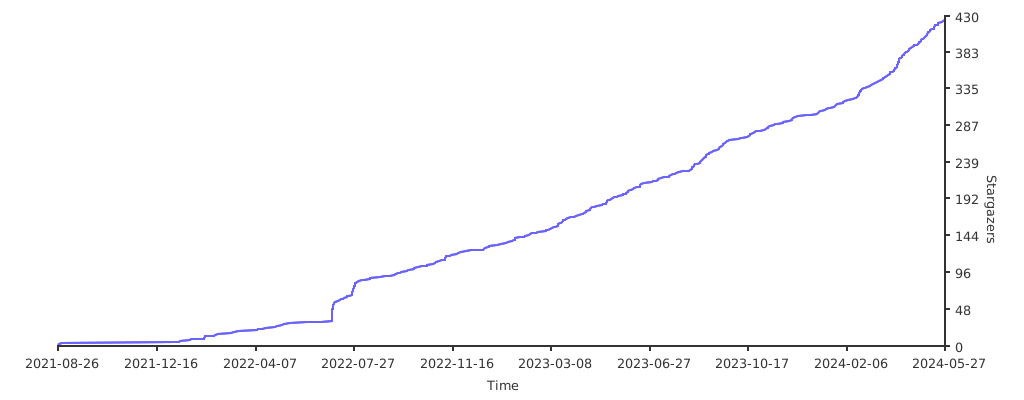
Powered by caarlos0/starcharts
:closed_lock_with_key: License
Telego is distributed under MIT licence.
[TelegramBotAPI]: https://core.telegram.org/bots/api
[TelegramVersionBadge]: https://img.shields.io/static/v1?label=Supported%20Telegram%20Bot%20API&color=29a1d4&logo=telegram&message=v10.3
[TelegramLastVersion]: https://core.telegram.org/bots/api#august-24-2026