
AI Video Production Editor
An open-source, local-first film studio for AI video: script → director → storyboard → filming → edit → color → export, all on your own machine with your own API keys.








Most AI video tools are a prompt box behind a paywall. This is a **production workstation**: a macOS-style desktop app (Electron + React) where the script, the director treatment, the storyboard, the generated shots, the timeline, the grade and the export live in one project folder you own. Bring your own keys for fal.ai, Replicate, Gemini, xAI, ElevenLabs and Runway; route every shot to the model that is actually best for it; keep everything local.
If it helps you make something, please star the repo. Stars are how other filmmakers and developers find it.
Why people use it
| | | | --- | --- | | One production loop | Script → Director pass → Concept & casting → Storyboard → Filming → Review → Edit → Color → Deliver, with a Studio Agent that can run phases for you. | | Best model per shot | Pick a model, or choose Auto and let the studio route people to Nano Banana / GPT Image 2, creatures to Krea 2, environments to Seedream 5 Pro, typography to Ideogram, dialogue to Veo 3.1, performance to Kling v3, action and long takes to Seedance 2.5. | | Real post tools | DaVinci-style page bar (Media, Cut, Edit, Fusion, Color, Fairlight, Deliver), colour wheels baked into 3D LUTs, waveform and histogram scopes, offline auto-cut (silence, scenes, filler words). | | 3D previs | Turn a reference image into a 3D blockout (Hunyuan3D v3, Trellis 2, Rodin 2.5), keyframe camera moves, render them as motion references for video generation. Scene maps flip into 3D with prefab houses, cameras, lights and characters. | | Boards and research | PureRef/Miro-style infinite moodboard with sticky notes and connectors, a knowledge graph over your research sources, an Apple Photos-style library across projects. | | Local and open | GPL-3.0 core, projects are plain folders, keys stay on your machine. Plugins install straight from GitHub. |
Tour
 Storyboard. Aspect ratio, camera body, lens and director persona per shot; model choice or Auto; Gemini continuity review and self-refine. |
 Filming. Seedance 2.5, Kling v3 / O3, Veo 3.1, WAN 2.7, LTX 2.3, PixVerse and more, with start/end frames, motion references and synced audio. |
 Moodboard. Infinite canvas with pan, pinch zoom, sticky notes, text, connectors, drag-and-drop and clipboard paste. Double-click anywhere to add. |
 Set Design. Reference image → 3D blockout, then keyframed camera moves (push in, orbit, crane) rendered straight into the library. |
 Scene Map 3D. The 2D floor plan becomes a blocking set with prefab houses, cameras with frustums, lights, characters and props. Look through any camera. |
 Images. Seedream 5.0 Pro, GPT Image 2, Nano Banana 2, Krea 2, Ideogram 4, Flux, Qwen and more, with per-model prompt structuring. |
 Library. Every generated or imported asset across projects, with quick look, inspector, Unsplash stock and asset packs. |
 Plugins. Install packs from any GitHub repo: LUTs become available in Color, DCTL and OpenFX bundles get one-click installers. |
 Research graph. Reports, sources and shared topics as a force-directed graph. Add your own links and tags. |
 Team. Presence, shared spaces, cloud sync, chat and meeting links as a collaboration layer next to the project. |
30-second tour
Script -> Director pass -> Concept & casting -> Storyboard -> AI filming
-> Continuity review -> Re-film queue -> Edit / Color / Sound -> Deliver- Choose a format in the Project hub (feature, short, microdrama 9:16,
- Write or generate the script, run Analyze Script to extract
- Director pass turns the script into a shot list with cinematic
- Storyboard and Filming generate frames and clips, with continuity
- Edit, Color, Fairlight, Deliver finish the cut, with the Studio Agent
Read the First 10 minutes, the capability map, the UI production workflow guide, and the demo project.
What is new (October 2026)
- Local AI workspace: run everything on your own computer, free and offline.
- New cloud models: FLUX.3 (text-to-image, multi-reference edit, Klein, video
- MachGen as a new provider (Settings → AI providers,
MGA_…key): MiniMax H3
- Assistant agents use the maintained ACP adapters (Claude Agent, Codex 2.x).
- Claude & Codex can drive the editor from outside: Settings → Claude & Codex
Earlier (September 2026)
- macOS-style shell: source-list sidebar, slim toolbar, activity center with
- Project hub rebuilt: sticky action bars per phase, production formats,
- Auto model choice for images and video based on what the shot shows.
- New engines: Seedance 2.5 (T2V, I2V, Omni), Seedream 5.0 Pro (+Edit), Krea 2,
- Color page with lift/gamma/gain/offset wheels, scopes and
.cubeexport;
- Offline auto-cut (adaptive silence removal, scene detection, filler words),
Models and providers
| Task | Engines | | --- | --- | | Images | Seedream 5.0 Pro / 4.5, GPT Image 2 / 1.5, Nano Banana 2, Gemini 3 Pro, Imagen 4, FLUX.3 / FLUX.3 Klein, Krea 3, Krea 2 Large / Turbo, Ideogram 4, Flux 1.1 Pro / 2, FLUX.2 dev, HiDream O1, Qwen Image 2.1 / Max, WAN 2.7, Z-Image, Grok Imagine | | Video | Seedance 2.5 / 2.0 / 1.5, Veo 3.1, Kling v3 Pro / O3 / 2.6, MiniMax H3 / H3 Turbo, FLUX.3 Video, Vidu Q3 Turbo, WAN 2.7 / 2.2, LTX 2.3, PixVerse C1, Happy Horse, Creatify Aurora, Grok Imagine | | Local (your GPU) | FLUX.3 Klein, Qwen Image 2.1 / Turbo, Z-Image Turbo, FLUX.2 Klein 4B, Wan 2.2 5B, LTX-2.3, LTX-2.5 via ComfyUI; any model in Draw Things; LLMs via Ollama / LM Studio | | 3D | Hunyuan3D v3, Trellis 2, Rodin 2.5 / Gen-2, World Labs Marble worlds | | Audio | ElevenLabs, Sonauto, Sonilo, Gemini TTS, local mastering tools | | Post | Runway Ruby (SDR→HDR), LTX ACES HDR upscale, colour wheels + LUTs, Auto Cut | | Providers | fal.ai, Replicate, Google Gemini, MachGen, xAI, ElevenLabs, Runway, LTX, World Labs, Brave Search, Unsplash, Supabase, Stripe; local: ComfyUI, Draw Things, Ollama, LM Studio |
Bring your own keys; the app stores them locally. Model APIs move quickly, so adapters are maintained integration points rather than permanent contracts. No keys at all? See Local AI: local LLMs for the text steps and open-weights models for images and video.
Quick start
New here? Follow the First 10 Minutes Walkthrough or watch the 4-minute setup video.
Just want the app? Download the newest installer from
GitHub Releases
(signed macOS .dmg, Windows .exe), open it, add at least one provider key
in Settings, choose a project folder.
Developers:
npm install
cp .env.example .env.local   # optional overrides
npm run dev                  # browser studio at http://localhost:5173/studio.html
npm run electron:dev         # desktop app against the dev server
npm run build:web            # production web build
npm run electron:build       # distributable desktop packages
Requirements: Node.js 20.19+ or 22.12+, npm 10+, Python 3 for the optional local audio tools. Local project storage, folder pickers and some integrations need the Electron app; the browser build is for development and previews.
Checks before a release:
npm test
npm run check:public-release
npm run check:public-release:strict
Screenshots in this README are generated with
node scripts/capture-screenshots.mjs against the dev server.
Video tutorials
Official channel: youtube.com/@AIVideoProductionEditor
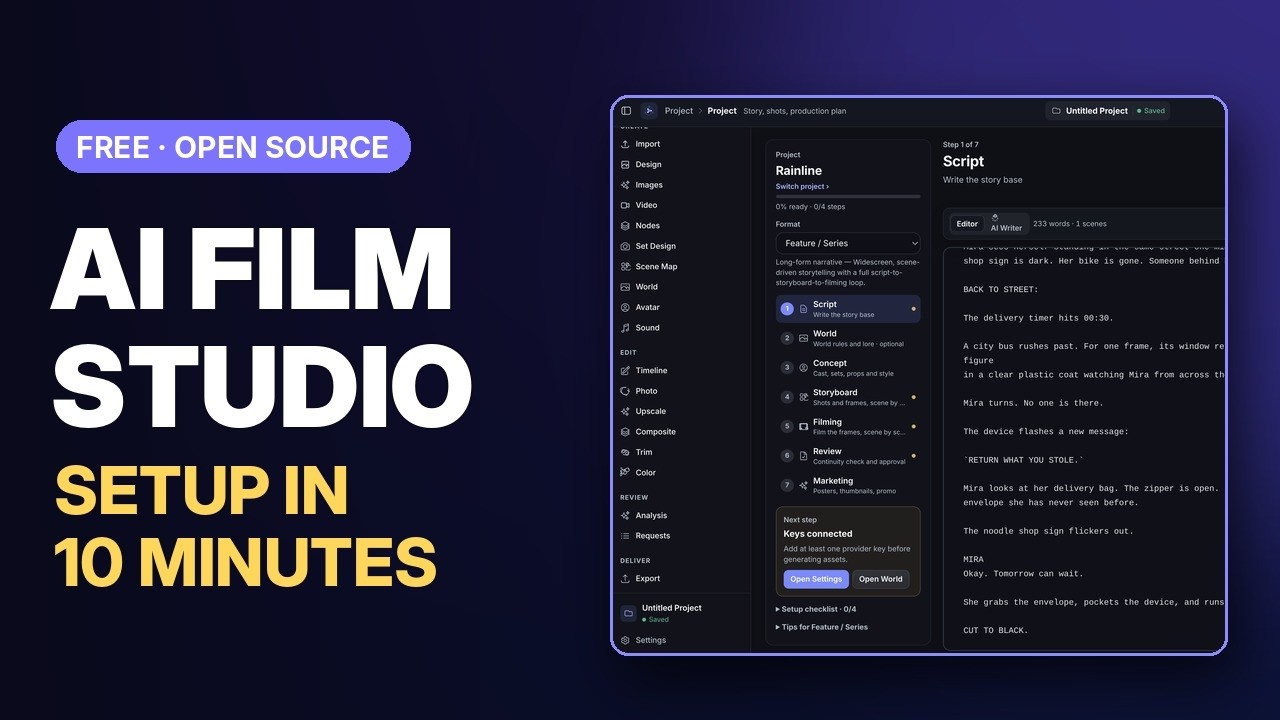
- Setup & first project in 10 minutes (start here): install, the
tutorials/first-10-minutes.
- Short product overview for a fast first impression.
- Full Mac walkthrough: keys, script, storyboards, video generation, editing,
- v1.5 tour: AI Director, Node Graph, Sound tab, 3D set design.
- v2.5 update: Scene Wall and YouTube-oriented workflow tips.
Project map
| Path | Purpose |
| --- | --- |
| src/workspaces | Studio workspaces (Project hub, Moodboard, Set Design, Edit, Color, Library, Plugins, Team, …) |
| src/components | Shared UI: shell, sidebar, toolbar, activity center, colour wheels, knowledge graph |
| src/services | Provider adapters (fal, Replicate, Gemini, Runway, LTX, …), project storage, plugins, task center |
| src/utils | Model auto-selection, prompt guides per model, colour wheels → LUT, offline auto-cut |
| src/data | Production formats, moodboard categories, camera/lens/style presets, asset packs |
| electron | Desktop shell, preload bridge, local runtime handlers |
| api, server/byok | Optional hosted billing, usage and BYOK proxy endpoints |
| docs | Product, build, pricing and launch documentation |
| packages/storyboard-embed-sdk | Embeddable story/project SDK |
Contributing
Good first areas: model adapters when APIs change, UI polish, one documented end-to-end workflow, Node Space templates, focused tests around utilities, translations.
- Contributor guide · Contributor paths · Starter tasks
- Roadmap · Open issues ·
good first issue·help wanted - Security: follow SECURITY.md instead of opening a public issue.
Releases and desktop builds
Installers are published on GitHub Releases, never committed to the tree.
Pushing a version tag such as v0.1.0-open-source runs
.github/workflows/desktop-release.yml, which builds a signed and notarized
macOS .dmg and a Windows .exe and attaches both to the release. Public tag
releases need these GitHub Actions secrets: MACOS_CERTIFICATE_BASE64,
MACOS_CERTIFICATE_PASSWORD, APPLE_ID, APPLE_APP_SPECIFIC_PASSWORD,
APPLE_TEAM_ID. Encode a certificate with base64 -i cert.p12 | pbcopy.
Configuration and privacy
- For step-by-step instructions on setting up credentials for Gemini, Replicate, FAL, xAI, ElevenLabs, and more, see the BYOK Provider Setup Guide.
- Provider keys are entered in the app and stored locally.
.env.localis for
- Never commit
.env, certificates, private keys, release builds or provider
.env.example holds placeholder names only.
- Hosted billing and proxy features require your own Supabase and Stripe
Open-source model, license and branding
The editor core is GPL-3.0-or-later; see LICENSE, NOTICE
and AUTHORS.md. Hosted services, managed credits, cloud rendering,
team sync and support can be built around the open core without putting the
local app behind a paywall. The package is marked private only to prevent
accidental npm publication.
Forks must keep copyright and license notices and may not present themselves as the official release; see TRADEMARK.md.
Copyright (C) 2026 Ludwig Maximillian Kienle.
Example AI Filmmaking Workflow
A practical AI video production workflow can be organized into the following steps:
- Start with a script — Define the story, scenes, dialogue, and required shots.
- Create a Director treatment — Establish the visual direction, tone, and style of the project.
- Create character and environment references — Define important visual details before generating shots.
- Build the storyboard — Plan the composition, camera angles, and sequence of each shot.
- Generate video shots — Create the individual shots using the available AI video generation tools.
- Review continuity — Check character appearance, environments, props, camera position, and other visual details between shots.
- Re-film inconsistent shots — Regenerate shots that introduce unwanted changes or continuity problems.
- Assemble the final sequence — Select the best generated shots and arrange them into the final timeline.
- Export the project — Review the completed sequence and export the final video.