
NeatMail
Never drop a promise buried in your inbox
NeatMail is an AI email assistant for Gmail and Outlook that tracks every promise you make and every promise made to you, files them under one Follow up label, and drafts the follow-up when it's due — plus auto-labeling, replies in your own voice, and a clearer inbox.
Website • Pricing • Blog • Use Cases • Free Tools • Features • Getting Started


Table of Contents
- What is NeatMail?
- Features
- Built for Your Team & Industry
- Guides & Resources
- Free Email Tools
- Getting Started
What is NeatMail?
NeatMail is an email management platform that automatically organizes your Gmail and Outlook inboxes in real-time. No complicated setup, no manual sorting — just clean, organized emails labeled exactly where you need them.
Want to see how it stacks up? Read Superhuman vs NeatMail: email productivity compared (2026), check out our pricing plans, or learn more about the team.
Features
- Gmail & Outlook Integration: Connect in minutes via OAuth. Labels sync directly in real time.
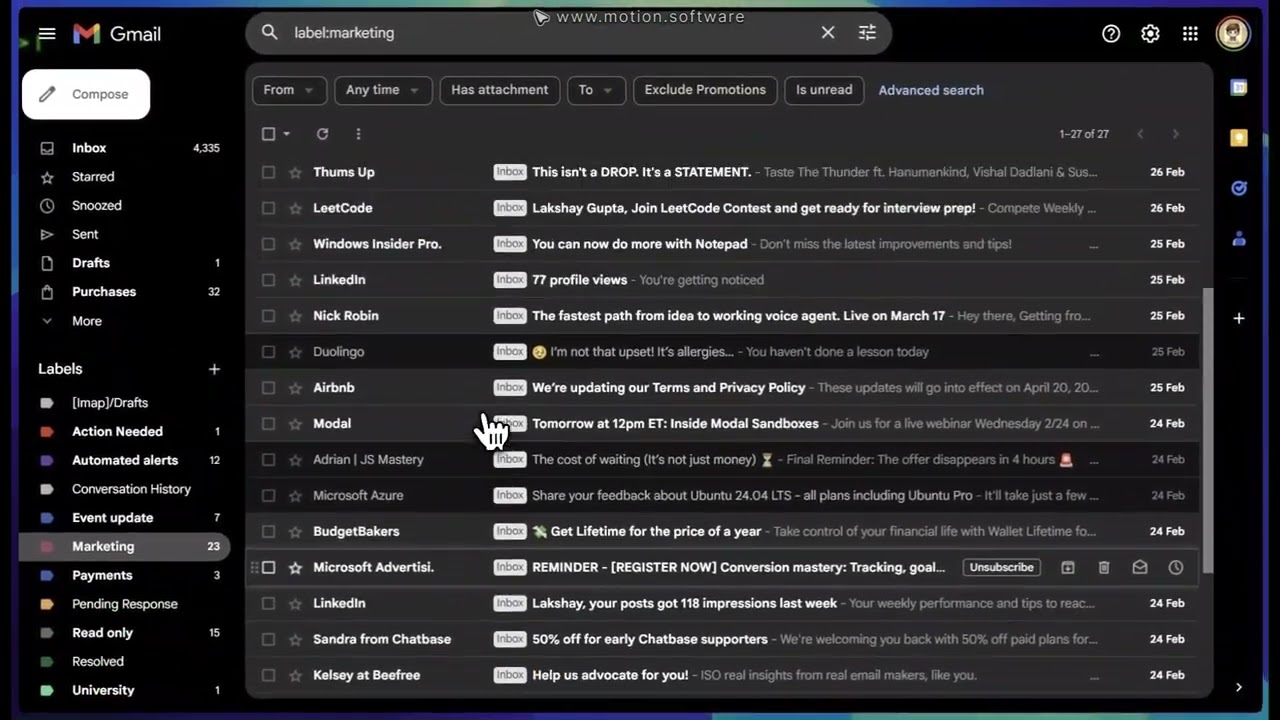
- Smart Email Labeling: AI automatically categorizes incoming emails into labels like Action Needed or Pending Response.
- Custom Labels: Create personalized label systems to match your exact workflow.
- AI-Powered Draft Replies: Auto-generate context-aware draft responses based on your conversation history and writing tone. See how AI draft generation actually works.
- One-Click Unsubscribe: Instantly remove unwanted newsletters to keep your inbox clutter-free.
- Auto-Archive Rules: Set rules to automatically archive emails based on labels, senders, or categories.
- Follow-Ups: Never drop a thread — NeatMail surfaces emails that need a nudge. Learn how to handle email follow-ups.
- Telegram Integration: Receive alerts, set routing rules, and approve AI drafts directly from Telegram.
Product Screenshots

Dashboard |

Smart Labels |

AI Drafts |

One-Click Unsubscribe |

One-Click Cleanup |

Follow-Ups |
Product Video
Built for Your Team & Industry
NeatMail adapts to how different teams and industries handle email. Explore the workflow built for you:
By role
- NeatMail for Founders
- NeatMail for Sales Teams
- NeatMail for Customer Support
- NeatMail for Recruiters
- NeatMail for Consultants
- NeatMail for Executive Assistants
- NeatMail for Law Firms
- NeatMail for Real Estate
- NeatMail for Accounting Firms
- NeatMail for MSPs
- NeatMail for Financial Advisors
- NeatMail for Healthcare Clinics
Guides & Resources
Practical guides from the NeatMail blog on inbox zero, email organization, and productivity:
- How to manage your email inbox — the complete guide (2026)
- Inbox zero when you get 100+ emails a day
- Inbox zero for freelancers
- Best email filters and folders for inbox zero
- Email labels vs folders — which should you use?
- How to stop newsletter clutter in Gmail (2026)
- How to handle promotional & marketing emails
- Open-source email assistant — 2026 guide
- Superhuman vs NeatMail — email productivity compared (2026)
Free Email Tools
Free, no-signup email tools from NeatMail:
- Gmail Filter Generator
- Unsubscribe Email Generator
- Email Header Parser
- SPF Record Generator
- Spam Word Checker
- Email Read Time Calculator
- Email Open Rate Checker
- Meeting Agenda Generator
- Meeting Cost Calculator
- Text Case Converter
- Remove Duplicate Lines
Getting Started
Prerequisites
- Bun (this project's package manager) and Node.js 20+
- PostgreSQL database
- Redis instance (e.g., Upstash)
- Third-party credentials for:
/api/bullboard)
- DodoPay (Payments)
- Resend (Transactional emails)
- Telegram (Bot token for chat integrations)
Installation
- Clone the repository
git clone https://github.com/Lakshay1509/NeatMail.git
cd neatmail- Install dependencies
bun install- Set up environment variables
cp .env.example .env.local- Set up the database
bunx prisma db push
bunx prisma generate- Run the development server
bun run devArchitecture
graph TD
    subgraph Email Providers
        Inbox[Gmail / Outlook]
        PubSub[Google Pub/Sub / MS Graph]
    end
Inbox -->|Push Notification| PubSub
    PubSub -->|Webhook| API[NeatMail API]
subgraph Core Processing
        API -->|Enqueue Job| BullMQ[BullMQ Worker]
        BullMQ -->|Fetch Full Email| Inbox
        BullMQ -->|Analyze Email| AI[OpenAI / Azure]
        AI -->|Labels & Drafts| BullMQ
        BullMQ -->|Apply Labels & Drafts| Inbox
    end
subgraph Data & State
        BullMQ -->|Store Metadata| DB[(PostgreSQL)]
        BullMQ -->|Cache & Deduplication| Redis[(Redis)]
    end
subgraph Notifications
        BullMQ -->|Send Alerts| Telegram[Telegram Bot]
    end
Tech Stack
- Frontend: Next.js 16.1.1, React 19, Tailwind CSS 4, shadcn/ui, TanStack Query
- Backend: Hono.js, Prisma, PostgreSQL, Redis (Upstash), Clerk, BullMQ
- AI: OpenAI GPT-4 Mini
- Integrations: Google APIs, Microsoft Graph API, DodoPay, Svix
Configuration
Refer to the code comments and documentation for detailed setup instructions for the Gmail API, Outlook API, and Clerk. Webhooks are central to how NeatMail works — make sure your Google Cloud Pub/Sub and Clerk webhook endpoints are correctly configured before testing.
Deployment
NeatMail is optimized for Vercel.
- Deploy to Vercel and configure environment variables.
- Run database migrations:
npx prisma migrate deploy - Point your webhooks (Pub/Sub, Clerk, DodoPay) to the new domain.
Contributing
- Fork the project
- Create your feature branch (
git checkout -b feature/your-feature) - Commit your changes (
git commit -m 'Add your feature') - Push to the branch (
git push origin feature/your-feature) - Open a pull request
License
Distributed under the Elastic License 2.0. See LICENSE for more information.
Built by the NeatMail team — neatmail.app