
Goma Gateway — Security-Focused, Cloud-Native API Gateway and Reverse Proxy
____
  / ___| ___  _ __ ___   __ _
 | |  _ / _ \| '_  _ \ / _ |
 | |_| | (_) | | | | | | (_| |
  \____|\___/|_| |_| |_|\__,_|
  :: Goma Gateway :: - ()

!Docker Image Size (latest by date)
!Docker Pulls
Goma Gateway is a high-performance, security-focused, cloud-native API Gateway. It puts security at the edge — automatic HTTPS, mTLS, built-in authentication, and exploit protection — and built to run where your services run: containers, Kubernetes, and dynamic, horizontally scaled environments. With declarative configuration, zero-downtime reloads, and first-class observability, Goma helps you route, secure, and scale traffic effortlessly.
Why "Goma"? 🇨🇩
The project takes its name from Goma, a resilient city in the eastern Democratic Republic of Congo that serves as a vital crossroads connecting diverse regions. Like its namesake, Goma Gateway acts as a strategic entry point managing, securing, and directing the flow of API traffic that connects your services.

Architecture:
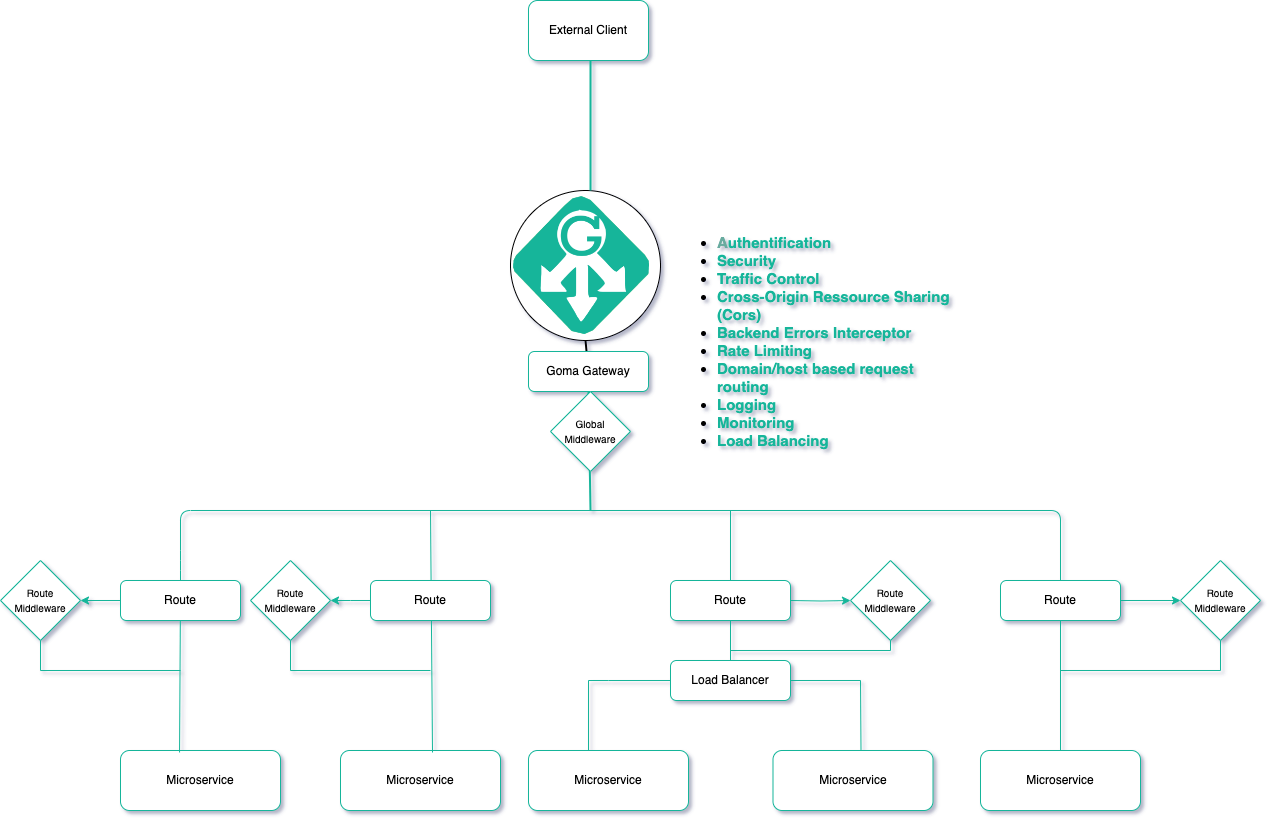
Quick Links
- Documentation: Documentation
- Source Code: Goma Gateway on GitHub
- Docker Image: jkaninda/goma-gateway
- Goma Admin(Control Plane): Goma Admin
- HTTP Provider: Goma HTTP Provider
- Docker Provider: Goma Docker Provider
- Kubernetes Provider: Kubernetes Provider
- Kubernetes Operator: Kubernetes Operator
- Miabi PaaS: Miabi PaaS
Documentation
Features
More than just a reverse proxy: Goma Gateway secures, routes, and scales your traffic from a single declarative configuration, with enterprise-grade features and none of the enterprise complexity.
Security & Access Control
- Automatic HTTPS via Let’s Encrypt or custom TLS
- Mutual TLS (mTLS) for client certificate authentication
- Built-in authentication: Basic Auth, JWT, OAuth, LDAP, ForwardAuth
- CORS policies, header injection, method restrictions, and fine-grained access control
- Exploit protection: SQL injection, XSS, and bot detection
- Rate limiting with abuse prevention:
- Extensible security – Custom middleware plugins for specialized authentication and authorization logic
Cloud-Native by Design
- Kubernetes Operator with
Gateway,Route, andMiddlewareCRDs - Dynamic configuration from File, HTTP, Docker, and Kubernetes providers
- Stateless data plane that scales horizontally, with Redis for shared rate-limit and cache state
- Liveness/readiness endpoints (
/healthz,/readyz) for orchestrator probes - Environment-variable configuration for container-first deployments
- Zero-downtime config reloads — GitOps and CI/CD ready, with version-controlled single- or multi-file configs
Routing & Traffic Management
- Declarative YAML-based configuration for routes, middleware, policies, and TLS
- Flexible routing for domains, hosts, paths, WebSocket, gRPC, TCP/UDP
- Multi-domain & multi-service support in one config
- Regex-based URL rewriting and backend abstraction
- Load balancing: round-robin and weighted, with health-aware backend routing
- Canary Deployments:
Performance & Observability
- Intelligent caching: HTTP caching with in-memory or Redis backend, smart cache invalidation
- Structured logging with configurable levels
- Prometheus metrics and a prebuilt Grafana dashboard
- Graceful error handling and backend failure interception
Use Cases
- Secure edge for public APIs — automatic HTTPS, JWT validation, rate limiting with client banning
- Single sign-on for internal tools and legacy apps — OpenID Connect, ForwardAuth, or LDAP in front of apps with no code changes
- Partner and B2B APIs — mutual TLS and network access policies
- API gateway for Kubernetes — routes and middleware as custom resources through the Operator
- Edge for container platforms and self-hosted PaaS — dynamic routes and certificates for every new app
- Canary releases and targeted rollouts — weighted and header-, cookie-, or IP-based routing
- Internal services with a private CA — certificates from Certio or HashiCorp Vault PKI
Quickstart Guide
Get started with Goma Gateway in just a few steps. This guide covers generating a configuration file, customizing it, validating your setup, and running the gateway with Docker.
Prerequisites
Before you begin, ensure you have:
- Docker — to run the Goma Gateway container
Installation Steps
1. Generate a Default Configuration
Run the following command to create a default configuration file (config.yml):
docker run --rm --name goma-gateway \
  -v "${PWD}/config:/etc/goma/" \
  jkaninda/goma-gateway config init --output /etc/goma/config.yml
This will generate the configuration under ./config/config.yml.
2. Customize the Configuration
Edit ./config/config.yml to define your routes, middlewares, backends, and other settings.
3. Validate Your Configuration
Check the configuration for errors before starting the server:
docker run --rm --name goma-gateway \
  -v "${PWD}/config:/etc/goma/" \
  jkaninda/goma-gateway config check --config /etc/goma/config.yml
Fix any reported issues before proceeding.
4. Start the Gateway
Launch the server with your configuration and Let's Encrypt volumes:
docker run --rm --name goma-gateway \
  -v "${PWD}/config:/etc/goma/" \
  -v "${PWD}/letsencrypt:/etc/letsencrypt" \
  -p 8080:8080 \
  -p 8443:8443 \
  jkaninda/goma-gateway --config /etc/goma/config.yml
By default, Goma Gateway listens on:
- 8080 → HTTP (
webentry point) - 8443 → HTTPS (
webSecureentry point)
5. (Optional) Use Standard Ports 80 & 443
To run on standard HTTP/HTTPS ports, update your config file:
version: 2
gateway:
  entryPoints:
    web:
      address: ":80"
    webSecure:
      address: ":443"
Start the container with:
docker run --rm --name goma-gateway \
  -v "${PWD}/config:/etc/goma/" \
  -v "${PWD}/letsencrypt:/etc/letsencrypt" \
  -p 80:80 \
  -p 443:443 \
  jkaninda/goma-gateway --config /etc/goma/config.yml
6. Health Checks
Goma Gateway exposes the following endpoints:
- Gateway health:
/readyz
* /healthz
- Routes health:
/healthz/routes
7. Deploy with Docker Compose
A simple docker-compose setup:
config.yaml
version: 2
gateway:
  entryPoints:
    web:
      address: ":80"
    webSecure:
      address: ":443"
  log:
    level: info
  routes:
    - name: api-example
      path: /
      target: http://api-example:8080
      middlewares: ["rate-limit","basic-auth"]
    - name: host-example
      path: /api
      rewrite: /
      hosts:
        - api.example.com
      backends:
        - endpoint: https://api-1.example.com
          weight: 20
        - endpoint: https://api-2.example.com
          weight: 80
      healthCheck:
        path: /
        interval: 30s
        timeout: 10s
middlewares:
  - name: rate-limit
    type: rateLimit
    rule:
      unit: minute
      requestsPerUnit: 20
      banAfter: 5
      banDuration: 5m
  - name: basic-auth
    type: basicAuth
    paths: ["/admin","/docs","/openapi"]
    rule:
      realm: Restricted
      forwardUsername: true
      users:
        # Generate your own hash — never copy one out of documentation:
        #   htpasswd -nbBC 12 admin 'your-password' | cut -d: -f2
        # or keep it out of the file entirely with ${VAR} expansion.
        - username: admin
          password: ${GOMA_ADMIN_PASSWORD_HASH}
Uncomment and set your contact email to issue certificates with Let's Encrypt:
certManager:
  providers:
    letsencrypt:
      type: acme
      acme:
        email: [email protected]
compose.yaml
services:
  goma-gateway:
    image: jkaninda/goma-gateway
    command: -c /etc/goma/config.yaml
    environment:
      # bcrypt hash for the basic-auth user, passed through from your shell
      - GOMA_ADMIN_PASSWORD_HASH
    ports:
      - "80:80"
      - "443:443"
    volumes:
      - ./config:/etc/goma/
      - ./letsencrypt:/etc/letsencrypt
api-example:
    image: jkaninda/okapi-example
Export GOMA_ADMIN_PASSWORD_HASH in your shell before running docker compose up, then visit http://localhost/docs to see the example API documentation (protected by the basic-auth middleware).
8. Goma Admin and Docker Provider
Goma Gateway intentionally does not include a built-in Docker provider or user interface in order to remain lightweight, modular, and focused on its role as a data plane.
These capabilities are provided by Goma Admin, which acts as the control plane and includes native support for a Docker provider. This allows automatic generation of gateway configuration from container labels.
Goma Admin
Goma Admin is a web-based control plane for managing Goma Gateway configurations.
It provides a structured and user-friendly interface to define routes, middleware, and TLS settings without requiring manual editing of YAML configuration files.
Key Features
- Multi-instance management
- File & HTTP provider integration
- Docker-based service discovery
- Import / Export of configurations
- API key management
- Metrics & monitoring (Prometheus)
- OAuth2 integration (Keycloak, Authentik, Gitea)
- Audit logs (configuration history)
- Git synchronization (bi-directional)
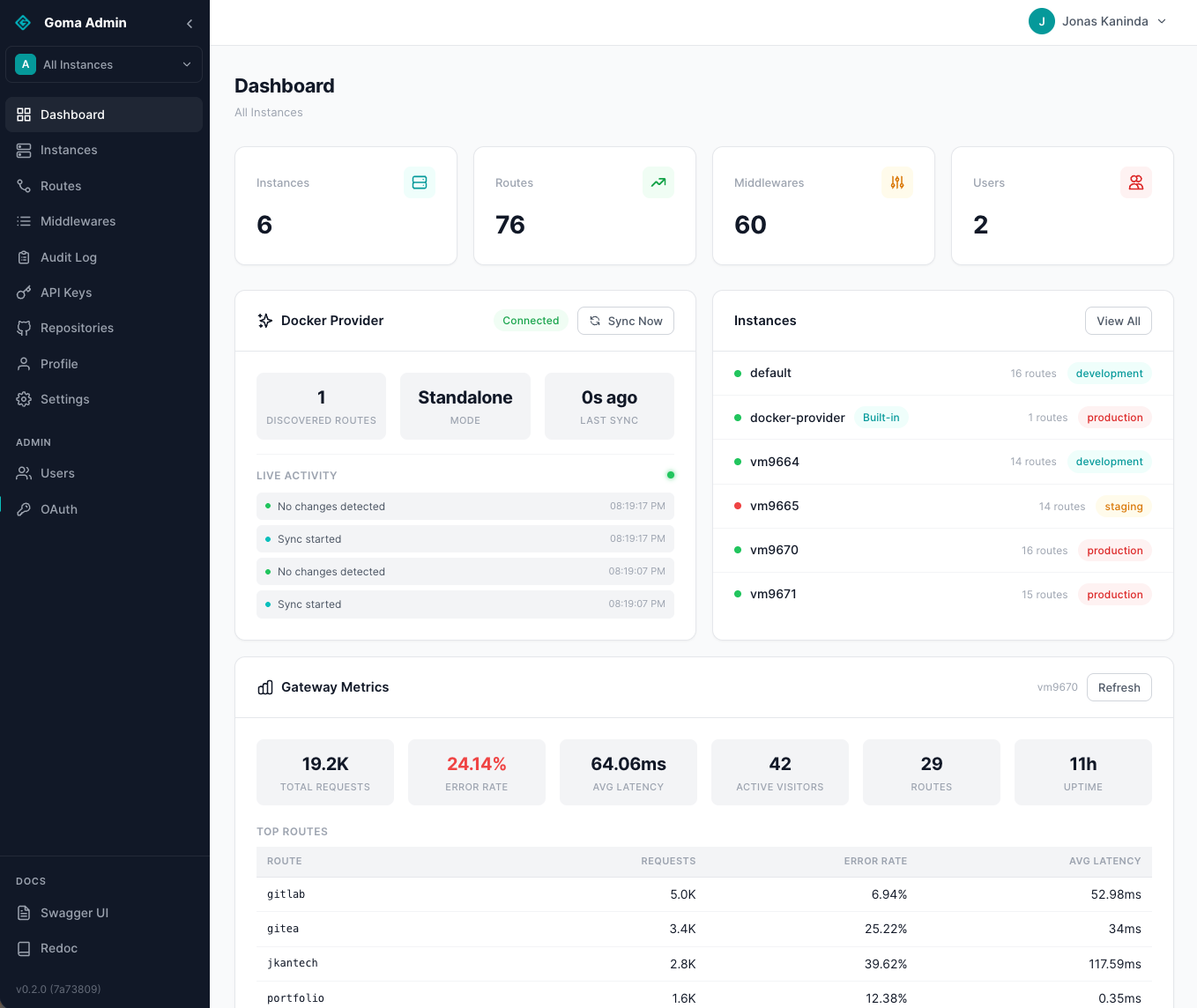
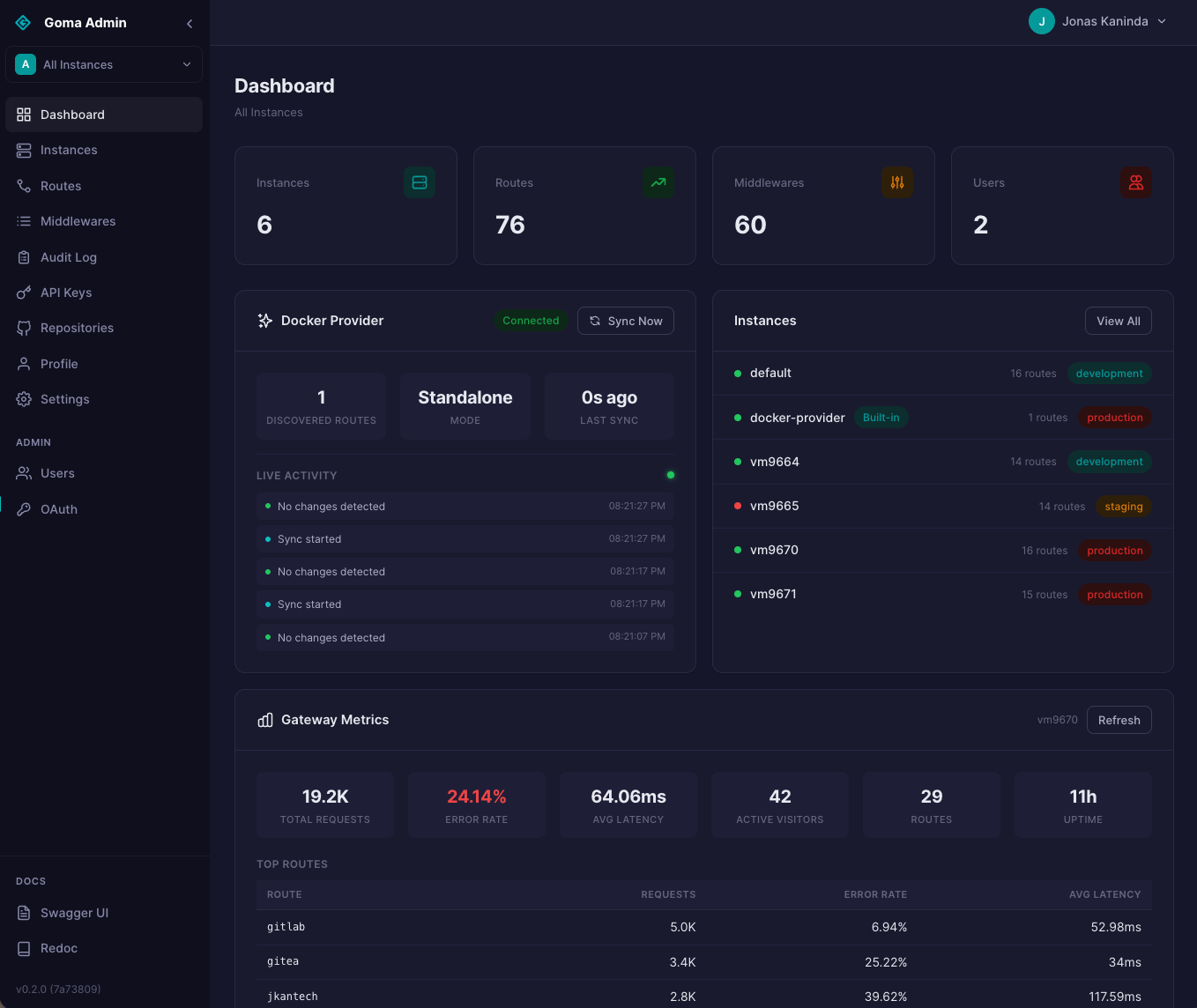
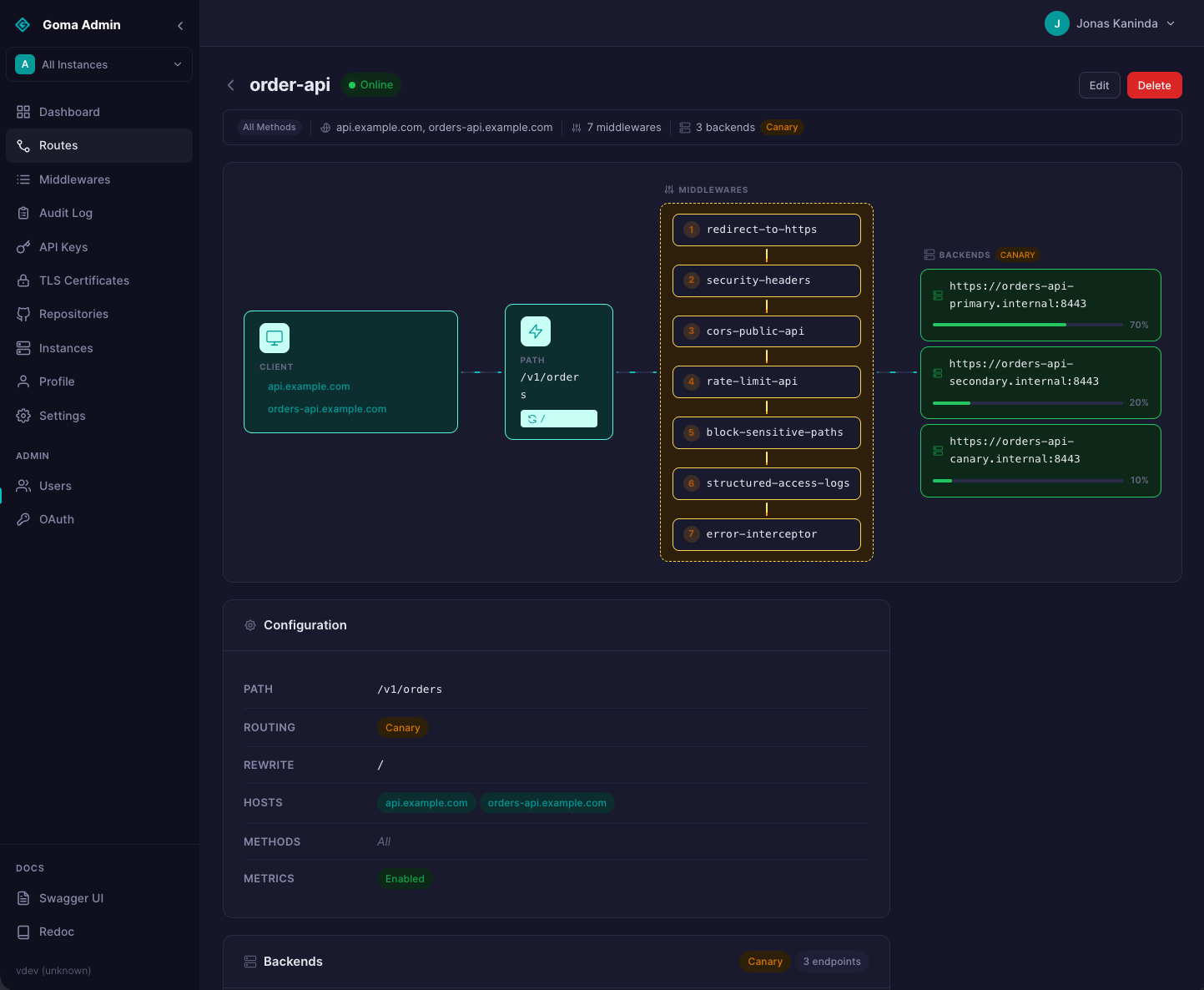
Screenshots
Dashboard
Dashboard (Dark Mode)
Dashboard Route Details
Goma Docker Provider
When deploying services with Docker Compose or Docker Swarm, the Goma Docker Provider automatically generates gateway configuration from container labels.
This model is similar to Traefik, where routing rules, services, and middleware are defined directly on containers through labels.
Example: docker-compose
services:
  # Goma Gateway - Data Plane
  goma-gateway:
    image: jkaninda/goma-gateway:latest
    ports:
      - "80:80"
      - "443:443"
    volumes:
      - ./:/etc/goma
      - providers:/etc/goma/providers
    environment:
      GOMA_LOG_LEVEL: info
      GOMA_ENTRYPOINT_WEB_ADDRESS: :80
      GOMA_ENTRYPOINT_WEB_SECURE_ADDRESS: :443
      GOMA_FILE_PROVIDER_ENABLED: true
      GOMA_FILE_PROVIDER_WATCH: true
      GOMA_FILE_PROVIDER_DIRECTORY: /etc/goma/providers/default # Default instance
    networks:
      - goma-net
# Goma Admin - Control Plane
  goma-admin:
    image: jkaninda/goma-admin:latest
    labels:
      - "goma.enable=false"
      - "goma.port=9000"
      - "goma.hosts=goma-admin.example.com"
    ports:
      - "9000:9000"
    environment:
      GOMA_DB_URL: postgresql://goma:goma@goma-postgres:5432/goma?sslmode=disable
      GOMA_ENVIRONMENT: development
      GOMA_PROVIDERS_DIR: /etc/goma/providers
      GOMA_DOCKER_ENABLED: true
    volumes:
      - /var/run/docker.sock:/var/run/docker.sock:ro
      - providers:/etc/goma/providers
    depends_on:
      goma-postgres:
        condition: service_healthy
    restart: unless-stopped
goma-postgres:
    image: postgres:17-alpine
    container_name: goma-admin-postgres
    environment:
      POSTGRES_USER: goma
      POSTGRES_PASSWORD: goma
      POSTGRES_DB: goma
    volumes:
      - postgres_data:/var/lib/postgresql/data
    healthcheck:
      test: ["CMD-SHELL", "pg_isready -U goma"]
      interval: 10s
      timeout: 5s
      retries: 5
# Example service exposed via Goma
  web-service:
    image: jkaninda/okapi-example
    labels:
      - "goma.enable=true"
      - "goma.port=8080"
      - "goma.hosts=example.com,www.example.com"
    networks:
      - goma-net
volumes:
  providers: {}
  postgres_data: {}
networks:
  goma-net:
    driver: bridge
References
- Goma Admin: https://github.com/jkaninda/goma-admin
- Goma Docker Provider: https://github.com/jkaninda/goma-docker-provider
9. Kubernetes deployment
Basic Deployment
kubectl apply -f https://raw.githubusercontent.com/jkaninda/goma-gateway/main/examples/k8s-basic-deployment.yamlAdvanced Deployment using CRDs
For declarative, GitOps-friendly deployments, use the Goma Gateway Operator, which manages Gateway, Route, and Middleware custom resources.
1. Install the operator and its CRDs:
kubectl apply -f https://raw.githubusercontent.com/jkaninda/goma-operator/main/dist/install.yaml2. Apply a minimal stack (Gateway + Middleware + Route):
---
apiVersion: gateway.jkaninda.dev/v1alpha1
kind: Gateway
metadata:
  name: gateway
spec:
  image: jkaninda/goma-gateway:latest
  replicas: 1
  server:
    logLevel: info

apiVersion: gateway.jkaninda.dev/v1alpha1
kind: Middleware
metadata:
  name: api-rate-limit
spec:
  type: rateLimit
  rule:
    requestsPerUnit: 100
    unit: minute
    burst: 20

apiVersion: gateway.jkaninda.dev/v1alpha1
kind: Route
metadata:
  name: api
spec:
  gateways:
    - gateway
  path: /
  hosts:
    - api.example.com
  target: http://api-service.default.svc.cluster.local:8080
  middlewares:
    - api-rate-limit
Or apply a ready-made example directly:
kubectl apply -f https://raw.githubusercontent.com/jkaninda/goma-gateway/main/examples/kubernetes-operator-basic.yamlFor a production-style stack (LoadBalancer, ACME, HPA, JWT, weighted backends), see kubernetes-advanced.yaml and the Operator Manual.
10. HTTP API Provider (External)
The Goma HTTP Provider exposes a REST API for managing routes, middleware, and gateway configuration dynamically.
It’s ideal for:
- Control planes
- Automation workflows
- Internal platform tools
11. Grafana Dashboard
Goma Gateway offers built-in monitoring capabilities to help you track the health, performance, and behavior of your gateway and its routes. Metrics are exposed in a Prometheus-compatible format and can be visualized using tools like Prometheus and Grafana.
A prebuilt Grafana dashboard is available to visualize metrics from Goma Gateway.
You can import it using dashboard ID: 23799
Dashboard Preview
!Goma Gateway Grafana Dashboard
12. Production Deployment Guide
For production deployments, use the example from the link below:
13. Miabi
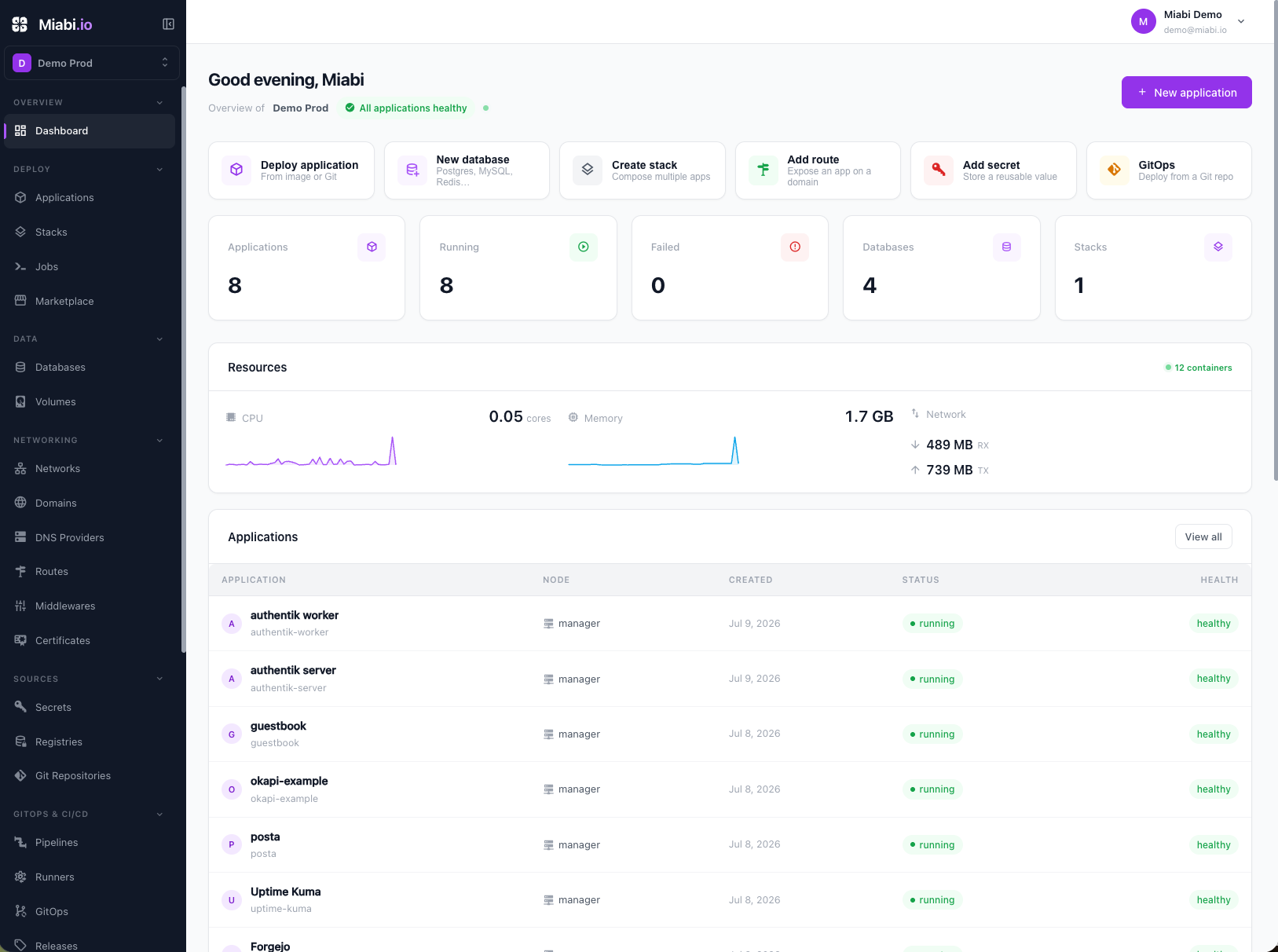
Miabi is a self-hosted, developer-first Platform-as-a-Service for containerized apps. Push an app from a Git repo, a Docker image, or a marketplace template and Miabi handles the rest: build, deploy, domains, automatic SSL, databases, scaling, backups, and monitoring. All from one web interface, in minutes, without touching a single Docker command.
Miabi runs Goma Gateway as its edge layer. Every app deployed on the platform is exposed through the gateway, which provides:
- Routing — service discovery and per-app routes, including load balancing and canary traffic splitting
- TLS — automatic HTTPS with Let's Encrypt, wildcard certificates, and DNS provider integrations (ACME)
- Middleware — authentication, rate limiting, access control, and the rest of Goma's middleware chain
- Security — a single hardened entry point in front of every workload
Dashboard Preview
Supported Systems
- [x] Linux
- [x] MacOS
- [x] Windows
Init configs:
./goma config init --output config.ymlTo run
./goma server --config config.ymlDeployment
- Docker
- Kubernetes
Contributing
The Goma Gateway project welcomes all contributors. We appreciate your help!
🌟 Star History
⭐ If you find Goma Gateway useful, please consider giving it a star on GitHub!
Give a Star! ⭐
If this project helped you, do not skip on giving it a star. Thanks!
License
This project is licensed under the Apache 2.0 License. See the LICENSE file for details.
Copyright
Copyright (c) 2024 Jonas Kaninda and contributors
Built with ❤️ for the developer community