
IndexedDB Polyfill






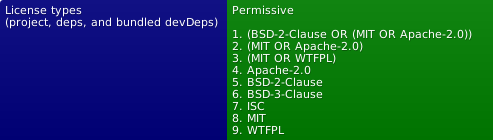 (see also licenses for dev. deps.)
|Live Demo (stable)! | Live Demo (master)! | | -------------- | ----------------- |
__Use a single, indexable, offline storage API across all desktop and mobile browsers and Node.js.__
Even if a browser natively supports IndexedDB, you may still want to use this shim. Some native IndexedDB implementations are very buggy. Others are missing certain features. There are also many minor inconsistencies between different browser implementations of IndexedDB, such as how errors are handled, how transaction timing works, how records are sorted, how cursors behave, etc. Using this shim will ensure consistent behavior across all browsers.
Features
- Optionally adds full IndexedDB support to any web browser that
- Does nothing if the browser already
- Can _optionally replace_ native IndexedDB on browsers with
- Works on __desktop__ and __mobile__ devices as well as __Node.js__ (courtesy of
- Works on __Cordova__ and __PhoneGap__ via the
- This shim is basically an IndexedDB-to-WebSQL adapter.
- More (though most likely now outdated) details about the project at
Installation
You can download the development or production (minified) script, or install it using NPM.
For Mac, you may need to have CMake installed
for the SQLite3 install to work (See
Tools->How to Install For Command Line Use) as well as build SQLite3 from
source via npm install --build-from-source in the node-sqlite3 directory.
Also make sure Python (2.7) is installed.
npm
npm install indexeddbshimor
yarn add indexeddbshimBrowser set-up
Add the following scripts to your page:
<script src="./node_modules/indexeddbshim/dist/indexeddbshim.min.js"></script>If you need full Unicode compliance (handling special non-alphanumeric identifiers in store and index names), use the following instead:
<script src="./node_modules/indexeddbshim/dist/indexeddbshim-UnicodeIdentifiers.min.js"></script>Node set-up
const setGlobalVars = require('indexeddbshim');
globalThis.window = globalThis; // We'll allow ourselves to use window.indexedDB or indexedDB as a global
setGlobalVars(); // See signature below
Deno set-up
The project works with Deno (and idb) according to a user.
Be sure to call with --location.
deno --location http:foo -A main.tsThe location must start with http: or https: per Deno.
Jest (or other test environments with a jsdom/Window-like global)
If you call setGlobalVars(global) (or setGlobalVars(window)) inside a
Jest test/setup file, accessing indexedDB afterwards can throw:
TypeError: Illegal invocationThis happens because the indexedDB getter performs a brand check (much
like native browsers do) to ensure it is invoked with the same this it
was defined on. Under Jest, the object accessing indexedDB (e.g. jsdom's
Window) is not always reference-equal to the object passed to
setGlobalVars, so the check fails.
As a workaround, set shimNS on the target global before calling
setGlobalVars, so the brand check is bypassed for that object:
// e.g., jest/testSetup.js
import setGlobalVars from 'indexeddbshim';
global.shimNS = true;
setGlobalVars(global);
I never call setGlobalVars myself (e.g. React Native/Expo + jest-expo)
You can still hit this even if your test never touches indexedDB
directly (e.g. a plain component-render test). It means some module in
your import chain (a dependency, a polyfill file, etc.) pulls in the
invasive build of indexeddbshim, which auto-invokes setGlobalVars()
as a side effect of being imported.
Because that happens at import time, you must set shimNS on the global
before that import chain runs — a normal test file beforeEach/import is
too late. Use Jest's setupFiles (which runs before the test framework and
any test file imports are evaluated) for this:
// jest.config.js
module.exports = {
    preset: 'jest-expo',
    setupFiles: ['./jest/shim-ns-setup.js']
};
// jest/shim-ns-setup.js
if (typeof global.window === 'undefined') {
global.window = global;
}
global.window.shimNS = true;
global.shimNS = true;If you're using setupFilesAfterEnv instead (e.g. because you also need
@testing-library/jest-native matchers), it will be too late if the
offending import happens as part of loading another setupFilesAfterEnv
module or the test file itself — keep the shimNS assignment in
setupFiles so it always runs first.
ES6 Modules
Bundler for Browser
import setGlobalVars from 'indexeddbshim';Bundler for Node
import setGlobalVars from 'indexeddbshim/src/node-UnicodeIdentifiers.js';
// Or without Unicode support
// import setGlobalVars from 'indexeddbshim/src/node.js';
Usage/API
For the browser scripts, if the browser already natively supports IndexedDB and is not known to be buggy, then the script won't do anything.
Otherwise, assuming WebSQL is available, the script will add the
IndexedDB API
to the browser (unless you use one of the non-invasive files, in which case
setGlobalVars can be used to optionally add the API to an object of your
choosing; if you also wish Unicode support, you will need to add it yourself).
Either way, you can use IndexedDB just like normal. Here's an example.
setGlobalVars(\null\>, initialConfig)
In the non-invasive builds (and Node.js), globals are not automatically set. You have the choice to set globals when you wish as well as to set the API on an object of your choosing in place of setting globals.
This is done through setGlobalVars() (which is otherwise called in the
browser builds automatically with no arguments).
This function defines shimIndexedDB, indexedDB, IDBFactory, etc. on
one of the following objects in order of precedence:
- The passed in
winObjobject if defined window(for Node, defineglobal.window = global;)self(for web workers)global(for Node)- A new empty object
initialConfig argument, if present, should be an object whose keys
are the config properties to set and its values are the config values (see
shimIndexedDB.__setConfig below).
If you are adding your own window.openDatabase implementation, supplying
it within initialConfig (keyed as openDatabase) will ensure that
shimIndexedDB.__useShim() is auto-invoked for you if poor IndexedDB
support is detected.
shimIndexedDB.\__useShim();
To force IndexedDBShim to shim the browser's native IndexedDB (if our code is not already auto-shimming your browser when detecting poor browser support), add this method call to your script.
On browsers that support WebSQL, this line will _completely replace_ the native IndexedDB implementation with the IndexedDBShim-to-WebSQL implementation.
On browsers that _don't_ support WebSQL, but _do_ support IndexedDB, this line will patch many known problems and add missing features. For example, on Internet Explorer, this will add support for compound keys.
If CFG.addNonIDBGlobals has been set (e.g., on the initialConfig argument
of setGlobalVars), the other non-IndexedDB shims necessitated by this
library will be polyfilled as possible on the chosen "global" (i.e.,
ShimEvent, ShimCustomEvent, ShimEventTarget, ShimDOMException,
and ShimDOMStringList). Mostly useful for testing.
If CFG.replaceNonIDBGlobals is used, it will instead attempt to add,
or if already present, overwrite these globals.
If CFG.fullIDLSupport has been set, the slow-performing
Object.setPrototypeOf calls required for full WebIDL compliance will
be used. Probably only needed for testing or environments where full
introspection on class relationships is required.
See this SO topic
shimIndexedDB.\__forceClose([dbName], [connIdx], [msg])
The spec anticipates the closing of a database connection with a forced flag.
The spec also mentions some circumstances where this may occur:
A connection may be closed by a user agent in exceptional circumstances,
for example due to loss of access to the file system, a permission change,
or clearing of the origin’s storage.
Since the latter examples are under the browser's control, this method may be more useful on the server or for unit-testing.
If the first argument, dbName is missing (or null or undefined),
all connections to all databases will be force-closed.
If the second argument, connIdx is missing (or null or undefined),
all connections with the given name will be force-closed. It can
alternatively be an integer representing a 0-based index to indicate a
specific connection to close.
The third argument msg will be appended to the AbortError that will be
triggered on the transactions of the connection.
Individual IDBDatabase database instances can also be force-closed
with a particular message:
db.__forceClose(msg);shimIndexedDB.\__setConnectionQueueOrigin(origin = getOrigin())
Establishes a connectionQueue for the supplied (or current) origin.
The queue is otherwise only keyed to the detected origin on the loading of the IndexedDBShim script, though this is usually the desired behavior.
shimIndexedDB.\__debug(boolean)
The IndexedDB polyfill has sourcemaps enabled, so the polyfill can be debugged even if the minified file is included.
To print out detailed debug messages, add this line to your script:
shimIndexedDB.__debug(true);shimIndexedDB.\__setConfig()
Rather than using globals, a method has been provided to share state across IndexedDBShim modules.
Configuration can be set early in the non-invasive browser and Node builds
via the second argument to setGlobalVars() (see its definition above).
Its signature (for setting configuration after shimIndexedDB is created) is:
shimIndexedDB.__setConfig({
    property: value, property2: value2, ...otherProperties
});
or:
shimIndexedDB.__setConfig(property, value);createDOMException(name, message)
A utility for creating a DOMException instance. Attempts to use any
available native implementation.
Configuration options
The available properties relevant to browser or Node are:
- __DEBUG__ - Boolean (equivalent to calling
shimIndexedDB.__debug(val)) - __cacheDatabaseInstances__ - Config to ensure that any repeat
IDBFactory.open call to the same name and version (assuming
no deletes or aborts causing rollbacks) will reuse the same SQLite
openDatabase instance.
- __checkOrigin__ - Boolean on whether to perform origin checks in
IDBFactory
open, deleteDatabase, databases); effectively
defaults to true (must be set to false to cancel checks); for Node
testing, you will either need to define a location global from which
the origin value can be found or set this property to false.
- __UnicodeIDStart__ and __UnicodeIDContinue__ - Invocation of
createObjectStore and createIndex calls for validation of key paths.
The specification technically allows all
IdentifierName](https://tc39.github.io/ecma262/#prod-IdentifierName)
strings, but as this requires a very large regular expression,
it is replaced by default with [$A-Z_a-z] and [$0-9A-Z_a-z],
respectively. Note that these are and must be expressed as strings,
not RegExp objects. You can use this configuration to change the default
to match the spec or as you see fit. In the future we may allow the spec
behavior via optional dynamic loading of an internal module.
- __registerSCA__ - For data created in 3.* versions of IndexedDBShim to
typeson.register. See the library
typeson-registry-sca-reverter
for a function that can do this and check it for updates if you are
using it in case needed to work against new updates of IndexedDBShim.
- __fullIDLSupport__ - If set to
true, the slow-performing
Object.setPrototypeOf calls required for full WebIDL compliance will
be used. Probably only needed for testing or environments where full
introspection on class relationships is required.
See this SO topic
- __win__, Object on which there may be an
openDatabasemethod (if any)
window or self in the browser and for Node,
it is set by default to node-websql.
If you are intending on adding your own openDatabase implementation,
please note that (for the sake of Node), we rely on supplying an additional
non-WebSQL-standard callback argument to WebSQL transaction or
readTransaction calls in our node-websql fork to allow it to prolong
the transaction (to last through our IndexedDB transaction) and to provide
rollback functionality. (See
- __cursorPreloadPackSize__ - Number indicating how many records to preload for
IDBCursor.continue calls. Defaults to 100.
- __DEFAULT_DB_SIZE__ - Used as estimated size argument (in bytes) to
openDatabase calls. Defaults to 4 1024 1024 or
25 1024 1024 in Safari (apparently necessary due to Safari creating
larger files and possibly also due to Safari not completing the storage
of all records even after permission is given). Has no effect in Node
(using node-websql),
and its use in WebSQL-compliant browsers is implementation dependent (the
browser may use this information to suggest the use of this quota to the
user rather than prompting the user regularly for say incremental 5MB
permissions).
- __useSQLiteIndexes__ - Whether to create indexes on SQLite tables (and also
false.
- __avoidAutoShim__ - Where WebSQL is detected but where
indexedDBis
shimIndexedDB.__useShim(). Set this to true to avoid forcing
the shim for such cases.
The following config are mostly relevant to Node but has bearing on the browser, particularly if one changes the defaults.
- __fs__ - File system module with
unlinkto remove deleted database files.
- __addNonIDBGlobals__ - If set to
truewill polyfill the "global" with
ShimEvent, ShimCustomEvent,
ShimEventTarget, ShimDOMException, and ShimDOMStringList.
Mostly useful for debugging (and in Node where these
are not available by default).
- __replaceNonIDBGlobals__ - Similar to
addNonIDBGlobalsbut will attempt
- __escapeDatabaseName__ - Due to the Node implementation's reliance on
node-websql/node-sqlite3 which create files for each database
(and the fact that we haven't provided an option to map filename-safe
IDs to arbitrary, user-supplied IndexedDB database names),
when the user creates IndexedDB databases, the Node implementation
will be subject to the limitations systems can have with filenames.
Since IndexedDBShim aims to facilitate code that can work on both
the server and client, we have applied some escaping and restrictions
by default. The default behavior is to prefix the database name with
D_ (to avoid filesystem, SQLite, and node-sqlite3 problems if
the user supplies the IndexedDB-permitted empty string database
name), to escape ^ which we use as our own generally-filename-supported
escape character, to escape NUL (which is also problematic in SQLite
identifiers and in node-sqlite3 in general) as ^0, to escape upper-case
letters A-Z as ^A, ^B, etc. (since IndexedDB insists on
case-sensitivity while file systems often do not), to escape any
characters mentioned in databaseCharacterEscapeList (as ^1 + a
two-hexadecimal-digit-padded sequence), and to throw an Error if
databaseNameLengthLimit is not set to false and is surpassed
by the resulting escaped name. You can use this escapeDatabaseName
callback property to override the default behavior, with the callback
accepting a single argument of the user's database name choice and
returning your own filename-safe value. Note that we do escape NUL and
our own escape character (^) before passing in the value (for the
above-mentioned reasons), though you could unescape and
return your own escaped format. While some file systems may not have
the other restrictions, you should at a minimum anticipate
the possibility for empty strings (since we rely on the result of this
function for internal escaping as a SQLite identifier) as well as
realize the string ":memory:" will, if unescaped, have a special
meaning with node-sqlite3. You can make the escaping more lax,
e.g., if your file system is case-sensitive, or you could make it more
stringent.
- __unescapeDatabaseName__ - Not used internally; usable as a convenience
- __databaseCharacterEscapeList__ - When this property and
escapeDatabaseName are not overridden, the following characters will
be escaped by default, even though IndexedDB has no such restrictions,
as they are restricted in a number of file systems, even modern,
Unicode-supporting ones: 0x00-0x1F 0x7F " * / : < > ? \ |. This
property can be overridden with a string that will be converted into
an alternate regular expression or supplied with false to disable
any character limitations.
- __databaseNameLengthLimit__ - When this property and
escapeDatabaseName are not overridden, an error will be thrown if
the escaped filename exceeds the length of 254 characters (the shortest
typical modern file length maximum). Provide a number to change the
limit or supply false to disable any length checking.
- __escapeNFDForDatabaseNames__ - Boolean defaulting to true on whether
- __addSQLiteExtension__ - Boolean on whether to add the
.sqliteextension
__sysdb__ which tracks versions);
defaults to true
- __autoName__ - Boolean config to interpret empty string name as a
IDBDatabase.name to get the actual name used); false by default
Node-only config:
- __sysDatabaseBasePath__ - Base path for the
__sysdb__(.sqlite)database
databaseBasePath unless another value (including
the empty string) is given; otherwise is the empty string. The same
path requirements as databaseBasePath (below) apply.
- __databaseBasePath__ - Base path for user database files; defaults to the
path module, so this value is joined to the
(escaped) database file name by plain string concatenation rather than
by path.join. It should therefore be an __absolute, already-normalized
path__: ./.. segments and repeated separators are not resolved or
collapsed. A single trailing separator (/ or \) is optional and is
stripped before joining, and the base's separator style is reused (a
backslash is used to join only when the base contains backslashes and
no forward slashes, i.e., a Windows path); Node's fs and SQLite
accept / on Windows regardless.
- __deleteDatabaseFiles__ - Deletes physical database file upon
deleteDatabase (instead of merely emptying). Defaults to true.
Does not currently delete the database for tracking available
databases and versions, __sys__, if emptied; see
#278.
- __memoryDatabase__ - String config to cause all opening, deleting, and
IDBFactory.databases(); causes database
name/version tracking to also be within an in-memory database; if
set in the browser, avoids normal database name escaping meant
for Node compatibility; allowable values include the empty string,
":memory:", and file::memory:[?optionalQueryString][#optionalHash].
See Node config mostly for development debugging:
- __sqlBusyTimeout__ - Integer used by Node WebSQL for
- __sqlTrace__ - Callback used by Node WebSQL for
- __sqlProfile__ - Callback used by Node WebSQL for
shimIndexedDB.\__getConfig()
For retrieving a config value:
shimIndexedDB.__getConfig(property);Known Issues
See KNOWN ISSUES.
Building
To build the project locally on your computer:
- __Clone this repo__
git clone https://github.com/indexeddbshim/indexeddbshim.git --recursive)
if you wish to have the W3C tests available for testing (which
unfortunately loads all W3C tests into the "web-platform-tests"
subdirectory rather than just the IndexedDB ones). Otherwise, just use
git clone https://github.com/indexeddbshim/indexeddbshim.git
- __Install dev dependencies (and websql for Node)__
yarn install
- __Run the build script__
npm start
- __Done__
dist directory
Upgrading from previous versions
See Versions for migration information.
Testing
See TESTING.
Resources for IndexedDB
- TrialTool - For experimenting with
Contributing
Pull requests or Bug reports welcome! See CONTRIBUTING