


AVA Core is an open-source AI voice agent for Asterisk and FreePBX. Build phone agents using realtime voice providers or modular speech-to-text, language-model, and text-to-speech pipelines, managed through a self-hosted Admin UI.
Managing multiple PBXs or customer installations? Explore AVA Operator — the commercial multi-installation management layer built around AVA Core, currently available as an early-access preview. AVA Core remains MIT-licensed, free, and fully functional on its own.
Quick Start · Capabilities · Demo · Documentation · Contributing · Community
Quick Start
For a fresh installation, use a Linux x86_64 host with Docker Compose v2 and an Asterisk 18+ / FreePBX system with ARI enabled. Cloud configurations start with 2 CPU cores and 4 GB RAM; local inference needs additional resources. Check supported platforms and transport compatibility first; some transports require newer Asterisk versions or additional modules.
Already running AVA? Follow the v7.7.0 upgrade guide instead of cloning another installation.
On the AVA host:
Run the pinned commands below only after v7.7.0 appears in
GitHub Releases.
Before publication, use the latest published release for stable installations.
For maintainer source evaluation only (unstable):
git clone --branch main https://github.com/hkjarral/AVA-AI-Voice-Agent-for-Asterisk.git.
git clone --branch v7.7.0 https://github.com/hkjarral/AVA-AI-Voice-Agent-for-Asterisk.git
cd AVA-AI-Voice-Agent-for-Asterisk
sudo ./preflight.sh --apply-fixes
docker compose -p asterisk-ai-voice-agent up -d --build admin_ui
Preflight prepares .env, generates the JWT secret, and checks PBX/media
permissions. Review its findings before continuing.
Open http://. Retrieve the one-time admin password:
docker compose -p asterisk-ai-voice-agent logs admin_ui | grep -i passwordChange the password at first login. Restrict port 3003 to trusted access using a firewall, VPN, or an authenticated TLS reverse proxy; do not expose plain HTTP admin access to the public internet.
Complete the Setup Wizard, configure the generated Asterisk dialplan, and start the AI Engine as described in the installation guide. Verify engine health and make a test call before routing callers to the agent. The guide also covers CLI/manual installation, permissions, and recovery; local AI setup covers CPU/GPU configurations.
OpenAI-compatible transcription
The Admin API can expose the configured local STT provider through:
GET /v1/modelsPOST /v1/audio/transcriptions
AAVA_SPEECH_API_KEY for Bearer authentication, or set both
AAVA_SPEECH_API_USERNAME and AAVA_SPEECH_API_PASSWORD for Basic
authentication in the Admin backend environment. The endpoints fail closed when
neither credential is set. Recreate the Admin container after changing these
environment variables; browser login credentials are unrelated. If the local
AI WebSocket requires LOCAL_WS_AUTH_TOKEN, configure the same token for the
Admin backend. The Admin UI itself has no transcription screen.
The transcription route accepts the standard multipart file, model,
language, and response_format fields; use model whisper-1. For example,
curl -u stt-client -F '[email protected]' -F 'model=whisper-1' https://YOUR-ADMIN-HOST/v1/audio/transcriptions
prompts for the Basic password without placing it on the command line.
Supported response formats are json, text, verbose_json, srt, and
vtt. The last three use one whole-file segment and synthetic 0-to-duration
timing, not model-derived word or segment timestamps.
The facade accepts WAV, MP3, M4A/MP4, OGG, WebM/Matroska, FLAC and AAC audio.
Input demuxers are restricted to these formats; playlists and external input
protocols are rejected. Uploads have a 25 MiB file cap,
25 MiB + 64 KiB total multipart cap, and 120-second
decoded-audio cap. Upload receipt times out after 30 seconds and decoding after
90 seconds. The local AI service runs at most one batch job in a killable
separate process, with no waiting queue and a 180-second worker deadline. A
live-call session rejects new batch work and preempts a running batch.
Disconnection or timeout cancels the worker; a lost HTTP response is not
evidence of a transcript. The Admin wait defaults to 240 seconds
(AAVA_SPEECH_STT_TIMEOUT_SECONDS, clamped to 10-600). A shorter API timeout
cancels its WebSocket request and reaps the isolated batch worker.
Batch transcription uses the configured local Vosk, Faster-Whisper or
Whisper.cpp backend; unsupported or unloaded backends fail explicitly, with no
cloud fallback. Only Faster-Whisper honors a per-request two-letter language
code or auto detection; English-only .en models accept en only. Omit
language for Vosk and Whisper.cpp so their configured model language is used.
Keep the Admin API behind the same network controls used for the rest of the
operator surface and keep its speech credential distinct from browser login.
Capabilities
- Realtime or modular voice: use a full voice-agent provider, or select
- Self-hosted management: configure providers and Agents, inspect Call
- Telephony tools: transfers, extension availability, voicemail, and hangup
- Business integrations: Google/Microsoft calendars, opt-in Teams meetings,
- Cloud, hybrid, or local operation: choose where audio and model inference
- Operational diagnostics: CLI health checks, sanitized support packages,
Providers and deployment modes
| Mode | Options | Setup | | --- | --- | --- | | Realtime voice agents | Deepgram, OpenAI Realtime, Google Live/Vertex, ElevenLabs, xAI Grok | Provider guides | | Modular pipelines | Mix supported STT, LLM and TTS adapters, including OpenAI-compatible endpoints | Pipeline configuration | | Local or hybrid | Local speech and/or LLM inference, optional GPU acceleration and remote local-model servers | Local setup |
Model availability, tools, latency, and transport support vary by configuration. Use the compatibility matrix and release validation evidence rather than assuming every provider/transport combination is qualified.
AudioSocket and ExternalMedia RTP are configuration-dependent; Media WebSocket is opt-in and has additional Asterisk requirements. See the WebSocket guide. Outbound campaigns and VICIdial integration remain alpha; FreeSWITCH setup is community-maintained.
Demo
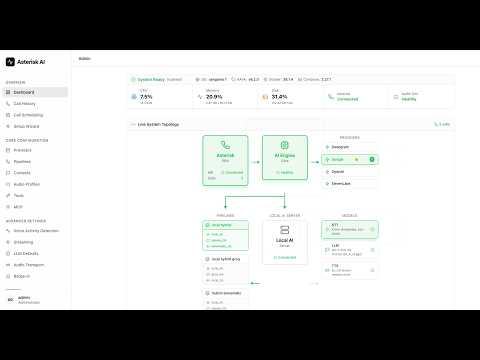
Try the US demo lines and follow the current voice menu:
- Standard voice: (925) 736-6718
- HD voice: (909) 788-2282
wideband_pcm_16k Audio Profile; other calls fall back to standard telephony
audio. The video is a v6.1 walkthrough, not a description of every current UI
screen or model.
Documentation
| I want to… | Start here | | --- | --- | | Install, upgrade, or recover | Installation · Migration notes | | Connect my PBX | FreePBX guide · Transport matrix | | Configure providers and Agents | Admin UI · Agents · Configuration | | Add actions and integrations | Tools · MCP | | Operate and troubleshoot | CLI · Troubleshooting · Monitoring | | Understand or extend the code | Architecture · Developer guides |
The core services are ai_engine and admin_ui; local_ai_server and
updater are optional. Run only the services required by your deployment.
All documentation · Roadmap · Security policy · Ask DeepWiki
Latest release: v7.7.0
- Native Calendly booking, opt-in Microsoft Teams meetings, and Pushover notifications.
- A refreshed Agents workspace and focused Tools editors with safer saves.
- Transfer/audio reliability, endpoint discovery, and updated recovery guidance.
Contributing
Code, documentation, tests, bug reports, and real-world validation are welcome. Start with CONTRIBUTING.md and the developer quickstart. Include reproducible evidence and follow the PR review workflow. Documentation and many automated tests do not require a PBX.
If you use an AI coding assistant, AVA.mdc provides optional project context. All contributions still require appropriate testing and review.
Contributors
 hkjarral Architecture, Code |
 Abhishek Telnyx LLM Provider |
 turgutguvercin NumPy Resampler |
 Scarjit Code |
 egorky Azure STT/TTS Provider |
 alemstrom Docs — PBX Setup |
 gcsuri Code — Google Calendar |
 octo-patch MiniMax LLM Provider |
 neilruaro-camb CAMB AI TTS Provider |
 Ai-chan-0411 Transcript Search, Health Badges |
 exaland Outbound .ULAW Compatibility |
 YosefAdPro Agents API/OpenAPI |
 Chris Wilson Google Live, Transfer Handoff, Admin UI |
 Rea-PC08 Fish Audio TTS, Call History Filters |
 Arnav Patil Admin UI Accessibility, Numeric Alignment, Empty States |
 Alce OpenAI Streaming Timeouts |
 Joey Roth OpenAI Tool-call Tests |
 Ivan Garcia Azure STT/TTS, OpenAI GA Tools |
 alexcastgonz Pipeline Tool Calls, CLI Troubleshooting |
 lucamancusodev Transfer Reports, Notification Requirements |
 pi0n00r Local AI, Whisper, DTMF Privacy, MCP |
 MVECoder Startup Recovery, Farewell Investigation |
 NC Local AI Environment Parser |
 Michael (theluckystrike) Farewell Hangup Fix |
 Kevin Rossen HTTP Template Security |
See CONTRIBUTORS.md for contribution details and historical credit. Commit-linked badges preserve attribution when no GitHub profile is linked; they do not imply a verified account identity.
AVA Operator
AVA Operator helps MSPs and operators manage AI voice across multiple Asterisk and FreePBX installations from one console. It builds on AVA Core while remaining a separate commercial product.
Explore the early-access preview →
Community and support
Discord · Issues · Discussions
AVA Core is independently maintained. GitHub Sponsors and Ko-fi support compatibility testing, maintenance, and release infrastructure. Book a consultation for dedicated help.
License
AVA Core is MIT-licensed. See LICENSE.