
GraphHopper Maps
A route planner user interface for the GraphHopper routing engine released under the Apache License 2.0.
We have developed an intuitive and simple user interface to find routes:
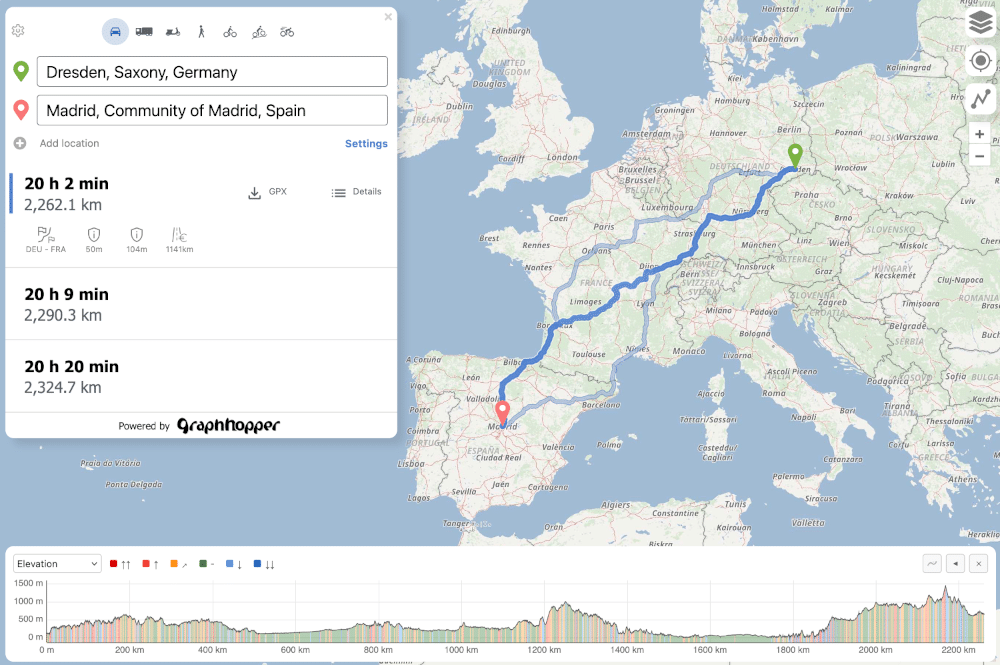
With address search (autocomplete), alternative routes, information along the route and POI search and everything available in all major browsers including mobile browsers. Read more details about it here.
Turn-by-Turn navigation
You can download this bundled as an app for Android on fdroid, where also a turn-by-turn navigation is implemented via Maplibre Navigation SDK using a capacitor plugin. Read more about it in this repository.
There was an experimental navi branch that implements turn-by-turn navigation
directly in the browser.
Start development:
* Clone this repository.
* Make sure node and npm are installed. We recommend using the iron LTS (node v24.12.0 and npm v11.6.2).
* npm install
* npm run serve
* Open your browser at http://0.0.0.0:3000/.
* Start development. The browser will update automatically when you change the code.
* Format the code and run the tests using npm run format and npm run test.
* Fork the repository and create a pull request. Contributions are welcome. Feel free to discuss your changes in our
forum or the GitHub issues.
* You can build the production bundle using npm run build.
* If you use the Directions API edit the config to show profile icons properly (see 'Advanced configuration' section below).
Help with translations:
GraphHopper Maps is translated into many languages and you can help improve GraphHopper by adding or improving your language! See this spreadsheet to create a new or improve an existing language. Let us know if you changed something or submit a pull request with your changes after the following steps:
* Edit the spreadsheet
* Run python update-translations.py
* Review your changes via e.g. http://localhost:3000/?locale=en and with git diff. Make sure that is the only one with git status.
Please note that the translations for the server-side turn instructions are located in a different repository.
Advanced configuration
You can point the app to a different url, like a local GraphHopper server,
set your own API keys for the different map tile providers and more in the config.js file. For such changes it is
best to create a copy of this file called config-local.js which will be ignored by git.
Further Notes
Every branch of this repository can be tested at https://graphhopper.com/maps-dev/
Powered By
This project uses
* the great OpenLayers library. * the codemirror code editor for the custom model editor. * many icons from Google's open source font library. * many more open source projects - see the package.json