

A cohesive, app-like card system for modern Home Assistant dashboards.






Installation · Cards · Engine · Quick start · Support · Translate on Weblate
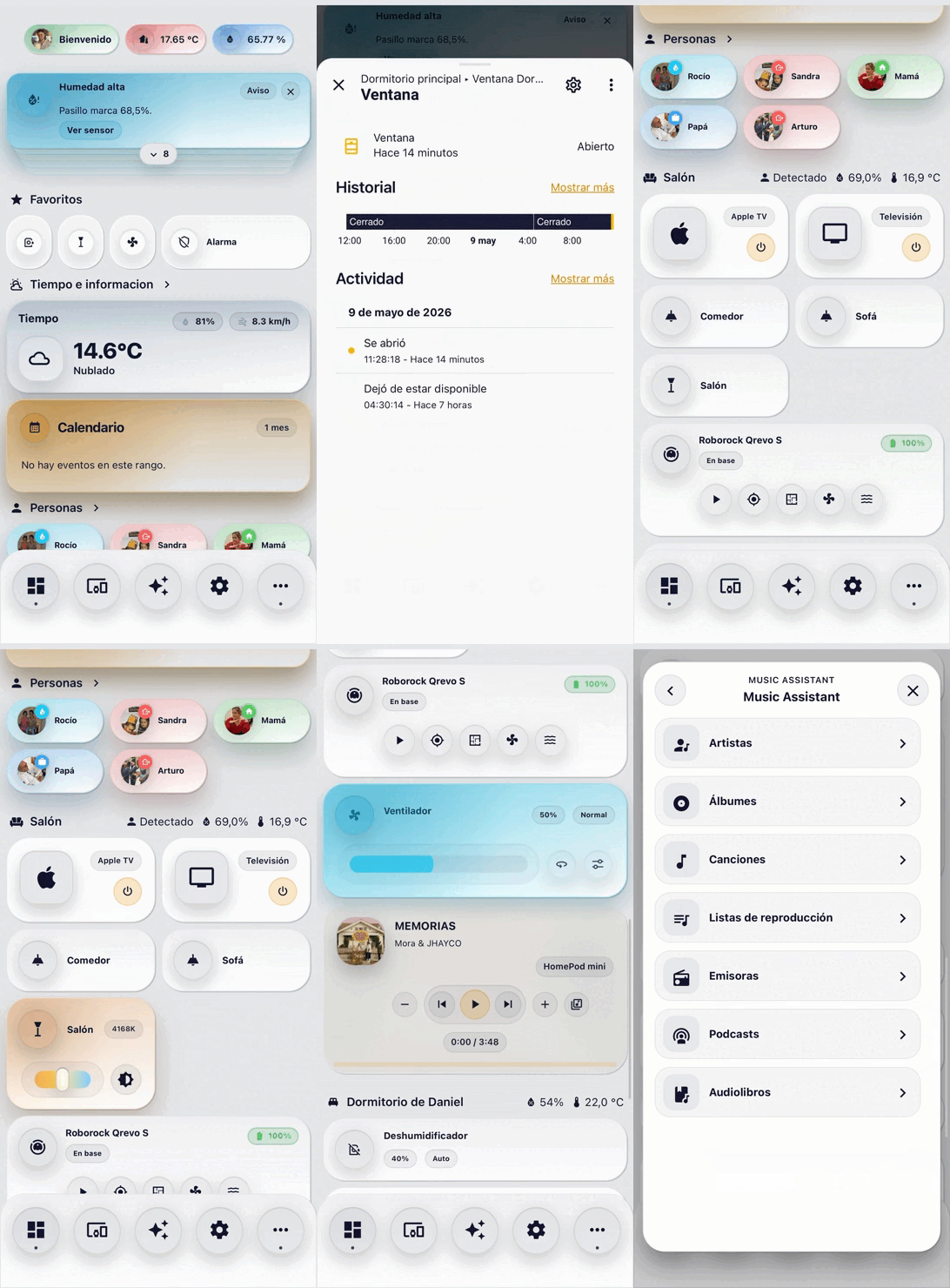
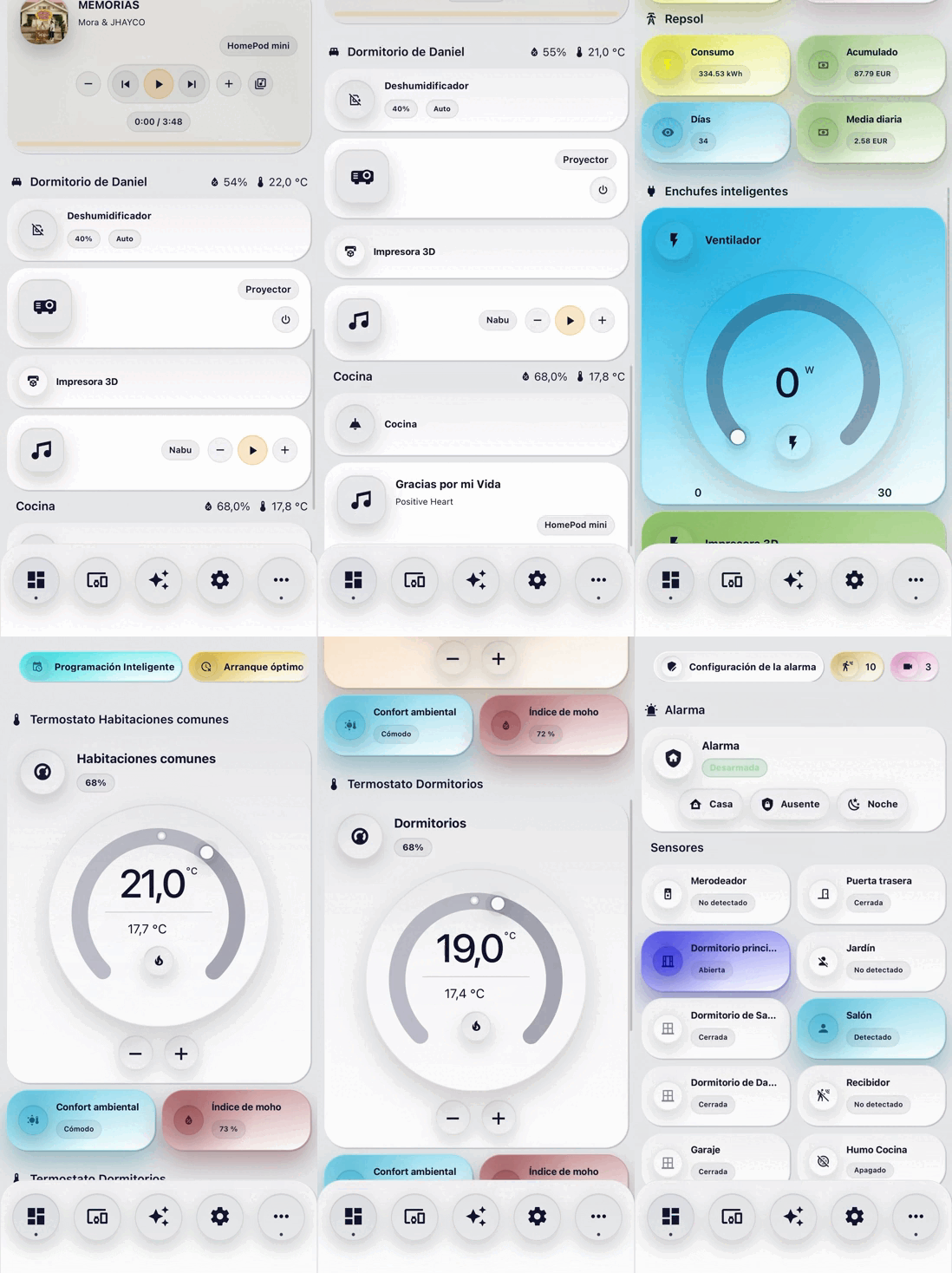
Nodalia Cards is a custom Home Assistant frontend card suite built as one visual system rather than a collection of unrelated components. Shared design tokens, motion, interactions and editors give Home Assistant a polished, consistent experience across mobile, tablet and desktop.
[!IMPORTANT]
Nodalia Cards is available directly from the official HACS catalogue as a Dashboard plugin. A custom repository is no longer required.
[!TIP]
Nodalia Cards Engine is optional. Install it when you want background notifications, shared dismissals, a notification inbox or native Climate schedules. The cards and visual editors continue to work without it.
Preview
Why Nodalia
| Design | Experience | Integration | |---|---|---| | Shared visual language | Mobile-first layouts | Native Home Assistant selectors | | Consistent spacing and surfaces | Smooth, purposeful motion | Integrated visual editors | | Theme-aware colours | Tactile controls and haptics | Minimal generated YAML | | Cohesive popup system | Responsive cards and dialogs | Context-aware entities and services |
The suite is designed for real daily dashboards: one interaction model, predictable configuration and a consistent finish across every card.
Included cards
| Everyday controls | Insight and context | Spaces and navigation | |---|---|---| | Light | Circular Gauge | Navigation Bar | | Fan | Graph | Room Summary | | Humidifier | Power Flow | Person | | Cover | Weather | Scenes | | Climate | Calendar | Favourites | | Alarm Panel / Lock | Notifications | Insignia | | Media Player | News | Entity | | Vacuum | Camera | Advanced Vacuum |
Every card is registered with the custom:nodalia-… prefix. The complete set currently includes:
Show all custom element names
custom:nodalia-navigation-barcustom:nodalia-media-playercustom:nodalia-light-cardcustom:nodalia-fan-cardcustom:nodalia-humidifier-cardcustom:nodalia-circular-gauge-cardcustom:nodalia-graph-cardcustom:nodalia-power-flow-cardcustom:nodalia-cover-cardcustom:nodalia-climate-cardcustom:nodalia-alarm-panel-cardcustom:nodalia-lock-cardcustom:nodalia-advance-vacuum-cardcustom:nodalia-entity-cardcustom:nodalia-fav-cardcustom:nodalia-insignia-cardcustom:nodalia-person-cardcustom:nodalia-scenes-cardcustom:nodalia-weather-cardcustom:nodalia-calendar-cardcustom:nodalia-notifications-cardcustom:nodalia-vacuum-cardcustom:nodalia-news-cardcustom:nodalia-camera-cardcustom:nodalia-room-summary-card
Visual editors
All Nodalia cards include a visual editor designed to fit naturally into Home Assistant:
- native entity selectors and colour pickers
- compact, collapsible configuration sections
- shared translations and editor behaviour
- responsive previews
- automatic removal of default values
Installation
HACS Dashboard — recommended
- Open HACS.
- Search for Nodalia Cards in the Dashboard category.
- Open it and choose Download.
- Reload your browser (or perform a hard refresh).

If a card does not appear immediately after installation or an update, perform a hard refresh or clear the Home Assistant frontend cache.
/hacsfiles/nodalia-cards/nodalia-cards.jsThat is the only generated runtime distributed by the repository. It includes both the cards and their visual editors, keeping HACS installs and updates lightweight. Existing Dashboard installations continue to work without changing card YAML or migrating to an integration.
Optional companion: Nodalia Cards Engine
Nodalia Cards Engine is a separate HACS Integration that runs advanced features inside Home Assistant even when no dashboard is open. Stable Engine 2.0.2 is the recommended companion for Nodalia Cards 2.2.2.
After opening the repository:
- Download Nodalia Cards Engine in HACS.
- Restart Home Assistant.
- Open Settings → Devices & services → Add integration.
- Search for Nodalia Cards Engine, complete setup and reload the browser once.
/hacsfiles/nodalia-cards/nodalia-cards.js and does not require dashboard YAML changes. See the Cards + Engine guide for compatibility, migration and recovery details.
Manual installation
- Download
nodalia-cards.jsfrom the latest GitHub release and copy it to/config/www/. - Add it as a Lovelace resource:
URL: /local/nodalia-cards.js
Type: module- Reload your browser.
Updating Nodalia Cards
- Update Nodalia Cards from HACS and perform a hard browser refresh so the self-contained
nodalia-cards.jsresource is replaced in the frontend cache. - Existing card YAML and Lovelace resources remain compatible; no Dashboard-to-Integration migration is required.
- If you use the optional Engine, keep it on stable
2.0.2, restart Home Assistant after installing or updating it, and confirm the editor shows Engine active. - Climate
heat_coolholds preserve both low and high setpoints, and Engine inbox dismissals now match the corresponding foreground comfort, humidity, door, window, motion, vacuum, rain, media and outdoor alerts.
Quick start
Add a card through the dashboard visual editor, or start with one of these minimal examples.
Light
type: custom:nodalia-light-card
entity: light.living_room
Lock
type: custom:nodalia-lock-card
entity: lock.front_door
layout: standard
Drag the handle to the end and release to unlock. A tap never unlocks. See the Lock Card guide for keyboard controls and supported states.
Calendar
type: custom:nodalia-calendar-card
calendars:
  - entity: calendar.home
Advanced vacuum
type: custom:nodalia-advance-vacuum-card
entity: vacuum.roborock
map_source:
  image: image.roborock_map
calibration_source:
  camera: true
Compact and circular device layouts
Fan, Humidifier and Cover keep their compact layout by default and can use the Climate-style circular surface with layout: circular. Climate keeps its circular layout by default and can use the horizontal device-card surface with layout: compact.
type: custom:nodalia-fan-card
entity: fan.living_room
layout: circular
The layout selector is also available in each card's visual editor. Existing YAML remains unchanged; see Device and Climate layouts for controls, defaults and examples.
Advanced guides
| Feature | Documentation | |---|---| | Nodalia Cards Engine | Installation, compatibility and migration | | Climate setpoint scheduling | Native weekly schedules | | Advanced Vacuum compatibility | Platforms, live room tracking and fallbacks | | News Card | Layouts, sources and configuration | | Device and Climate layouts | Compact and circular variants | | Shared styling | Theme variables and card-mod reference | | Background mobile notifications | Native delivery and legacy fallback | | Translations | Contributor guide · Weblate · Operator setup |
Release channels
| Maturity | Branch / tag | Intended use |
|---|---|---|
| Stable | main, vX.Y.Z | Recommended for daily dashboards |
| Release candidate | vX.Y.Z-rc.N | Final compatibility and release validation |
| Beta | beta, vX.Y.Z-beta.N | Feature-complete preview for broader testing |
| Alpha | alpha, vX.Y.Z-alpha.N | Active development; breaking changes are possible |
HACS installs the latest stable release by default. To test a prerelease, open Nodalia Cards in HACS, choose Redownload → Need a different version?, and select the desired alpha, beta or RC tag.
Stable changes are documented in the changelog. Detailed prerelease notes live in CHANGELOG-PRERELEASES.md, and longer-term work is tracked in the roadmap.
Translations
Nodalia Cards currently includes Spanish, English, German, French, Italian, Dutch, Norwegian, Portuguese, Russian, Greek, Chinese and Romanian.
Community translations are curated on the self-hosted Weblate instance. GitHub remains the source repository; locale files under i18n/ are what the cards build from. Translation pull requests are also welcome.
- Translators: translate.getnodalia.com
- Developer / key workflow: docs/TRANSLATIONS.md
- Weblate operators / self-host setup: docs/weblate/README.md
Support and contributions
- Use GitHub Issues for reproducible bugs and focused feature requests.
- Use the Engine issue tracker for integration setup, background execution or Engine diagnostics problems.
- Include the Home Assistant version, Nodalia Cards version, browser, relevant YAML and screenshots when reporting a visual problem.
- Read CONTRIBUTING.md before submitting code or translations.
- Never publish tokens, webhook secrets or private entity data.
License
Nodalia Cards is released under the MIT License.
