

Occamy


Occamy is an open source protocol and proxy for modern remote desktop control that written in Go.
Project status
Occamy is experimental. Development paused at the end of 2021 and resumed in 2026 with a toolchain and dependency refresh. What works today:
| Protocol | Status | |----------|--------| | VNC | Builds and serves sessions, verified end to end | | SSH | Builds and serves the first session; joining again fails (#22) | | RDP | Not built: the bundled guacamole-server only supports FreeRDP 1.x, which current distributions no longer ship |
Known gaps and planned work are tracked as design specs in specs/.
To start using Occamy
Build
Occamy is deployed as a container image. To build it you need Podman (or Docker)
and make:
git clone https://github.com/changkun/occamy.git
cd occamy
make build                          # or: make build CONTAINER_ENGINE=docker
The image builds the web client, the bundled libguac with its VNC and SSH
plugins, and occamyd in separate stages (see docker/Dockerfile).
Then you should be able to run occamy with:
podman run -itd -p 5636:5636 occamy:latestBuild from source
A native build needs Go 1.26+ and the libguac build dependencies. On Debian or Ubuntu:
sudo apt install autoconf automake libtool make pkg-config \
    libcairo2-dev libpango1.0-dev libpng-dev \
    libssh2-1-dev libssl-dev libvncserver-dev
sudo ./guacamole/src/build-libguac.sh "$PWD/guacamole" /usr/local
export LD_LIBRARY_PATH=/usr/local/lib    # libguac dlopen()s its protocol plugins
make compile                             # produces ./occamyd
./occamyd -conf=./conf.yaml
Native builds on macOS are untested (#25).
Web client
The demo web client lives in client/occamy-web (Vue 3, Vite). It needs Node.js 20.19+ or 22.12+:
make client # npm install && npm run build, output in client/occamy-web/distWith client: true in conf.yaml, occamyd serves it at /static.
For development, run npm run dev in client/occamy-web; it proxies /api to an
occamyd on localhost:5636.
APIs
Occamy offers two APIs:
/api/v1/logindistributes JWT tokens for authentication and/api/v1/connectis used for WebSocket based Occamy connection.
/static for web client demo.
Demo
With compose (podman compose needs a compose provider such as
podman-compose or docker-compose installed), you should be able to run a
working demo with:
make build      # the occamy image
make run        # occamy plus the demo servers, on localhost:5636
make stop
docker/docker-compose.yaml builds small Debian demo servers from docker/demo for amd64 and arm64. Occamy reaches them by compose service name:
| Protocol | Host | Username | Password |
|----------|------|----------|----------|
| VNC | vnc:5900 | | vncpassword |
| SSH | ssh:22 | occamy | occamy |
There is no RDP demo server yet (specs/005). The stack also runs upstream guacd 1.6, which occamy does not use yet.
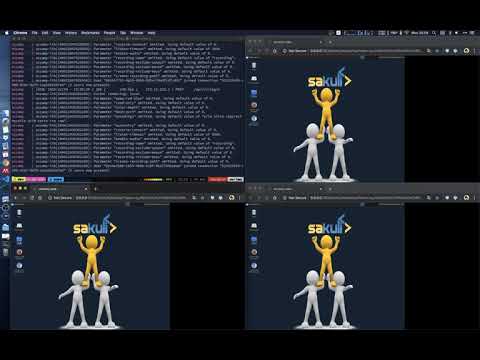
Here is a working video demo:
Tests
go test ./internal/... ./server/...internal/lib links against libguac, so run it where libguac is installed
(for example the build stage of the Dockerfile).
tests/ holds end-to-end and pressure tests that open real
sessions to the demo servers. They are skipped unless
OCCAMY_E2E_ENDPOINT is set; make e2e sets it to localhost:5636:
make build
make run
make e2e
make stop
The pressure test also needs OCCAMY_PRESSURE_N, the number of rounds
(make e2e OCCAMY_PRESSURE_N=10). It still crashes occamyd
(#20), so CI does not run it yet.
Contributing
Easiest way to contribute is to provide feedback! We would love to hear what you like and what you think is missing. PRs are welcome. Please follow the given PR template before you send your pull request.
Why Occamy and how it works?
Occamy implements a generic remote desktop protocol with modern approaches. It currently performs Guacamole protocol and eventually intends to redesign and propose Occamy protocol.
The benefits of Occamy that differ from Guacamole are:
- Authentication supports
- Simplified architecture
- Streaming compression and optimization
- Modern with Go
Read more details in docs.
License
Occamy | MIT © 2019 Ou Changkun