

An open-source bastion host (jump server) for SSH, RDP, VNC, Telnet and databases
Casvisor gives your team one place to reach servers, desktops and databases from the browser.
It connects over SSH, RDP, VNC, Telnet, MySQL and PostgreSQL, with an SSH gateway for ssh, scp and VS Code,
and records every session, checks every command and keeps the passwords to itself.
Website · Documentation · Live demo · Discord


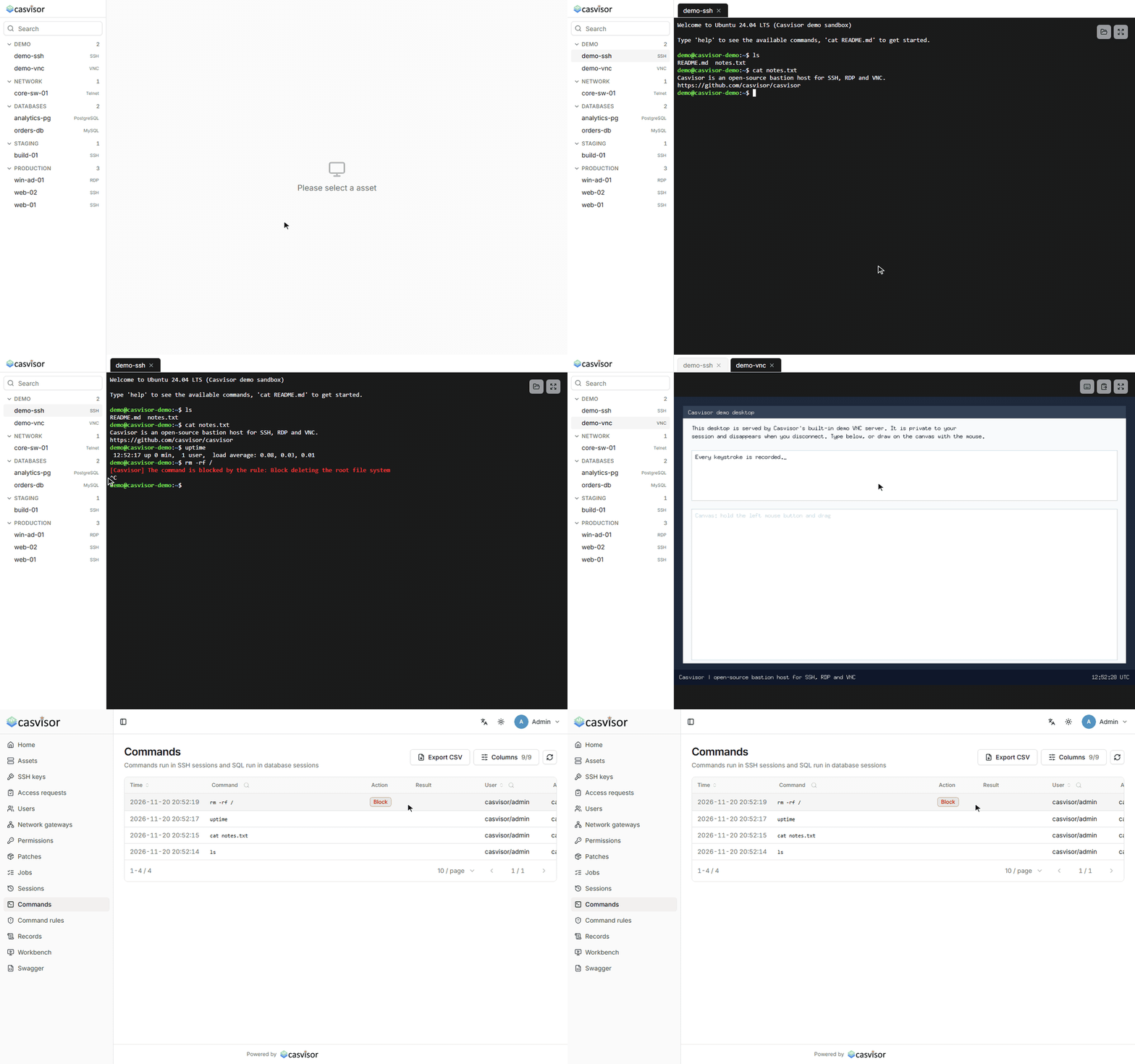
SSH and VNC in the browser, with rm -rf / stopped by a command rule and every command on record.
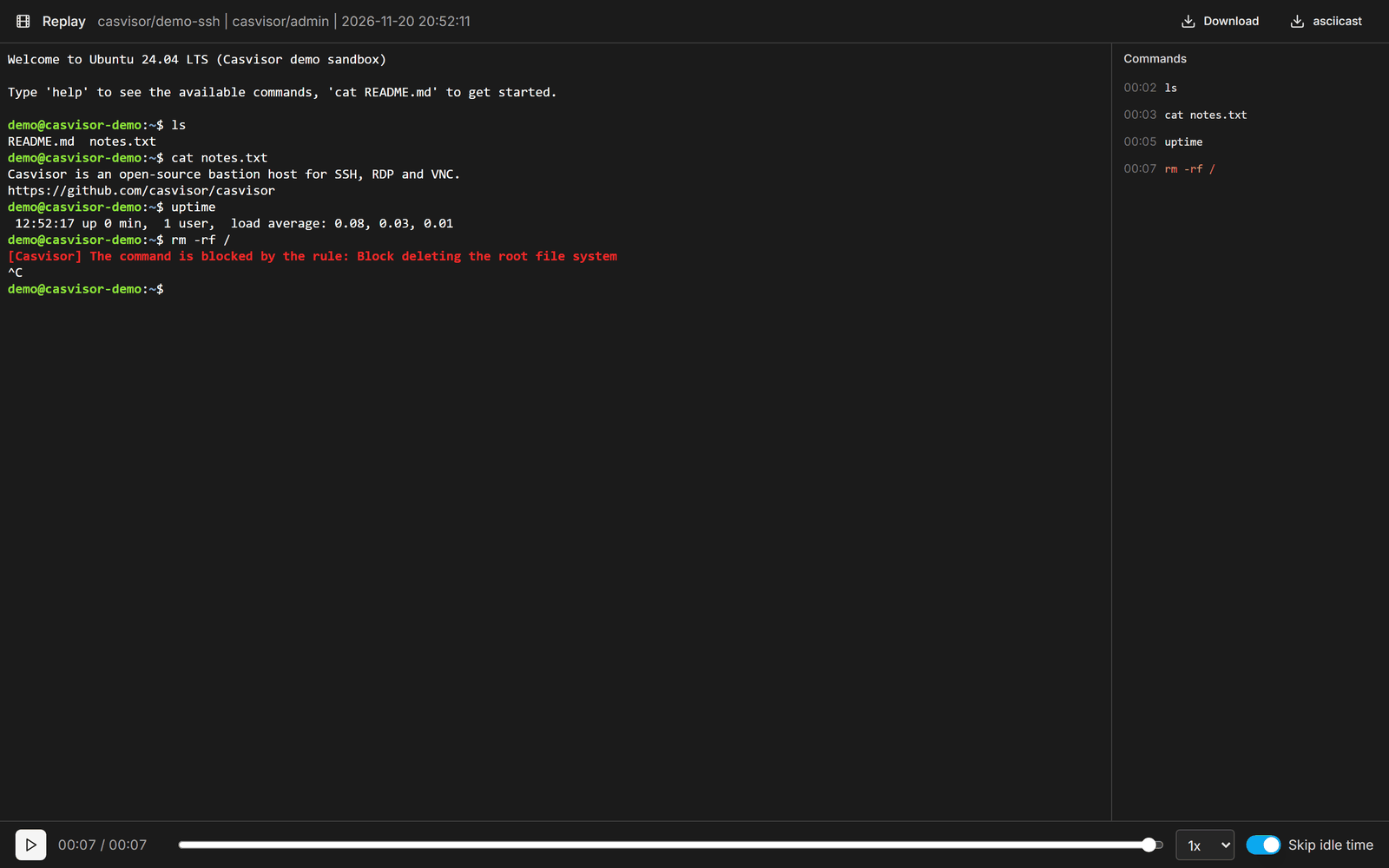 Session replay. Play back SSH, Telnet, VNC and RDP sessions in the browser, with the commands beside them. |
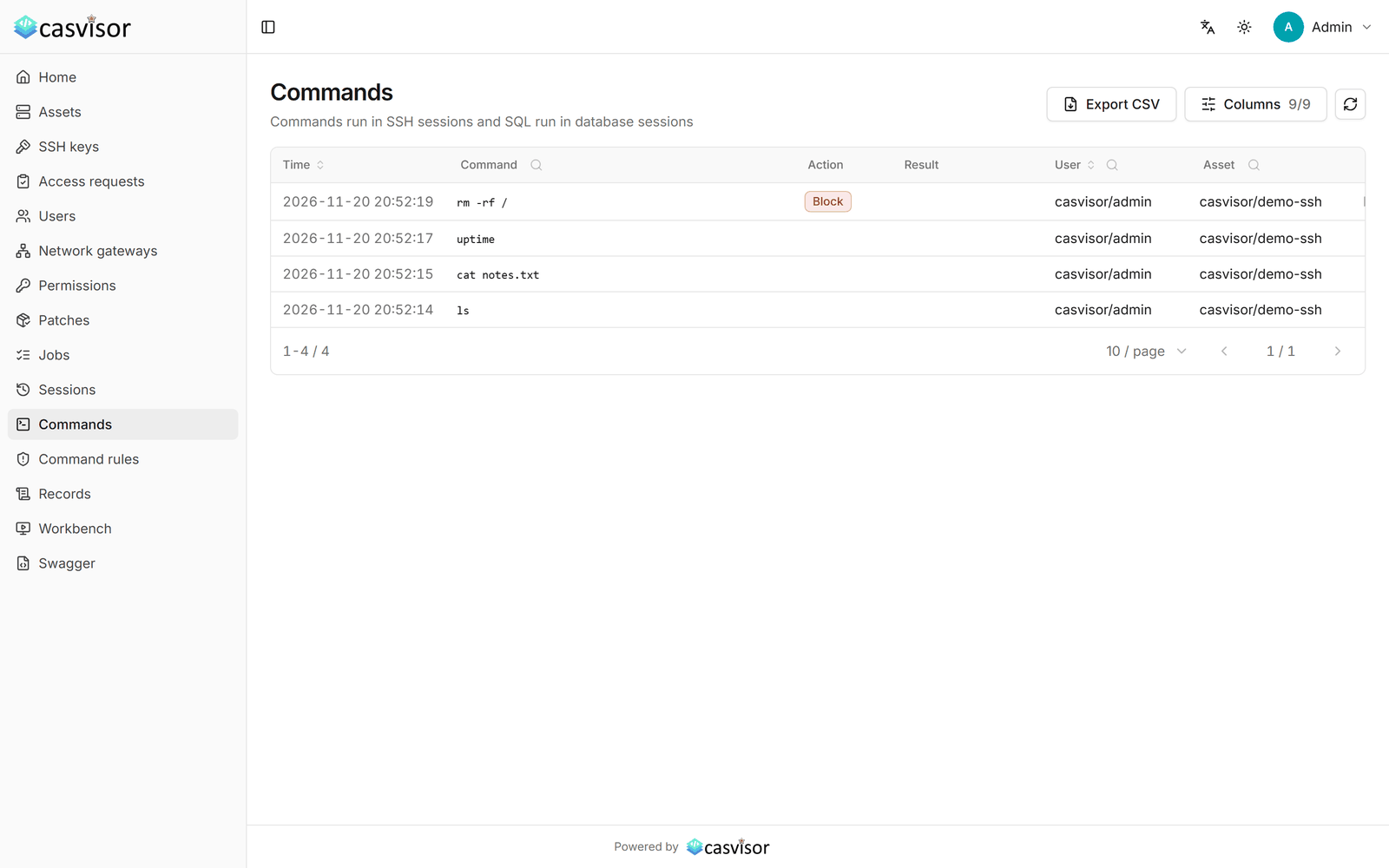 Command records. Every command and SQL statement, and which rule blocked or flagged it. |
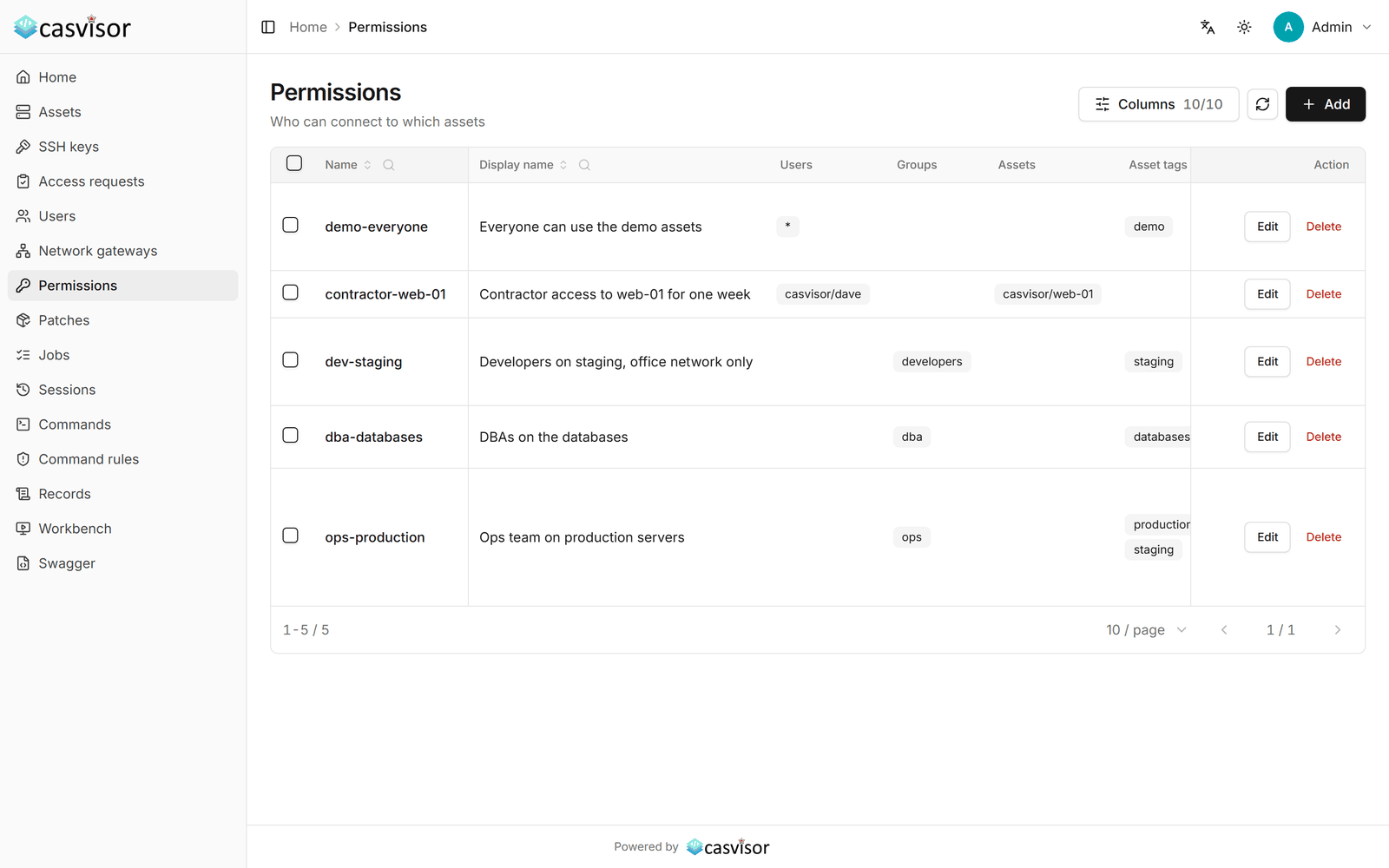 Permissions. Who can reach which assets, from where, until when and with which actions. |
🚀 Try it in 30 seconds
No database and no config file needed. This runs Casvisor on SQLite with its own accounts:
docker run -d --name casvisor -p 19000:19000 -p 2222:2222 \
  -v casvisor-db:/db -v casvisor-recordings:/recordings casbin/casvisor
docker logs casvisor
Open
| Field | Value |
|-------|-------|
| Username | admin |
| Password | the one printed in docker logs casvisor |
Pass -e adminPassword= to choose the first password instead. Either way, change it under My Account after you sign in.
Prefer not to install anything? The hosted demo at demo.casvisor.com comes with a sandboxed Linux shell (SSH) and a private desktop (VNC) to connect to. Nothing there touches a real server, sessions end after 15 minutes, and each visitor can keep two sessions open at a time.
🤔 Why Casvisor
Casvisor sits between the people who run your servers and the servers themselves. People open sessions from a browser tab, or with their own ssh, scp and VS Code through the SSH gateway. They only reach the servers and databases a permission gives them, and never see the stored passwords.
- One Go binary. Casvisor speaks SSH, RDP, VNC, Telnet, MySQL and PostgreSQL itself, with nothing to install on the servers. It runs on SQLite with its own accounts out of the box.
- Apache-2.0, no enterprise edition. Recording, the SSH gateway, network gateways, system accounts, jobs and everything else in this README are in the open-source project.
- Policy you can read. Permissions are enforced with Casbin, and sign-in can be handed to Casdoor for SSO, MFA, LDAP and social logins.
- Audit by default. Sessions are recorded, commands and SQL statements are checked against your rules and logged, and the logs export to CSV or a syslog server.
📦 Installation
Three supported paths, fastest first. All of them end up at
Docker
docker run -d --name casvisor -p 19000:19000 -p 2222:2222 \
  -v casvisor-db:/db -v casvisor-recordings:/recordings casbin/casvisor
Port 19000 is the web console and port 2222 is the SSH gateway. The two volumes keep the database and the session recordings when the container is replaced.
Guide: Quick start
Docker Compose
docker-compose.yml builds the image from this repository and runs it with the same ports and volumes:
docker compose up -dSet adminPassword in the compose file to choose the first password of admin; when it is empty, a random one is printed in the log.
From source — for development
Use this if you intend to modify Casvisor. Prerequisites: Go 1.23+ (see go.mod), Node.js 20 LTS and Yarn 1.x.
git clone https://github.com/casvisor/casvisor
cd casvisor/web && yarn install && yarn build && cd ..
go run main.go
Guide: Build from source
Configuration
Settings are read from conf/app.conf. Put the settings of your own server in conf/app.local.conf (same format, not tracked by git), or pass any of them as environment variables.
Database. The default is SQLite. To use MySQL instead (the database is created if it does not exist):
driverName = mysql
dataSourceName = root:123456@tcp(localhost:3306)/
dbName = casvisor
Sign in with Casdoor. Instead of its own accounts, Casvisor can sign users in with Casdoor, for SSO, MFA, LDAP and third-party logins, and use Casdoor's groups in permissions. Create an organization and an application for Casvisor in Casdoor, add http:// to the redirect URLs of the application, and set:
casdoorEndpoint = https://<your Casdoor host>
clientId = <client ID of the application>
clientSecret = <client secret of the application>
casdoorOrganization = <organization>
casdoorApplication = <application>
When casdoorEndpoint is empty, Casvisor uses its own accounts.
Recordings. Sessions are recorded to recordings/ under the working directory (/recordings in Docker). recordingPath moves them, recordingRetentionDays deletes the ones older than that many days, and disableRecording = true turns recording off.
Guide: Configuration · Sign in with Casdoor · Behind a reverse proxy
👉 After you sign in
At this point you have a running bastion host with nothing behind it yet. Next:
- Change the
adminpassword under My Account, and turn on two-step verification there. - Add an asset under Assets (a server, a desktop or a database) and click Connect. Administrators reach every asset.
- Let other people in: add them under Users and give them a Permission on assets or asset tags.
- Use the SSH gateway: users add their public key under SSH keys and connect with
ssh -p 2222.@ - Add command rules to block or flag commands such as
rm -rf /orDROP DATABASE.
✨ Features
🔌 Connect
- SSH — an xterm.js terminal in the browser, with a file panel beside it for upload and download over SFTP
- RDP — gordp, a pure-Go RDP client: NLA, the GFX graphics pipeline (ClearCodec, RemoteFX Progressive) like the Windows client, sharp text on high-DPI screens, the remote cursor, clipboard with text, images and files, resizing with the window, and file transfer through a redirected drive. Works with Windows Server, Windows 10/11 and FreeRDP-based hosts such as Ubuntu
- VNC — noVNC in the browser; Casvisor does the VNC authentication itself, so the password stays on the server
- Telnet — for network gear and old systems, logging in with the asset's account
- MySQL and PostgreSQL — a browser SQL console with the databases, tables and columns on the left, one tab per result, and CSV export
- SSH gateway —
ssh -p 2222 [email protected],scp,sftp,rsync, Xshell and VS Code Remote, signed in with the user's public key and under the same permissions as the browser - Port forwarding to any asset —
ssh -p 2222 -N -L 13389:win-01:3389 [email protected], then mstsc, a VNC viewer or a database client connects tolocalhost:13389 - Network gateways — reach assets in another data center or behind NAT, through an SSH jump host or an agent that connects out over HTTPS
- Stored credentials — passwords and private keys are encrypted in the database and filled in by Casvisor; SSH host keys and RDP certificates are pinned on first use
- Permissions — on users, groups, assets and asset tags, with the actions
Connect,Copy,Paste,Upload,DownloadandForward, client IP ranges and a time window - System accounts — several accounts per asset, such as
root,deployandreadonly; permissions decide which one a user may connect with, and passwords can be changed by hand or on a schedule - Access requests — users ask for an asset with a reason and an end time, an administrator approves, and withdrawing it disconnects open sessions
- Two-step verification — for local accounts, with any TOTP authenticator app
- Command rules — block or flag commands matching a regular expression, in the web terminal, the SQL console and through the SSH gateway alike
- Revocation takes effect at once — open sessions are disconnected as soon as their permission or account is edited, deleted or expires
- Session recording and playback — SSH, Telnet, VNC and RDP, replayed in the browser with the same code that drew them live; SSH and Telnet recordings download as asciicast
- Live monitoring — watch online sessions and stop any of them
- Command records — SSH and Telnet commands are read off a virtual screen, so tab completion, history and line edits are captured as they ran; SQL statements are logged too
- Operation log — file transfers and every change made through the API
- Export and syslog — session, command and operation logs export to CSV and can be forwarded to a syslog server as RFC 5424 JSON or CEF
- Jobs — run a command, a Bash or PowerShell script, or a file copy on many SSH assets at once, with concurrency, timeouts and per-asset output and exit codes
- Patch management — scan SSH assets for pending system updates, install them and restart, on Windows (Windows Update) and Linux (apt, dnf, yum)
- REST API — every console action is also an API call, with Swagger docs
- Web console — in 9 languages, built with React, Vite and shadcn/ui
🌐 Network gateways
Assets in another data center, or behind NAT in an office, are reached through a network gateway. Add one under Network gateways and pick it in the asset's Network gateway field. Every connection to the asset (web SSH, Telnet, VNC, RDP, databases, the SSH gateway and patch management) then goes through it.
- SSH jump host: a server in that network that Casvisor can log in to over SSH. Nothing is installed on it; its sshd needs
AllowTcpForwarding yes. - Agent: for networks Casvisor cannot connect into at all. Generate a token on the gateway's page and run the agent on any machine in that network:
casvisor agent --server https://casvisor.example.com --token cva_... --fingerprint SHA256:...The agent is the same casvisor binary (with Docker: docker run -d --restart unless-stopped casbin/casvisor agent --server ...). It connects out to Casvisor's web address over WebSocket, so it works wherever HTTPS gets out, listens on no port, and only connects to the Allowed networks set on the gateway.
Guide: Network gateways
🧱 Technology stack
Casvisor is a frontend–backend separated application:
- Backend — Go with the Beego framework: the REST API, the protocol tunnels and the SSH gateway (repository root)
- Frontend — React with shadcn/ui on Tailwind CSS, built with Vite: the console, the workbench and the session player (
web/) - RDP — casvisor/gordp, a pure-Go RDP client
- Authorization — Casbin
- Database — SQLite or MySQL through XORM
📖 Documentation
The full documentation lives at casvisor.org. Common starting points:
| I want to… | Go to | |------------|-------| | Install Casvisor | Quick start · From source | | Connect to servers and databases | Protocols · Databases · SSH gateway | | Decide who can reach what | Permissions · Access requests | | Review what people did | Recordings · Commands · Export | | Run it in production | Configuration · Reverse proxy · Upgrading |
🔒 Security
Please do not report security vulnerabilities in public GitHub issues. Email
Before exposing a Casvisor instance to the internet:
- Change the
adminpassword and turn on two-step verification, or sign in through Casdoor. - Serve Casvisor over HTTPS only, behind a reverse proxy, and set
trustedProxiesandallowedOriginsinconf/app.conf. - Keep port 2222 (the SSH gateway) closed to networks that do not need it.
- Back up the credential key with the database: stored passwords and private keys cannot be decrypted without it. It is
credentialKeyin the config, orcredential.keynext to the SQLite database when that is not set.
🤝 Community and support
- Discord — join the community for questions and help
- GitHub Issues — bug reports and feature requests
🌍 Contributing
Contributions are welcome. For anything larger than a small fix, please open an issue first so you can agree on the approach with the maintainers before writing code.
Translations. User-facing strings in the web console go through i18next. After adding or changing one under web/, run go test -tags manual ./i18n -run TestGenerateI18nStrings to add the new keys to every catalog in web/src/locales/, then translate them.
📄 License
Casvisor is licensed under the Apache License 2.0.
If Casvisor is useful to you, a star helps other people find it.

© 2026 Casvisor · Apache License 2.0