
⛔ Apple AI is discontinued: use Utilix instead
AppleAI is no longer maintained. The name is retired, and every feature now lives in Utilix: the same menu-bar AI chat, plus 25+ utilities (⌘Space command palette, clipboard, OCR, translate, window snap, calendar, AI chat with your own API key), with automatic in-app updates.
> | | AppleAI (this repo, archived) | Utilix (active) |
|---|---|---|
| AI chat (ChatGPT, Claude, Gemini…) | ✅ frozen as-is | ✅ + Web AI, no key needed |
| New versions | ❌ none, ever | ✅ in-app, signed |
| Bug reports & ideas | ❌ closed | ✅ Issues + in-app form |
> Get Utilix: GitHub Releases · itch.io
> This repository stays up as an archive. The last AppleAI release below still works, but no new versions will ship here.
Archive (AppleAI history)
Everything below describes the archived AppleAI app, kept for reference.
Apple AI is a lightweight, privacy‑minded macOS menu bar app that keeps your favorite AI assistants one keystroke away. Open a compact, always‑on‑top chat window and jump between services like ChatGPT, Claude, Copilot, Perplexity, Gemini, and more. All from one place.
Download
The last AppleAI release still works. Get it from this repo's Releases page. For everything new, get Utilix instead.App Preview

Video Demo
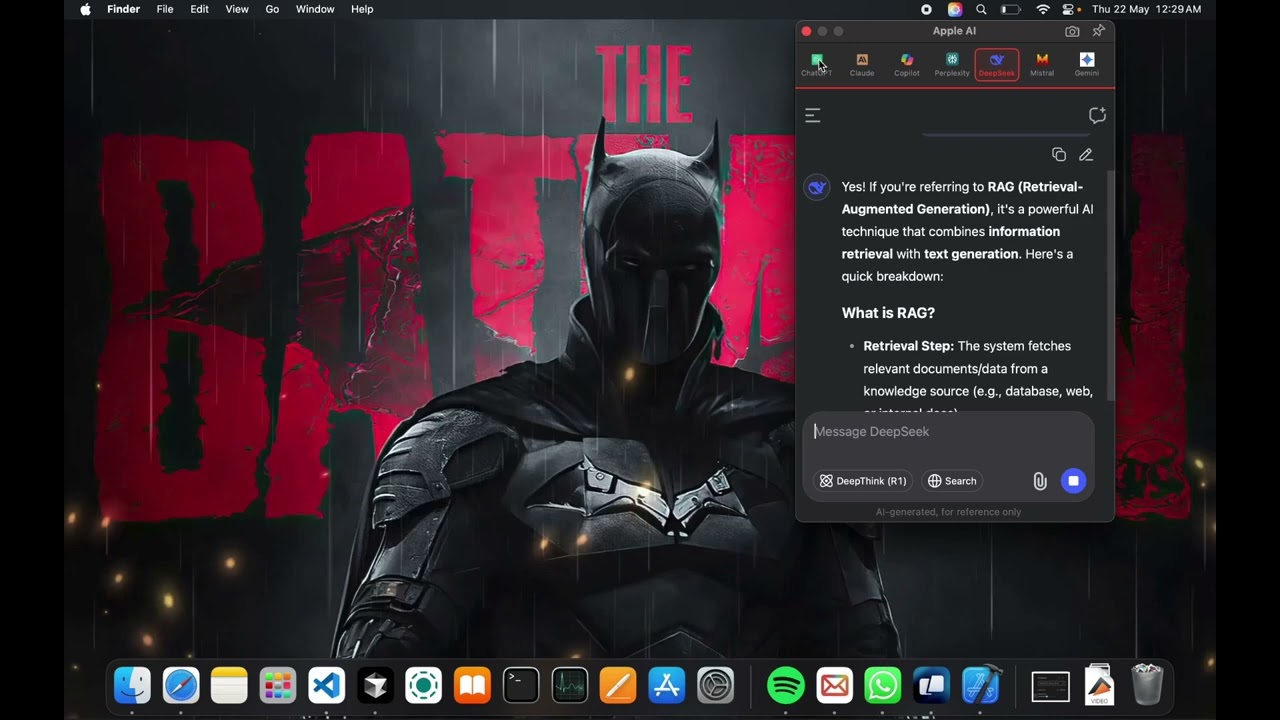
Click to watch the demo video
Screenshots


Features
- Menu bar access with a compact, distraction‑free chat window
- Quick model switching with icons for each service
- Global shortcut to toggle the window: ⌘E
- Always on Top mode to keep the chat visible while you work
- Pinnable interface so the window stays put while multitasking
- Instant access to all assistants from the menu bar
- Persistent sessions per assistant across app restarts
- Native macOS performance (Swift + SwiftUI, WKWebView)
- Resource‑efficient compared to multiple browser tabs
- Clean, modern UI that follows macOS design guidelines
- Customizable themes: light/dark with accent color options
- Smart history: search and reference past conversations
- Privacy‑focused: all preferences and data stored locally by default
- Full keyboard support: ⌘C, ⌘V, ⌘A work in all chat inputs
- Open at Login option for quick startup
- Simple, fast, and local. No auto‑updaters, no background daemons
Supported services
- ChatGPT
- Claude
- Copilot
- Perplexity
- DeepSeek
- Grok
- Mistral
- Gemini
- Pi
- Blackbox
- Meta
- Zhipu AI
- MCP Chat
- askAppleAI (custom entry)
Installation (archived)
- Download the last DMG
Apple_AI_Universal.dmgfrom this repo's Releases page - Open the DMG and drag “Apple AI” to Applications.
- Launch Apple AI. A star icon appears in the macOS menu bar.
First Launch Security
- When installing Apple AI, you may encounter a security warning due to macOS's Gatekeeper feature
- This is a normal security measure to ensure the app is from a trusted source
- If you see a security warning, go to System Settings > Privacy & Security and click
Preferences
Open Preferences from the menu:- Always on top: Keep the chat window above other apps.
- Open at Login: Start Apple AI automatically when you log in.
- Models: Show/hide the services you want in the quick menu.
- Keyboard Shortcuts: Toggle Window is fixed to ⌘E for reliability.
- About: Shows the app version and helpful links.
Keyboard Shortcuts
- ⌘E: Toggle Apple AI window open/closed (works globally across apps)
- Standard text editing in chat inputs: ⌘C, ⌘V, ⌘A
Privacy
- Apple AI runs entirely on your Mac. It opens each service’s official website in a WKWebView.
- Your chats and settings remain on your device. We do not collect your data.
- Microphone and screen access are only requested when you use features inside those web apps (e.g., voice chat or screenshot uploads).
Compatibility
- macOS Monterey (12.0) and later
- Apple Silicon (M1/M2/M3) and Intel Macs
- Universal DMG recommended for best compatibility
Troubleshooting
- “App is damaged and can’t be opened”: run
xattr -cr "/Applications/Apple AI.app"or use System Settings → Privacy & Security → Open Anyway. - Global shortcut not working: ensure no other app uses ⌘E globally.
- Chat not accepting input: click once inside the web view to focus, or toggle the window with ⌘E.
License
This repository is provided for personal use. See source headers for details.Credits
- Designed and developed by bunnysayzz.
- Icons for services belong to their respective owners.
AppleAI is archived. For suggestions or issues, use Utilix Issues.