
Actions Up!




Actions Up scans your workflows and composite actions to discover every referenced GitHub Action, then checks for newer releases.
Interactively upgrade and pin actions to exact commit SHAs for secure, reproducible CI, or preserve tag-style references when you need to stay on tags.
Features
- Auto-discovery: Scans all workflows (
.github/workflows/*.yml) and
.github/actions/*/action.yml and root
action.yml/action.yaml)
- Reusable Workflows: Detects and updates reusable workflow calls at the job
- Runner Images: Detects outdated
runs-onlabels and moves them to the
- Flexible update styles: Use SHA pinning by default, or preserve tag-style
--style preserve
- Batch Updates: Update multiple actions at once
- Interactive Selection: Choose which actions to update
- Breaking Changes Detection: Warns about major version updates
- Fast & Efficient: Optimized API usage with deduped lookups
- CI/CD Integration: Use in GitHub Actions workflows for automated PR checks
Why
Keeping GitHub Actions updated is critical and time-consuming. Actions Up scans all workflows, highlights available updates, and can pin actions to SHAs for reproducibility.
| Without Actions Up | With Actions Up | | :----------------------------- | :------------------------------- | | Check each action manually | Scan all workflows in seconds | | Risk using vulnerable versions | SHA pinning for maximum security | | 30+ minutes per repository | Under 1 minute total |
Security Motivation
GitHub Actions run arbitrary code in your CI. If a job has secrets available, any action used in that job can read the environment and exfiltrate those secrets. A compromised action or a mutable version tag is a direct path to leakage.
Actions Up reduces risk by:
- Pinning actions to commit SHAs to prevent tag hijacking
- Making outdated actions visible and showing exactly what runs in CI
- Warning about major updates so you can review changes before applying them
push, workflow_dispatch, schedule, and
pull_request_target triggers (and on fork PRs if explicitly enabled). Always
scope workflow permissions to the minimum required.
Installation
Quick use (no installation)
npx actions-upGlobal installation
npm install -g actions-upPer-project
npm install --save-dev actions-upAlternatively, you can install Actions Up with Homebrew
brew install actions-upUsage
Interactive Mode (Default)
Run in your repository root:
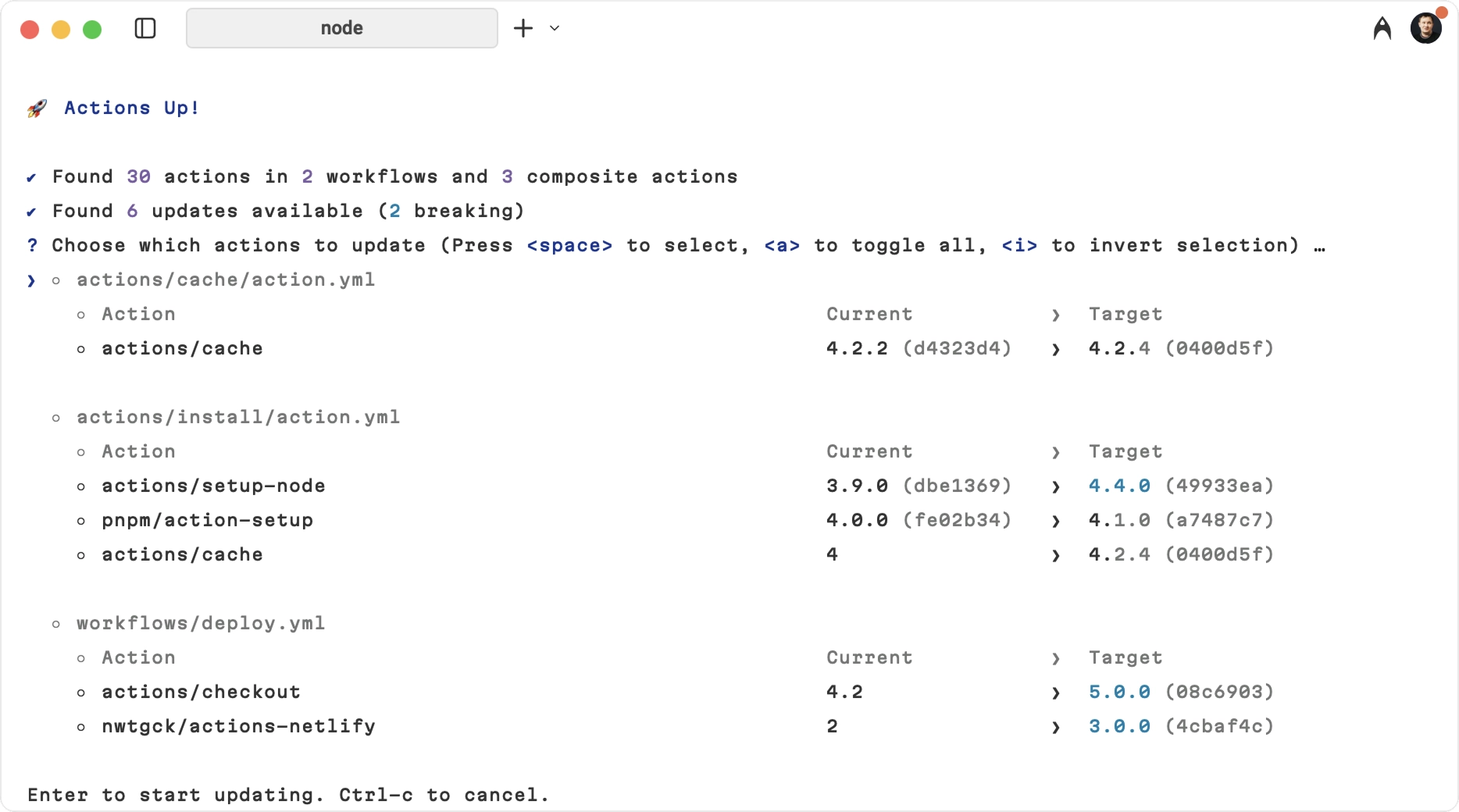
npx actions-upThis will:
- Scan all
.github/workflows/.ymland.github/actions//action.ymlfiles,
action.yml/action.yaml
- Check for available updates
- Show an interactive list to select updates
- Apply selected updates with SHA pinning by default
Auto-Update Mode
Skip all prompts and update everything:
npx actions-up --yes
or
npx actions-up -y
Dry Run Mode
Check for updates without making any changes:
npx actions-up --dry-runJSON Mode
Output a machine-readable JSON report instead of the interactive UI:
npx actions-up --json--json is report-only: it never writes files, skips the interactive prompt,
and cannot be combined with --yes.
Alongside updates, the report lists what was left out: skipped, plus
blockedByMode for actions --mode held back, blockedByAge for actions the
cool-down held back, blockedByTrust for actions whose tag failed a security
check and blockedAsDowngrade for updates that would downgrade a SHA pin.
status describes the actionable updates only, so it can read up-to-date
while those lists are not empty.
Runner updates appear in runners, with summary.totalRunnerUpdates and
summary.totalRunners counting available updates and scanned labels. updates,
summary.totalUpdates and summary.totalActions exclude runners.
Custom Directory
By default, Actions Up scans .github.
Use --dir to choose another directory, and pass it multiple times to scan
several directories:
npx actions-up --dir .gitea
npx actions-up --dir .github --dir ./other/.github
Recursive Scanning
Use --recursive (-r) to scan YAML workflow/composite-action files
recursively in the selected directories:
npx actions-up -r
npx actions-up --dir ./gh-repo-defaults -r
When --recursive is used without --dir, Actions Up scans from the current
directory (.).
Branch References
By default, actions pinned to branch refs (e.g., @main, @release/v1) are
skipped to avoid changing intentionally floating references. Skipped entries are
listed in the output. To include them in update checks, pass
--include-branches.
Tag Families
Some repositories publish several independent tag families at once — npm
releases under v1.2.3 and an action under actions-v1.2.3, for example. A
candidate from the wrong family resolves to a real commit but to the wrong
artifact, so a reference from a named family is resolved from that family's own
tags rather than from the repository's latest release.
This works for every update style: actions-v1.2.3 updates to actions-v1.3.0,
and a SHA pin is matched by family through the # actions-v1.2.3 comment
written next to it. When the family cannot be resolved — it has no other
members, or the repository answers with an unrelated family — the reference is
listed in the output instead of being rewritten.
Runner Images
Actions Up updates runs-on labels, such as ubuntu-22.04 → ubuntu-24.04, to
the newest stable GitHub-hosted image in its bundled catalog. Upgrade Actions Up
to receive new images.
Only known, versioned ubuntu-, macos- and windows-* labels without
suffixes are supported. Quotes and comments are preserved.
Arrays, runner groups, self-hosted/custom labels, *-latest, expressions and
matrix values are skipped. Retired and unknown images are ignored; preview
images are never update targets.
Runner updates appear as runner/ in the interactive list. Use
--exclude '^runner/' or # actions-up-ignore to skip them.
Quiet Mode
Use --quiet (-q) to hide the skipped and blocked-update warnings (for
example, actions intentionally pinned to branches). Other output — results,
applied updates, and errors — is unchanged.
npx actions-up --yes --quietUpdate Mode
By default, Actions Up allows major updates. Use --mode to limit updates:
npx actions-up --mode minor
npx actions-up --mode patch
In minor and patch modes, Actions Up tries to find the newest compatible tag
first (for example, from @v4 in minor mode it will choose the latest
v4.x.y). If no compatible version exists, that action is skipped.
runs-on updates count as major changes and appear in blockedByMode when
--mode minor or --mode patch is used.
Update Style
By default, Actions Up writes updates as pinned SHAs:
npx actions-up --style shaUse --style preserve to keep the current reference style:
npx actions-up --style preservepreserve keeps tag references on tags and SHA references on SHAs. Tag refs
also keep their granularity, so actions/checkout@v5 updates to
actions/checkout@v6, while actions/[email protected] updates to
actions/[email protected]. A SHA-pinned action continues updating to the latest
resolved SHA.
Actions Up only writes tags that actually exist in the action repository. Floating tag conventions differ between publishers, so when the preferred granularity is not published, the closest existing tag is used instead:
astral-sh/setup-uv@v7updates toastral-sh/[email protected], because the
v8 tag
- A broader floating tag is preferred when it points at the latest release, so a
v6.1-style reference may resolve to v6 when v6.2 does not exist
Keep in mind that a broader floating tag moves with future releases, so it may
cross minor version boundaries over time even when the update was selected with
--mode patch.
Use --style semver to rewrite tag references to the conventional floating tag
for the selected --mode, regardless of the granularity used in the workflow:
npx actions-up --style semver
npx actions-up --style semver --mode patch
With --mode major or --mode minor the preferred form is v, and with
--mode patch it is v. The same existence rules apply: when
the publisher does not provide the preferred floating tag, the closest existing
tag is used, falling back to the exact version. SHA-pinned references keep
updating to the latest resolved SHA and are never converted to tags.
Prefer Tags
Some repositories stop publishing GitHub Releases but keep tagging new versions
(for example, bridgecrewio/checkov-action, whose latest release dates back to
2022 while tags stay current). By default, Actions Up trusts the latest release,
so such actions resolve to an outdated version.
Use --prefer-tags to also inspect repository tags when a release exists and
take whichever version is higher:
npx actions-up --prefer-tagsThe comparison covers the first 100 tags returned by the GitHub API and costs one extra API request per action, plus a few more when a tag wins the comparison.
Even without this flag, SHA-pinned actions whose inline version comment is
higher than the resolved latest version are never downgraded: such updates are
skipped with a warning suggesting --prefer-tags.
GitHub Actions Integration
Automated PR Checks
You can integrate Actions Up into your CI/CD pipeline to automatically check for outdated actions on every pull request. This helps maintain security and ensures your team stays aware of available updates.
Create
.github/workflows/check-actions-updates.yml.
name: Check for outdated GitHub Actions
on:
  pull_request:
    types: [edited, opened, synchronize, reopened]
jobs: check-actions: name: Check for GHA updates runs-on: ubuntu-latest permissions: contents: read pull-requests: write issues: write steps: - name: Checkout repository uses: actions/checkout@v4
- name: Setup Node.js uses: actions/setup-node@v4 with: node-version: '20'
- name: Install actions-up run: npm install -g actions-up
- name: Run actions-up check id: actions-check env: GITHUB_TOKEN: ${{ secrets.GITHUB_TOKEN }} run: | set -euo pipefail echo "## GitHub Actions Update Check" >> $GITHUB_STEP_SUMMARY echo "" >> $GITHUB_STEP_SUMMARY
# Run actions-up and capture machine-readable output echo "Running actions-up to check for updates..." actions-up --json > actions-up-report.json
UPDATE_COUNT=$(node -pe "JSON.parse(require('node:fs').readFileSync('actions-up-report.json', 'utf8')).summary.totalUpdates")
# Create formatted output
if [ "$UPDATE_COUNT" -gt 0 ]; then
echo "Found $UPDATE_COUNT GitHub Actions with available updates" >> $GITHUB_STEP_SUMMARY
echo "" >> $GITHUB_STEP_SUMMARY
echo "<details>" >> $GITHUB_STEP_SUMMARY
echo "<summary>Click to see JSON report</summary>" >> $GITHUB_STEP_SUMMARY
echo "" >> $GITHUB_STEP_SUMMARY
echo 'json' >> $GITHUB_STEP_SUMMARY
cat actions-up-report.json >> $GITHUB_STEP_SUMMARY
echo '`' >> $GITHUB_STEP_SUMMARY
echo "" >> $GITHUB_STEP_SUMMARY
# Create detailed markdown report with better formatting node --input-type=module <<'EOF' import { readFileSync, writeFileSync } from 'node:fs'
let report = JSON.parse(readFileSync('actions-up-report.json', 'utf8'))
let lines = [
'## GitHub Actions Update Report',
'',
'### Summary',
- Updates available: ${report.summary.totalUpdates},
'',
'### Updates',
'',
]
for (let update of report.updates) {
let file = update.action.file ?? 'unknown'
let currentVersion = update.currentVersion ?? 'unknown'
let latestVersion = update.latestVersion ?? 'unknown'
lines.push(
- \${update.action.name}\ in \${file}\: \${currentVersion}\ → \${latestVersion}\,
)
}
lines.push('')
lines.push('Run npx actions-up locally to review and apply updates.')
writeFileSync('actions-up-report.md', lines.join('\n')) EOF
echo "has-updates=true" >> $GITHUB_OUTPUT echo "update-count=$UPDATE_COUNT" >> $GITHUB_OUTPUT else echo "All GitHub Actions are up to date!" >> $GITHUB_STEP_SUMMARY
{ echo "## GitHub Actions Update Report" echo "" echo "### All GitHub Actions in this repository are up to date!" echo "" echo "No action required. Your workflows are using the latest versions of all GitHub Actions." } > actions-up-report.md
echo "has-updates=false" >> $GITHUB_OUTPUT echo "update-count=0" >> $GITHUB_OUTPUT fi
- name: Comment PR with updates if: github.event_name == 'pull_request' && github.event.pull_request.head.repo.full_name == github.repository uses: actions/github-script@v7 with: script: | const fs = require('fs'); const report = fs.readFileSync('actions-up-report.md', 'utf8'); const hasUpdates = '${{ steps.actions-check.outputs.has-updates }}' === 'true';
// Check if we already commented const comments = await github.paginate(github.rest.issues.listComments, { owner: context.repo.owner, repo: context.repo.repo, issue_number: context.issue.number });
const botComment = comments.find(comment => comment.user.type === 'Bot' && comment.body.includes('GitHub Actions Update Report') );
const commentBody = ${report}
---
Generated by actions-up | Last check: ${new Date().toISOString()};
// Only comment if there are updates or if we previously commented if (hasUpdates || botComment) { if (botComment) { // Update existing comment await github.rest.issues.updateComment({ owner: context.repo.owner, repo: context.repo.repo, comment_id: botComment.id, body: commentBody }); console.log('Updated existing comment'); } else { // Create new comment only if there are updates await github.rest.issues.createComment({ owner: context.repo.owner, repo: context.repo.repo, issue_number: context.issue.number, body: commentBody }); console.log('Created new comment'); } } else { console.log('No updates found and no previous comment exists - skipping comment'); }
// Add or update PR labels based on status const labels = await github.rest.issues.listLabelsOnIssue({ owner: context.repo.owner, repo: context.repo.repo, issue_number: context.issue.number });
const hasOutdatedLabel = labels.data.some(label => label.name === 'outdated-actions');
if (hasUpdates && !hasOutdatedLabel) { // Add label if updates are found try { await github.rest.issues.addLabels({ owner: context.repo.owner, repo: context.repo.repo, issue_number: context.issue.number, labels: ['outdated-actions'] }); console.log('Added outdated-actions label'); } catch (error) { console.log('Could not add label (might not exist in repo):', error.message); } } else if (!hasUpdates && hasOutdatedLabel) { // Remove label if no updates try { await github.rest.issues.removeLabel({ owner: context.repo.owner, repo: context.repo.repo, issue_number: context.issue.number, name: 'outdated-actions' }); console.log('Removed outdated-actions label'); } catch (error) { console.log('Could not remove label:', error.message); } }
- name: Fail if outdated actions found if: steps.actions-check.outputs.has-updates == 'true' run: | echo "::error:: Found ${{ steps.actions-check.outputs.update-count }} outdated GitHub Actions. Please update them before merging." echo "" echo "You can update them by running: npx actions-up" echo "Or manually update the versions in your workflows." exit 1
</details>
Example
Regular Actions
Before
- uses: actions/checkout@v3
- uses: actions/setup-node@v3
After running actions-up
- uses: actions/checkout@08c6903cd8c0fde910a37f88322edcfb5dd907a8 # v5.0.0
- uses: actions/setup-node@49933ea5288caeca8642d1e84afbd3f7d6820020 # v4.4.0
### Reusable Workflows
Actions Up also detects and updates reusable workflow calls:
Before
jobs: call-workflow: uses: org/repo/.github/workflows/[email protected] with: config: productionAfter running actions-up
jobs: call-workflow: uses: org/repo/.github/workflows/ci.yml@a1b2c3d4e5f6 # v2.0.0 with: config: production## Advanced Usage
GitHub Token
Use GITHUB_TOKEN (or a PAT) to raise API rate limits from 60 to 5000
requests/hour.
Or in GitHub Actions:- name: Check for updates
### Skipping Updates
Use CLI excludes or YAML ignore comments.
Updates released less than 1 day ago are skipped by default. This cool-down
protects against supply-chain attacks through freshly published releases. Use
--min-age to change the threshold, or set it to 0 to disable the cool-down:The age is taken only from GitHub's records, never from commit or tag dates: the
date of an immutable release, or the moment the default branch or a protected
branch got the commit the tag points at now. An update whose age is unknown is
held back, and so is a commit outside those branches, even with --min-age 0;
such holds are printed even with --quiet. Only SHA pins keep the checked
commit: a tag written by --style preserve or semver can be moved later.
When the latest release is too new, the older releases are checked in turn and
the newest one that clears the cool-down is offered instead. The walk never
rises above the latest release, and it skips prereleases unless the pinned
version is itself a prerelease. An action is reported as held back when no
release satisfies both the cool-down and --mode.
Use --min-age-exclude to skip the cool-down for trusted actions, such as your
own reusable workflows. It takes the same regex patterns as --exclude; anchor
them so that look-alike owners do not match:
Ignore comments (file/block/next-line/inline):actions-up-ignore-file
actions-up-ignore-next-line
- uses: actions/checkout@v3
- uses: actions/setup-node@v3 # actions-up-ignore
actions-up-ignore-start
- uses: actions/cache@v3
actions-up-ignore-end
``
Why Actions Up?
Interactive CLI for developers who want control over GitHub Actions updates.
- vs. Dependabot/Renovate: Dependabot and Renovate update via pull requests;
Actions Up is an interactive CLI with explicit SHA pinning by default and an
opt-in preserve mode for tag users.
- vs. pinact: pinact is a CLI to pin and update Actions and reusable
workflows; Actions Up adds interactive selection and major update warnings.
- Zero-config:
npx actions-up` runs immediately.
Contributing
See Contributing Guide.
License
MIT © Azat S.