
AI Runway

Deploy and manage large language models on Kubernetes — no YAML required.
[!NOTE]
AI Runway is still under heavy development and the APIs are not currently considered stable. Feedback is welcome! ❤️
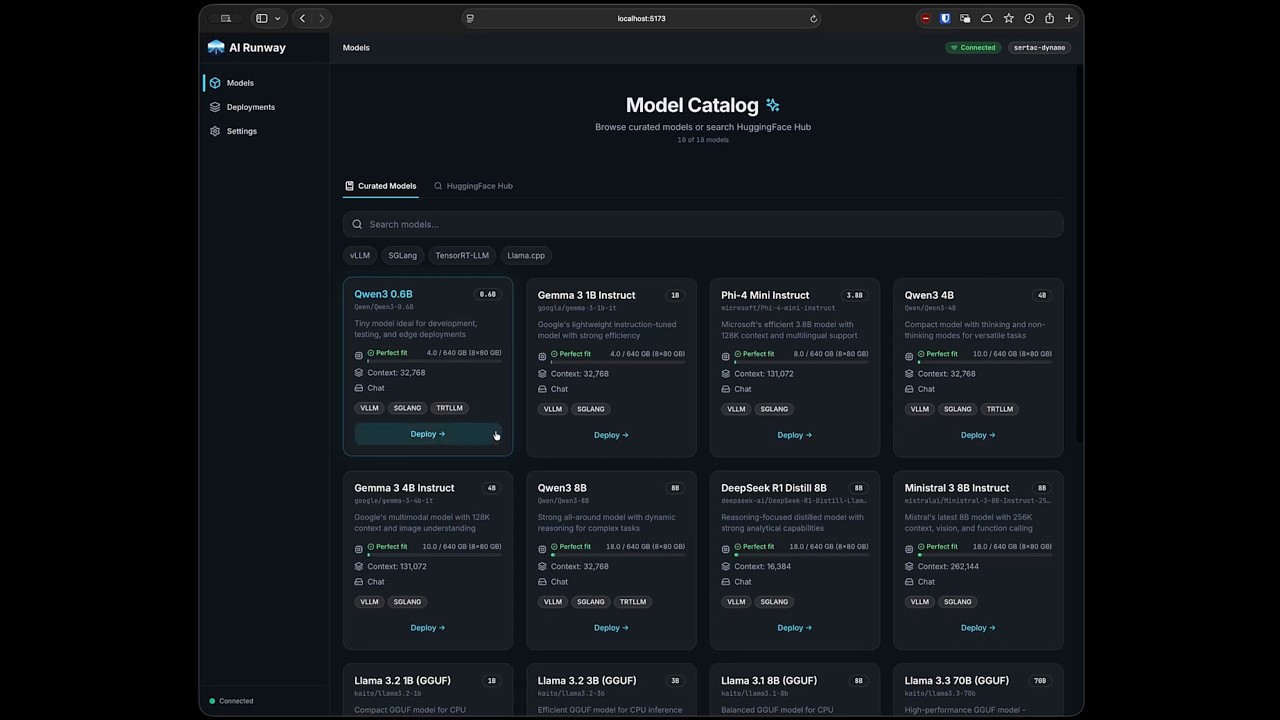
AI Runway gives you a web UI and a unified Kubernetes CRD (ModelDeployment) to deploy models across multiple inference providers. Browse HuggingFace, pick a model, click deploy.
Demo
Highlights
- 🚀 One-Click Deploy — Browse models, check GPU fit, and deploy from the UI
- 🎯 Unified CRD — Single
ModelDeploymentAPI across all providers - 🔧 Multiple Engines — vLLM, SGLang, TensorRT-LLM, llama.cpp
- 📈 Live Monitoring — Real-time status, logs, and Prometheus metrics
- 💰 Cost Estimation — GPU pricing and capacity guidance
- 🌐 Gateway API Integration — Unified inference endpoint via Gateway API Inference Extension with auto-detected setup
- 🔌 Headlamp Plugin — Full-featured Headlamp dashboard plugin
Supported Providers
| Provider | Description | Provider Shim | | -------------------------------------------------------- | ------------------------------------------------------------------ | ----------------------------------------------------- | | NVIDIA Dynamo | GPU-accelerated inference with aggregated or disaggregated serving | dynamo.yaml | | KubeRay | Ray-based distributed inference | kuberay.yaml | | KAITO | vLLM (GPU) and llama.cpp (CPU/GPU) support | kaito.yaml | | LLM-D | vLLM (GPU) with aggregated or disaggregated serving | llmd.yaml | | Direct vLLM | Direct OpenAI-compatible vLLM Deployments for newest model support | vllm.yaml |
Quick Start
Prerequisites
- Kubernetes cluster with
kubectlconfigured helmCLI installed- GPU nodes with NVIDIA drivers (KAITO also supports CPU-only)
Option A: Run Locally
Download the latest release and run:
./airunwayOpen http://localhost:3001
macOS: Remove quarantine if needed: xattr -dr com.apple.quarantine airunway
Option B: Deploy to Kubernetes
set -euo pipefail
Block AgentDeployment CREATE/UPDATE before webhook versions can mix (phase 1)
kubectl apply -f https://raw.githubusercontent.com/ai-runway/airunway/main/deploy/agentdeployment-webhook-guard.yaml
Install CRDs and roll out without AgentDeployment admission routes (phase 2)
kubectl apply -f https://raw.githubusercontent.com/ai-runway/airunway/main/deploy/controller.yaml
Force a new ReplicaSet even when the image tag string is unchanged, then wait
until every webhook Service endpoint runs the replacement pods.
kubectl rollout restart deployment/airunway-controller-manager -n airunway-system
kubectl rollout status deployment/airunway-controller-manager -n airunway-system --timeout=5m
Activate the complete validator/mutator set, then unblock writes (phase 3).
Wait until cert-controller injects the serving CA before deleting the guard.
kubectl apply -f https://raw.githubusercontent.com/ai-runway/airunway/main/deploy/agentdeployment-webhook.yaml
kubectl wait secret/airunway-webhook-server-cert -n airunway-system --for=jsonpath='{.data.ca\.crt}' --timeout=5m
AIRUNWAY_WEBHOOK_CA_BUNDLE="$(kubectl get secret/airunway-webhook-server-cert -n airunway-system -o jsonpath='{.data.ca\.crt}')"
test -n "${AIRUNWAY_WEBHOOK_CA_BUNDLE}"
kubectl wait mutatingwebhookconfiguration/airunway-mutating-webhook-configuration --for="jsonpath={.webhooks[?(@.name==\"magentdeployment-v1alpha1.kb.io\")].clientConfig.caBundle}=${AIRUNWAY_WEBHOOK_CA_BUNDLE}" --timeout=5m
kubectl wait validatingwebhookconfiguration/airunway-validating-webhook-configuration --for="jsonpath={.webhooks[?(@.name==\"vagentdeployment-v1alpha1.kb.io\")].clientConfig.caBundle}=${AIRUNWAY_WEBHOOK_CA_BUNDLE}" --timeout=5m
kubectl delete --ignore-not-found=true -f https://raw.githubusercontent.com/ai-runway/airunway/main/deploy/agentdeployment-webhook-guard.yaml
Install dashboard UI (optional)
kubectl apply -f https://raw.githubusercontent.com/ai-runway/airunway/main/deploy/dashboard.yaml
kubectl port-forward -n airunway-system svc/airunway 3001:80
For production upgrades, use a versioned release and an immutable digest or a new image tag. The explicit restart prevents an unchanged Deployment template from making the rollout check succeed against old pods.
Open http://localhost:3001 — see deployment docs for more options.
Getting Started
- Install a provider shim — Apply one or more provider shims to register providers with AI Runway. See Supported Providers for available options.
- Install the provider — Go to the Installation page and install the upstream provider via Helm
- Connect HuggingFace — Sign in via Settings → HuggingFace (optional for non-gated models)
- Deploy a model — Browse the catalog, pick a model, configure, and deploy
- Monitor — Track status, stream logs, and view metrics on the Deployments page
Access Your Model
Deployed models expose an OpenAI-compatible API:
kubectl port-forward svc/<deployment-name> 8000:8000 -n <namespace>
curl http://localhost:8000/v1/chat/completions \
  -H "Content-Type: application/json" \
  -d '{"model": "<model-name>", "messages": [{"role": "user", "content": "Hello!"}]}'
ModelDeployment CRD
apiVersion: airunway.ai/v1alpha1
kind: ModelDeployment
metadata:
  name: my-model
spec:
  model:
    id: "Qwen/Qwen3-0.6B"
The controller automatically selects the best engine and provider, creates provider-specific resources, and reports unified status. See CRD Reference for details.
Documentation
📖 Browse the docs at ai-runway.github.io/airunway
The same content also lives in docs/ for in-repo browsing.
| Topic | Link | | --- | --- | | Architecture | docs/architecture.md | | CRD Reference | docs/crd-reference.md | | Providers | docs/providers.md | | Observability | docs/observability.md | | Development | docs/development.md | | Kubernetes Deployment | deploy/README.md | | Gateway Integration | docs/gateway.md | | Headlamp Plugin | docs/headlamp-plugin.md |
Community
- Slack: Join the CNCF Slack workspace and find us in
#airunway - Issues: Report bugs or request features in GitHub Issues
- Roadmap: Follow planned work on the AI Runway project board
Contributing
See CONTRIBUTING.md for development setup. We also accept AI-assisted prompt requests.